Minecraft version
Back to mods 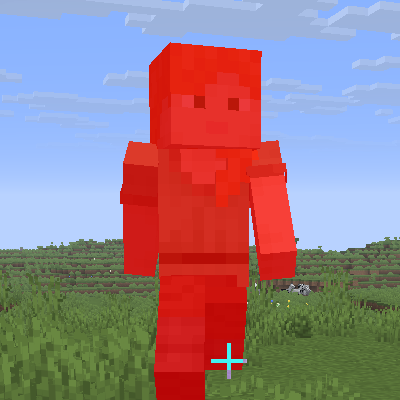
CurseForge · Minecraft mod
Hit Color
Hitcolour replaces Minecraft's vanilla entity hit-flash — the red wash that flashes over a mob/player when they take damage
Choose a version Pick your version below, then grab the matching file.
Quick answer
Which Hit Color release should I use?
Latest stable file hitcolour-neoforge-1.0.0+26.3.jar
Game version 26.3
Loader NeoForge
Hit Color hitcolour-neoforge-1.0.0+26.3.jar targets 26.3 with NeoForge. The project page does not say whether this file belongs on the client, dedicated server, or both. No extra mods listed for this file.
Where it goes
Is Hit Color required on the client, server, or both?
The project page does not say whether this file belongs on the client, dedicated server, or both.
Client Source doesn’t say
Dedicated server Source doesn’t say
Loader for this release NeoForge
Required install it here Optional supported, not mandatory Not supported do not install here Source doesn’t say do not assume
The source does not explicitly classify this release as client-only or server-only.
What else does Hit Color hitcolour-neoforge-1.0.0+26.3.jar need?
hitcolour-neoforge-1.0.0+26.3.jar. Change the file and its required mods may change too.
This file does not list any required mods. Do not add a library just because a different file uses it.
This file does not list any required or optional mods.
Before you install it
Add Hit Color without breaking your instance.
Built for Hit Color hitcolour-neoforge-1.0.0+26.3.jar. Pick another file and the loader, install side or required mods may change.
- 01
Stick to this file
Use hitcolour-neoforge-1.0.0+26.3.jar. It targets 26.3 with NeoForge; another release may have different loader, side or dependency requirements.
- 02
Bring the mods it needs
This file does not list any required mods. Do not add a library just because a different file uses it.
- 03
Put it on the correct side
The project page does not say whether this file belongs on the client, dedicated server, or both.
- 04
Pick the file you checked
Use the “Get this file” button beside hitcolour-neoforge-1.0.0+26.3.jar. It opens that exact file at the source.
About this project
What does Hit Color add?
● Hitcolour — Full Breakdown
What the mod does
Hitcolour replaces Minecraft's vanilla entity hit-flash — the red wash that flashes over a mob/player when they take damage — with a color and opacity of your choosing. It's a client-side Fabric mod, pure
cosmetic, no server required.
How it works (the trick)
Vanilla renders the hurt flash from a small 16×8 texture inside OverlayTexture (the same atlas used for eye/eye-in-jar and the white flash). The first 8 rows encode the red "hurt" overlay as pixels; the
entity shader then does roughly:
finalColor = mix(overlayColor, textureColor, overlayAlpha)
Project description from CurseForge.
Pick your setup
Hit Color by Minecraft version and loader
Choose the version and loader you play, then open the matching release.
Minecraft version
26.2
3 loader buildsMinecraft version
26.1.2
3 loader buildsMinecraft version
26.1.1
2 loader buildsMinecraft version
26.1
3 loader buildsMinecraft version
1.21.11
3 loader buildsCheck the dependencies, then try the file in a copied instance before changing a world you care about.
Recent files
Hit Color versions and loaders
hitcolour-neoforge-1.0.0+26.3.jar
hitcolour-neoforge-1.0.0-26.3.jar
7 Nov 2026
Client Source doesn’t say Server Source doesn’t say Dependencies No extras listed Listed on Release listing
Check the 26.3 · NeoForge setup NeoForge26.3 release
hitcolour-neoforge-1.0.0+26.2.jar
hitcolour-neoforge-1.0.0-26.2.jar
7 Nov 2026
Client Source doesn’t say Server Source doesn’t say Dependencies No extras listed Listed on Release listing
Check the 26.2 · NeoForge setup NeoForge26.2 release
hitcolour-neoforge-1.0.0+26.1.jar
hitcolour-neoforge-1.0.0-26.1.jar
7 Nov 2026
Client Source doesn’t say Server Source doesn’t say Dependencies No extras listed Listed on Release listing
Check the 26.1 · NeoForge setup NeoForge26.1 release
hitcolour-neoforge-1.0.0+26.1.2.jar
hitcolour-neoforge-1.0.0-26.1.2.jar
7 Nov 2026
Client Source doesn’t say Server Source doesn’t say Dependencies No extras listed Listed on Release listing
Check the 26.1.2 · NeoForge setup NeoForge26.1.2 release
hitcolour-neoforge-1.0.0+26.1.1.jar
hitcolour-neoforge-1.0.0-26.1.1.jar
7 Nov 2026
Client Source doesn’t say Server Source doesn’t say Dependencies No extras listed Listed on Release listing
Check the 26.1.1 · NeoForge setup NeoForge26.1.1 release
hitcolour-neoforge-1.0.0+1.21.11.jar
hitcolour-neoforge-1.0.0-1.21.11.jar
7 Nov 2026
Client Source doesn’t say Server Source doesn’t say Dependencies No extras listed Listed on Release listing
Check the 1.21.11 · NeoForge setup NeoForge1.21.11 release
hitcolour-forge-1.0.0+26.3.jar
hitcolour-forge-1.0.0-26.3.jar
7 Nov 2026
Client Source doesn’t say Server Source doesn’t say Dependencies No extras listed Listed on Release listing
Check the 26.3 · Forge setup Forge26.3 release
hitcolour-forge-1.0.0+26.2.jar
hitcolour-forge-1.0.0-26.2.jar
7 Nov 2026
Client Source doesn’t say Server Source doesn’t say Dependencies No extras listed Listed on Release listing
Check the 26.2 · Forge setup Forge26.2 release
hitcolour-forge-1.0.0+26.1.jar
hitcolour-forge-1.0.0-26.1.jar
7 Nov 2026
Client Source doesn’t say Server Source doesn’t say Dependencies No extras listed Listed on Release listing
Check the 26.1 · Forge setup Forge26.1 release
hitcolour-forge-1.0.0+26.1.2.jar
hitcolour-forge-1.0.0-26.1.2.jar
7 Nov 2026
Client Source doesn’t say Server Source doesn’t say Dependencies No extras listed Listed on Release listing
Check the 26.1.2 · Forge setup Forge26.1.2 release
hitcolour-forge-1.0.0+26.1.1.jar
hitcolour-forge-1.0.0-26.1.1.jar
7 Nov 2026
Client Source doesn’t say Server Source doesn’t say Dependencies No extras listed Listed on Release listing
Check the 26.1 · Forge setup Forge26.1 release
hitcolour-forge-1.0.0+1.21.11.jar
hitcolour-forge-1.0.0-1.21.11.jar
7 Nov 2026
Client Source doesn’t say Server Source doesn’t say Dependencies No extras listed Listed on Release listing
Check the 1.21.11 · Forge setup Forge1.21.11 release
Looking for an older file? The official CurseForge project page is in Resources.