Minecraft version
Back to mods 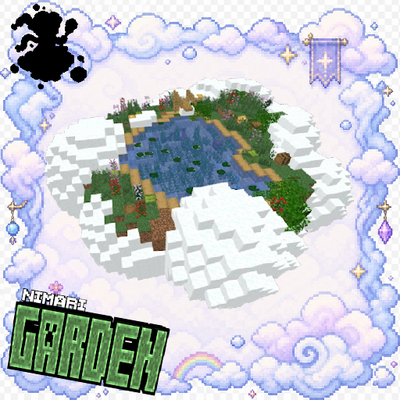
CurseForge · Minecraft mod
Nimari Garden
This datapack adds a unique structure belonging to the Nimari Garden, bringing their distinctive style to your Minecraft world! Compatibility 1.20 to 26.2
Choose a version Pick your version below, then grab the matching file.
Quick answer
Which Nimari Garden release should I use?
Latest stable file nimari-garden-1.0.jar
Game version 26.1, 26.1.1, 26.1.2
Loader Fabric, Forge, NeoForge
Nimari Garden nimari-garden-1.0.jar targets 26.1, 26.1.1, 26.1.2 with Fabric, Forge, NeoForge. The project page does not say whether this file belongs on the client, dedicated server, or both. No extra mods listed for this file.
Where it goes
Is Nimari Garden required on the client, server, or both?
The project page does not say whether this file belongs on the client, dedicated server, or both.
Client Source doesn’t say
Dedicated server Source doesn’t say
Loader for this release Fabric, Forge, NeoForge
Required install it here Optional supported, not mandatory Not supported do not install here Source doesn’t say do not assume
The source does not explicitly classify this release as client-only or server-only.
What else does Nimari Garden nimari-garden-1.0.jar need?
nimari-garden-1.0.jar. Change the file and its required mods may change too.
This file does not list any required mods. Do not add a library just because a different file uses it.
This file does not list any required or optional mods.
Before you install it
Add Nimari Garden without breaking your instance.
Built for Nimari Garden nimari-garden-1.0.jar. Pick another file and the loader, install side or required mods may change.
- 01
Stick to this file
Use nimari-garden-1.0.jar. It targets 26.1, 26.1.1, 26.1.2 with Fabric, Forge, NeoForge; another release may have different loader, side or dependency requirements.
- 02
Bring the mods it needs
This file does not list any required mods. Do not add a library just because a different file uses it.
- 03
Put it on the correct side
The project page does not say whether this file belongs on the client, dedicated server, or both.
- 04
Pick the file you checked
Use the “Get this file” button beside nimari-garden-1.0.jar. It opens that exact file at the source.
About this project
What does Nimari Garden add?
🌿☁️ Nimari Garden 🌸
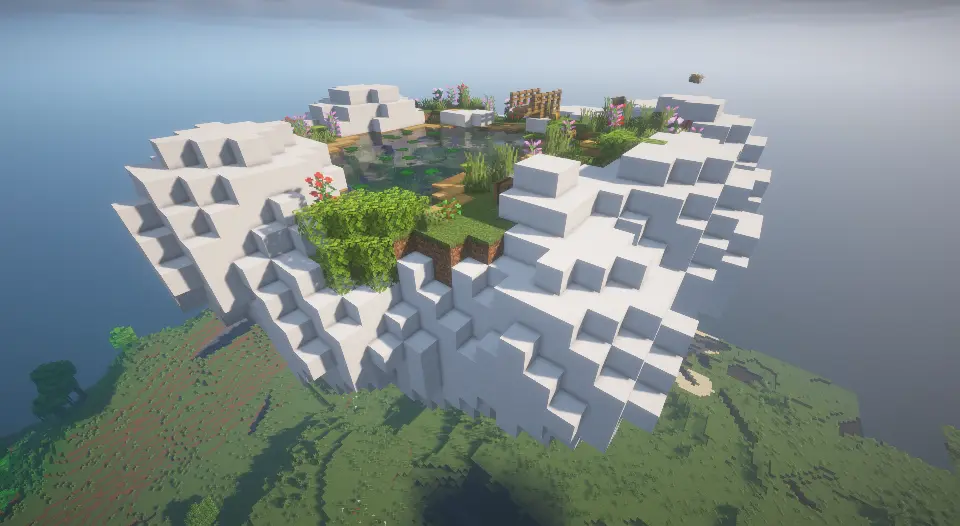
This DataPack adds a magical garden in the sky to your Minecraft world! Explore the heights and discover Nimari Garden, a floating garden structure surrounded by nature, peaceful scenery, and beautiful wooden details.
☁️ The DataPack
The main feature of this DataPack is the Nimari Garden, a floating garden structure designed to bring a peaceful and magical atmosphere to your Minecraft world.
The garden can be generated using all available Minecraft wood types, allowing the structure to take on different appearances while preserving its original design and details.
Instead of creating a completely separate structure for every wood type, the project uses a single base structure that can be adapted into multiple variants.
🪵 All Wood Variants Nimari Garden includes variants using all wood types available in Minecraft, giving the garden a different appearance depending on the materials used.
🌸 A Floating Garden The structure is built high above the ground, creating a unique location to explore and enjoy the scenery of your world.
🏡 Unique Atmosphere Nimari Garden combines wooden structures with a natural garden environment, creating a peaceful place that can fit into many different Minecraft worlds.
🔄 Multiple Variants The same base design can be transformed into different versions using the various wood types, providing more visual variety without changing the essence of the structure.
🗺️ Structure
🌿 Nimari Garden
The Nimari Garden is the main structure added by this DataPack. It is a floating garden in the sky designed as a peaceful and decorative location for exploration.
Each wood variant keeps the main structure and layout while changing its wooden materials, allowing the garden to blend with different building styles and Minecraft environments.
The different variants are generated from the same base structure, making it possible to create multiple versions while maintaining the original design.
Look to the sky, find the garden, and discover which wooden variant awaits you! ☁️🌸
✨ Features
- 🌿 New floating garden structure
- ☁️ Garden generated in the sky
- 🪵 Variants using all Minecraft wood types
- 🔄 Multiple structure variations
- 🏡 Decorative and peaceful environment
- 📦 Based on a single
.nbtstructure - 🌸 Adds a unique location to world exploration
🌸 Welcome to Nimari Garden!
Look beyond the ground, explore the skies, and discover a hidden garden waiting among the clouds...
Every garden has its own style, but Nimari Garden always has a place in the sky. ☁️🌿🌸
Project description from CurseForge.
Pick your setup
Nimari Garden by Minecraft version and loader
Choose the version and loader you play, then open the matching release.
Minecraft version
26.1.2
4 loader buildsMinecraft version
26.1.1
4 loader buildsMinecraft version
26.1
4 loader buildsMinecraft version
1.21.11
4 loader buildsMinecraft version
1.21.10
4 loader buildsMinecraft version
1.21.9
4 loader buildsMinecraft version
1.21.8
4 loader buildsMinecraft version
1.21.7
4 loader buildsMinecraft version
1.21.6
4 loader buildsMinecraft version
1.21.5
4 loader buildsMinecraft version
1.21.4
4 loader buildsShowing the newest 12 of 23 game versions. Older files are in the list below.
Check the dependencies, then try the file in a copied instance before changing a world you care about.
Recent files
Nimari Garden versions and loaders
nimari-garden-1.0.jar
nimari-garden-1.0 (12).jar
10 Sept 2026
Client Source doesn’t say Server Source doesn’t say Dependencies No extras listed Listed on Release listing
Check the 26.2 · Fabric setup FabricForgeNeoForgeQuilt release
nimari-garden-1.0.jar
nimari-garden-1.0 (11).jar
10 Sept 2026
Client Source doesn’t say Server Source doesn’t say Dependencies No extras listed Listed on Release listing
Check the 1.21.11 · Fabric setup FabricForgeNeoForgeQuilt release
nimari-garden-1.0.jar
nimari-garden-1.0 (10).jar
10 Sept 2026
Client Source doesn’t say Server Source doesn’t say Dependencies No extras listed Listed on Release listing
Check the 1.21.10 · Fabric setup FabricForgeNeoForgeQuilt release
nimari-garden-1.0.jar
nimari-garden-1.0 (9).jar
10 Sept 2026
Client Source doesn’t say Server Source doesn’t say Dependencies No extras listed Listed on Release listing
Check the 1.21.8 · Fabric setup Fabric1.21.8Forge1.21.7 release
nimari-garden-1.0.jar
nimari-garden-1.0 (8).jar
10 Sept 2026
Client Source doesn’t say Server Source doesn’t say Dependencies No extras listed Listed on Release listing
Check the 1.21.6 · Fabric setup FabricForge1.21.6NeoForge release
nimari-garden-1.0.jar
nimari-garden-1.0 (7).jar
10 Sept 2026
Client Source doesn’t say Server Source doesn’t say Dependencies No extras listed Listed on Release listing
Check the 1.21.5 · Fabric setup Fabric1.21.5ForgeNeoForge release
nimari-garden-1.0.jar
nimari-garden-1.0 (6).jar
10 Sept 2026
Client Source doesn’t say Server Source doesn’t say Dependencies No extras listed Listed on Release listing
Check the 1.21.4 · Fabric setup Fabric1.21.4ForgeNeoForge release
nimari-garden-1.0.jar
nimari-garden-1.0 (5).jar
10 Sept 2026
Client Source doesn’t say Server Source doesn’t say Dependencies No extras listed Listed on Release listing
Check the 1.21.3 · Fabric setup FabricForge1.21.3NeoForge release
nimari-garden-1.0.jar
nimari-garden-1.0 (4).jar
9 Sept 2026
Client Source doesn’t say Server Source doesn’t say Dependencies No extras listed Listed on Release listing
Check the 1.21.1 · Fabric setup 1.21FabricForge1.21.1 release
nimari-garden-1.0.jar
nimari-garden-1.0 (3).jar
9 Sept 2026
Client Source doesn’t say Server Source doesn’t say Dependencies No extras listed Listed on Release listing
Check the 1.20.6 · Fabric setup Fabric1.20.5Forge1.20.6 release
nimari-garden-1.0.jar
nimari-garden-1.0 (2).jar
9 Sept 2026
Client Source doesn’t say Server Source doesn’t say Dependencies No extras listed Listed on Release listing
Check the 1.20.4 · Fabric setup FabricForge1.20.4NeoForge release
nimari-garden-1.0.jar
nimari-garden-1.0 (1).jar
9 Sept 2026
Client Source doesn’t say Server Source doesn’t say Dependencies No extras listed Listed on Release listing
Check the 1.20.2 · Fabric setup 1.20.2FabricForgeNeoForge release
Looking for an older file? The official CurseForge project page is in Resources.
 mod
mod CurseForge · Minecraft
Alchemia: Potion Crafting
A rough replication of Potion Craft: Alchemist Simulator, rebuilt for Minecraft and stripped down a bit.
 mod
mod CurseForge · Minecraft
Cromta's Solo Leveling
Solo Leveling manhwa mod
 mod
mod CurseForge · Minecraft
Outer Wilds Discs
Adds music from out of this world!