Grand Workshop Needed by Grand Workshop: Companions — Minecraft 1.19.2 — recipe unlock fix
requiredMatching file found Matched file: Grand Workshop — Minecraft 1.19.2 — Core
CurseForge · Minecraft mod
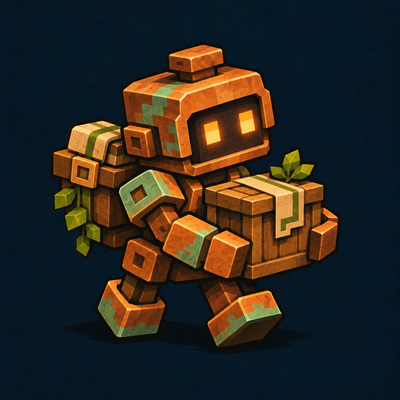
Build a copper Porter companion for Grand Workshop with owner-only cargo, follow and wait modes, and collection of your dropped Workshop blocks.
Quick answer
Grand Workshop: Companions — Minecraft 1.19.2 — recipe unlock fix targets 1.19.2 with Fabric. The project page does not say whether this file belongs on the client, dedicated server, or both. All 2 required mods have matching files.
Where it goes
The project page does not say whether this file belongs on the client, dedicated server, or both.
The source does not explicitly classify this release as client-only or server-only.
Grand Workshop: Companions — Minecraft 1.19.2 — recipe unlock fix. Change the file and its required mods may change too.
Install Grand Workshop, Fabric API first. We found matching files for this game-version and loader setup.
We only count dependency files that match this setup. A file for another loader does not fill the gap.
Before you install it
Built for Grand Workshop: Companions — Minecraft 1.19.2 — recipe unlock fix. Pick another file and the loader, install side or required mods may change.
Use Grand Workshop: Companions — Minecraft 1.19.2 — recipe unlock fix. It targets 1.19.2 with Fabric; another release may have different loader, side or dependency requirements.
Install Grand Workshop, Fabric API first. We found matching files for this game-version and loader setup.
The project page does not say whether this file belongs on the client, dedicated server, or both.
Use the “Get this file” button beside Grand Workshop: Companions — Minecraft 1.19.2 — recipe unlock fix. It opens that exact file at the source.
About this project
Build a small copper Workshop Porter to accompany your building projects. It has a custom animated model, an original 16x16 skin with 254 visible colors, and nine cargo slots.
Fabric files are available for 1.19.2, 1.20.1, 1.20.3, 1.20.4, 1.21, 1.21.1, 1.21.4, 1.21.6, 1.21.11, 26.1, 26.1.2, 26.2 and 26.3. Choose your version in Files. Features and material catalogs can differ between ports; read the selected file's changelog before updating an existing world.
This is an active standalone expansion for Grand Workshop Core. It is also included in Grand Workshop Complete. Choose one installation style.
Install this expansion with Grand Workshop Core and Fabric API for the same Minecraft version, on both client and server. Grand Workshop Complete already includes this collection, so use either Complete or Core plus standalone expansions. Use Java 17 for the listed 1.19/1.20 ports, Java 21 for the listed 1.21 ports, and Java 25 for 26.x. Each file's changelog lists its required Fabric Loader and Fabric API versions. Other Workshop expansions are optional.
Craft a Porter Assembly Kit in a normal crafting table:
C C C
C B C
I R I
C = copper ingot, B = chest, I = iron ingot, R = redstone dust. Picking up copper unlocks the recipe. Use the kit on a block to assemble the Porter in adjacent clear space. Survival assembly consumes one kit; blocked placement consumes nothing. It belongs to the player who assembled it. Porters have 24 health and do not breed or spawn naturally.
Cargo access closes when the owner moves too far away. The Porter uses ordinary ground navigation and standard tame-animal following; it is not remote storage across unloaded worlds. Name tags work normally.
Verified owner-only cargo interaction, assembly, repairs, death drops, eight repeated collection cycles, and saved-world persistence across separate game processes. Keep this expansion installed in worlds containing Porters.
The original artwork includes ImageGen-derived textures exported to exactly 16x16. The project logo is a branding illustration, not a gameplay screenshot. No vanilla texture replacements are included.
For a great combination, explore my other mods: Carry & Quarry, Grand Workshop, Grand Workshop: Cultivation, Grand Workshop: Hearthworks, Grand Workshop: Passageways, Grand Workshop: Signalworks, IDEAS Workshop, Praseodymium.
Choose files for the same Minecraft version. Use Grand Workshop Complete on its own, or Grand Workshop Core with your chosen standalone expansions; do not install duplicate expansions with Complete. Praseodymium belongs on the client only. The matching nine-project collection passed representative client/server checks across the listed versions; this does not cover every feature interaction.
Project description from CurseForge.
Pick your setup
Choose the version and loader you play, then open the matching release.
Showing the newest 12 of 13 game versions. Older files are in the list below.
Check the dependencies, then try the file in a copied instance before changing a world you care about.
Recent files
gw-companions-1.19.2-0.1.1.jar
29 Oct 2026
gw-companions-1.20.1-0.1.1.jar
29 Oct 2026
gw-companions-1.20.3-0.1.1.jar
29 Oct 2026
gw-companions-1.20.4-0.1.1.jar
28 Oct 2026
gw-companions-26.1-0.1.0.jar
11 Oct 2026
gw-companions-26.1.2-0.1.0.jar
11 Oct 2026
gw-companions-26.2-0.1.0.jar
11 Oct 2026
gw-companions-26.3-0.1.0.jar
11 Oct 2026
gw-companions-1.19.2-0.1.0.jar
11 Oct 2026
gw-companions-1.20.4-0.1.0.jar
11 Oct 2026
gw-companions-1.20.3-0.1.0.jar
11 Oct 2026
gw-companions-1.21.6-0.1.0.jar
11 Oct 2026
Looking for an older file? The official CurseForge project page is in Resources.
 mod
companion bot that mines, builds houses, reads .schem files
 mod
Pick your race and build your legend with elves, dwarves, werewolves, goblins, mighty bosses, and a world full of fantasy loot.
 mod
Cute Minions that farm, fish, chop trees and guard for you. They run on emeralds, carry the harvest to a chest, chatter in their own gibberish and nap at night. Plus a jetpack for you to fly!