Fabric API Needed by Gear Compare 0.1.1 for Minecraft 26.2 (NeoForge)
requiredNo matching file
CurseForge · Minecraft mod
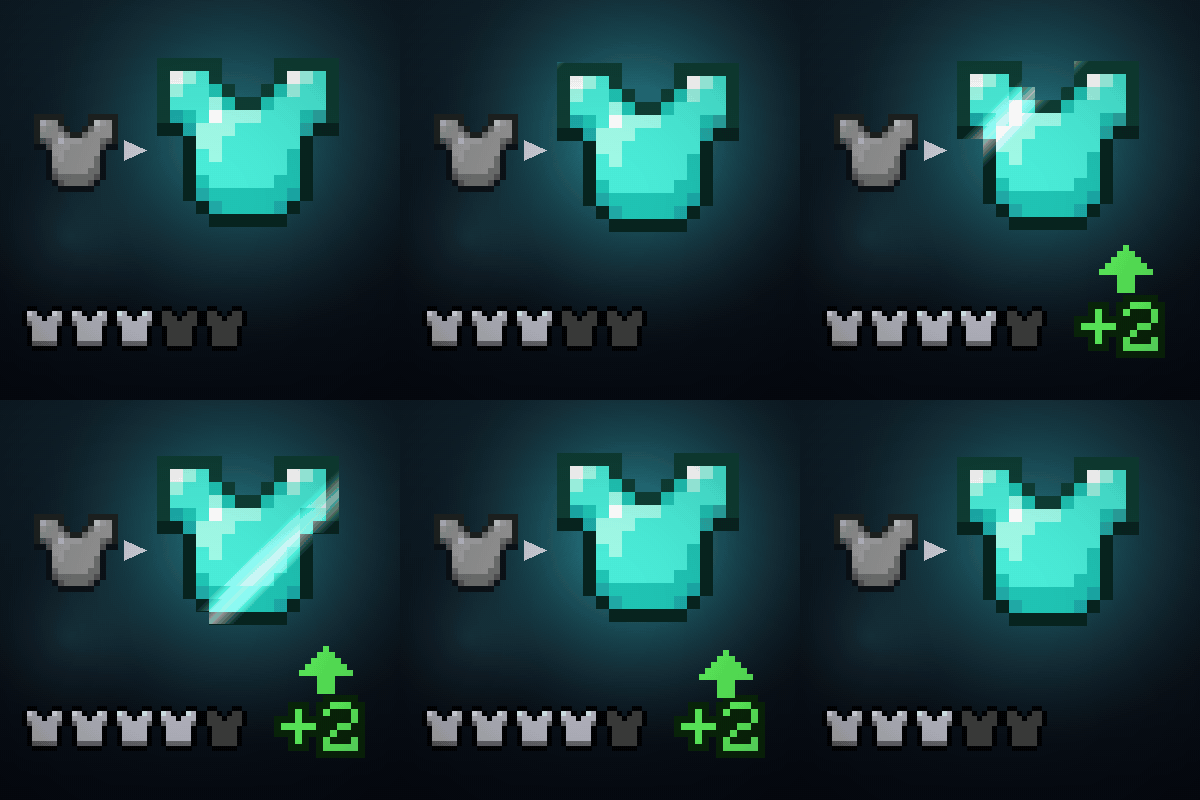
Hover any armour, tool or weapon and the tooltip tells you how it compares to the one you are already using, as a plain difference. Client-side, works on any server.
Quick answer
Gear Compare 0.1.1 for Minecraft 26.2 (NeoForge) targets 26.2 with NeoForge. The project page does not say whether this file belongs on the client, dedicated server, or both. 1 required mod needs a matching file.
Where it goes
The project page does not say whether this file belongs on the client, dedicated server, or both.
The source does not explicitly classify this release as client-only or server-only.
Gear Compare 0.1.1 for Minecraft 26.2 (NeoForge). Change the file and its required mods may change too.
Install Fabric API first, but 1 required mod has no matching file for this setup. Do not mix loader builds to force a match.
We only count dependency files that match this setup. A file for another loader does not fill the gap.
Before you install it
Built for Gear Compare 0.1.1 for Minecraft 26.2 (NeoForge). Pick another file and the loader, install side or required mods may change.
Use Gear Compare 0.1.1 for Minecraft 26.2 (NeoForge). It targets 26.2 with NeoForge; another release may have different loader, side or dependency requirements.
Install Fabric API first, but 1 required mod has no matching file for this setup. Do not mix loader builds to force a match.
The project page does not say whether this file belongs on the client, dedicated server, or both.
Use the “Get this file” button beside Gear Compare 0.1.1 for Minecraft 26.2 (NeoForge). It opens that exact file at the source.
About this project
You find a chestplate in a chest. Is it better than the one you are wearing?
The tooltip tells you what the new one gives. It says nothing about what you are giving up, and that is the only number that decides it. So you close the chest, open your inventory, hover your own chestplate, read its numbers, go back, and try to hold both sets in your head.
Gear Compare puts the difference in the tooltip:
Diamond Chestplate

When on Chest:

+8 Armor

+2 Armor Toughness

Compared with your Iron Chestplate

+2 Armor (6 → 8)

+2 Armor Toughness (0 → 2)

+ Protection IV (was II)

− Thorns I

+288 durability left
Each line is coloured the way the game itself colours that attribute, so a value where a smaller number is better reads correctly, and so does one added by another mod. Enchantments and durability, which have no such colour of their own, are green when the swap helps and red when it costs you.
**Armour, tools, weapons and shields.** Anything the game lets you wear or hold.
**Every attribute that changes**, with both values beside the difference.
**Enchantments** gained, lost, or moved to a different level.
**Durability left**, when both items wear out.
A shield is compared against your off hand when that hand is busy, because that is the item it would replace.
It never turns an enchantment into a damage number. What Sharpness is worth depends on what you are hitting and how, so a single figure there would look precise and be wrong. Enchantments are named instead.
Client-side only. Nothing is installed on the server, and it works on servers you do not run.
No configuration. It does the right thing on first launch.
Pick the file that matches your setup and drop it in your mods folder.
Fabric, Minecraft 26.3 - needs Fabric Loader and Fabric API
Fabric, Minecraft 26.2 - needs Fabric Loader and Fabric API
Fabric, Minecraft 26.1 - needs Fabric Loader and Fabric API
NeoForge, Minecraft 26.2 - no extra dependency
Every one of these four was opened in a world made on that exact version and had its accuracy test run there:
4,252 item pairs compared against an independent oracle read from the game's own code, with no disagreement. The same test is run with the tooltip hook switched off, where it has to fail - otherwise a passing run would prove only that the arithmetic works, not that anything reaches your screen.
Feel free to include it in any modpack, no need to ask!
Like the mod? You can support future updates and new mods on Ko-fi. Totally optional, everything stays free.
Project description from CurseForge.
Pick your setup
Choose the version and loader you play, then open the matching release.
Check the dependencies, then try the file in a copied instance before changing a world you care about.
Recent files
gearcompare-neoforge-mc26.2-0.1.1.jar
23 Sept 2026
gearcompare-mc26.1-0.1.1.jar
23 Sept 2026
gearcompare-mc26.2-0.1.1.jar
23 Sept 2026
gearcompare-mc26.3-0.1.1.jar
23 Sept 2026
Looking for an older file? The official CurseForge project page is in Resources.
 mod
Fish the actual fish from the water
 mod
Become a werewolf, master multiple forms and skills, survive Hunters armed with Silver, and conquer the Alpha Trial.
 mod
When the player is inactive for an extended period, the game automatically switches to a cinematic camera view and plays a sequence showcasing the surrounding scenery.