Minecraft version
Back to mods 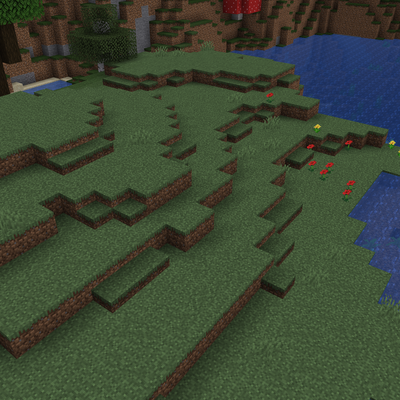
CurseForge · Minecraft mod
Slabs
Adds slab to terrain to² make it smoother
Choose a version Pick your version below, then grab the matching file.
Quick answer
Which Slabs release should I use?
Latest stable file slabs-0.3.jar
Game version 1.20.1
Loader Forge
slabs-0.3.jar targets 1.20.1 with Forge. The project page does not say whether this file belongs on the client, dedicated server, or both. No extra mods listed for this file.
Where it goes
Is Slabs required on the client, server, or both?
The project page does not say whether this file belongs on the client, dedicated server, or both.
Client Source doesn’t say
Dedicated server Source doesn’t say
Loader for this release Forge
Required install it here Optional supported, not mandatory Not supported do not install here Source doesn’t say do not assume
The source does not explicitly classify this release as client-only or server-only.
What else does slabs-0.3.jar need?
slabs-0.3.jar. Change the file and its required mods may change too.
This file does not list any required mods. Do not add a library just because a different file uses it.
This file does not list any required or optional mods.
Before you install it
Add Slabs without breaking your instance.
Built for slabs-0.3.jar. Pick another file and the loader, install side or required mods may change.
- 01
Stick to this file
Use slabs-0.3.jar. It targets 1.20.1 with Forge; another release may have different loader, side or dependency requirements.
- 02
Bring the mods it needs
This file does not list any required mods. Do not add a library just because a different file uses it.
- 03
Put it on the correct side
The project page does not say whether this file belongs on the client, dedicated server, or both.
- 04
Pick the file you checked
Use the “Get this file” button beside slabs-0.3.jar. It opens that exact file at the source.
About this project
What does Slabs add?
Slabs fills in the slab blocks vanilla don't have and uses them to smooth out the terrain.
Performance impact is basically none.
42 new slabs
- Dirt, coarse dirt, rooted dirt, grass, podzol, mycelium, moss, mud, packed mud and clay
- Sand, red sand, gravel, soul sand and soul soil
- Calcite, tuff, dripstone, deepslate, basalt, smooth basalt, netherrack and end stone
- Packed ice and blue ice
- Terracotta in all 17 colours
Craft them like any slab (3 blocks give 6), or cut them in the stonecutter. Grass slabs take the biome's colour, and grass, podzol and mycelium slabs turn snowy under snow.
Softer terrain
In the Overworld, the edges of hills, dunes and cliffs sometimes get a half-step, so walking up them doesn't always mean jumping. Stone, sandstone and cobblestone edges use the vanilla slabs. Where it happens follows a noise pattern, so some areas get a lot of steps and others get none.
Project description from CurseForge.
Pick your setup
Slabs by Minecraft version and loader
Choose the version and loader you play, then open the matching release.
Check the dependencies, then try the file in a copied instance before changing a world you care about.
Recent files
Slabs versions and loaders
slabs-0.3.jar
18 Nov 2026
Client Source doesn’t say Server Source doesn’t say Dependencies No extras listed Listed on Release listing
Check the 1.20.1 · Forge setup 1.20.1Forge release
slabs-0.3.jar
19 Oct 2026
Client Source doesn’t say Server Source doesn’t say Dependencies No extras listed Listed on Release listing
Check the 1.20.1 · Forge setup 1.20.1Forge release
slabs-0.2.jar
26 Sept 2026
Client Source doesn’t say Server Source doesn’t say Dependencies No extras listed Listed on Release listing
Check the 1.20.1 · Forge setup 1.20.1Forge release
Looking for an older file? The official CurseForge project page is in Resources.
 mod
CurseForge · Minecraft
Spakkraft’s first horror mod experience
This is my first horror mod. It features jumpscares, fog, and more.
 mod
CurseForge + Modrinth · Minecraft
Assorted Discoveries
Experience Minecraft like never before with over 90 new plushies! As well as many other new vanilla style blocks, food, and much much more with Assorted Discoveries!
 mod
CurseForge · Minecraft
Fields
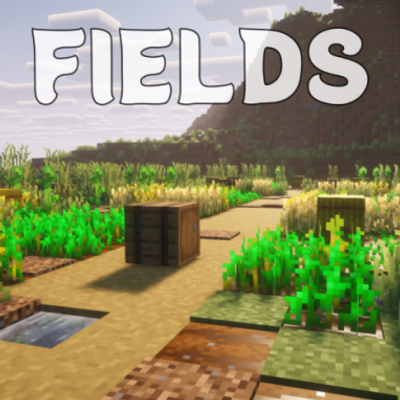
Worldgen mod that adds eight farm-field structure variants to plains biomes, complete with crops, roads, irrigation, and fences.