Minecraft version
Back to mods 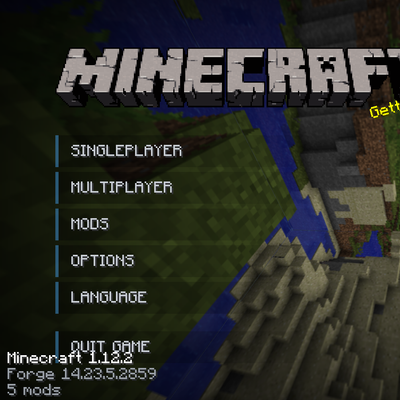
CurseForge · Minecraft mod
ModernMenu with customization by Adapts
A modern, animated main menu, pause menu and loading screens for Minecraft 1.12.2.
Choose a version Pick your version below, then grab the matching file.
Quick answer
Which ModernMenu with customization by Adapts release should I use?
Latest stable file ModernMenu-1.1.1-(by Adapts).jar
Game version 1.12.2
Loader Forge
ModernMenu with customization by Adapts ModernMenu-1.1.1-(by Adapts).jar targets 1.12.2 with Forge. The project page does not say whether this file belongs on the client, dedicated server, or both. No extra mods listed for this file.
Where it goes
Is ModernMenu with customization by Adapts required on the client, server, or both?
The project page does not say whether this file belongs on the client, dedicated server, or both.
Client Source doesn’t say
Dedicated server Source doesn’t say
Loader for this release Forge
Required install it here Optional supported, not mandatory Not supported do not install here Source doesn’t say do not assume
The source does not explicitly classify this release as client-only or server-only.
What else does ModernMenu with customization by Adapts ModernMenu-1.1.1-(by Adapts).jar need?
ModernMenu-1.1.1-(by Adapts).jar. Change the file and its required mods may change too.
This file does not list any required mods. Do not add a library just because a different file uses it.
This file does not list any required or optional mods.
Before you install it
Add ModernMenu with customization by Adapts without breaking your instance.
Built for ModernMenu with customization by Adapts ModernMenu-1.1.1-(by Adapts).jar. Pick another file and the loader, install side or required mods may change.
- 01
Stick to this file
Use ModernMenu-1.1.1-(by Adapts).jar. It targets 1.12.2 with Forge; another release may have different loader, side or dependency requirements.
- 02
Bring the mods it needs
This file does not list any required mods. Do not add a library just because a different file uses it.
- 03
Put it on the correct side
The project page does not say whether this file belongs on the client, dedicated server, or both.
- 04
Pick the file you checked
Use the “Get this file” button beside ModernMenu-1.1.1-(by Adapts).jar. It opens that exact file at the source.
About this project
What does ModernMenu with customization by Adapts add?
Modern Menus (Join us on discord: https://discord.gg/B5sMcUThpv)
Give Minecraft the look of a modern game, or create your very own menus! Modern Menus redesigns the main menu, the pause menu and the loading screens, and lets you build your own with simple JSON themes: animations, particles, animated images, custom pages... no coding needed.
🎨 THEMES
- Every menu is a theme: a folder with a few JSON files and your images
- Switch themes in-game with the Themes button (top right of the main menu)
- Press F5 on a menu to reload your changes instantly
- Mistakes are shown on screen with the file and element number, so they are easy to fix
- Share a theme by zipping its folder: perfect for modpacks and servers!
📦 BUILT-IN THEMES
- Default: smooth panorama, animated side buttons, world info card in the pause menu
- Showcase: a demo of every feature (particles, animated fire, rolling credits, easing curves...)
🧩 WHAT YOU CAN CUSTOMIZE
- Main menu, pause menu (Esc), loading screens, and your own custom pages
- Backgrounds: panorama, animated lights, image slideshow with fade and slow zoom
- Particles: snow, rain, embers, stars, fireflies, bubbles, dust
- Images: your own PNGs or any game/mod texture, including animated sprite sheets
- Texts with variables: {player}, {mods}, {biome}, {x} {y} {z}, {world}...
- 5 button styles: modern, flat, text, vanilla, or your own textures
- Position of every element anywhere on screen, in pixels or percent
✨ ANIMATIONS
- Keyframe animations on position, size, rotation and opacity
- Play them when the menu opens, in a loop, on hover or on click
- 20 easing curves: smooth, bounce, elastic, back...
🎯 BUTTON ACTIONS
- Vanilla menus: singleplayer, multiplayer, options, mods, language, quit
- Open your own pages (credits, rules, news...) and go back
- Open a web link (Discord, website...)
- Join a server in one click
- Load a singleplayer world directly
⏳ LOADING SCREENS
- World creation and loading, server connection and terrain download
- Real progress bar while the terrain is generating
- Rotating gameplay tips (or your own)
- Very lightweight: adds almost no loading time
🖥️ STARTUP SCREEN
- The Forge startup screen gets a matching dark theme (visible from the second launch, since Forge shows it before mods are loaded)
⚙️ CONFIGURATION
In-game (Mods > Modern Menus > Config) or in config/modernmenus.cfg:
- Active theme
- Animations on/off
- Each part (main menu, pause menu, loading screens) can be turned off to get the vanilla screen back
📖 CREATE YOUR OWN THEME
A full guide is available on our Discord and in the THEMES.md file, with examples for every feature.
📦 INSTALLATION
- Minecraft 1.12.2 with Forge
- Drop the .jar into your mods folder
- Client-side only: works on any server!
❓ FAQ
Does it need a resource pack?
No, everything is drawn by the mod. Themes can use their own images if you want.
Do I need to know how to code?
No, themes are simple JSON files. Copy the default theme and edit it, then press F5 to see the result.
Can I use it in my modpack or for my server?
Yes! Make a theme with your logo, your links and a button that joins your server in one click.
Does it work with other mods?
Yes. It only replaces the vanilla menus, so menus added by other mods are left untouched.
Project description from CurseForge.
Pick your setup
ModernMenu with customization by Adapts by Minecraft version and loader
Choose the version and loader you play, then open the matching release.
Check the dependencies, then try the file in a copied instance before changing a world you care about.
Recent files
ModernMenu with customization by Adapts versions and loaders
ModernMenu-1.1.1-(by Adapts).jar
25 Oct 2026
Client Source doesn’t say Server Source doesn’t say Dependencies No extras listed Listed on Release listing
Check the 1.12.2 · Forge setup Forge1.12.2 release
ModernMenu-1.0.1-(by Adapts).jar
22 Oct 2026
Client Source doesn’t say Server Source doesn’t say Dependencies No extras listed Listed on Release listing
Check the 1.12.2 · Forge setup Forge1.12.2 release
ModernMenu wtih animation (by Adapts) 1.12.2.jar
ModernMenu wtih animation (by Adapts).jar
26 Sept 2026
Client Source doesn’t say Server Source doesn’t say Dependencies No extras listed Listed on Release listing
Check the 1.12.2 · Forge setup Forge1.12.2 release
Looking for an older file? The official CurseForge project page is in Resources.
 mod
CurseForge · Minecraft
Shuu's Hit/Damage Indicator
Adds a damage indicator to Minecraft; when you take damage, it will show you the relative location to where the enemy was when they hit you.
 mod
CurseForge · Minecraft
Unyielding
Companion mod for Cobblemon Unyielding: ranks, gym leader tags, a spawn leaderboard with a dancing podium, a Tome of Souls, and giant items
 mod
CurseForge · Minecraft
Bubie
The little CRT robot from bubie.gg as your helper: it chops trees, digs, quarries, farms and mines, then stores everything in your chest.