Minecraft version
Back to mods 
CurseForge · Minecraft mod
LIVING TEXTURES HD
Every mob reborn in HD: hand-sculpted models for 7 iconic creatures, 4x HD + PBR textures for all the rest, living motion and 3D creature audio. Client-side, joins any server.
Choose a version Pick your version below, then grab the matching file.
Quick answer
Which LIVING TEXTURES HD release should I use?
Latest stable file Living Textures HD 1.0.0 (NeoForge 1.21.1)
Game version 1.21.1
Loader NeoForge
LIVING TEXTURES HD Living Textures HD 1.0.0 (NeoForge 1.21.1) targets 1.21.1 with NeoForge. The project page does not say whether this file belongs on the client, dedicated server, or both. No extra mods listed for this file.
Where it goes
Is LIVING TEXTURES HD required on the client, server, or both?
The project page does not say whether this file belongs on the client, dedicated server, or both.
Client Source doesn’t say
Dedicated server Source doesn’t say
Loader for this release NeoForge
Required install it here Optional supported, not mandatory Not supported do not install here Source doesn’t say do not assume
The source does not explicitly classify this release as client-only or server-only.
What else does LIVING TEXTURES HD Living Textures HD 1.0.0 (NeoForge 1.21.1) need?
Living Textures HD 1.0.0 (NeoForge 1.21.1). Change the file and its required mods may change too.
This file does not list any required mods. Do not add a library just because a different file uses it.
This file does not list any required or optional mods.
Before you install it
Add LIVING TEXTURES HD without breaking your instance.
Built for LIVING TEXTURES HD Living Textures HD 1.0.0 (NeoForge 1.21.1). Pick another file and the loader, install side or required mods may change.
- 01
Stick to this file
Use Living Textures HD 1.0.0 (NeoForge 1.21.1). It targets 1.21.1 with NeoForge; another release may have different loader, side or dependency requirements.
- 02
Bring the mods it needs
This file does not list any required mods. Do not add a library just because a different file uses it.
- 03
Put it on the correct side
The project page does not say whether this file belongs on the client, dedicated server, or both.
- 04
Pick the file you checked
Use the “Get this file” button beside Living Textures HD 1.0.0 (NeoForge 1.21.1). It opens that exact file at the source.
About this project
What does LIVING TEXTURES HD add?
Every mob, reborn in high definition.
LIVING TEXTURES HD is a visual and audio overhaul for Minecraft creatures. Seven iconic mobs get hand-sculpted HD models, every other mob gets 4x HD textures, and everything that lives moves and sounds like it.
It is 100% client-side, so it works on any server, vanilla ones included. No dependencies.
What you get
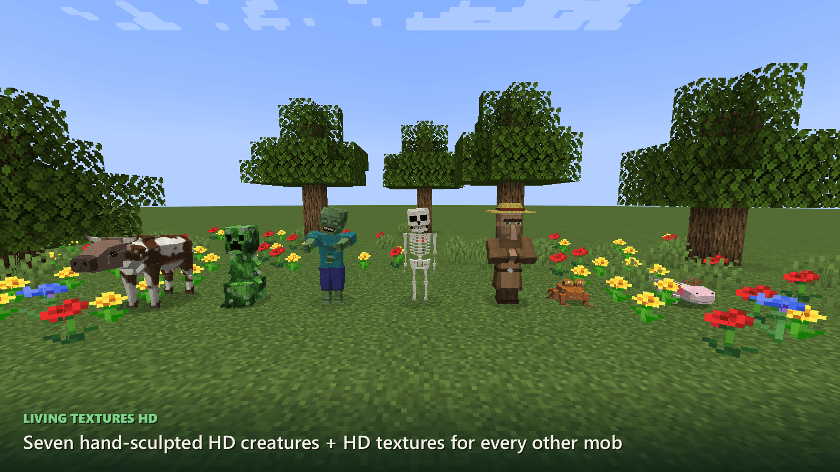
- 7 hand-sculpted HD mobs - cow, creeper, zombie, skeleton, villager (every profession and biome), frog and axolotl, with vanilla hitboxes and animations kept
- 4x HD textures for every other mob, generated on your own machine from your copy of the game, with LabPBR normal and specular maps for shader packs
- Living motion for every creature, modded ones too: leaning into turns, squash on landing, flinching and breathing
- New creature sounds for the 7 HD mobs, with several variations each
- 3D audio for every positional sound: occlusion behind walls, reverb that matches the space, air absorption
- Level of detail past 48 blocks to keep it light, and a config for every part
Versions and loaders
- NeoForge - Minecraft 1.21.1
- Client-side only: you do not need it on the server
✅ You can use this mod in your modpacks.
The full guide

Seven mobs got the full ranch treatment. They're smooth, sculpted and hand-painted instead of boxy:
| Mob | What's new |
|---|---|
| 🐄 Cow | Horns, a dewlap, an udder, hooves and a tufted tail. Finally a cow worth braggin' about. |
| 💥 Creeper | A leafy, fibrous body with a face that'll make you jump outta your boots. |
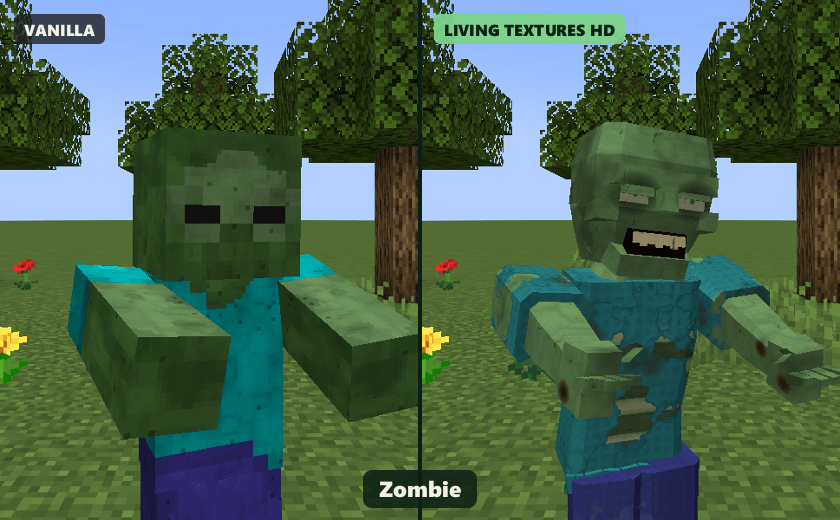
| 🧟 Zombie | A torn shirt, sunken eyes and bared teeth. Uglier than a mud fence, just how we like 'em. |
| 💀 Skeleton | A real ribcage, spine, pelvis and skull. |
| 🧑🌾 Villager | A sculpted face and robes, with every profession outfit and all 7 biome variants. |
| 🐸 Frog | Wet skin, toe pads and bulging eyes, in all 3 variants. |
| 🦎 Axolotl | Frilly gills and soft, glossy skin in all 5 colours. |
They keep vanilla's hitboxes and animations, so they fight, walk, swim and trade exactly like before. They just look a whole lot finer doin' it. Babies are properly proportioned too.

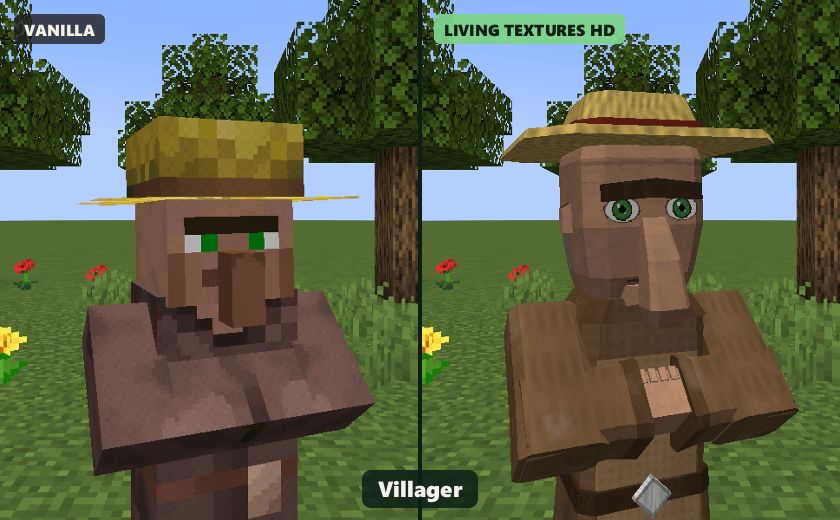
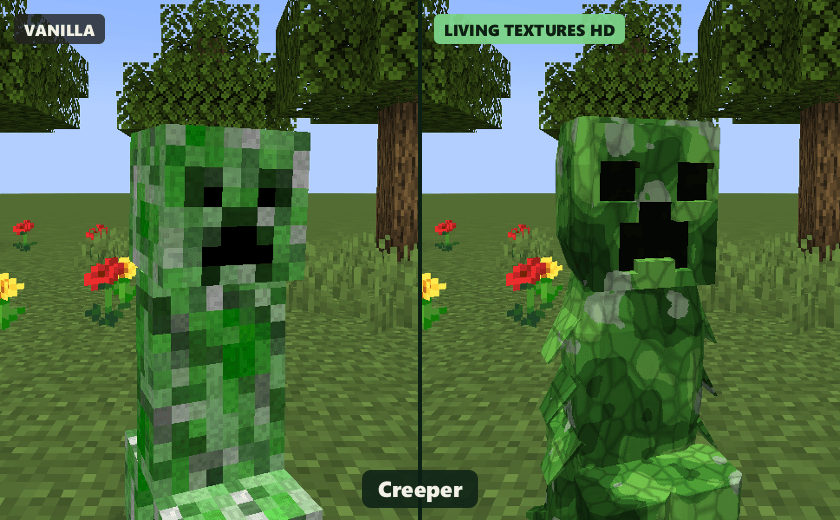
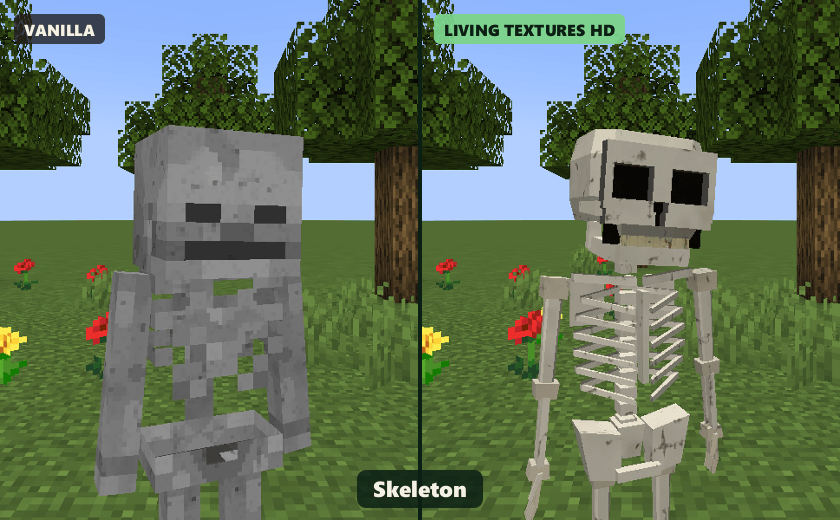

Pigs, sheep, wolves, horses, spiders, the Warden, even the Ender Dragon: every other creature texture is upscaled to 4× resolution automatically, right on your machine.
- Smart upscaling: curves come out smooth while eyes and small details stay crisp.
- Real material detail: fur strands, wool curls, pores, scales, bone cracks, leather grain and fabric weave. Saddles, armor, collars and villager clothes each get their own material.
- LabPBR normal + specular maps for shader packs that support them. Wet frog skin shines, fur stays soft, and metal armor gleams like a new belt buckle.
🔒 None of Mojang's files are redistributed. Everything is generated from your own copy of the game.

Procedural animation runs on every living entity, including mobs from other mods:
- Creatures lean into turns like a cuttin' horse and squash a little when they land.
- They flinch when you hit 'em and breathe while they stand around.
- Heads, tails and ears follow the movement.

- All-new creature sounds for the 7 HD mobs: moos, groans, rattles, croaks, squeaks, villager "hmm"s and more. There are several variations of each, so they never get repetitive.
- 3D spatial audio for EVERY positional sound in the game:
- 🧱 Occlusion: sounds behind walls come through muffled.
- ⛰️ Reverb that changes with the space you're in, from open prairie to deep caves.
- 🌬️ Air absorption: far-off sounds lose their sharp edges, just like in real life.
⚡ Runs lean
- Level of detail: creatures beyond 48 blocks switch to the lightweight vanilla model.
- Motion effects are skipped for far-away critters.
- HD textures are generated once and then cached.
⚙️ Configure it your way
Open Mods → Living Textures HD → Config to set:
- HD models on or off, the LOD distance, and a list of mobs to keep vanilla.
- Motion on or off, its strength and its range.
- HD textures on or off, their resolution (2×, 4× or 8×) and the PBR maps.
- New sounds on or off, 3D audio on or off, and how strong the reverb is.
🌍 Languages
English and Español.
🤝 Compatibility
- Client-side only. You don't need it on the server, and it'll never keep you out of one.
- Modded creatures get the living motion, while their own textures are left alone.
- Built for NeoForge 1.21.1. I've tested it with NeoForge alone; Sodium, Iris and other performance or shader mods haven't been tested yet. If anything looks off, holler in the comments!
❓ FAQ
Can I put it in my modpack? Absolutely, partner! Modpacks are more than welcome.
Can I turn off one mob's HD model? Sure can. Add it to the disabled list in the config (for example cow) and press F3+T.
More HD mobs? You bet. More sculpted critters are coming in future updates. Tell me in the comments which mob you want next!
⭐ If you like it, hit that download button and leave a comment, partner. It means the world! 🤠
Every model, texture and sound in this mod was made from scratch.
More mods by me
If you like this one, you might like these too. All made from scratch.
- MEGATON: Nuclear Warfare - 114 nukes, real craters, tsunamis and fallout
- SKY ACES - 30+ flyable jets, warbirds, helicopters and warships
- SCP: Secure & Craft - survival horror in abandoned Foundation sites
- Hearthstead: Biome Villages - vanilla villages rebuilt as real towns in 8 biomes
- SEISMIC: Living World - structural collapse, earthquakes and body temperature
- Combat Juice - hit markers, damage numbers and a kill feed (client-side)
- Shadowstep: Stealth & Mob Senses - stealth with mobs that see, hear and smell
- Samurai Dynasty - feudal Japan RPG with katanas, parkour and yokai
Found a bug or have an idea? Leave a comment, I read all of them.
Project description from CurseForge.
Pick your setup
LIVING TEXTURES HD by Minecraft version and loader
Choose the version and loader you play, then open the matching release.
Check the dependencies, then try the file in a copied instance before changing a world you care about.
Recent files
LIVING TEXTURES HD versions and loaders
Living Textures HD 1.0.0 (NeoForge 1.21.1)
livingtextures-hd-1.21.1-1.0.0.jar
27 Sept 2026
Client Source doesn’t say Server Source doesn’t say Dependencies No extras listed Listed on Release listing
Check the 1.21.1 · NeoForge setup 1.21.1NeoForge release
Looking for an older file? The official CurseForge project page is in Resources.
 mod
CurseForge + Modrinth · Minecraft
Simple Tracking Compass
Simple Tracking Compass is a Minecraft mod that adds a Compass to the top-left corner of your screen which lets you track other players.
 mod
CurseForge · Minecraft
The Frozen Dominion
A soulslike citadel in the snow: five stages of halls, ten minibosses, and Velkhar, the Hollow Sovereign, in four phases.
 mod
CurseForge · Minecraft
【TACZ-Addon】Wall-displayed Guns with High Fps!
Turn equipped TACZ guns into detailed, recoverable decorative blocks for large armory displays with reduced rendering overhead.