Minecraft version
Back to mods 
CurseForge · Minecraft mod
Combat Juice
Hit markers, damage numbers, a kill feed, medals and hit-stop, like a modern shooter. 100% client-side: every hit feels amazing on any server, with any mob or weapon.
Choose a version Pick your version below, then grab the matching file.
Quick answer
Which Combat Juice release should I use?
Latest stable file Combat Juice 1.0.0 (NeoForge 1.21.1)
Game version 1.21.1
Loader NeoForge
Combat Juice 1.0.0 (NeoForge 1.21.1) targets 1.21.1 with NeoForge. The project page does not say whether this file belongs on the client, dedicated server, or both. No extra mods listed for this file.
Where it goes
Is Combat Juice required on the client, server, or both?
The project page does not say whether this file belongs on the client, dedicated server, or both.
Client Source doesn’t say
Dedicated server Source doesn’t say
Loader for this release NeoForge
Required install it here Optional supported, not mandatory Not supported do not install here Source doesn’t say do not assume
The source does not explicitly classify this release as client-only or server-only.
What else does Combat Juice 1.0.0 (NeoForge 1.21.1) need?
Combat Juice 1.0.0 (NeoForge 1.21.1). Change the file and its required mods may change too.
This file does not list any required mods. Do not add a library just because a different file uses it.
This file does not list any required or optional mods.
Before you install it
Add Combat Juice without breaking your instance.
Built for Combat Juice 1.0.0 (NeoForge 1.21.1). Pick another file and the loader, install side or required mods may change.
- 01
Stick to this file
Use Combat Juice 1.0.0 (NeoForge 1.21.1). It targets 1.21.1 with NeoForge; another release may have different loader, side or dependency requirements.
- 02
Bring the mods it needs
This file does not list any required mods. Do not add a library just because a different file uses it.
- 03
Put it on the correct side
The project page does not say whether this file belongs on the client, dedicated server, or both.
- 04
Pick the file you checked
Use the “Get this file” button beside Combat Juice 1.0.0 (NeoForge 1.21.1). It opens that exact file at the source.
About this project
What does Combat Juice add?
Make every hit feel amazing.
Combat Juice gives Minecraft the combat feedback you know from modern action games: hit markers, punchy hit sounds, floating damage numbers, a kill feed with medals and a tiny freeze-frame on big hits.
It is 100% client-side. Drop it in your mods folder and it works on servers that do not have it, including vanilla ones, and it picks up modded mobs and weapons on its own.
What you get
- Hit markers and hit sounds - a shooter-style X with its own colour and sound for hits, crits, headshots, kills and shield blocks
- Floating damage numbers that arc away and stack damage over time into one number
- Kill feed and medals - Double Kill to Rampage, Killing Spree to Godlike, First Blood, Headshot, Longshot, Revenge, Clutch, Smash and more
- Hit-stop and camera punch - a few milliseconds of freeze on crits and kills (visual only, the server is never touched)
- Target health bar with a fighting-game style damage chip
- Damage direction arcs that keep pointing at whoever is hurting you
- Low health heartbeat and red vignette
- Every effect can be turned off or scaled in the config, 8 languages, no dependencies
Versions and loaders
- NeoForge - Minecraft 1.21.1
- Client-side only: you do not need it on the server
✅ You can use this mod in your modpacks.
The full guide
🎯 Hit markers & hit sounds
- A shooter-style X at the crosshair every time you land a hit.
- White = hit · Yellow = critical · Gold = headshot · Red = kill (with a ring) · Blue = blocked by a shield · Grey = weak, spammed hit.
- A short, crisp sound for each kind of hit: tick, metallic crit, helmet "dink" for headshots, and a punchy kill confirm.
- The marker gets bigger the harder you hit.
💥 Floating damage numbers
- Numbers pop out of the target, arc away and fade.
- Crits and headshots are bigger and flash, and kills get a ☠.
- Fire, poison and fast weapons stack into a single number instead of flooding your screen.
- Choose between health points and hearts, or show damage for every mob around you instead of only yours.
- Always readable: numbers are never hidden behind mobs or blocks.
☠ Kill feed & medals
- A kill feed in the top-right corner showing you, the weapon you used and your victim.
- Medals with their own badge, animation and sound:
- Double / Triple / Quad / Penta Kill / Rampage for chained kills
- Killing Spree → Unstoppable → Godlike for kills without dying
- First Blood, Headshot (bows & crossbows), Longshot (30+ blocks), Revenge, Clutch (kill while almost dead), One Shot, Smash (mace)
❤ Target health bar
- A fighting-game style health bar for the last thing you hit.
- The bar drops instantly, and a pale "chip" shows the damage you just did before it drains away.
- Shakes on big hits, and shows the target's name and a ☠ on death. It can sit under the crosshair or at the top of the screen.
🧭 Damage direction
- Red arcs around the crosshair point at whatever is hurting you, whether it's a melee attacker, an archer or an explosion.
- An arc keeps tracking its attacker as it fades, so you can turn around and find them.
🎬 Feel
- Hit-stop: a few milliseconds of freeze-frame on crits and kills, like in fighting games. It is a visual effect only; ticks, movement and the server are never touched.
- Camera punch: a tiny FOV kick and micro-shake when you land a hit.
- Hurt kick: the camera tilts toward the hit when you take damage (it respects vanilla's Damage Tilt setting).
- Impact frames: one manga-style inverted frame plus speed lines on epic kills (mace smashes, one-shotting big mobs, bosses). It is rate-limited, and you can turn it off with one toggle.
💓 Low health
- A pulsing red vignette and a heartbeat that speeds up as your health drops.
⚙️ Fully configurable
Every effect can be switched off or rescaled in-game: Mods → Combat Juice → Config. That covers sizes, volumes, hit-stop strength, camera punch, feed length, where the health bar sits, and more.
🌍 Languages
English, Español, Português, Français, Deutsch, Русский, 简体中文, 日本語.
🤝 Compatibility
- Client-side only. You don't need it on the server, and it never blocks you from joining one.
- Built to work with modded mobs, bosses and weapons: everything it shows comes from standard vanilla packets, so it doesn't need to know about other mods.
- Tiny performance cost: it only does work when a hit happens.
- Tried a combat mod that doesn't play nice with it? Let me know in the comments and I'll take a look.
❓ FAQ
Is it allowed on servers? It only shows information your client already receives, the same way vanilla shows hurt animations and crit particles. It gives no ESP and no hidden information. Still, always follow each server's rules.
Can I use it in a modpack? Yes! Modpacks are welcome.
Photosensitivity: impact frames are a one-frame flash and are only used on rare epic kills. You can turn them off with Impact frames in the config.
Made from scratch with love. Found a bug or have an idea for a new medal? Leave a comment!
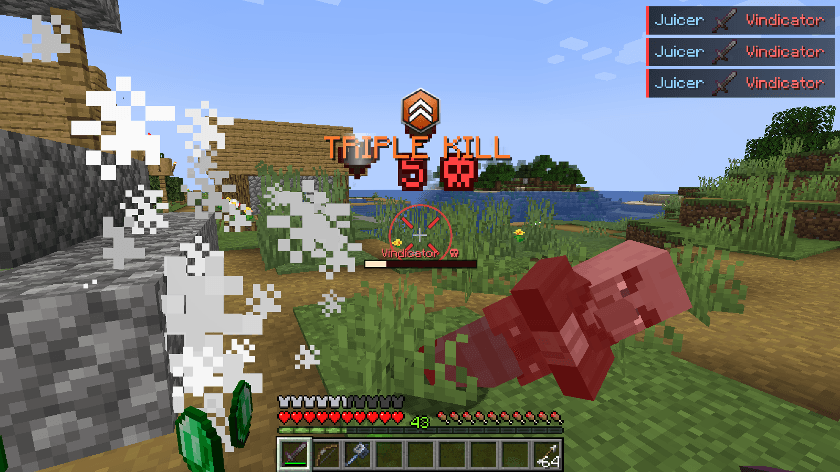
📸 In game
More mods by me
If you like this one, you might like these too. All made from scratch.
- MEGATON: Nuclear Warfare - 114 nukes, real craters, tsunamis and fallout
- SKY ACES - 30+ flyable jets, warbirds, helicopters and warships
- SCP: Secure & Craft - survival horror in abandoned Foundation sites
- Hearthstead: Biome Villages - vanilla villages rebuilt as real towns in 8 biomes
- SEISMIC: Living World - structural collapse, earthquakes and body temperature
- LIVING TEXTURES HD - every mob reborn in HD (client-side)
- Shadowstep: Stealth & Mob Senses - stealth with mobs that see, hear and smell
- Samurai Dynasty - feudal Japan RPG with katanas, parkour and yokai
Found a bug or have an idea? Leave a comment, I read all of them.
Project description from CurseForge.
Pick your setup
Combat Juice by Minecraft version and loader
Choose the version and loader you play, then open the matching release.
Check the dependencies, then try the file in a copied instance before changing a world you care about.
Recent files
Combat Juice versions and loaders
Combat Juice 1.0.0 (NeoForge 1.21.1)
combatjuice-1.21.1-1.0.0.jar
27 Sept 2026
Client Source doesn’t say Server Source doesn’t say Dependencies No extras listed Listed on Release listing
Check the 1.21.1 · NeoForge setup 1.21.1NeoForge release
Looking for an older file? The official CurseForge project page is in Resources.
 mod
CurseForge + Modrinth · Minecraft
Reliable Gliders
A mod that adds a simple, immersive, and balanced Glider to the game!
 mod
CurseForge + Modrinth · Minecraft
Afterimages
A lightweight, data-driven mod that adds visual afterimage trails to entities!
 mod
CurseForge · Minecraft
CatSkinC
A simple skin mod for use in other server and make your skin can use with high resolution up to 8192x!