Minecraft version
Back to mods 
CurseForge · Minecraft mod
Twilight Forge - Twilight Forest Addon
Expand your Twilight Forest armory with new metal alloys, heat-tiered forging, custom set bonuses, and seamless smithing upgrades.
Choose a version Pick your version below, then grab the matching file.
Quick answer
Which Twilight Forge - Twilight Forest Addon release matches NeoForge?
Best match for your filters twilight_forge-0.4.0-26.1.2.jar
Game version 26.1.2
Loader NeoForge
Twilight Forge - Twilight Forest Addon twilight_forge-0.4.0-26.1.2.jar targets 26.1.2 with NeoForge. The project page does not say whether this file belongs on the client, dedicated server, or both. No extra mods listed for this file.
Where it goes
Is Twilight Forge - Twilight Forest Addon required on the client, server, or both?
The project page does not say whether this file belongs on the client, dedicated server, or both.
Client Source doesn’t say
Dedicated server Source doesn’t say
Loader for this release NeoForge
Required install it here Optional supported, not mandatory Not supported do not install here Source doesn’t say do not assume
The source does not explicitly classify this release as client-only or server-only.
What else does Twilight Forge - Twilight Forest Addon twilight_forge-0.4.0-26.1.2.jar need?
twilight_forge-0.4.0-26.1.2.jar on NeoForge. Every mod below is checked against that same setup.
This file does not list any required mods. Do not add a library just because a different file uses it.
This file does not list any required or optional mods.
Before you install it
Add Twilight Forge - Twilight Forest Addon without breaking your instance.
Built for Twilight Forge - Twilight Forest Addon twilight_forge-0.4.0-26.1.2.jar on NeoForge. Pick another file and the loader, install side or required mods may change.
- 01
Stick to this file
Use twilight_forge-0.4.0-26.1.2.jar. It targets 26.1.2 with NeoForge; another release may have different loader, side or dependency requirements.
- 02
Bring the mods it needs
This file does not list any required mods. Do not add a library just because a different file uses it.
- 03
Put it on the correct side
The project page does not say whether this file belongs on the client, dedicated server, or both.
- 04
Pick the file you checked
Use the “Get this file” button beside twilight_forge-0.4.0-26.1.2.jar. It opens that exact file at the source.
About this project
What does Twilight Forge - Twilight Forest Addon add?

Questions or ideas? Ask here: https://tally.so/r/GepONO
An addon for The Twilight Forest! Combine realm materials in a heat-powered forge block to smelt new metal alloys, craft custom armor and tools with set bonuses, and upgrade your existing Twilight Forest gear at a smithing table.
Supports Minecraft 1.21.1 (NeoForge) and Minecraft 26.1.2 (NeoForge).
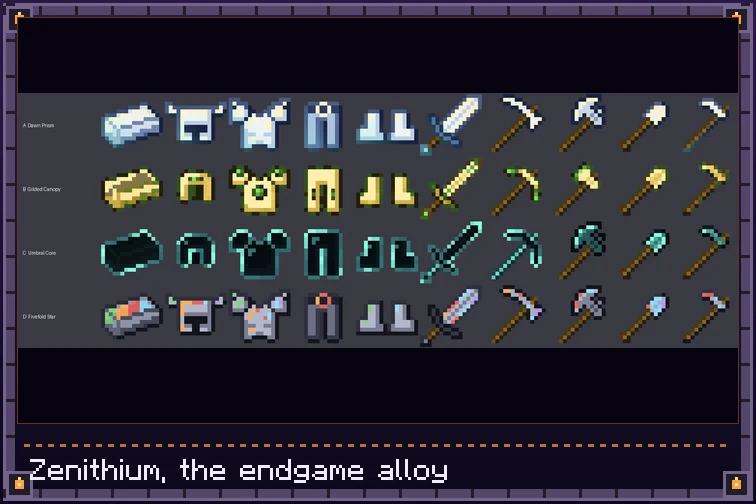

- Heat-Tiered Twilight Forge Block: Combine up to six ingredients into alloy ingots. Hotter fuels unlock higher-tier recipes (Heat I: any fuel, Heat II: coal or charcoal, Heat III: Fiery Blood or Fiery Tears — hover the heat pips to inspect). Fully compatible with hoppers and pipes for automation.
- Custom Alloys, Armor & Tools: Smelt and forge full gear sets across six alloys: Bronzewood, Leafsteel, Emberknight, Frostsilver, Twilight Alloy, and the endgame Zenithium (a near-black teal metal with a cold green glow, forged from all five other alloys plus a Netherite Ingot).
- Toggleable Set Bonuses: Equip full armor sets to gain unique passives: Speed, Regeneration, Fire Immunity, Frost Armor, or Extra Hearts. A full Zenithium set grants all five bonuses simultaneously!
- Seamless Smithing Upgrades: Upgrade existing Twilight Forest gear using alloy ingots and Upgrade Templates at the Smithing Table while preserving all enchantments, custom names, and durability states.
- A Forge That Feels Alive: Flames, smoke and an occasional crackle while it burns, and a soul-fire flame with Fiery Blood or Fiery Tears (heat III). A comparator reads how full the six input slots are.
- Alloying Pays Experience: Like a furnace, paid when you take the result out: 0.5 for Bronzewood and Leafsteel, 1 for Emberknight and Frostsilver, 2 for Twilight Alloy and 5 for Zenithium per craft.
- Data-Driven Fuels and Advancements: Fuel heat comes from the item data map
twilight_forge:forge_fuels, so a datapack can add or change fuels. A "Twilight Forge" advancement tab walks you from the forge to each alloy and its full armor set. - Fully Configurable: Fine-tune every armor and tool stat to match your modpack's balance.

📌 Requirements
- The Twilight Forest (4.8+ on 1.21.1 | 4.9+ on 26.1.2 — Required)
- NeoForge (1.21.1 or 26.1.2 — Client & Server)
📚 Same Author Mods & Ecosystem
- Spell's Atlas — Achievement goals, structure tracking, and unified settings hub compatibility.
- Quintessence: Elemental Spellcraft & Runes — Native Twilight Forest dimensional scroll gates and Manalite integration.
- Player System — Rank attributes, XP scaling, and gear rank assignment support.
- Arcane Storage Network — Store, sort, and craft with your Twilight Forest alloys wirelessly.
🧩 Optional Mod Integrations

Twilight Forge is currently available for Minecraft 1.21.1 and 26.1.2 on NeoForge. Looking for another Minecraft version or mod loader? Leave a comment below or open a request on the issue tracker — ports can be added based on community interest!

- AI Disclosure: Created with the assistance of AI tools.
- Modpacks: Free to include in any modpack hosted on CurseForge or Modrinth!
Found a bug or have a suggestion? Report it on GitHub.


Project description from CurseForge.
Pick your setup
Twilight Forge - Twilight Forest Addon by Minecraft version and loader
Choose the version and loader you play, then open the matching release.
Minecraft version
1.21.1
1 loader buildCheck the dependencies, then try the file in a copied instance before changing a world you care about.
Recent files
Twilight Forge - Twilight Forest Addon versions and loaders
twilight_forge-0.4.0-26.1.2.jar
19 Nov 2026
Client Source doesn’t say Server Source doesn’t say Dependencies No extras listed Listed on Release listing
Check the 26.1.2 · NeoForge setup NeoForge26.1.2 release
twilight_forge-0.4.0-1.21.1.jar
19 Nov 2026
Client Source doesn’t say Server Source doesn’t say Dependencies No extras listed Listed on Release listing
Check the 1.21.1 · NeoForge setup 1.21.1NeoForge release
twilight_forge-0.2.1-1.21.1.jar
17 Nov 2026
Client Source doesn’t say Server Source doesn’t say Dependencies No extras listed Listed on Release listing
Check the 1.21.1 · NeoForge setup 1.21.1NeoForge release
twilight_forge-0.2.1-26.1.2.jar
17 Nov 2026
Client Source doesn’t say Server Source doesn’t say Dependencies No extras listed Listed on Release listing
Check the 26.1.2 · NeoForge setup NeoForge26.1.2 release
twilight_forge-0.2.0-26.1.2.jar
16 Nov 2026
Client Source doesn’t say Server Source doesn’t say Dependencies No extras listed Listed on Release listing
Check the 26.1.2 · NeoForge setup NeoForge26.1.2 release
twilight_forge-0.2.0-1.21.1.jar
16 Nov 2026
Client Source doesn’t say Server Source doesn’t say Dependencies No extras listed Listed on Release listing
Check the 1.21.1 · NeoForge setup 1.21.1NeoForge release
twilight_forge-0.1.4-1.21.1.jar
14 Nov 2026
Client Source doesn’t say Server Source doesn’t say Dependencies No extras listed Listed on Release listing
Check the 1.21.1 · NeoForge setup 1.21.1NeoForge release
twilight_forge-0.1.4-26.1.2.jar
14 Nov 2026
Client Source doesn’t say Server Source doesn’t say Dependencies No extras listed Listed on Release listing
Check the 26.1.2 · NeoForge setup NeoForge26.1.2 release
twilight_forge-0.1.3-26.1.2.jar
12 Nov 2026
Client Source doesn’t say Server Source doesn’t say Dependencies No extras listed Listed on Release listing
Check the 26.1.2 · NeoForge setup NeoForge26.1.2 release
twilight_forge-0.1.3-1.21.1.jar
12 Nov 2026
Client Source doesn’t say Server Source doesn’t say Dependencies No extras listed Listed on Release listing
Check the 1.21.1 · NeoForge setup 1.21.1NeoForge release
twilight_forge-0.1.2-1.21.1.jar
9 Nov 2026
Client Source doesn’t say Server Source doesn’t say Dependencies No extras listed Listed on Release listing
Check the 1.21.1 · NeoForge setup 1.21.1NeoForge release
twilight_forge-0.1.2-26.1.2.jar
9 Nov 2026
Client Source doesn’t say Server Source doesn’t say Dependencies No extras listed Listed on Release listing
Check the 26.1.2 · NeoForge setup NeoForge26.1.2 release
Looking for an older file? The official CurseForge project page is in Resources.
 mod
CurseForge · Minecraft
Void Inspire (Thaumaturge Addon)
Continuing the way of the thaumaturge, touch the void, warps and expansion of your consciousness
 mod
CurseForge + Modrinth · Minecraft
Do Another Barrel Roll
Microsoft flight simulator for Minecraft elytras, now native to NeoForge.
 mod
CurseForge · Minecraft
OG'S Backpacks
Backpack mod on all versions