Minecraft version
Back to mods 
CurseForge · Minecraft mod
Chaos Clock
Every 60 seconds something crazy happens: 52 random events, a countdown boss bar and voting with friends. Server-side.
Choose a version Pick your version below, then grab the matching file.
Quick answer
Which Chaos Clock release should I use?
Latest stable file Chaos Clock 1.0.0 (MC 1.20.1)
Game version 1.20.1
Loader Fabric
Chaos Clock 1.0.0 (MC 1.20.1) targets 1.20.1 with Fabric. The project page does not say whether this file belongs on the client, dedicated server, or both. No extra mods listed for this file.
Where it goes
Is Chaos Clock required on the client, server, or both?
The project page does not say whether this file belongs on the client, dedicated server, or both.
Client Source doesn’t say
Dedicated server Source doesn’t say
Loader for this release Fabric
Required install it here Optional supported, not mandatory Not supported do not install here Source doesn’t say do not assume
The source does not explicitly classify this release as client-only or server-only.
What else does Chaos Clock 1.0.0 (MC 1.20.1) need?
Chaos Clock 1.0.0 (MC 1.20.1). Change the file and its required mods may change too.
This file does not list any required mods. Do not add a library just because a different file uses it.
This file does not list any required or optional mods.
Before you install it
Add Chaos Clock without breaking your instance.
Built for Chaos Clock 1.0.0 (MC 1.20.1). Pick another file and the loader, install side or required mods may change.
- 01
Stick to this file
Use Chaos Clock 1.0.0 (MC 1.20.1). It targets 1.20.1 with Fabric; another release may have different loader, side or dependency requirements.
- 02
Bring the mods it needs
This file does not list any required mods. Do not add a library just because a different file uses it.
- 03
Put it on the correct side
The project page does not say whether this file belongs on the client, dedicated server, or both.
- 04
Pick the file you checked
Use the “Get this file” button beside Chaos Clock 1.0.0 (MC 1.20.1). It opens that exact file at the source.
About this project
What does Chaos Clock add?
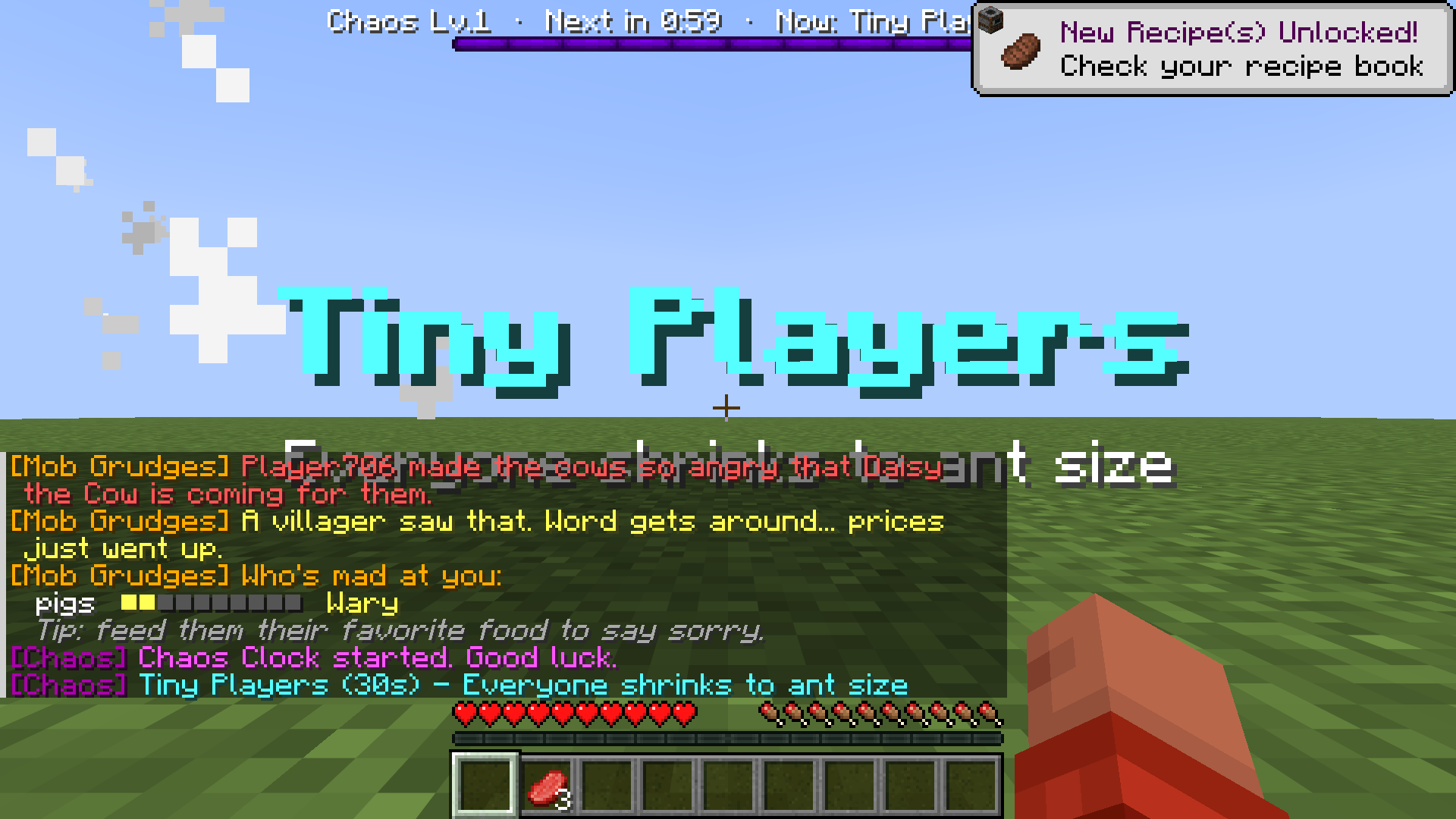
Chaos Clock
Every 60 seconds, something crazy happens.
A countdown at the top of your screen. When it hits zero: 52 different events, from silly to total chaos. Tiny players. Giant mobs. Chicken rain. The floor is lava. A hot potato you have to throw before it explodes. Moon gravity. TNT rain.
Perfect for "Minecraft, but every minute..." challenges, videos and chaotic nights with friends.
It's server-side only: friends can join with plain Minecraft. No client mod needed.
Features
- 52 events in 3 levels: Level 1 = silly, Level 2 = spicy, Level 3 = total chaos. The level goes up every 5 events.
- Countdown boss bar shows the level, the next event and what's happening now.
- Voting: with 2+ players, everyone votes on the next event (
/chaosvote). - Everything goes back to normal when an event ends, or when you type
/chaos stop. - Want to keep your builds safe? Turn off block-changing events (TNT rain, anvil rain, ice age) in the settings.
Commands
/chaosvote <1|2|3>- vote for the next event- Operators:
/chaos start | stop | skip | next | list,/chaos trigger <event>,/chaos interval <seconds>,/chaos level <1-3>
Settings
In config/chaosclock.json: auto start, seconds between events, voting on/off and vote time, events per level, max level, block-changing events on/off, and a list of events to never use.
Install
- Install Fabric Loader and Fabric API.
- Put the mod in your
modsfolder (on the server, or your own game for singleplayer). - Versions: 1.20.1, 1.21.1, 26.1.2, 26.2, 26.3.
Made by nobub with a lot of help from AI (Claude). Every feature is checked in a real game by an automatic test before each release. Found a bug? Leave a comment and I'll fix it fast.
On 1.20.1: 5 events need newer Minecraft and are left out there (Moon Gravity, Tiny, Giant, Long Arms, Giant Creepers). The other 47 all work.
More from nobub
Eclipse: Eclipse Suite · Eclipse Shaders · Eclipse Plus · Eclipse Server
Mods: The Other You · Trader Alert · Daily Quest Board · Banner Claims · Player Bounties · Monthly Wrapped · Player Mailbox · Treasure Expeditions · Past You · Mob Grudges · Not A Chest · Pet Totem · Weather Vane · Trophy Hunter
Texture packs: Clear Glass + Clean UI · Hearthlight · Better Tools & Weapons · Eclipse Glowing Ores · Cozy Autumn · Eclipse PvP Pack · Eclipse Dark GUI · Cute Mob Faces
Shaders: Hearthlight Shaders
Modpacks: Eclipse Suite Pack · Hearthlight Cozy Survival · Eclipse Friends SMP · Eclipse FPS Boost & PvP · Eclipse Adventures
Project description from CurseForge.
Pick your setup
Chaos Clock by Minecraft version and loader
Choose the version and loader you play, then open the matching release.
Minecraft version
26.2
1 loader buildMinecraft version
26.1.2
1 loader buildMinecraft version
1.21.1
1 loader buildMinecraft version
1.20.1
1 loader buildCheck the dependencies, then try the file in a copied instance before changing a world you care about.
Recent files
Chaos Clock versions and loaders
Chaos Clock 1.0.0 (MC 1.20.1)
chaosclock-1.0.0-1.20.1.jar
18 Nov 2026
Client Source doesn’t say Server Source doesn’t say Dependencies No extras listed Listed on Release listing
Check the 1.20.1 · Fabric setup Fabric1.20.1 release
Chaos Clock 1.0.0 (MC 1.21.1)
chaosclock-1.0.0-1.21.1.jar
18 Nov 2026
Client Source doesn’t say Server Source doesn’t say Dependencies No extras listed Listed on Release listing
Check the 1.21.1 · Fabric setup Fabric1.21.1 release
Chaos Clock 1.0.0 (26.1.2)
chaosclock-1.0.0-26.1.2.jar
13 Nov 2026
Client Source doesn’t say Server Source doesn’t say Dependencies 1 required · 1 unchecked Listed on Release listing
Check the 26.1.2 · Fabric setup Fabric26.1.2 release
Chaos Clock 1.0.0 (26.2)
chaosclock-1.0.0-26.2.jar
13 Nov 2026
Client Source doesn’t say Server Source doesn’t say Dependencies 1 required · 1 unchecked Listed on Release listing
Check the 26.2 · Fabric setup Fabric26.2 release
Chaos Clock 1.0.0 (26.3)
chaosclock-1.0.0-26.3.jar
13 Nov 2026
Client Source doesn’t say Server Source doesn’t say Dependencies 1 required · 1 unchecked Listed on Release listing
Check the 26.3 · Fabric setup Fabric26.3 release
Looking for an older file? The official CurseForge project page is in Resources.
 mod
CurseForge · Minecraft
The Other You
A copy of you, wearing your skin, watches you at night and gets closer every night until it hunts you. Server-side horror.
 mod
CurseForge · Minecraft
Past You
See-through echoes of you and your friends walk the exact paths you walked minutes or hours ago. Server-side.
 mod
CurseForge · Minecraft
Not A Chest
Some chests are alive. Mimics bite, hop after you and drop extra loot. At night your own crafting table can turn on you. Server-side.