Minecraft version
Back to mods 
CurseForge · Minecraft mod
Not A Chest
Some chests are alive. Mimics bite, hop after you and drop extra loot. At night your own crafting table can turn on you. Server-side.
Choose a version Pick your version below, then grab the matching file.
Quick answer
Which Not A Chest release should I use?
Latest stable file Not A Chest 1.0.0 (MC 1.21.1)
Game version 1.21.1
Loader Fabric
Not A Chest 1.0.0 (MC 1.21.1) targets 1.21.1 with Fabric. The project page does not say whether this file belongs on the client, dedicated server, or both. No extra mods listed for this file.
Where it goes
Is Not A Chest required on the client, server, or both?
The project page does not say whether this file belongs on the client, dedicated server, or both.
Client Source doesn’t say
Dedicated server Source doesn’t say
Loader for this release Fabric
Required install it here Optional supported, not mandatory Not supported do not install here Source doesn’t say do not assume
The source does not explicitly classify this release as client-only or server-only.
What else does Not A Chest 1.0.0 (MC 1.21.1) need?
Not A Chest 1.0.0 (MC 1.21.1). Change the file and its required mods may change too.
This file does not list any required mods. Do not add a library just because a different file uses it.
This file does not list any required or optional mods.
Before you install it
Add Not A Chest without breaking your instance.
Built for Not A Chest 1.0.0 (MC 1.21.1). Pick another file and the loader, install side or required mods may change.
- 01
Stick to this file
Use Not A Chest 1.0.0 (MC 1.21.1). It targets 1.21.1 with Fabric; another release may have different loader, side or dependency requirements.
- 02
Bring the mods it needs
This file does not list any required mods. Do not add a library just because a different file uses it.
- 03
Put it on the correct side
The project page does not say whether this file belongs on the client, dedicated server, or both.
- 04
Pick the file you checked
Use the “Get this file” button beside Not A Chest 1.0.0 (MC 1.21.1). It opens that exact file at the source.
About this project
What does Not A Chest add?
Not A Chest
Some chests are alive. Open the wrong one and it bites.
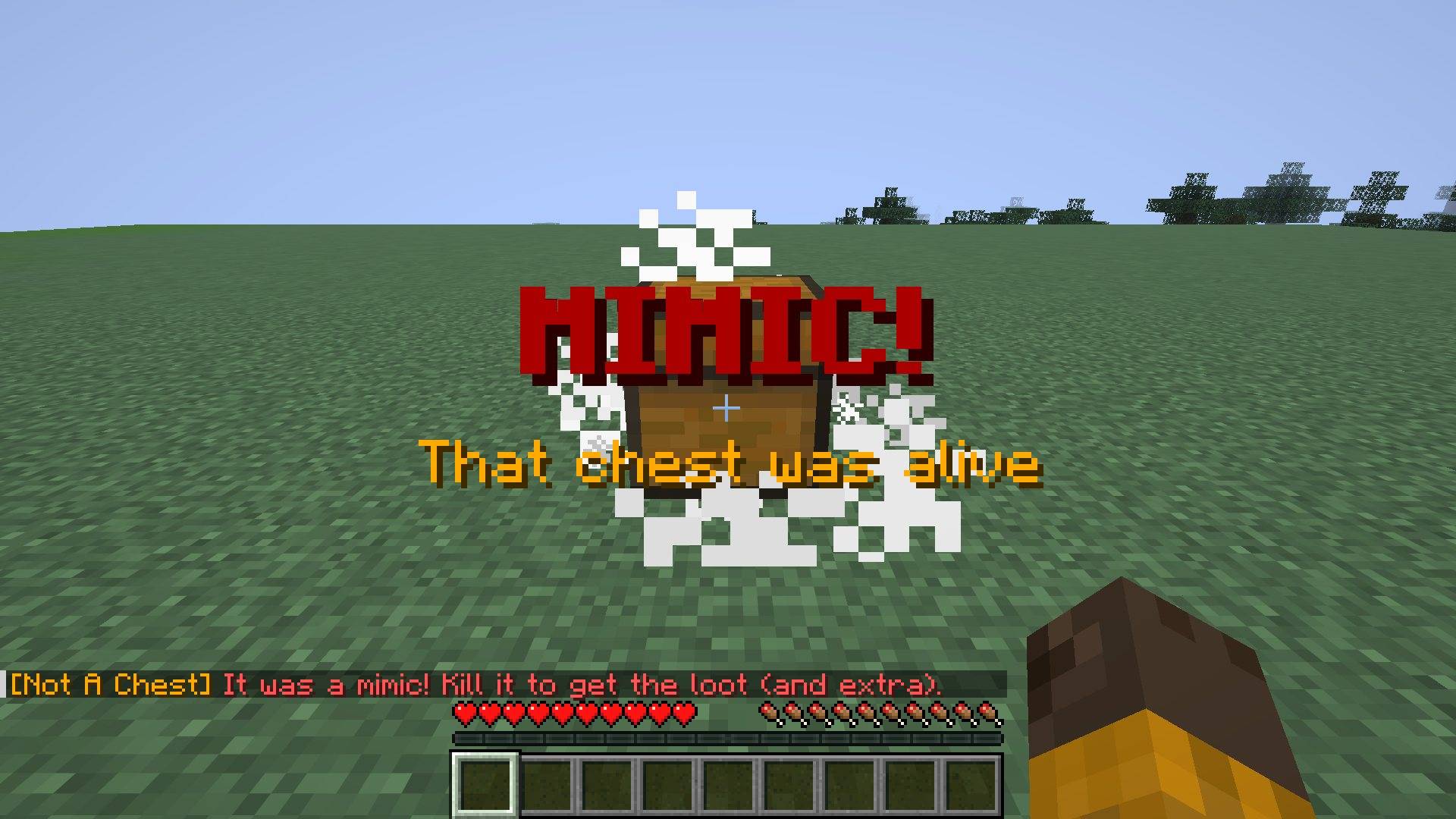
Not A Chest adds mimics. About 1 in 7 unopened loot chests (dungeons, villages, mineshafts, temples...) is really a monster pretending to be a chest. Open it and it wakes up, hops after you and bites. Kill it and it coughs up the loot, plus extra.
And at night, your own stuff can turn on you. An empty chest, barrel, crafting table or furnace in your base can secretly become a mimic...
It's server-side only: put it on your server (or in singleplayer) and your friends can join with plain Minecraft. No client mod needed.
How it works
- Loot mimics: about 15% of unopened loot chests and loot barrels are mimics. The world decides which ones, so reloading won't change it.
- The tell: a sleeping mimic creaks and drools when you walk near it. Listen before you open!
- Wake it by opening it or hitting it. "MIMIC!"
- It hops after you, its lid clacking with every jump, and bites hard.
- It has 30 health (a zombie has 20).
- Kill it for the chest's loot twice, the chest itself and some XP.
- Home mimics: each night there is a small chance that an empty chest, barrel, crafting table or furnace near you becomes a mimic. It never eats your items: if you put something in it, it gives up. Kill it and you get your block back.
- No mimics on Peaceful.
Commands
/notachest- how it works + how many mimics are awake- Operators:
/notachest spawn [chest|trapped_chest|barrel|crafting_table|furnace]- a mimic jumps out in front of you/notachest make- turn the block you look at into a sleeping mimic/notachest prank <player>- secretly turn something near a friend into a mimic/notachest chance <0-1>- how many loot chests are mimics/notachest reload- reload the settings
Great for recording: prank a friend and wait for them to use their crafting table.
Settings
In config/notachest.json: on/off, loot chest chance, barrels on/off, home mimics on/off + chance + range, mimic health, bite damage, extra loot rolls, XP, dropping the block, and the tell (on/off + range).
Install
- Install Fabric Loader and Fabric API.
- Put the mod in your
modsfolder (on the server, or your own game for singleplayer). - Versions: 26.1.2, 26.2, 26.3.
Made by nobub with a lot of help from AI (Claude). Every feature is checked in a real game by an automatic test before each release. Found a bug? Leave a comment and I'll fix it fast.
More from nobub
Eclipse: Eclipse Suite · Eclipse Shaders · Eclipse Plus · Eclipse Server
Mods: The Other You · Trader Alert · Daily Quest Board · Banner Claims · Player Bounties · Monthly Wrapped · Player Mailbox · Treasure Expeditions · Past You · Mob Grudges · Chaos Clock · Pet Totem · Weather Vane · Trophy Hunter
Texture packs: Clear Glass + Clean UI · Hearthlight · Better Tools & Weapons · Eclipse Glowing Ores · Cozy Autumn · Eclipse PvP Pack · Eclipse Dark GUI · Cute Mob Faces
Shaders: Hearthlight Shaders
Modpacks: Eclipse Suite Pack · Hearthlight Cozy Survival · Eclipse Friends SMP · Eclipse FPS Boost & PvP · Eclipse Adventures
Project description from CurseForge.
Pick your setup
Not A Chest by Minecraft version and loader
Choose the version and loader you play, then open the matching release.
Minecraft version
26.2
1 loader buildMinecraft version
26.1.2
1 loader buildMinecraft version
1.21.1
1 loader buildCheck the dependencies, then try the file in a copied instance before changing a world you care about.
Recent files
Not A Chest versions and loaders
Not A Chest 1.0.0 (MC 1.21.1)
notachest-1.0.0-1.21.1.jar
18 Nov 2026
Client Source doesn’t say Server Source doesn’t say Dependencies No extras listed Listed on Release listing
Check the 1.21.1 · Fabric setup Fabric1.21.1 release
Not A Chest 1.0.0 (26.3)
notachest-1.0.0-26.3.jar
14 Nov 2026
Client Source doesn’t say Server Source doesn’t say Dependencies 1 required · 1 unchecked Listed on Release listing
Check the 26.3 · Fabric setup Fabric26.3 release
Not A Chest 1.0.0 (26.2)
notachest-1.0.0-26.2.jar
14 Nov 2026
Client Source doesn’t say Server Source doesn’t say Dependencies 1 required · 1 unchecked Listed on Release listing
Check the 26.2 · Fabric setup Fabric26.2 release
Not A Chest 1.0.0 (26.1.2)
notachest-1.0.0-26.1.2.jar
14 Nov 2026
Client Source doesn’t say Server Source doesn’t say Dependencies 1 required · 1 unchecked Listed on Release listing
Check the 26.1.2 · Fabric setup Fabric26.1.2 release
Looking for an older file? The official CurseForge project page is in Resources.
 mod
CurseForge · Minecraft
Trader Alert
Wandering Trader alert: chat message with direction and distance, a bell sound and a glow when a trader spawns. Server-side.
 mod
CurseForge · Minecraft
Mob Grudges
Mobs remember what you did. Hit one cow and every cow holds a grudge, until an Avenger comes for you. Server-side.
 mod
CurseForge · Minecraft
Chaos Clock
Every 60 seconds something crazy happens: 52 random events, a countdown boss bar and voting with friends. Server-side.