Minecraft version
Back to mods 
CurseForge · Minecraft mod
Zakarum's Ore Control - Universal Ore Control
Universal Control for EVERY Vanilla and Modded Ores built with a dedicated GUI without making any DataPacks or Json Scripts without loading it with KubeJS.
Choose a version Pick your version below, then grab the matching file.
Quick answer
Which Zakarum's Ore Control - Universal Ore Control release should I use?
Latest stable file zakarumsorecontrol-0.11.jar
Game version 1.20.1
Loader Forge
Zakarum's Ore Control - Universal Ore Control zakarumsorecontrol-0.11.jar targets 1.20.1 with Forge. The project page does not say whether this file belongs on the client, dedicated server, or both. No extra mods listed for this file.
Where it goes
Is Zakarum's Ore Control - Universal Ore Control required on the client, server, or both?
The project page does not say whether this file belongs on the client, dedicated server, or both.
Client Source doesn’t say
Dedicated server Source doesn’t say
Loader for this release Forge
Required install it here Optional supported, not mandatory Not supported do not install here Source doesn’t say do not assume
The source does not explicitly classify this release as client-only or server-only.
What else does Zakarum's Ore Control - Universal Ore Control zakarumsorecontrol-0.11.jar need?
zakarumsorecontrol-0.11.jar. Change the file and its required mods may change too.
This file does not list any required mods. Do not add a library just because a different file uses it.
This file does not list any required or optional mods.
Before you install it
Add Zakarum's Ore Control - Universal Ore Control without breaking your instance.
Built for Zakarum's Ore Control - Universal Ore Control zakarumsorecontrol-0.11.jar. Pick another file and the loader, install side or required mods may change.
- 01
Stick to this file
Use zakarumsorecontrol-0.11.jar. It targets 1.20.1 with Forge; another release may have different loader, side or dependency requirements.
- 02
Bring the mods it needs
This file does not list any required mods. Do not add a library just because a different file uses it.
- 03
Put it on the correct side
The project page does not say whether this file belongs on the client, dedicated server, or both.
- 04
Pick the file you checked
Use the “Get this file” button beside zakarumsorecontrol-0.11.jar. It opens that exact file at the source.
About this project
What does Zakarum's Ore Control - Universal Ore Control add?

Zakarum's Ore Control
I want to see Terramity or Lethality Ores in the Mining Dimension from ATM, how can I do that?
Zakarum's Ore Control is a new ore generation customization mod, currently planned for upcoming versions like NeoForge, Fabric and latest MC versions. Take control of how and where ores generate in your world, from vanilla resources to ores introduced by other mods, through a dedicated GUI built in-game without using TOML files, coding JSON files or making any lots of datapacks.
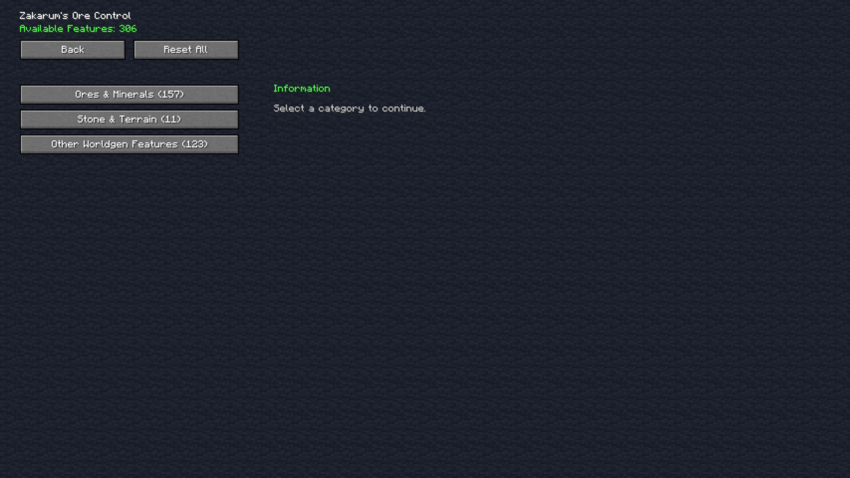
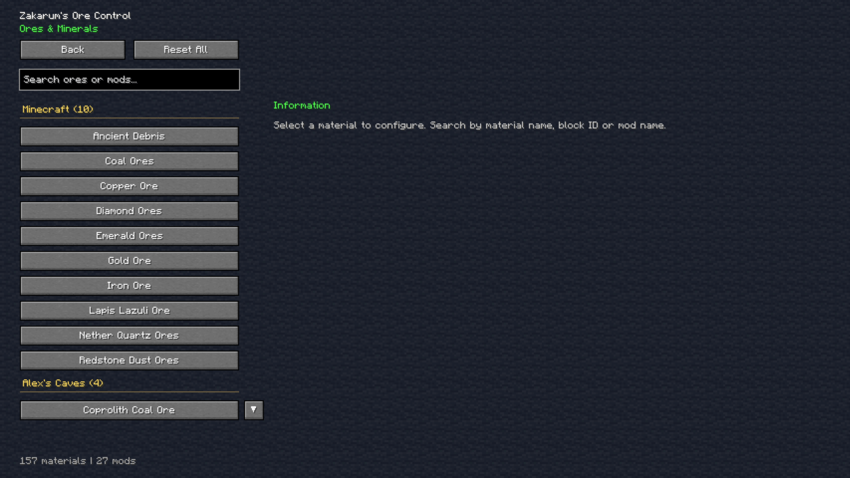 Main Features:
💡Automatic Ore Detection:
- Automatically detects vanilla and supported modded ores (For Modded Ores instead, you need to create a world after installing the mod inside the Modpack);
- Provides a searchable ore catalog;
- Detects supported ore generation features;
- Displays individual generation settings for each supported feature.
💡Advanced Ore Generation Control:
Customize the most important aspects of ore generation:
- Vein Size: Control the size of ore deposits;
- Generation Frequency: Adjust how frequently ores attempt to generate;
- Minimum Height: Set the lower generation boundary;
- Maximum Height: Set the upper generation boundary;
- Vertical Anchors: Choose between Absolute, Above Bottom, and Below Top;
- Enable or Disable Generation: Prevent unwanted ore features from generating;
- Mod Defaults: Preserve original generation settings whenever desired.
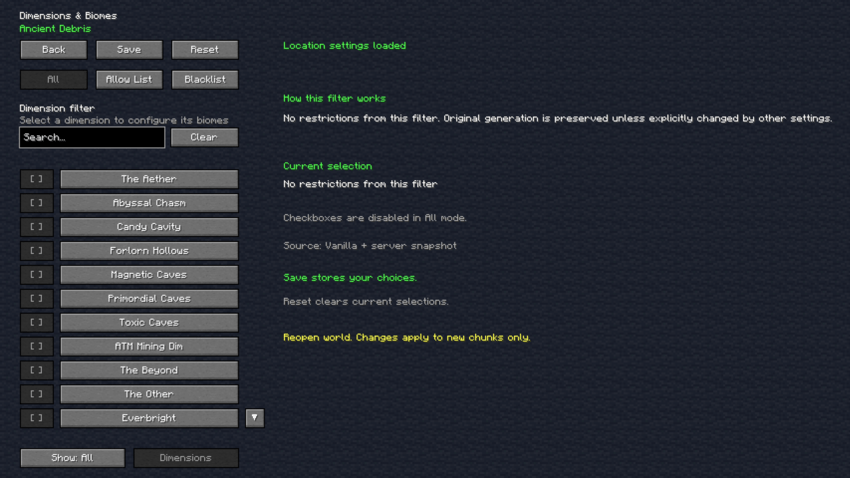
💡Dimension Control:
Decide which dimensions can contain specific ores:
Preserve original dimension generation;
Allow generation in selected dimensions;
Blacklist unwanted dimensions;
Expand supported ore generation into additional dimensions;
Want diamonds in the Nether, Ancient Debris in the Overworld, or any modded ores in the End or other dimensions? With the appropriate generation settings and target blocks, you can make it happen.
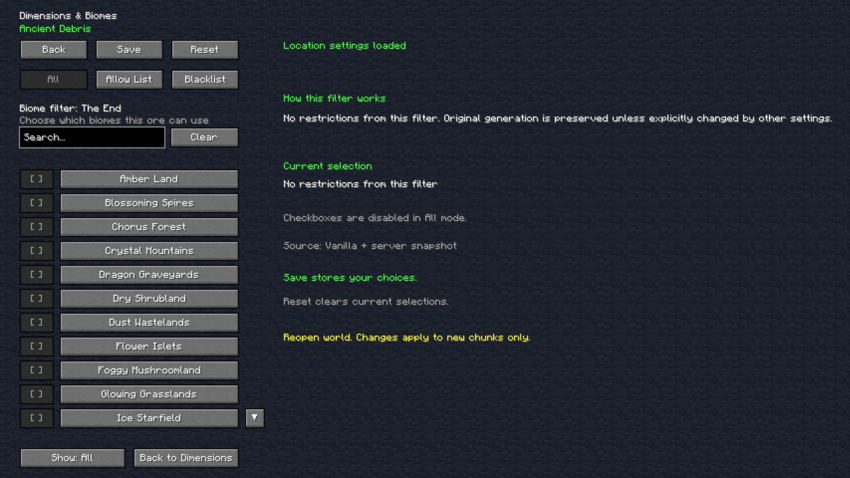
💡Biome Control:
Customize ore distribution across different biomes:
Preserve original biome generation;
Allow generation in selected biomes;
Blacklist specific biomes;
Create biome-specific resource distributions;
Support for detected vanilla and modded biomes.
💡Custom Target Blocks:
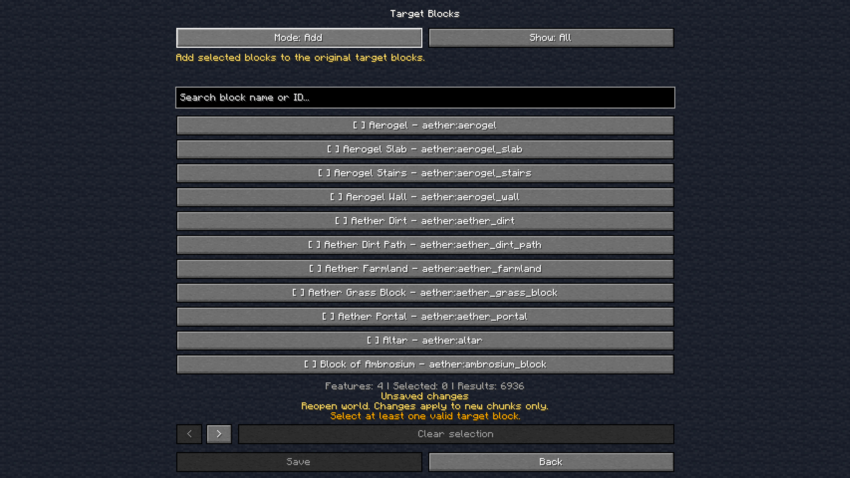
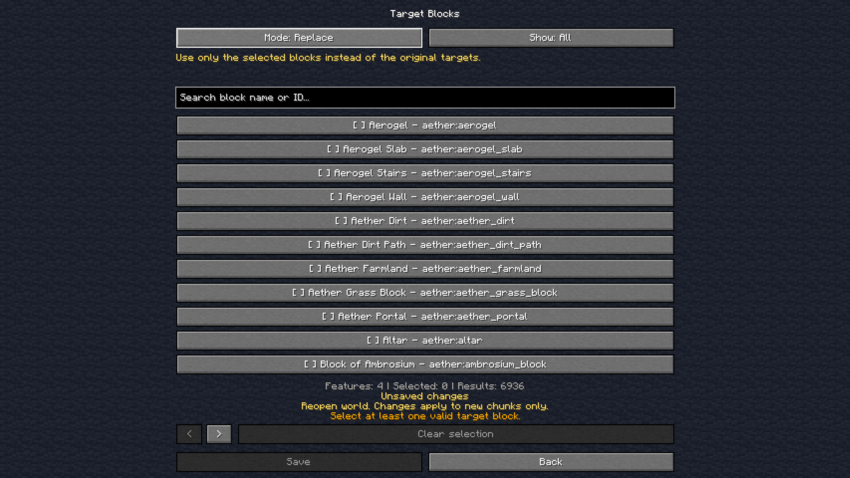
Control which blocks ores are allowed to replace during world generation.
Three different modes are available:
- DEFAULT: Preserve the original target block rules.
- ADD: Add custom target blocks while preserving the original rules.
- REPLACE: Replace the original target rules with your own selection.
***This system allows you to adapt supported ores to different environments, terrain types, and dimensions.
 ***
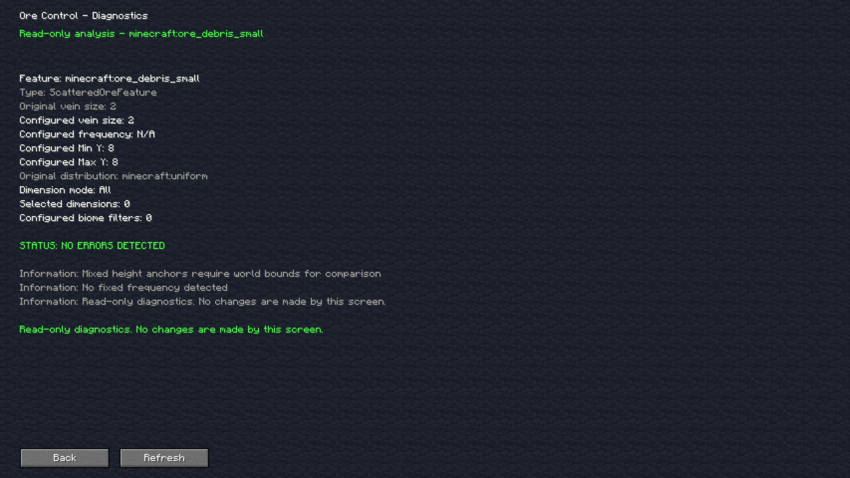
💡Advanced Diagnostics:
Better understand how your ores generate through the built-in diagnostic system.
Inspect supported generation features, original settings, custom restrictions, target blocks, height ranges, and potential configuration issues.
💡How to Get Started:
- Place Zakarum's Ore Control file jar inside your mod folder.
- Launch Minecraft.
- Open the Mods menu.
- Select Zakarum's Ore Control.
- Click the Config button.
- Search for the ore you want to customize.
- Adjust its generation settings, dimensions, biomes, or target blocks.
- Save your changes.
- Reopen your world and explore newly generated chunks.
🖥️Dedicated GUI
Configure your ores without manually editing complicated configuration files HELL YEAH!!!!
Question: How to access to the GUI?
- Answer: Go to the Mod list and search "Zakarum's Ore Control" and click "Config" buttonOrganized ore catalog;
Search functionality;
Mod-based categories;
Individual generation controls;
Dimension and biome selection;
Target block configuration;
Advanced feature settings;
Detailed generation information.
For Modded Ores instead:
- Create any world
- Return to Zakarum's Ore Control menu and you'll see every Modded ores and dimensions
No manual configuration file editing is required for the supported in-game settings.
Mod Compatibility:
Currently planned for more Minecraft versions, it will be updated very soon.
This mod it will automatically detects any ores and modded ores installed in the modpack, like Forbidden & Arcanus, Terramity, new dimensions and many more and it got tested with over +100 mods.
It also supports English, Italian and Spanish languages.
⚠️READ CAREFULLY:
- Ore generation changes apply to newly generated chunks;
- Existing ores in previously generated chunks are not automatically changed or removed;
- Reopen your world after modifying generation settings;
- Modded dimensions may require appropriate target blocks for the destination dimension, like Blue Skies caves needs
blue_skies:turquoise_stoneorblue_skies:lunar_stone; - Increasing generation frequency and vein sizes excessively may affect world generation performance or resource balance;
- Some modded ores may have generation settings that cannot be modified;
- Creating a backup of important worlds before making major world generation changes is strongly recommended.
💬Eternal Studios Discord Server
Feel free to join our community if you want to share any suggestions or report any bugs, issues. Ask any question or keep updated and notified when the new release is out.
📜License:
The mod is under All Rights Reserved content since I don't want this mod backported or ported to other any versions. I'll do that by myself since I'm still learning Java language and such.
Also, feel free to use this mod in any modpack since my goal is this.
Project description from CurseForge.
Pick your setup
Zakarum's Ore Control - Universal Ore Control by Minecraft version and loader
Choose the version and loader you play, then open the matching release.
Check the dependencies, then try the file in a copied instance before changing a world you care about.
Recent files
Zakarum's Ore Control - Universal Ore Control versions and loaders
zakarumsorecontrol-0.11.jar
20 Nov 2026
Client Source doesn’t say Server Source doesn’t say Dependencies No extras listed Listed on Release listing
Check the 1.20.1 · Forge setup 1.20.1Forge release
zakarumsorecontrol-0.10.jar
19 Nov 2026
Client Source doesn’t say Server Source doesn’t say Dependencies No extras listed Listed on Release listing
Check the 1.20.1 · Forge setup 1.20.1Forge release
Looking for an older file? The official CurseForge project page is in Resources.
 mod
CurseForge · Minecraft
cinematicafk
When the player is inactive for an extended period, the game automatically switches to a cinematic camera view and plays a sequence showcasing the surrounding scenery.
 mod
CurseForge + Modrinth · Minecraft
Sanity: Renewed
Brings the sanity mechanic from Don't Starve into Minecraft
 mod
CurseForge + Modrinth · Minecraft
Howling Werewolf
Become a werewolf, master multiple forms and skills, survive Hunters armed with Silver, and conquer the Alpha Trial.