Applied Energistics 2 Needed by AE2-lunyi ae2_lunyi-1.0.6-1.21.1.jar
requiredMatching file found Matched file: AE2 19.2.20 [NEOFORGE]
CurseForge · Minecraft mod
AE2-Lunyi (ae2-lunyi) is an AE2 add-on
Quick answer
AE2-lunyi ae2_lunyi-1.0.6-1.21.1.jar targets 1.21.1 with NeoForge. The project page does not say whether this file belongs on the client, dedicated server, or both. All 5 required mods have matching files.
Where it goes
The project page does not say whether this file belongs on the client, dedicated server, or both.
The source does not explicitly classify this release as client-only or server-only.
ae2_lunyi-1.0.6-1.21.1.jar. Change the file and its required mods may change too.
Install Applied Energistics 2, Just Enough Items (JEI), creat-id, GuideME and 1 more first. We found matching files for this game-version and loader setup. 12 come through another mod in the chain.
12 extra mods were pulled in by other dependencies. Indented rows show who needs each one. We only count dependency files that match this setup. A file for another loader does not fill the gap.
Before you install it
Built for AE2-lunyi ae2_lunyi-1.0.6-1.21.1.jar. Pick another file and the loader, install side or required mods may change.
Use ae2_lunyi-1.0.6-1.21.1.jar. It targets 1.21.1 with NeoForge; another release may have different loader, side or dependency requirements.
Install Applied Energistics 2, Just Enough Items (JEI), creat-id, GuideME and 1 more first. We found matching files for this game-version and loader setup. 12 come through another mod in the chain.
The project page does not say whether this file belongs on the client, dedicated server, or both.
Use the “Get this file” button beside ae2_lunyi-1.0.6-1.21.1.jar. It opens that exact file at the source.
About this project
== Overview ==
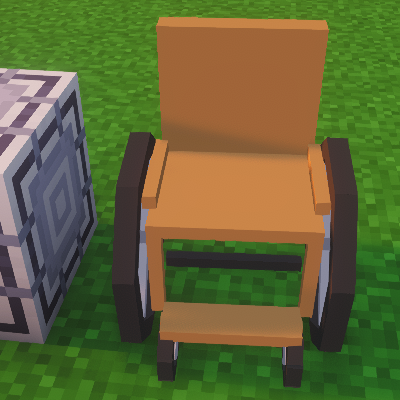
AE2-Lunyi (ae2-lunyi) is an AE2 add-on. It combines a rideable vehicle with a portable AE crafting terminal
and an unlimited pattern store, and adds a dedicated "Wheelchair Crafting Core" — a CPU with no parallelism
or storage limits that produces finished items directly.
== Features ==
* Rideable: right-click to sit, double-tap space to fly, press R to dismount
* Survival friendly: harmful effects are cleared while riding; permanent level-255 Fire Resistance, Resistance,
Regeneration, Night Vision and Saturation are applied
* Portable terminal: Shift + right-click opens the AE crafting terminal
* Portable pattern store: Alt + right-click opens it; unlimited slots, supports both crafting and processing patterns
* Wheelchair Crafting Core: unlimited parallelism (the GUI shows 16), unlimited storage, produces finished items
directly without intermediate steps
* Pattern validation: enabled by default; blocks fake patterns such as "one log makes a Creative ME Component"
* Contents preserved: breaking the wheelchair or the core drops a spawn egg carrying everything inside, so patterns
and AE state are not lost
== Items and obtaining ==
* Wheelchair: a placeable vehicle entity; effects apply as soon as you sit on it
* Wheelchair Crafting Core: a block that looks like an AE2 crafting unit and can form CPU clusters
== Usage ==
== Wheelchair Crafting Core (CPU) ==
* Unlimited parallelism: the GUI shows 16 (AE2's per-block cap), but the number of parallel crafts is not actually limited
* Unlimited storage: consumes no storage bytes
* Direct output: skips all intermediate steps and produces the finished item in one go
* Therefore: for multi-block "fake crafting" (e.g. hundreds of blocks making a renamed piece of paper),
assign another CPU; this core does not handle intermediate products
== Pattern store and terminal ==
* Unlimited slots, supporting both crafting patterns and processing patterns
* Encode directly from JEI recipes, no manual multiplier adjustments needed
* Upload every pattern from the terminal to the core in one click
* Compatible with AE2's Pattern Access Terminal: patterns can be viewed and inserted there
== Pattern validation ==
When enabled (default), patterns are checked against the real recipe:
* Crafting patterns: exact input comparison by recipeId
* Processing patterns: comparison by slot, amount and output
* Special patterns such as Omniversal (Useless Mod): skipped and allowed through
* Dedicated support implemented for: Create, Industrial Foregoing, Modern Industrialization, Oritech,
Actually Additions, Ender IO, Draconic Evolution, Mystical Agriculture (infusion crystal treated as a
non-consumed catalyst)
* For unsupported mods, the server asks the client's JEI once; if a recipe is found the request is allowed
(result cached for 10 minutes)
== Known limitations ==
* Items with component variants are not supported, such as Create brewing / potions: they cannot be indexed by id,
and allowing them would let patterns with missing ingredients succeed, so they are rejected
* JEI fallback cannot cover: outputs that JEI never displays, and recipes hidden via hideRecipes
* When another CPU is explicitly selected, this mod does not take over the job
== Configuration ==
* autoInterceptCrafting: take over crafting automatically when a core/wheelchair is in the network (default true)
* strictPatternValidation: enable pattern validation (default true)
* riderImmuneToHarmfulEffects: clear harmful effects while riding (default true)
* patternStoreAllPatterns: also store non-crafting patterns (default true)
* notifyNoFallbackCpu: warn when a recipe cannot be verified and no fallback CPU exists (default true)
* logValidation: print validation logs for troubleshooting (default false)
== Requirements and versions ==
* Minecraft 1.21.1 / NeoForge 21.1.x
* Required: AE2 (19.2.x)
* Optional: JEI (fallback queries), creat-id (recipe index mod, strongly recommended)
* License: MIT
== FAQ ==
Q: I get "the recipe has changed, please re-encode"; what does it mean?
A: The pattern no longer matches the current recipe (mod update or recipe change). Re-encode that pattern.
Q: Why are some items rejected outright?
A: The index has no recipe and JEI found none either, or the item is a component variant such as a potion.
Q: Why should fake crafting (multi-block) be assigned to another CPU?
A: This core skips intermediate steps and outputs the finished item directly, which conflicts with multi-block
machine workflows.
== Changelog ==
(Fill in per version; only 1.0.3 through 1.0.6 changes are recommended)
Project description from CurseForge.
Pick your setup
Choose the version and loader you play, then open the matching release.
Check the dependencies, then try the file in a copied instance before changing a world you care about.
Recent files
22 Nov 2026
Looking for an older file? The official CurseForge project page is in Resources.
 mod
Farmer's Delight: Heart of Europe – Central European cuisine for Farmer's Delight: goat milk, cheese and more.
 mod
Automates Jambels for you, fork of modrinth mod casino-helper
 mod
Adds faction-specific defensive towers, barracks, tech buildings, and traps to Hundred Years War, along with a wealth-based raid system and RTS construction mechanics.