Minecraft version
Back to mods 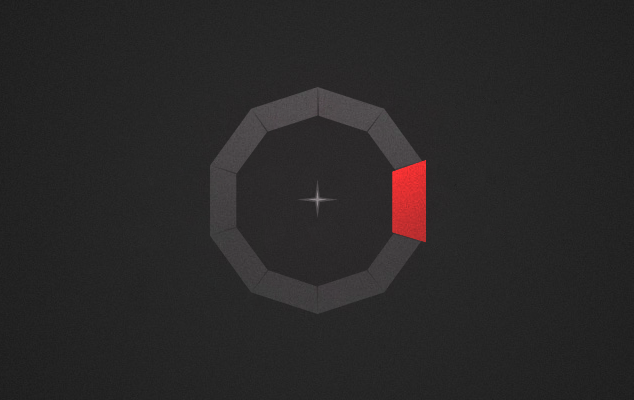
CurseForge · Minecraft mod
MineMenu
Mine Menu - Radial menu, 'nuff said
Choose a version Pick your version below, then grab the matching file.
Quick answer
Which MineMenu release should I use?
Latest stable file MineMenu-neoforge-26.1-1.16.0.jar
Game version 26.1, 26.1.1, 26.1.2
Loader NeoForge
MineMenu-neoforge-26.1-1.16.0.jar targets 26.1, 26.1.1, 26.1.2 with NeoForge. The project page does not say whether this file belongs on the client, dedicated server, or both. No extra mods listed for this file.
Where it goes
Is MineMenu required on the client, server, or both?
The project page does not say whether this file belongs on the client, dedicated server, or both.
Client Source doesn’t say
Dedicated server Source doesn’t say
Loader for this release NeoForge
Required install it here Optional supported, not mandatory Not supported do not install here Source doesn’t say do not assume
The source does not explicitly classify this release as client-only or server-only.
What else does MineMenu-neoforge-26.1-1.16.0.jar need?
MineMenu-neoforge-26.1-1.16.0.jar. Change the file and its required mods may change too.
This file does not list any required mods. Do not add a library just because a different file uses it.
This file does not list any required or optional mods.
Before you install it
Add MineMenu without breaking your instance.
Built for MineMenu-neoforge-26.1-1.16.0.jar. Pick another file and the loader, install side or required mods may change.
- 01
Stick to this file
Use MineMenu-neoforge-26.1-1.16.0.jar. It targets 26.1, 26.1.1, 26.1.2 with NeoForge; another release may have different loader, side or dependency requirements.
- 02
Bring the mods it needs
This file does not list any required mods. Do not add a library just because a different file uses it.
- 03
Put it on the correct side
The project page does not say whether this file belongs on the client, dedicated server, or both.
- 04
Pick the file you checked
Use the “Get this file” button beside MineMenu-neoforge-26.1-1.16.0.jar. It opens that exact file at the source.
About this project
What does MineMenu add?
{width=500 height=210}
You’ve probably encountered a fair amount of key binding conflicts and have been overwhelmed with the hassles of finding which key best suits the mod functions, but with this fancy new radial menu you put the power of 10 keys…that’s right, 10, in to the comfort of only one. Even with the option to have sub-menus! MineMenu supports key bindings, commands, and creative functions to make your life easier.
Button can be re-configured by holding shift when clicking a button in the radial menu.
{width=450 height=253}
Modpack permissions
Feel free to use Mine Menu in any kind of modpack, as long as you link back to this page and don’t make any money of the modpack.
Credits:
* The always wonderful CyanideX, for putting up with me, and for offering his artistic services
Please report any issues on Github!(Click the "Issue"-button above)
Project description from CurseForge.
Pick your setup
MineMenu by Minecraft version and loader
Choose the version and loader you play, then open the matching release.
Minecraft version
26.1.1
2 loader buildsMinecraft version
26.1
2 loader buildsMinecraft version
1.21.11
2 loader buildsMinecraft version
1.21.10
2 loader buildsMinecraft version
1.21.9
2 loader buildsMinecraft version
1.21.8
2 loader buildsMinecraft version
1.21.7
2 loader buildsMinecraft version
1.21.6
2 loader buildsMinecraft version
1.21.5
2 loader buildsMinecraft version
1.21.4
2 loader buildsMinecraft version
1.21.1
2 loader buildsShowing the newest 12 of 26 game versions. Older files are in the list below.
Check the dependencies, then try the file in a copied instance before changing a world you care about.
Recent files
MineMenu versions and loaders
MineMenu-neoforge-26.1-1.16.0.jar
28 Mar 2026
Client Source doesn’t say Server Source doesn’t say Dependencies No extras listed Listed on Release listing
Check the 26.1.2 · NeoForge setup NeoForge26.126.1.126.1.2 release
MineMenu-fabric-26.1-1.16.0.jar
28 Mar 2026
Client Source doesn’t say Server Source doesn’t say Dependencies 2 required · 2 unchecked Listed on Release listing
Check the 26.1.2 · Fabric setup Fabric26.126.1.126.1.2 release
MineMenu-neoforge-1.21.11-1.15.8.jar
17 Feb 2026
Client Source doesn’t say Server Source doesn’t say Dependencies No extras listed Listed on Release listing
Check the 1.21.11 · NeoForge setup NeoForge1.21.11 release
MineMenu-fabric-1.21.11-1.15.8.jar
17 Feb 2026
Client Source doesn’t say Server Source doesn’t say Dependencies 2 required · 2 unchecked Listed on Release listing
Check the 1.21.11 · Fabric setup Fabric1.21.11 release
MineMenu-neoforge-1.21.11-1.15.7.jar
19 Dec 2025
Client Source doesn’t say Server Source doesn’t say Dependencies No extras listed Listed on Release listing
Check the 1.21.11 · NeoForge setup NeoForge1.21.11 release
MineMenu-fabric-1.21.11-1.15.7.jar
19 Dec 2025
Client Source doesn’t say Server Source doesn’t say Dependencies 2 required · 2 unchecked Listed on Release listing
Check the 1.21.11 · Fabric setup Fabric1.21.11 release
MineMenu-neoforge-1.21.11-1.15.6.jar
14 Dec 2025
Client Source doesn’t say Server Source doesn’t say Dependencies No extras listed Listed on Release listing
Check the 1.21.11 · NeoForge setup NeoForge1.21.11 release
MineMenu-fabric-1.21.11-1.15.6.jar
14 Dec 2025
Client Source doesn’t say Server Source doesn’t say Dependencies 2 required · 2 unchecked Listed on Release listing
Check the 1.21.11 · Fabric setup Fabric1.21.11 release
MineMenu-neoforge-1.21.10-1.15.5.jar
13 Dec 2025
Client Source doesn’t say Server Source doesn’t say Dependencies No extras listed Listed on Release listing
Check the 1.21.10 · NeoForge setup NeoForge1.21.91.21.10 release
MineMenu-fabric-1.21.10-1.15.5.jar
13 Dec 2025
Client Source doesn’t say Server Source doesn’t say Dependencies 2 required · 2 unchecked Listed on Release listing
Check the 1.21.10 · Fabric setup Fabric1.21.91.21.10 release
MineMenu-neoforge-1.21.7-1.15.4.jar
12 Dec 2025
Client Source doesn’t say Server Source doesn’t say Dependencies No extras listed Listed on Release listing
Check the 1.21.8 · NeoForge setup 1.21.81.21.7NeoForge release
MineMenu-fabric-1.21.7-1.15.4.jar
12 Dec 2025
Client Source doesn’t say Server Source doesn’t say Dependencies 2 required · 2 unchecked Listed on Release listing
Check the 1.21.8 · Fabric setup Fabric1.21.81.21.7 release
Looking for an older file? The official CurseForge project page is in Resources.
 mod
mod CurseForge + Modrinth · Minecraft
Music Player
Play music from many sources like youtube, soundcloud or radio livestreams
 mod
mod CurseForge · Minecraft
ViScriptRecipe
A mod for visually editing recipes.
 mod
mod CurseForge + Modrinth · Minecraft
Customizable Brightness - Fullbright & Gamma Control
Cycle through customizable brightness levels from 0% to 1000%+ with a keybind. Fullbright mod with 5+ stops, persistent settings, and GUI config.