Minecraft version
Back to mods 
CurseForge · Minecraft mod
Thermal Conversion
Universal Energy Translation between any furnace supporting mods.
Choose a version Pick your version below, then grab the matching file.
Quick answer
Which Thermal Conversion release should I use?
Latest stable file ThermalConversion[Forge]-3.3.0
Game version 1.16.1
Loader Forge
Thermal Conversion ThermalConversion[Forge]-3.3.0 targets 1.16.1 with Forge. The project page does not say whether this file belongs on the client, dedicated server, or both. No extra mods listed for this file.
Where it goes
Is Thermal Conversion required on the client, server, or both?
The project page does not say whether this file belongs on the client, dedicated server, or both.
Client Source doesn’t say
Dedicated server Source doesn’t say
Loader for this release Forge
Required install it here Optional supported, not mandatory Not supported do not install here Source doesn’t say do not assume
The source does not explicitly classify this release as client-only or server-only.
What else does Thermal Conversion ThermalConversion[Forge]-3.3.0 need?
ThermalConversion[Forge]-3.3.0. Change the file and its required mods may change too.
This file does not list any required mods. Do not add a library just because a different file uses it.
This file does not list any required or optional mods.
Before you install it
Add Thermal Conversion without breaking your instance.
Built for Thermal Conversion ThermalConversion[Forge]-3.3.0. Pick another file and the loader, install side or required mods may change.
- 01
Stick to this file
Use ThermalConversion[Forge]-3.3.0. It targets 1.16.1 with Forge; another release may have different loader, side or dependency requirements.
- 02
Bring the mods it needs
This file does not list any required mods. Do not add a library just because a different file uses it.
- 03
Put it on the correct side
The project page does not say whether this file belongs on the client, dedicated server, or both.
- 04
Pick the file you checked
Use the “Get this file” button beside ThermalConversion[Forge]-3.3.0. It opens that exact file at the source.
About this project
What does Thermal Conversion add?
Thermal Conversion allows you to take any energy system that supports smelting and convert into solid fuel, allowing you to move it into any other typical coal type generator.
Start out by crafting a Thermal Cell.
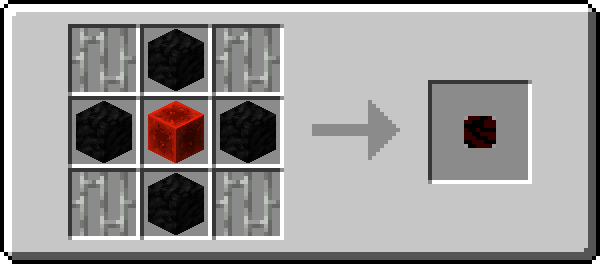
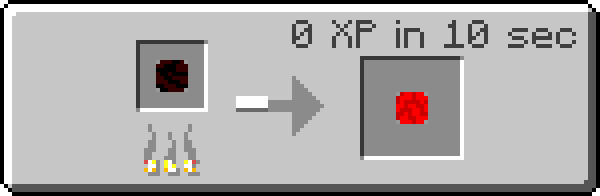
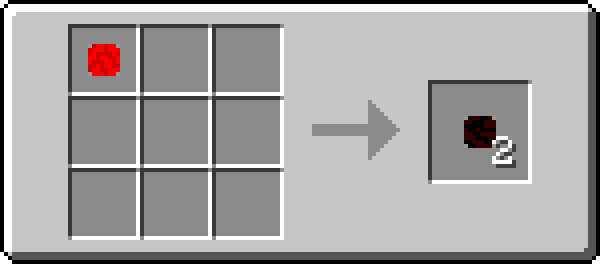
Once you pick up enough thermal cells, you may compress them using the same formation as with a chest or furnace.
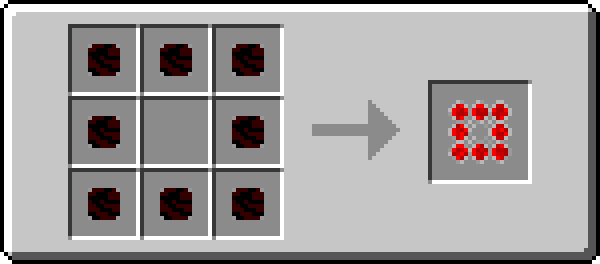
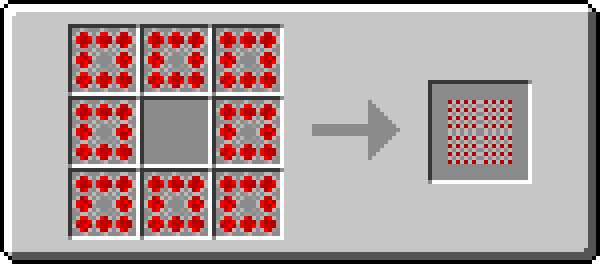
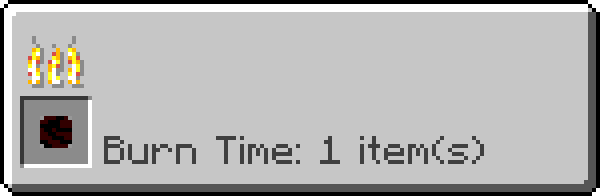
All of these can be used to smelt items, equal to the amount of fuel put in.

You can even get lava.
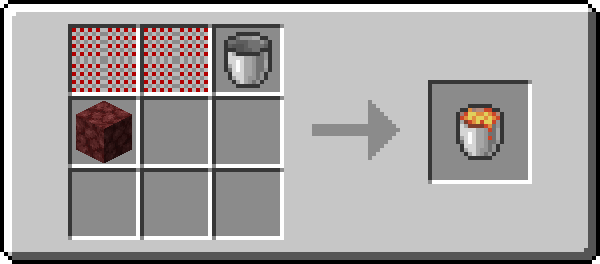
You lose some energy, (lava only smelts 100,) but for many applications it is well worth it.
From Botania, to Thermal Expansion, and now to Tinkers Construct. Thermal Conversion has it covered.
I hope you enjoy.
(All images generated using the Roughly Enough Items export tool).
Project description from CurseForge.
Pick your setup
Thermal Conversion by Minecraft version and loader
Choose the version and loader you play, then open the matching release.
Minecraft version
1.16.2
1 loader buildMinecraft version
1.16.1
2 loader buildsMinecraft version
1.16
1 loader buildMinecraft version
1.15.2
2 loader buildsMinecraft version
1.12.2
1 loader buildMinecraft version
1.12.1
1 loader buildMinecraft version
1.12
1 loader buildMinecraft version
1.10.2
1 loader buildMinecraft version
1.10
1 loader buildMinecraft version
1.9.4
1 loader buildCheck the dependencies, then try the file in a copied instance before changing a world you care about.
Recent files
Thermal Conversion versions and loaders
ThermalConversion[Fabric]-4.0.0+1.17.1.jar
thermal-conversion-4.0.0+1.17.1.jar
10 Jul 2021
Client Source doesn’t say Server Source doesn’t say Dependencies 1 required · 1 unchecked Listed on Release listing
Check the 1.17.1 · Fabric setup 1.17.1Fabric beta
ThermalConversion[Fabric]-3.2.1
thermal-conversion-3.2.1+1.16.2.jar
17 Aug 2020
Client Source doesn’t say Server Source doesn’t say Dependencies No extras listed Listed on Release listing
Check the 1.16.2 · Fabric setup Fabric1.16.2 beta
ThermalConversion[Forge]-3.3.0
thermalconversion-3.3.0.jar
26 Jul 2020
Client Source doesn’t say Server Source doesn’t say Dependencies No extras listed Listed on Release listing
Check the 1.16.1 · Forge setup 1.16.1Forge release
ThermalConversion[Fabric]-3.2.0.jar
thermal-conversion-3.2.0.jar
23 Jun 2020
Client Source doesn’t say Server Source doesn’t say Dependencies No extras listed Listed on Release listing
Check the 1.16.1 · Fabric setup 1.16.11.16Fabric beta
ThermalConversion[Forge]-3.2.0.jar
ThermalConversion-3.2.0.jar
6 May 2020
Client Source doesn’t say Server Source doesn’t say Dependencies No extras listed Listed on Release listing
Check the 1.15.2 · Forge setup 1.15.2Forge release
ThermalConversion[Fabric]-3.1.0.jar
thermal-conversion-3.1.0.jar
1 Apr 2020
Client Source doesn’t say Server Source doesn’t say Dependencies No extras listed Listed on Release listing
Check the 1.15.2 · Fabric setup Fabric1.15.2 beta
ThermalConversion-1.12.2-2.0.jar
12 Apr 2018
Client Source doesn’t say Server Source doesn’t say Dependencies No extras listed Listed on Release listing
Check the 1.12.2 setup 1.12.11.121.12.2 release
ThermalConversion-1.9.4-2.0.jar
19 Jul 2016
Client Source doesn’t say Server Source doesn’t say Dependencies No extras listed Listed on Release listing
Check the 1.10.2 setup 1.9.41.10.21.10 beta
ThermalConversion-1.9.4-1.0.jar
16 Jul 2016
Client Source doesn’t say Server Source doesn’t say Dependencies No extras listed Listed on Release listing
Check the 1.9.4 setup 1.9.4 beta
Looking for an older file? The official CurseForge project page is in Resources.
 mod
mod CurseForge · Minecraft
Realistic Traffic Control
A Revamped Version Of Traffic Control That makes it a bit more Realistic
 mod
mod CurseForge · Minecraft
Noname's Reactive Boots
This Mod Adds Reactive (Jet) and Rocket Boots
 mod
mod Modrinth · Minecraft
Infinite Night Vision
This datapack adds infinite night vision to all players in the given world.