Minecraft version
Back to mods 
CurseForge · Minecraft mod
From the Ground Up
A mod which adds research to Minecraft
Choose a version Pick your version below, then grab the matching file.
Quick answer
Which From the Ground Up release should I use?
beta file FTGU-1.12.2-b1.4.3
Game version 1.12.2
Loader Forge
From the Ground Up FTGU-1.12.2-b1.4.3 targets 1.12.2 with Forge. The project page does not say whether this file belongs on the client, dedicated server, or both. No extra mods listed for this file.
Where it goes
Is From the Ground Up required on the client, server, or both?
The project page does not say whether this file belongs on the client, dedicated server, or both.
Client Source doesn’t say
Dedicated server Source doesn’t say
Loader for this release Forge
Required install it here Optional supported, not mandatory Not supported do not install here Source doesn’t say do not assume
The source does not explicitly classify this release as client-only or server-only.
What else does From the Ground Up FTGU-1.12.2-b1.4.3 need?
FTGU-1.12.2-b1.4.3. Change the file and its required mods may change too.
This file does not list any required mods. Do not add a library just because a different file uses it.
This file does not list any required or optional mods.
Before you install it
Add From the Ground Up without breaking your instance.
Built for From the Ground Up FTGU-1.12.2-b1.4.3. Pick another file and the loader, install side or required mods may change.
- 01
Stick to this file
Use FTGU-1.12.2-b1.4.3. It targets 1.12.2 with Forge; another release may have different loader, side or dependency requirements.
- 02
Bring the mods it needs
This file does not list any required mods. Do not add a library just because a different file uses it.
- 03
Put it on the correct side
The project page does not say whether this file belongs on the client, dedicated server, or both.
- 04
Pick the file you checked
Use the “Get this file” button beside FTGU-1.12.2-b1.4.3. It opens that exact file at the source.
About this project
What does From the Ground Up add?

Short description
From the Ground Up adds research into Minecraft. All vanilla items are tied to a technology and you can only craft those items when you have successfully researched that technology. You do this by experimenting with items until you get the desired result. The research is in the form of puzzles, inspired by the research in Thaumcraft. The mod also includes a nifty research book to see what you've learned and to look at what you can research next. The GUI of this book is greatly inspired by the Achievement GUI.
Thanks to Thaumatarge for the artwork and extra ideas!
If you found any bugs or problems, please report them in the GitHub repository. Experimental versions can be found here.
You're able to add custom technologies yourself! More info can be found in the Github Wiki.
FTGU is free to use in any modpack if you link to this page in some way
Recipes and info
Recipes:
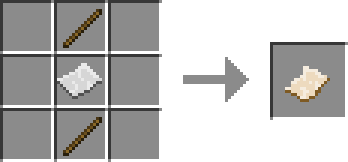
Parchment:
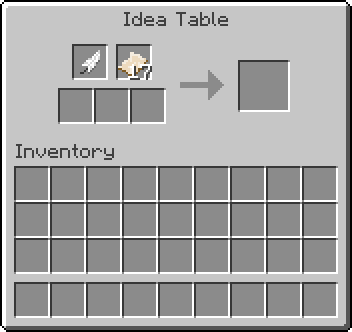
Idea Table:
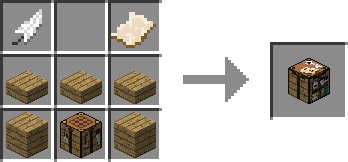
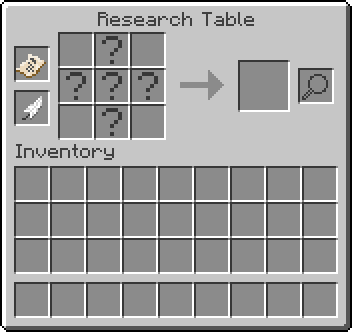
Research Table:
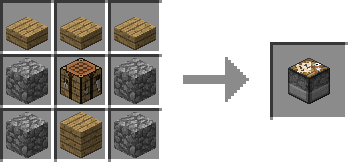
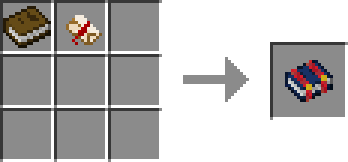
Research Book:
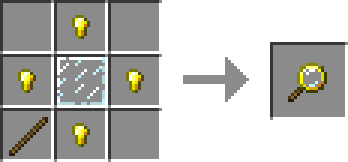
Magnifying Glass:
More in-depth look at the blocks and items:
Parchment
Parchment is used in crafting recipes and researching. There are three types of parchment:
- Blank parchment, which is only used in crafting recipes
- Idea parchment, which is used in researching
- Research parchment, which is the final product of researching
When you right-click research parchment, you research the technology and it changes back to a blank parchment.
Idea Table
The Idea Table is the first table used in researching. The Idea Table requires one feather and some parchment to function. You can insert up to three items and if you made the correct combination, you get an Idea Parchment.
Research Table
The Research Table is the last table needed to research technologies. It requires a feather and an Idea Parchment to run. The Research Table supports multiple types of puzzles: the match puzzle and the connecting puzzle.
In the match puzzle, you need to insert the correct items to finalise your research. The Research Table does help you with the items. It gives you vague hints in the slots that need to be filled with a specific item. Sometimes multiple items are valid for a given slot.
In the connecting puzzle, you see an item to the left and an item to the right. You need to connect them with 3 items in between. Items connect if one item is used to make the other.
Research Book
When you open your Research Book, which you get when you join a new world, you see all the technologies which you have researched and which you are able to research. When you click on a technology that you have researched in this book, it shows you a list of items and blocks which the technology allows you to craft. When hovering over the icon of one of these items, you can see the recipe(s) of that item.
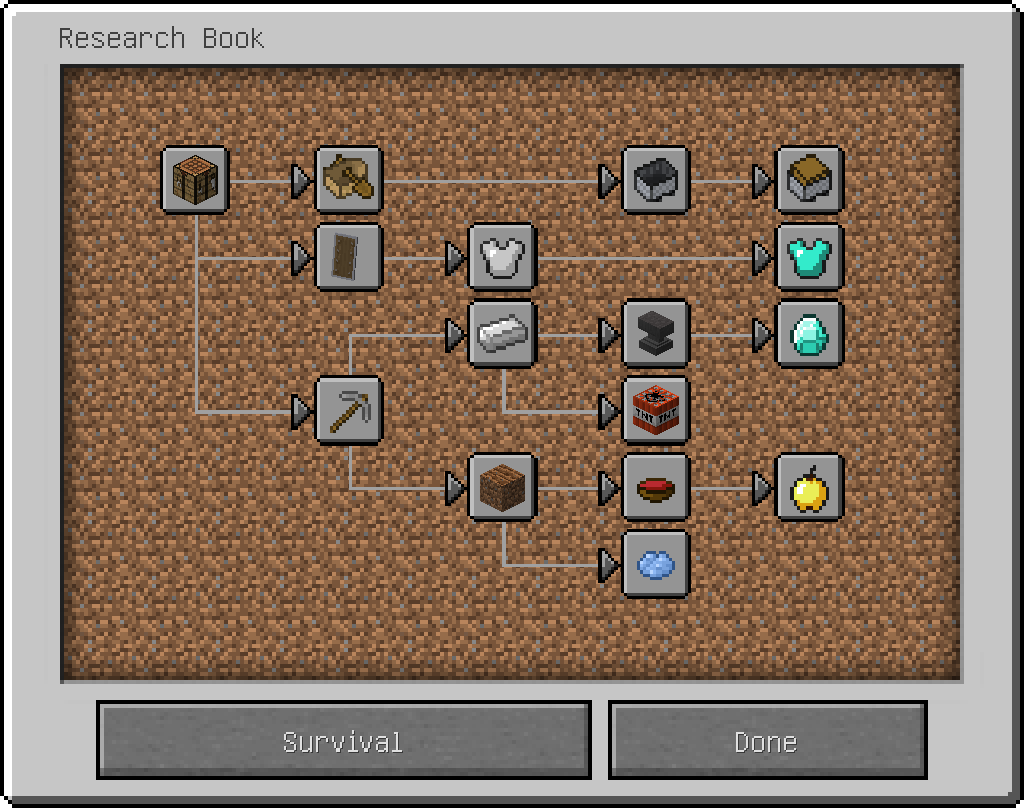
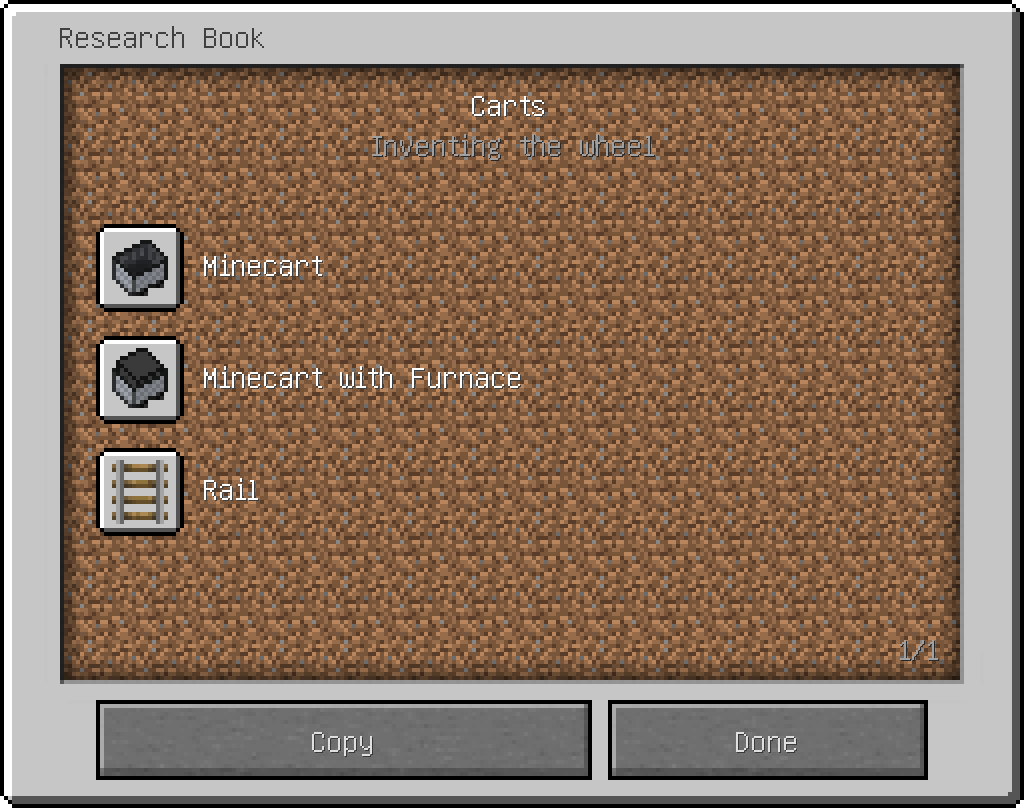

Magnifying Glass
The magnifying glass allows you to scan blocks. If you successfully do so, a hint in a match puzzle will become clearer. You do need to place the magnifying glass in the Research Table.

Project description from CurseForge.
Pick your setup
From the Ground Up by Minecraft version and loader
Choose the version and loader you play, then open the matching release.
Minecraft version
1.11.2
1 loader buildMinecraft version
1.10.2
1 loader buildMinecraft version
1.9.4
1 loader buildCheck the dependencies, then try the file in a copied instance before changing a world you care about.
Recent files
From the Ground Up versions and loaders
FTGU-1.12.2-b1.4.3
ftgu-1.12.2-b1.4.3.jar
10 Apr 2021
Client Source doesn’t say Server Source doesn’t say Dependencies No extras listed Listed on Release listing
Check the 1.12.2 · Forge setup Forge1.12.2 beta
FTGU-1.12.2-b1.4.2
ftgu-1.12.2-b1.4.2.jar
3 Apr 2021
Client Source doesn’t say Server Source doesn’t say Dependencies No extras listed Listed on Release listing
Check the 1.12.2 · Forge setup Forge1.12.2 beta
FTGU-1.12.2-b1.4.1
ftgu-1.12.2-b1.4.1.jar
27 Apr 2020
Client Source doesn’t say Server Source doesn’t say Dependencies No extras listed Listed on Release listing
Check the 1.12.2 · Forge setup Forge1.12.2 beta
FTGU-1.12.2-b1.4.0
ftgu-1.12.2-b1.4.0.jar
23 Apr 2020
Client Source doesn’t say Server Source doesn’t say Dependencies No extras listed Listed on Release listing
Check the 1.12.2 · Forge setup Forge1.12.2 beta
FTGU-1.12.2-b1.3.16
FTGU-1.12.2-b1.3.16.jar
29 Jul 2019
Client Source doesn’t say Server Source doesn’t say Dependencies No extras listed Listed on Release listing
Check the 1.12.2 setup 1.12.2 beta
FTGU-1.12.2-b1.3.15
ftgu-1.12.2-b1.3.15.jar
27 Dec 2018
Client Source doesn’t say Server Source doesn’t say Dependencies No extras listed Listed on Release listing
Check the 1.12.2 setup 1.12.2 beta
FTGU-1.12.2-b1.3.13
ftgu-1.12.2-b1.3.13.jar
13 Nov 2018
Client Source doesn’t say Server Source doesn’t say Dependencies No extras listed Listed on Release listing
Check the 1.12.2 setup 1.12.2 beta
FTGU-1.12.2-b1.3.12
ftgu-1.12.2-b1.3.12.jar
13 Nov 2018
Client Source doesn’t say Server Source doesn’t say Dependencies No extras listed Listed on Release listing
Check the 1.12.2 setup 1.12.2 alpha
FTGU-1.12.2-b1.3.11
FTGU-1.12.2-b1.3.11.jar
5 Nov 2018
Client Source doesn’t say Server Source doesn’t say Dependencies No extras listed Listed on Release listing
Check the 1.12.2 setup 1.12.2 alpha
FTGU-1.12.2-b1.3.8
FTGU-1.12.2-b1.3.8.jar
4 Nov 2018
Client Source doesn’t say Server Source doesn’t say Dependencies No extras listed Listed on Release listing
Check the 1.12.2 setup 1.12.2 alpha
FTGU-1.12.2-b1.3.7
ftgu-1.12.2-b1.3.7.jar
23 Oct 2018
Client Source doesn’t say Server Source doesn’t say Dependencies No extras listed Listed on Release listing
Check the 1.12.2 setup 1.12.2 alpha
FTGU-1.12.2-b1.2.16
ftgu-1.12.2-b1.2.16.jar
17 Apr 2018
Client Source doesn’t say Server Source doesn’t say Dependencies No extras listed Listed on Release listing
Check the 1.12.2 setup 1.12.2 beta
Looking for an older file? The official CurseForge project page is in Resources.