Silent Lib (silentlib) Needed by Torch Bandolier torch-bandolier-1.21-neoforge-1.12.0.jar
requiredMatching file found Matched file: 10.6.0 for NeoForge 1.21.1
CurseForge · Minecraft mod
A simple torch holder/placer
Quick answer
Torch Bandolier torch-bandolier-1.21-neoforge-1.12.0.jar targets 1.21, 1.21.1 with NeoForge. The project page does not say whether this file belongs on the client, dedicated server, or both. All 2 required mods have matching files.
Where it goes
The project page does not say whether this file belongs on the client, dedicated server, or both.
The source does not explicitly classify this release as client-only or server-only.
torch-bandolier-1.21-neoforge-1.12.0.jar. Change the file and its required mods may change too.
Install Silent Lib (silentlib), Silent Lib first. We found matching files for this game-version and loader setup.
We only count dependency files that match this setup. A file for another loader does not fill the gap.
Before you install it
Built for Torch Bandolier torch-bandolier-1.21-neoforge-1.12.0.jar. Pick another file and the loader, install side or required mods may change.
Use torch-bandolier-1.21-neoforge-1.12.0.jar. It targets 1.21, 1.21.1 with NeoForge; another release may have different loader, side or dependency requirements.
Install Silent Lib (silentlib), Silent Lib first. We found matching files for this game-version and loader setup.
The project page does not say whether this file belongs on the client, dedicated server, or both.
Use the “Get this file” button beside torch-bandolier-1.21-neoforge-1.12.0.jar. It opens that exact file at the source.
About this project
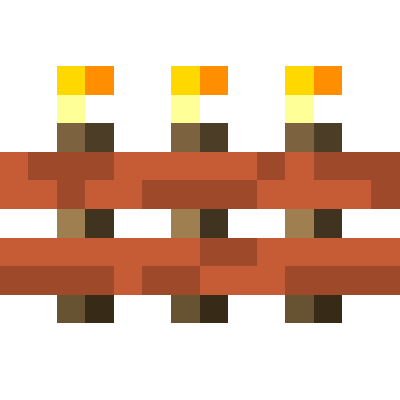
Torch Bandolier adds an item that stores a large number of torches and can place them. This is currently just like the one from Silent's Gems 2, but I thought it deserved its own mod.
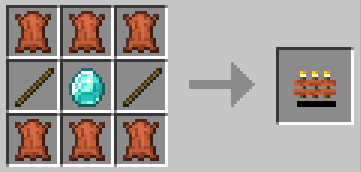
(1.14.x) The recipe above now crafts an empty torch bandolier. Craft an empty torch bandolier with a supported torch to set the type. The mod supports vanilla torches and Silent Gear stone torches by default. Mods could add additional types. Possible torch bandoliers and recipes should show up in JEI. Completely empty a torch bandolier (see "Extracting Torches" below) to reset it to an empty torch bandolier.
(1.12.2) Only vanilla torches are supported, so there is no need to set the torch type.
Just right-click as if you were holding a stack of torches. This will place a torch, assuming the bandolier has any. No torches are consumed if the player is in creative mode.
(1.14.x) Place the torch bandolier in a crafting grid to extract torches a stack at a time. This will disable auto-fill mode so the bandolier won't just reabsorb the torches.
(1.12.2) Sneak and left-click to throw out a stack of torches. You may want to disable auto-fill first...
Torch bandoliers will occasionally search the player's inventory for torches to absorb. You can disable this by sneaking and using (shift + right-click) the torch bandolier. The tooltip of the torch bandolier will tell you whether auto-fill is currently on or off.

Project description from CurseForge.
Pick your setup
Choose the version and loader you play, then open the matching release.
Showing the newest 12 of 24 game versions. Older files are in the list below.
Check the dependencies, then try the file in a copied instance before changing a world you care about.
Recent files
18 Aug 2024
18 Aug 2024
20 Jun 2024
torch-bandolier-1.19.4-1.9.0.jar
15 Jun 2023
torch-bandolier-1.20.1-1.10.0.jar
15 Jun 2023
15 Jun 2023
29 May 2023
29 May 2023
4 Sept 2022
20 Apr 2022
5 Dec 2021
29 Jul 2021
Looking for an older file? The official CurseForge project page is in Resources.
 mod
modMakes your hotbar seemingly float in place by shifting it a few pixels upward.
 mod
modimplements features from Casualties Unknown into minecraft
 mod
modMinecraft vanilla weather overhauled!