




Minecraft version
Back to mods 
Modrinth · Minecraft mod
Emotify
Animated reactions for Minecraft with cross-loader support for NeoForge, Fabric, and Paper
Choose a version Pick your version below, then grab the matching file.
Quick answer
Which Emotify release matches 26.2?
Best match for your filters 0.8.1-paper
Game version 1.21.1, 1.21.8, 1.21.11
Loader folia, paper, purpur
Emotify 0.8.1-paper targets 1.21.1, 1.21.8, 1.21.11 with folia, paper, purpur. Installation on the client is optional. Installation on the dedicated server is optional. No extra mods listed for this file.
Where it goes
Is Emotify required on the client, server, or both?
Installation on the client is optional. Installation on the dedicated server is optional.
Client Optional
Dedicated server Optional
Loader for this release folia, paper, purpur
Required install it here Optional supported, not mandatory Not supported do not install here Source doesn’t say do not assume
The source marks this as usable on both the client and server.
What else does Emotify 0.8.1-paper need?
0.8.1-paper on 26.2. Every mod below is checked against that same setup.
This file does not list any required mods. Do not add a library just because a different file uses it.
This file does not list any required or optional mods.
Before you install it
Add Emotify without breaking your instance.
Built for Emotify 0.8.1-paper on 26.2. Pick another file and the loader, install side or required mods may change.
- 01
Stick to this file
Use 0.8.1-paper. It targets 1.21.1, 1.21.8, 1.21.11 with folia, paper, purpur; another release may have different loader, side or dependency requirements.
- 02
Bring the mods it needs
This file does not list any required mods. Do not add a library just because a different file uses it.
- 03
Put it on the correct side
Installation on the client is optional. Installation on the dedicated server is optional.
- 04
Pick the file you checked
Use the “Get this file” button beside 0.8.1-paper. It opens that exact file at the source.
About this project
What does Emotify add?
😊 Emotify
A small visual language for the moments when chat is one message too slow.
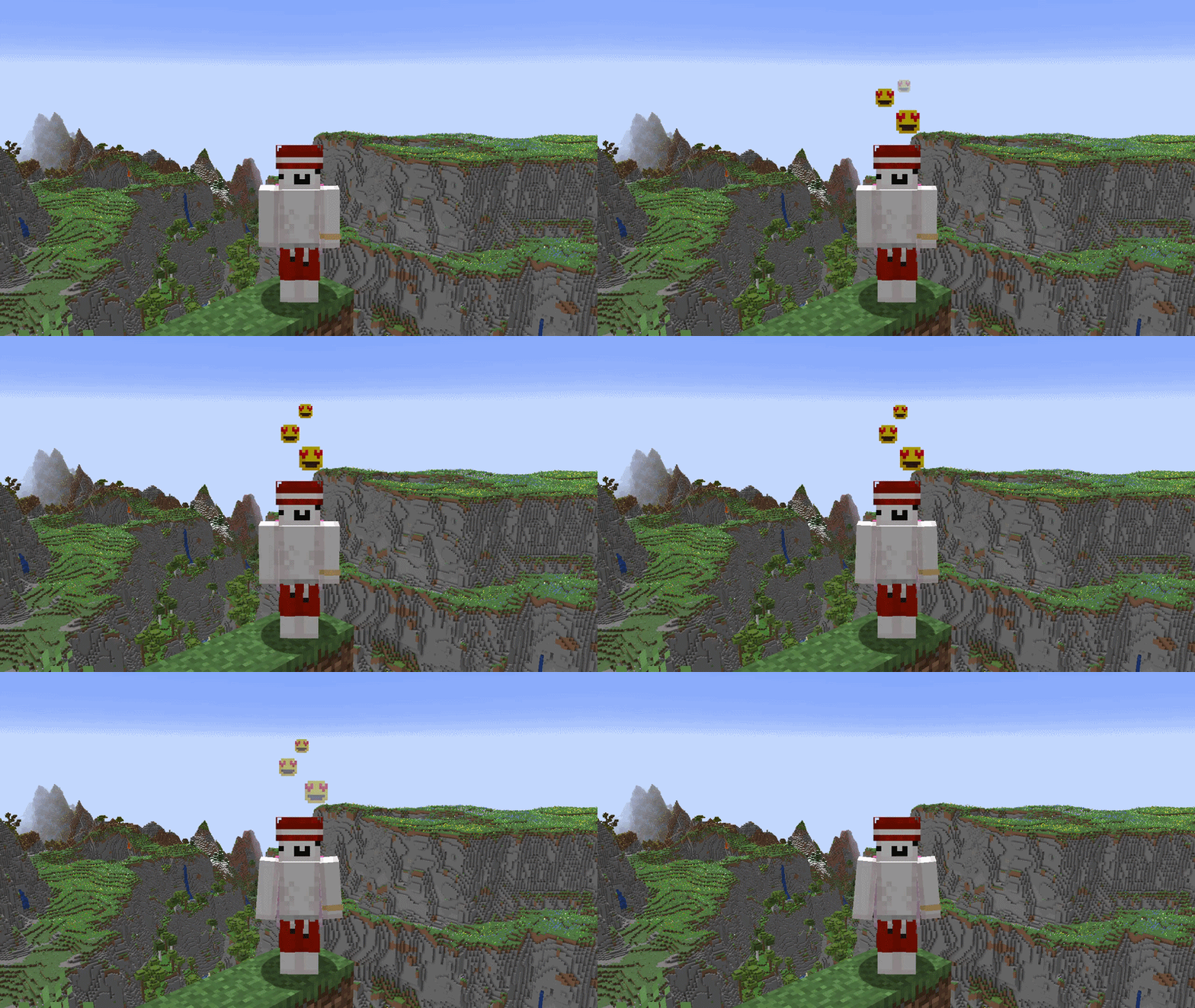
Emotify adds animated emotions above Minecraft players: a fast and quiet alternative to another chat message or a full-body emote.
NeoForge and Fabric players can share built-in and custom emotions across NeoForge, Fabric, Paper, and Purpur servers through the same bounded server-authoritative system.
✨ Features
- 162 built-in emojis with persistent favorites.
- Complete English and Russian localization.
- Localized search across emoji names and aliases.
- Hotbar emoji indicator — a lightweight, smoothly animated 16×16 preview appears right above your hotbar when sending an emoji, synchronized with your overhead emotion lifecycle.
- Nine persistent quick slots assigned through drag and drop and activated with the top-row or Numpad
1–9keys. - Personal custom emojis from PNG, JPG, JPEG, and animated GIF files.
- Multiplayer custom emoji sharing across all supported client and server combinations.
- Local saving of another player's custom emoji using Shift and right-click.
- Readable saved filenames with stable duplicate-lineage protection.
- Four distinct animated presentations: Elastic Pop, Ribbon Weave, Lantern Release, and Echo Bloom.
- A unified three-second emotion lifecycle with smooth entrance, steady presentation, and fade-out phases.
- Smooth world-space rendering that follows standing, crouching, swimming, sleeping, riding, and gliding players.
- Emotions remain behind blocks and respect first-person, invisibility, spectator, and visibility rules.
- Movement-friendly picker that does not take control away from the player.
- Automatic refresh when custom emoji files are added, changed, or removed.
- Client settings for incoming emotions, custom emotions, hotbar feedback indicator, ignored players, sound volume, and Reduced Motion.
- Versioned client and server configuration with bounded migration and backup protection.
- Server-controlled cooldowns, custom emoji limits, visibility filtering, bounded payloads, and abuse protection.
Emotify keeps its visual language close to Minecraft: readable pixel sprites, smooth motion, and no particle noise competing with gameplay.
🖼️ Custom emojis
Place custom emoji files directly in:
<game directory>/emoji
The folder can also be opened using the folder button beside the emotion picker.
Supported static image sizes:
8×816×1632×3264×64128×128
Supported animated GIF sizes:
8×816×1632×3264×64
Each file must be no larger than 512 KiB. Images are never resized, so unsupported dimensions are ignored instead of losing quality.
GIF files are optimized automatically. Emotify can inspect up to 300 source frames, merge redundant frames, preserve visible timing, and prepare an animation with up to 30 transmitted frames, 15 FPS, and a three-second presentation cycle. Longer animations are clipped without accelerating the retained portion.
Custom emojis appear in their own picker tab and can be searched, added to favorites, or assigned to any of the nine quick slots. Compatible servers share them automatically with nearby Emotify players.
Only content-addressed decoded pixels, frame durations, a bounded display name, and a stable origin ID are transferred. Original image containers, local paths, and image metadata never leave the client.
To save another player's active custom emotion, hold Shift and right-click the interaction area above the player. The hit test uses the normal Minecraft block-interaction distance, respects block occlusion, and does not require aiming directly at a moving sprite.
Saving reuses the custom asset already cached by the client and sends no additional network packet. Static assets are stored losslessly as PNG files and animated assets as normalized looping GIF files. A vanilla pickup sound confirms successful saving and follows the client sound-volume setting.
Server owners can disable custom emojis or reduce the maximum accepted static and animated resolutions.
🌐 Compatibility
| Component | Supported version |
|---|---|
| Minecraft | 1.21.1, 1.21.8, 1.21.11, and 26.2 |
| NeoForge | 21.1.234+ on 1.21.1; 21.8.54+ on 1.21.8; 21.11.45+ on 1.21.11; 26.2.0.59+ on 26.2 |
| Fabric Loader | 0.19.3 or newer |
| Fabric API | 0.116.15+1.21.1 on 1.21.1; 0.129.0+1.21.8 on 1.21.8; 0.141.6+1.21.11 on 1.21.11; 0.157.0+26.2 on 26.2, or newer compatible releases |
| Fabric Language Kotlin | 1.13.12+kotlin.2.4.0 or newer compatible release |
| Paper / Purpur | 1.21.1, 1.21.8, 1.21.11, and 26.2 |
| Java | 21 on 1.21.1–1.21.11; 25 on 26.2 |
| Kotlin for Forge | 5.12.0+ on 1.21.1 and 1.21.8; 6.3.0+ on 1.21.11 and 26.2 |
All supported platforms use the same Emotify protocol. NeoForge and Fabric clients can connect to either modded server platform or to Paper and Purpur servers running the plugin.
Players without the Emotify client can still join normally, but they cannot send or see emotions.
Important: Emotify uses separate NeoForge, Fabric, and Paper files. Install only the file intended for the platform on which it runs.
📦 Installation
NeoForge
Install the NeoForge Emotify file in the mods folder.
- On 1.21.1 & 1.21.8: requires Kotlin for Forge
5.12.0or a newer compatible 5.x release. - On 1.21.11 & 26.2: requires Kotlin for Forge
6.3.0or a newer compatible 6.x release.
The same file supports NeoForge clients, singleplayer, and NeoForge dedicated servers.
Fabric
Install the Fabric Emotify file in the mods folder together with:
- Fabric API;
- Fabric Language Kotlin.
The same file supports Fabric clients, singleplayer, and Fabric dedicated servers.
Mod Menu is optional. Emotify settings remain available through the emotion picker without it.
Paper or Purpur
Install the Paper Emotify file in the server's plugins folder.
No additional server dependencies are required. Players connect using either the NeoForge or Fabric Emotify client.
A single Paper/Purpur JAR supports Minecraft versions 1.21.1, 1.21.8, 1.21.11, and 26.2.
Do not install multiple Emotify platform files in the same game or server instance.
⚙️ Client settings
The shared settings screen is available from the gear button beside the emotion picker. It can also be opened from the NeoForge Mods screen or Fabric Mod Menu when installed.
Available settings include:
- show or hide emotions from other players;
- independently show or hide custom emotions;
- toggle the hotbar emoji feedback indicator;
- manage a persistent ignored-player list;
- enable Reduced Motion;
- adjust the saved-emoji confirmation and future emotion-sound volume.
Your own emotions remain visible when incoming emotions are disabled.
Favorites and quick slots are managed directly in the emotion picker. Drag any built-in or custom emoji card onto a slot, press its number while the picker is open to use it, or right-click a filled slot to clear it.
Quick slots are stored independently from favorites. Built-in and custom assignments persist across game restarts. When a local custom-emoji file is removed, its assignment is cleared after a complete stable library refresh. Incomplete scans, decoding failures, capacity limits, and directory limits preserve existing assignments.
🛡️ Server administration
Server settings are stored in:
| Platform | Configuration file |
|---|---|
| NeoForge | <world>/serverconfig/emotify-server.toml |
| Fabric | config/emotify-server.properties |
| Paper / Purpur | plugins/Emotify/config.yml |
Server owners can configure:
- whether Emotify is enabled;
- whether custom emojis are allowed;
- maximum static and animated custom emoji resolutions;
- emotion cooldown;
- emotion allow and deny lists;
- visibility radius;
- bounded broadcast and network ingress limits.
The default emotion cooldown is 3000 milliseconds, matching the complete three-second presentation lifecycle.
All server formats use versioned configuration schema 1. Valid versionless configurations from earlier releases are backed up and migrated automatically. Future configuration schemas are never overwritten by an older Emotify build.
NeoForge and Fabric apply server settings during startup.
Paper and Purpur settings can be applied without restarting:
/emotify reload
Invalid Paper or Purpur reloads are rejected without replacing the active server policy. Invalid Fabric configuration is rejected during startup. NeoForge uses its standard configuration correction behavior.
Paper and Purpur permissions
| Permission | Default | Purpose |
|---|---|---|
emotify.use |
Everyone | Send emotions |
emotify.receive |
Everyone | Receive emotions |
emotify.admin.reload |
Operators | Reload the plugin configuration |
The plugin uses the standard Bukkit permission API and does not require direct LuckPerms integration.
🐛 Bug reports
Report problems through the GitHub issue tracker.
Please include:
- Emotify and Minecraft versions;
- client loader and server platform;
- relevant client and server
latest.logsections; - clear reproduction steps;
- a screenshot or short recording for visual problems.
Remove private server addresses, access tokens, and personal information before uploading logs.
🎨 Asset credits
The 162 bundled 8×8 emoji assets come from Happy's Better Emojis by Happy_AlexRO.
The artwork is included without visual modification and remains licensed under Creative Commons Attribution 4.0 International.
Emotify provides its own catalog, stable identifiers, categories, atlas coordinates, localization, animations, interface, and multiplayer system.
📄 License
Emotify's source code and original project material are available under the MIT License.
The bundled Happy's Better Emojis artwork remains subject to CC BY 4.0.
Emotify is an independent project and is not affiliated with Mojang Studios, Microsoft, NeoForge, Fabric, PaperMC, Purpur, Kotlin for Forge, Happy_AlexRO, or the Happy's Better Emojis project.
Project description from Modrinth.
Pick your setup
Emotify by Minecraft version and loader
Choose the version and loader you play, then open the matching release.
Minecraft version
1.21.11
3 loader buildsMinecraft version
1.21.8
3 loader buildsMinecraft version
1.21.1
3 loader buildsCheck the dependencies, then try the file in a copied instance before changing a world you care about.
Recent files
Emotify versions and loaders
0.8.1-paper
emotify-paper-1.21-0.8.1.jar
21 Aug 2026
Client Optional Server Optional Dependencies No extras listed Listed on Release listing
Check the 26.2 · folia setup 1.21.11.21.81.21.1126.2 release
0.8.1-neoforge
emotify-neoforge-26.2-0.8.1.jar
21 Aug 2026
Client Optional Server Optional Dependencies No extras listed Listed on Release listing
Check the 26.2 · NeoForge setup 26.2NeoForge release
0.8.1-fabric
emotify-fabric-26.2-0.8.1.jar
21 Aug 2026
Client Optional Server Optional Dependencies No extras listed Listed on Release listing
Check the 26.2 · Fabric setup 26.2Fabric release
0.8.0-paper
emotify-paper-1.21-0.8.0.jar
20 Aug 2026
Client Optional Server Optional Dependencies No extras listed Listed on Release listing
Check the 26.2 · folia setup 1.21.11.21.81.21.1126.2 release
0.8.0-neoforge
emotify-neoforge-26.2-0.8.0.jar
20 Aug 2026
Client Optional Server Optional Dependencies 1 required · 1 unchecked Listed on Release listing
Check the 26.2 · NeoForge setup 26.2NeoForge release
0.8.0-fabric
emotify-fabric-26.2-0.8.0.jar
20 Aug 2026
Client Optional Server Optional Dependencies 2 required · 2 unchecked Listed on Release listing
Check the 26.2 · Fabric setup 26.2Fabric release
0.8.0-beta.1-paper
emotify-paper-1.21-0.8.0-beta.1.jar
15 Aug 2026
Client Optional Server Optional Dependencies No extras listed Listed on Release listing
Check the 26.2 · paper setup 1.21.11.21.81.21.1126.2 beta
0.8.0-beta.1-fabric
emotify-fabric-26.2-0.8.0-beta.1.jar
15 Aug 2026
Client Optional Server Optional Dependencies 2 required · 2 unchecked Listed on Release listing
Check the 26.2 · Fabric setup 26.2Fabric beta
0.8.0-beta.1-neoforge
emotify-neoforge-26.2-0.8.0-beta.1.jar
15 Aug 2026
Client Optional Server Optional Dependencies 1 required · 1 unchecked Listed on Release listing
Check the 26.2 · NeoForge setup 26.2NeoForge beta
Looking for an older file? The official Modrinth project page is in Resources.
 mod
mod CurseForge + Modrinth · Minecraft
Carpet-FGA-Addition
An AI-powered Carpet extension mod packed with practical utilities, including longer player name support and fake-player area mining.
 mod
mod CurseForge + Modrinth · Minecraft
Easy Hopper
Speed up Hoppers and add classification function to it!
 mod
mod CurseForge · Minecraft
EnchantStats: Enchantment Descriptions +Tooltip+Inventory HUD+ + Monster HP+Damage Indicator+Tool Info Hub
EnchantStats is the combat & magic sequel to AppleStats — enchanting your HUD with exact enchantment values, advanced tooltips, and monster combat stats.