Minecraft version
Back to mods 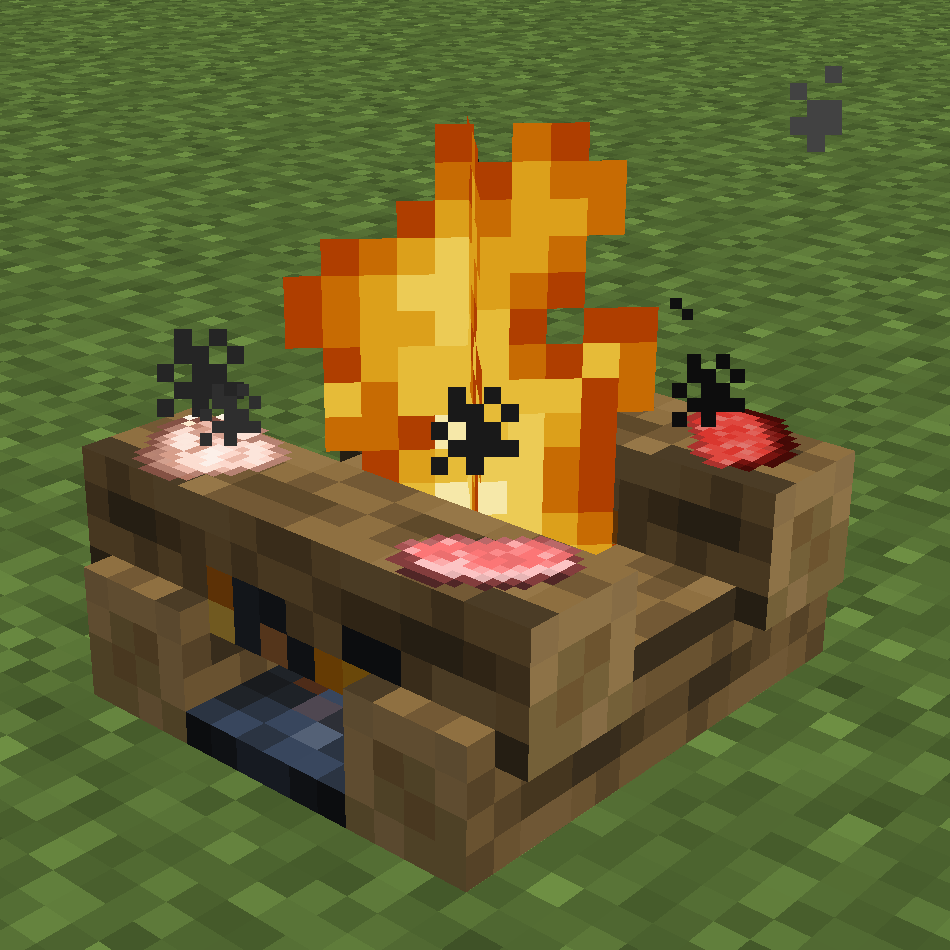
CurseForge · Minecraft mod
Campfire Backport
Backports Minecraft 1.14/1.16 Campfires to 1.7.10
Choose a version Pick your version below, then grab the matching file.
Quick answer
Which Campfire Backport release should I use?
Latest stable file Campfire Backport v1.11.3
Game version 1.7.10
Loader Forge
Campfire Backport v1.11.3 targets 1.7.10 with Forge. The project page does not say whether this file belongs on the client, dedicated server, or both. No extra mods listed for this file.
Where it goes
Is Campfire Backport required on the client, server, or both?
The project page does not say whether this file belongs on the client, dedicated server, or both.
Client Source doesn’t say
Dedicated server Source doesn’t say
Loader for this release Forge
Required install it here Optional supported, not mandatory Not supported do not install here Source doesn’t say do not assume
The source does not explicitly classify this release as client-only or server-only.
What else does Campfire Backport v1.11.3 need?
Campfire Backport v1.11.3. Change the file and its required mods may change too.
This file does not list any required mods. Do not add a library just because a different file uses it.
This file does not list any required or optional mods.
Before you install it
Add Campfire Backport without breaking your instance.
Built for Campfire Backport v1.11.3. Pick another file and the loader, install side or required mods may change.
- 01
Stick to this file
Use Campfire Backport v1.11.3. It targets 1.7.10 with Forge; another release may have different loader, side or dependency requirements.
- 02
Bring the mods it needs
This file does not list any required mods. Do not add a library just because a different file uses it.
- 03
Put it on the correct side
The project page does not say whether this file belongs on the client, dedicated server, or both.
- 04
Pick the file you checked
Use the “Get this file” button beside Campfire Backport v1.11.3. It opens that exact file at the source.
About this project
What does Campfire Backport add?
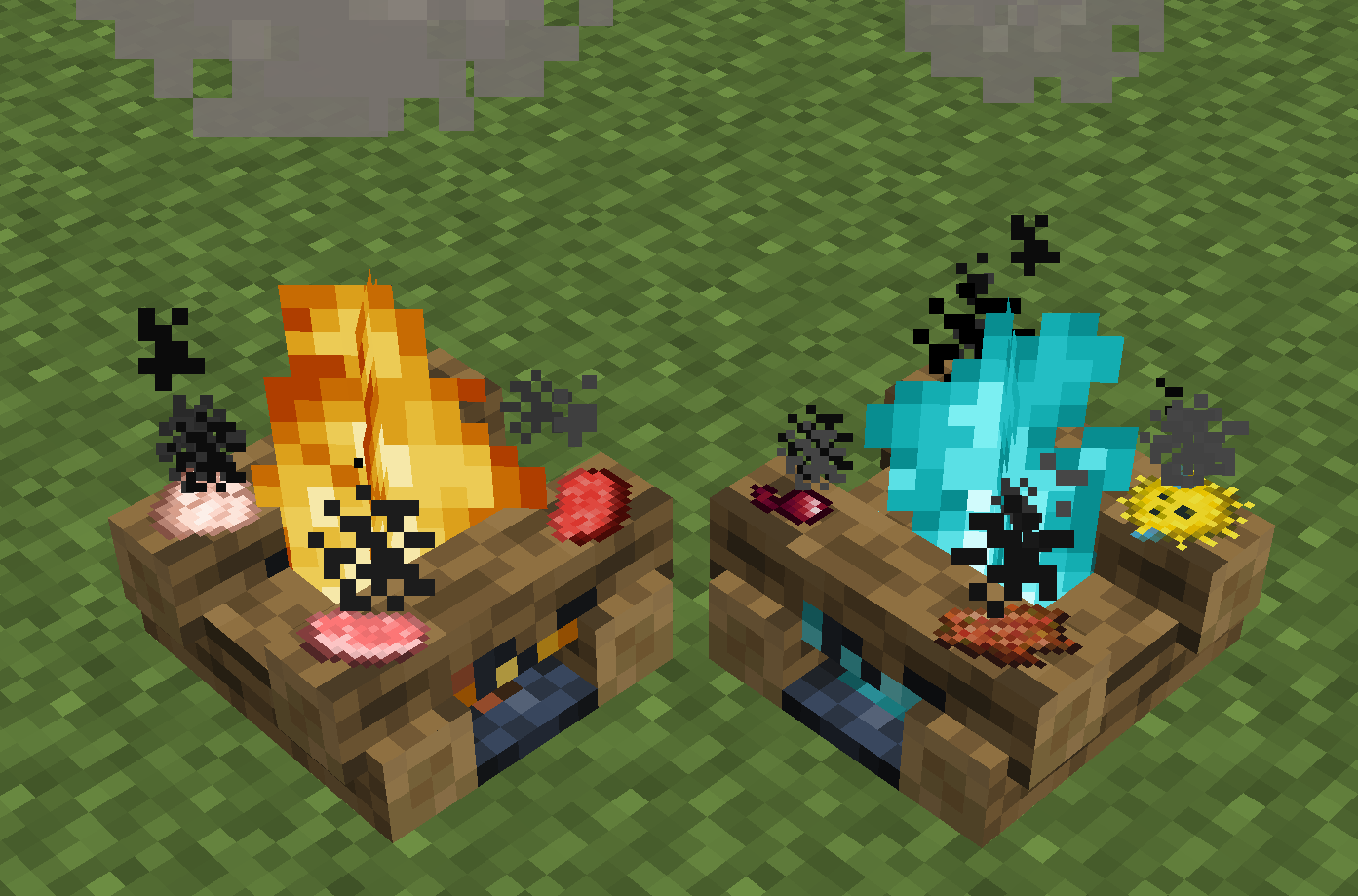
This mod brings campfires and soul campfires from modern versions of vanilla Minecraft back to 1.7.10.
Features:
- Right click with a food item to put it on the campfire. After 30 seconds, the item will pop off cooked. Up to 4 items can be on a campfire at once.
- Putting a hay bale under a campfire will make it a signal fire, increasing the height its smoke particles climb.
- Stepping on a lit campfire will hurt mobs. Soul campfires hurt more.
- Breaking a regular campfire without silk touch drops charcoal instead.
- Breaking a soul campfire without silk touch drops soul sand instead, or soul soil if Netherlicious is installed.
- Campfires can be extinguished and ignited various ways:
To extinguish a campfire:
- Use a shovel (also works from a dispenser)
- Use a water bucket
- Throw a splash potion on it
To ignite a campfire:
- Use a flint on steel
- Use a fire charge
- Left click with something enchanted with Fire Aspect, such as a sword (also works from a dispenser)
- Step on it while on fire
- Hit it with an arrow that's on fire
- Hit it with a small fireball projectile, such as from a blaze or from a dispenser dispensing fire charges
There are also many config settings for modpack makers.
Overview of config settings:
Nearly all of these settings can be set for both campfires, regular only, soul only, or neither.
- Charcoal Only: Removes the ability to craft regular campfires using coal. Only charcoal can be used. Turn it on if being able to turn coal into charcoal (by crafting with coal and then placing and breaking) is a problem in your modpack.
- Soul Soil Only: Removes the ability to craft soul campfires using soul sand. Only soul soil from mods such as Netherlicious can be used. Turn it on if being able to turn soul sand into soul soil (by crafting with soul sand and then placing and breaking) is a problem in your modpack.
- Automation: Lets blocks such as hoppers insert items into campfires from the sides.
- Regeneration Campfires: If set, lit campfires will apply a regeneration effect to nearby players. You can choose the regeneration level, timer on effect, range of effect, and how often it's applied. Signal fires have 50% further range.
- Silk Touch Needed: Whether silk touch is required to get the campfire block back.
- Unlit by Default: If set, the crafting recipe will make unlit campfires, which must be lit after being placed. Breaking a lit campfire will drop an unlit one.
- Remember Lit/Unlit State: If set, breaking a campfire will drop it in whatever state it was in when broken, regardless of the setting of Unlit by Default.
- Put Out by Rain: If set, campfires will be eventually be put out by rain falling on their block. By default, signal fires won't burn out.
- Damage: Lets you stop campfires from dealing damage to mobs that walk on them. Might be a good idea if you're using campfires as decoration in a village.
- Set Respawn: If set, you can right-click on lit campfires with an empty hand while holding shift to set your spawn point. You can also set it so campfires burn out when you use them to respawn (by default, signal fires won't burn out). Inspired by Home Camp.
- Colorful Campfire Smoke: If set, campfires will have coloured smoke based on the block below them when they have a redstone signal. Based on Colorful Campfire Smoke.
- Vis Costs: Set the Aqua/Ignis vis costs for extinguishing/igniting campfires with wands from Thaumcraft.
- Burn Out Timers: Set a timer for how long campfires stay lit before burning out automatically. By default, signal fires won't burn out.
- Burn Out Biome/Dimension Timers: Set biome and/or dimension specific Burn Out Timers. You can also use CraftTweaker (v3.1.0 or later) to set timers. For more information, see Campfire-Backport/wiki.
- Burn to Nothing: Set a probability for a campfire to break when it burns out from Burn Out Timers, Put Out by Rain, or Set Respawn.
- Burn Out As An Item: If set, campfires will count down their Burn Out Timers even as an item in your inventory or an item on the ground.
- Campfire Drops: Set the item that a campfire drops when broken without Silk Touch.
- Signal Fire Blocks: Set which blocks, when placed below the campfire, will make it a signal fire. Smoke from signal fires goes much higher than normal. You can specify an individual block + metadata, all metadatas of a block, or an ore dictionary entry.
- Auto Recipe Discovery: Automatically searches through all registered furnace recipes and copies the ones that make food, allowing them to be used in the campfire just like vanilla food items. There's also a blacklist in case you want only some recipes to be copied.
- Custom Recipes: Set custom recipes for campfires. You can specify the input item, output item, byproducts, cooking time, and whether or not the campfire must be a signal fire. You can also use CraftTweaker (v3.1.0 or later) to make recipes. For more information, see Campfire-Backport/wiki.
- Custom Extinguishers/Ignitors: Set custom ways to put out or light the campfire. You can specify whether it works by right clicking or left clicking, what item must be used, whether it works in a dispenser as well, whether the item takes damage or not, and whether you get a different item back. You can also use CraftTweaker (v3.1.0 or later) to make extinguishers/ignitors. For more information, see Campfire-Backport/wiki.
Compatibilities with other mods:
NEI:
- Campfire recipes and campfire exinguishers/ignitors are in NEI.
- View all of them by pressing the "Usages" hotkey on a campfire item.
WAILA:
- Campfires show the cooking progress of their items.
Thaumcraft:
- Campfires can be lit and extinguished by wands using vis.
- Campfires can be scanned by thaumometers for aspects.
- Campfires can heat up crucibles/thaumatoriums.
- Campfires can be extinguised with water arrows and ignited with fire arrows.
Witchery:
- Campfires can heat up kettles and witch's cauldrons.
- Campfires can be extinguished with the Extinguish brew and ignited with the Flame brew.
- Campfires can be extinguished with the Aguamenti symbol and ignited with the Incendio symbol.
Botania:
- Campfires can be lit by mana bursts fired using a Kindle Lens.
Galacticraft / Advanced Rocketry:
- Campfires will burn out if there's no oxygen.
- Campfire smoke will move faster or slower depending on the atmosphere.
Netherlicious:
- Soul campfires can be crafted with Soul Soil.
- You can craft foxfire campfires and shadow campfires. Most config options that apply to soul campfires will apply to these as well.
CraftTweaker:
- Campfire recipes, extinguishers/ignitors, and burn out timers can be made using CraftTweaker (v3.1.0 or later). See Campfire-Backport/wiki.
Can I use this in my modpack?
Please do!
Project description from CurseForge.
Pick your setup
Campfire Backport by Minecraft version and loader
Choose the version and loader you play, then open the matching release.
Check the dependencies, then try the file in a copied instance before changing a world you care about.
Recent files
Campfire Backport versions and loaders
Campfire Backport v1.11.3
campfirebackport-1.7.10-1.11.3.jar
26 Nov 2024
Client Source doesn’t say Server Source doesn’t say Dependencies No extras listed Listed on Release listing
Check the 1.7.10 · Forge setup Forge1.7.10 release
Campfire Backport v1.11.2
campfirebackport-1.7.10-1.11.2.jar
15 Sept 2024
Client Source doesn’t say Server Source doesn’t say Dependencies No extras listed Listed on Release listing
Check the 1.7.10 · Forge setup Forge1.7.10 release
Campfire Backport v1.11.1
campfirebackport-1.7.10-1.11.1.jar
30 Jul 2024
Client Source doesn’t say Server Source doesn’t say Dependencies No extras listed Listed on Release listing
Check the 1.7.10 · Forge setup Forge1.7.10 release
Campfire Backport v1.11
campfirebackport-1.7.10-1.11.jar
4 May 2024
Client Source doesn’t say Server Source doesn’t say Dependencies No extras listed Listed on Release listing
Check the 1.7.10 · Forge setup Forge1.7.10 release
Campfire Backport v1.10.1
campfirebackport-1.7.10-1.10.1.jar
27 Jun 2023
Client Source doesn’t say Server Source doesn’t say Dependencies No extras listed Listed on Release listing
Check the 1.7.10 · Forge setup Forge1.7.10 release
Campfire Backport v1.10
campfirebackport-1.7.10-1.10.jar
22 Aug 2022
Client Source doesn’t say Server Source doesn’t say Dependencies No extras listed Listed on Release listing
Check the 1.7.10 setup 1.7.10 release
Campfire Backport v1.9.2
campfirebackport-1.7.10-1.9.2.jar
3 Oct 2021
Client Source doesn’t say Server Source doesn’t say Dependencies No extras listed Listed on Release listing
Check the 1.7.10 setup 1.7.10 release
Campfire Backport v1.9.1
campfirebackport-1.7.10-1.9.1.jar
28 Aug 2021
Client Source doesn’t say Server Source doesn’t say Dependencies No extras listed Listed on Release listing
Check the 1.7.10 setup 1.7.10 release
Campfire Backport v1.9
campfirebackport-1.7.10-1.9.jar
26 May 2021
Client Source doesn’t say Server Source doesn’t say Dependencies No extras listed Listed on Release listing
Check the 1.7.10 setup 1.7.10 release
Campfire Backport v1.8.4
campfirebackport-1.7.10-1.8.4.jar
23 Apr 2021
Client Source doesn’t say Server Source doesn’t say Dependencies No extras listed Listed on Release listing
Check the 1.7.10 setup 1.7.10 release
Campfire Backport v1.8.3
campfirebackport-1.7.10-1.8.3.jar
4 Mar 2021
Client Source doesn’t say Server Source doesn’t say Dependencies No extras listed Listed on Release listing
Check the 1.7.10 setup 1.7.10 release
Campfire Backport v1.8.2
campfirebackport-1.7.10-1.8.2.jar
27 Feb 2021
Client Source doesn’t say Server Source doesn’t say Dependencies No extras listed Listed on Release listing
Check the 1.7.10 setup 1.7.10 release
Looking for an older file? The official CurseForge project page is in Resources.
 mod
mod CurseForge + Modrinth · Minecraft
Tasty Tiles
Tasty Tiles adds a yummy variety of building blocks focused around, well, tiles! Give your home some cozy ceramic flavor!
 mod
mod CurseForge · Minecraft
Armor Studio
Draw, paint, and fully customize your Armor and Shields in real-time with an interactive in-game 3D Studio
 mod
mod CurseForge · Minecraft
Immersive FX Reborn
Immersive audio, ambient environments, footsteps, weather, and complementary effects for a more atmospheric Minecraft — Re-imagined from the original Dynamic Surroundings mod by OreCruncher.