Minecraft version
Back to mods 
CurseForge · Minecraft mod
Last Played Logger
Logs the last date a player was online to a Google spreadsheet.
Choose a version Pick your version below, then grab the matching file.
Quick answer
Which Last Played Logger release should I use?
Latest stable file Last Played Logger 26.1-3.0.1
Game version 26.1, 26.1.1, 26.1.2
Loader NeoForge
Last Played Logger 26.1-3.0.1 targets 26.1, 26.1.1, 26.1.2 with NeoForge. The project page does not say whether this file belongs on the client, dedicated server, or both. No extra mods listed for this file.
Where it goes
Is Last Played Logger required on the client, server, or both?
The project page does not say whether this file belongs on the client, dedicated server, or both.
Client Source doesn’t say
Dedicated server Source doesn’t say
Loader for this release NeoForge
Required install it here Optional supported, not mandatory Not supported do not install here Source doesn’t say do not assume
The source does not explicitly classify this release as client-only or server-only.
What else does Last Played Logger 26.1-3.0.1 need?
Last Played Logger 26.1-3.0.1. Change the file and its required mods may change too.
This file does not list any required mods. Do not add a library just because a different file uses it.
This file does not list any required or optional mods.
Before you install it
Add Last Played Logger without breaking your instance.
Built for Last Played Logger 26.1-3.0.1. Pick another file and the loader, install side or required mods may change.
- 01
Stick to this file
Use Last Played Logger 26.1-3.0.1. It targets 26.1, 26.1.1, 26.1.2 with NeoForge; another release may have different loader, side or dependency requirements.
- 02
Bring the mods it needs
This file does not list any required mods. Do not add a library just because a different file uses it.
- 03
Put it on the correct side
The project page does not say whether this file belongs on the client, dedicated server, or both.
- 04
Pick the file you checked
Use the “Get this file” button beside Last Played Logger 26.1-3.0.1. It opens that exact file at the source.
About this project
What does Last Played Logger add?
Version 3.X.X
For older versions of the mod, check the wiki.
This mod logs the last date a player was online/logged in into a Google spreadsheet.
It's a utility mod to help you moderate your whitelist.
It only works on the server side and won't work on the client side.
You need a server to play with friends? You don't know how to set up one? Just rent an already configured server!

Click on the picture above, select a plan (with recommended at least 6 GB),
use my code agent to get 25% off your first month and enjoy playing with your friends!
Support
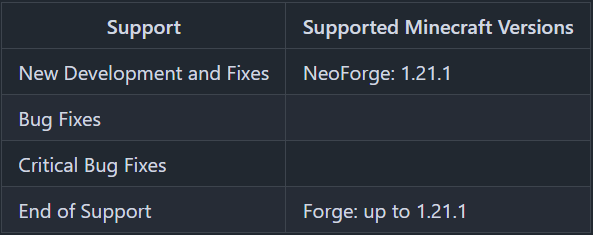
Minecraft versions, for which the mod is not released, are not supported.
You can find a text version here.
Server Config
The config file can be found in the "serverconfig" folder in the "world" folder and is named "last_played_logger-server.toml". The name of the world folder is set for servers in the "server.properties" file.
- active
Shall the mod be active or not? - spreadsheetID
ID of the Spreadsheet. - tab_name
Name of the spreadsheet tab.
Wonder how do you get these data? Read the "How to configure the mod".
How to configure the mod
Enable the Google Sheets API
First, you have to enable the "Google Sheets API" on https://developers.google.com/sheets/api/quickstart/java#enable_the_api and click onto the "Enable the API" button.
Create a folder named "last_played_logger" next to the "config" folder.
Next you have to go to https://developers.google.com/sheets/api/quickstart/java#authorize_credentials_for_a_desktop_application and follow the steps to create credentials, that the "Last Played Logger" uses to change the Google Spreadsheet.
Save the credentials.json in the "last_played_logger" folder.
How to set up the spreadsheet
You can copy this Example Spreadsheet to use it with the "Last Played Logger".
For that, you have to click "File" > "Make a copy".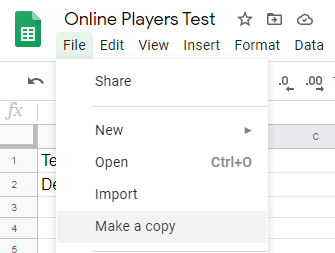
In the copy window, you give it a name and click "OK".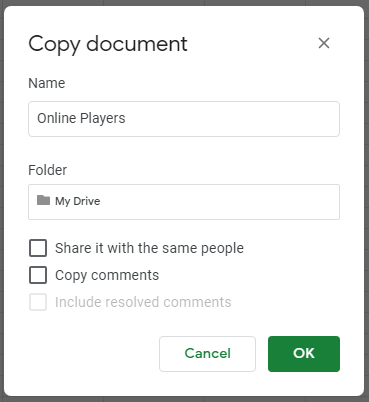
This "Example Spreadsheet" has two tabs.
In the "Online Log" tab, the "Last Played Logger" adds lines for every player joining the server. For players already joint the server, only the date will be updated.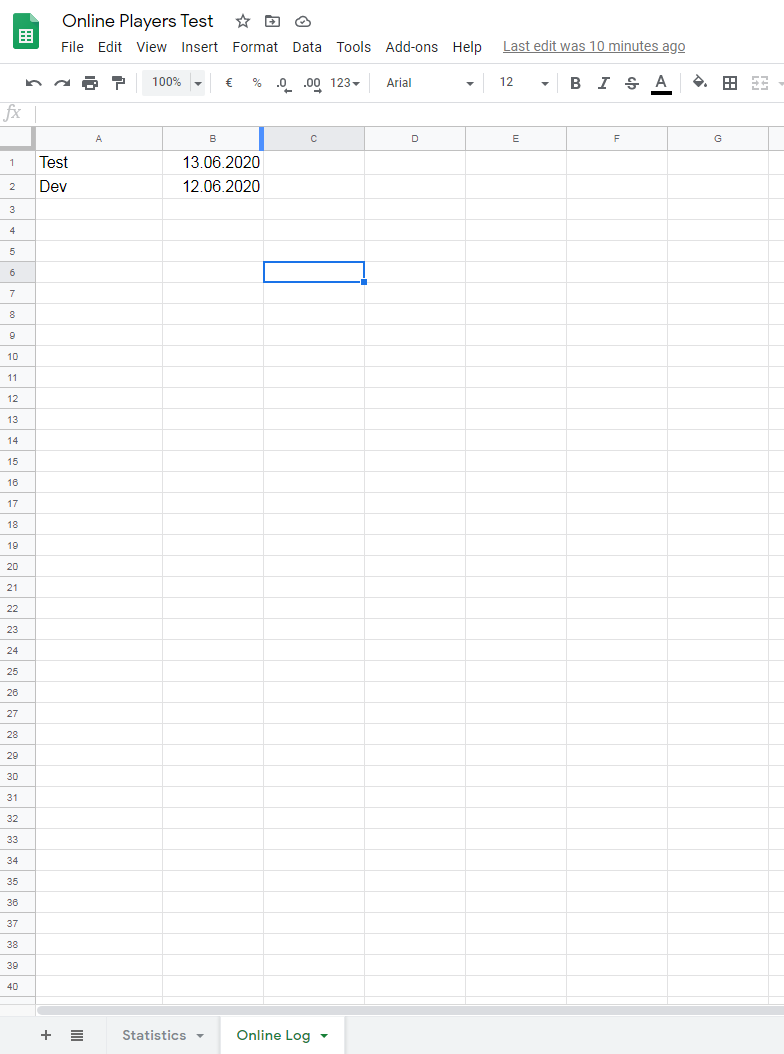
In the "Statistics" tab, you have two lists. The left list shows all players sorted by name and the right list shows all players sorted by the date. The player last online is the first player in this list.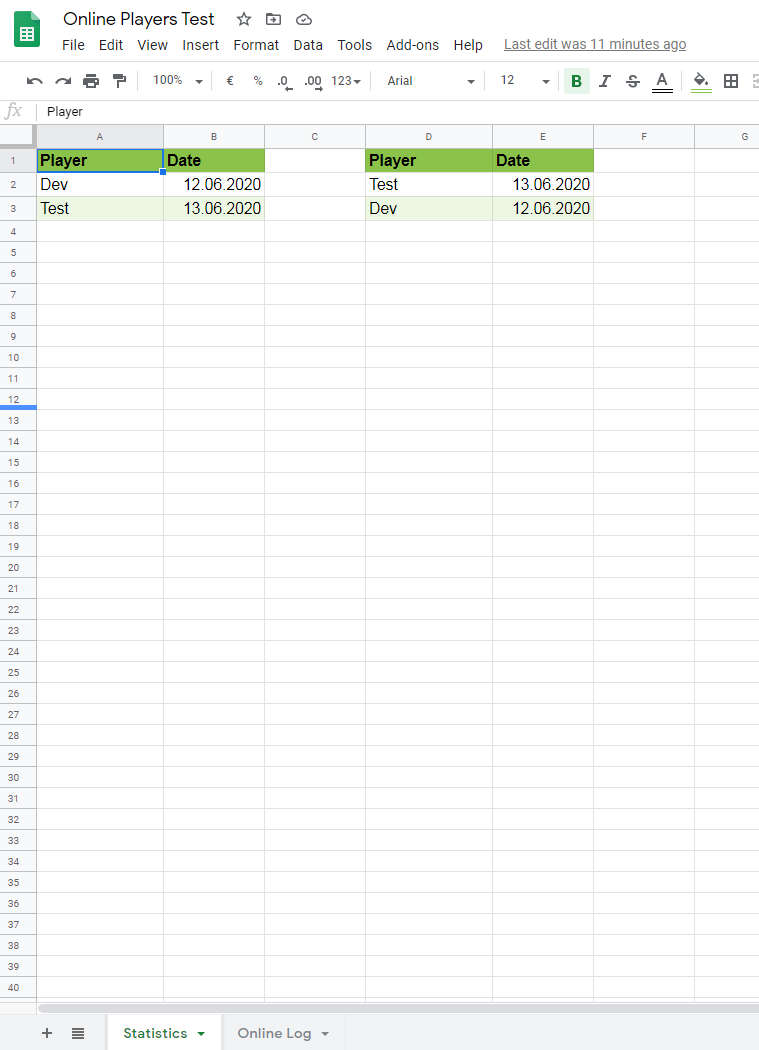
For the mod it's needed, that the spreadsheet is shared. For that you have to click onto the "Share" button.
In the Share window you have to select "Get Link" and on the right side of "Anyone with the link" you have to select "Editor".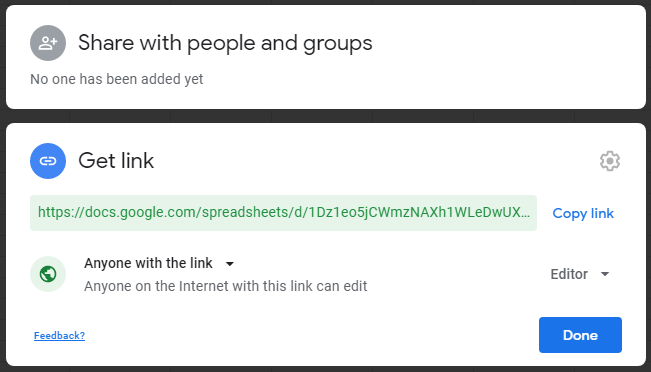
In the config, you now have to set "active" to "true" and set the "tab_name". In this example the "tab_name" has to be "Online Log".
From the URL, you have to extract the spreadsheet ID. In this example, the spreadsheet ID is "1dcoWy1ZOCEzf9wSqpsd731MKr8rBsazUVuUYafF4nzA".
What is to do on the first launch
When you have finished the config and done all previous steps, it gets to the first launch and the authentication of the server/mod.
Important: The first launch of the server has to be on your local desktop pc. During the following steps don't stop the server.
After you launched the server and a player joined, you find in the log a link with the following lines:
Please open the following address in your browser:
*https://accounts.google.com/o/oauth2/auth?access\_type=offline&client\_id=…\*
*Attempting to open that address in the default browser now…*
Maybe the link is opened by your default browser automatically. If not, copy the link to your browser and open it.
It opens a website where you have to choose the Google account, from the owner of the spreadsheet.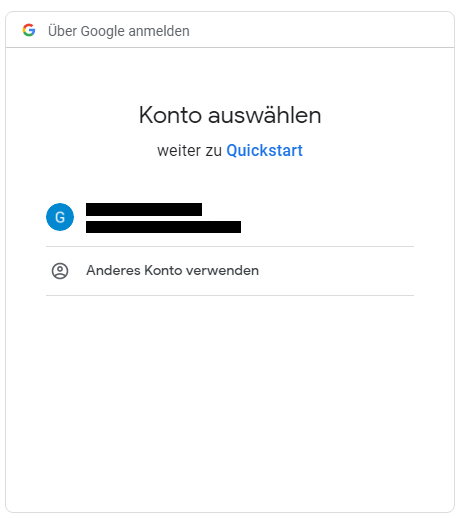
Next, there opens a warning because your project on which the application is running is not verified. You can ignore the warning and click "Advanced".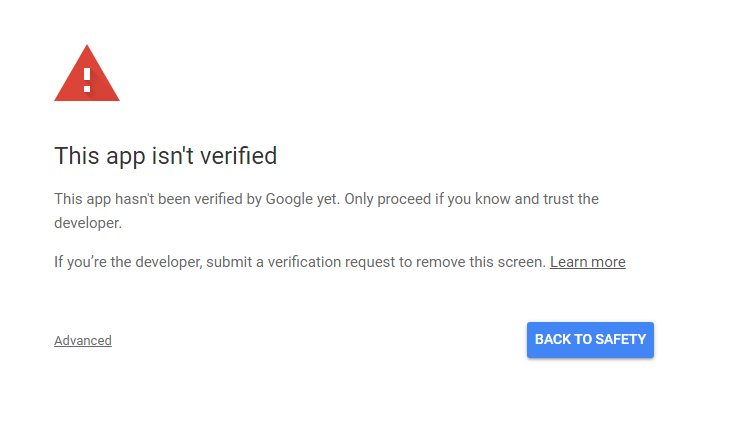
Next, you click on "Go to Quickstart"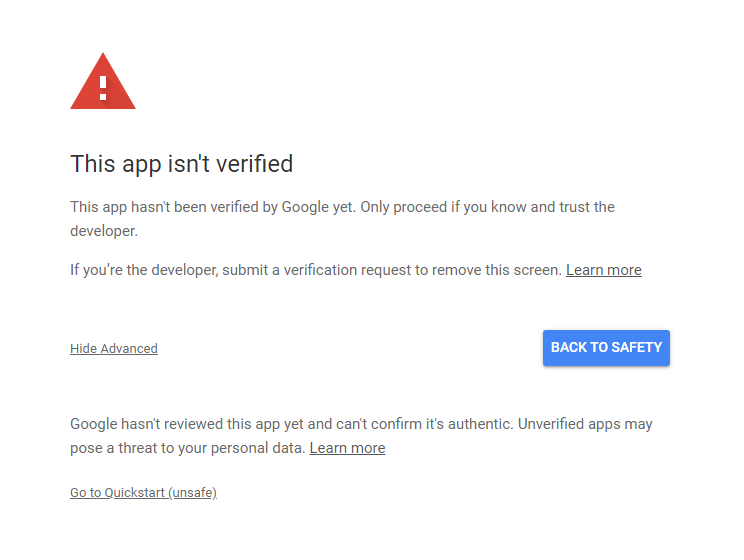
After that, a permission request is showing up, that wants to access your spreadsheets. "Allow" clicking will grant this permission.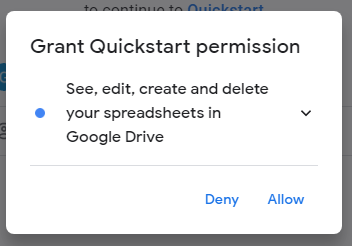
This permission request has to be confirmed.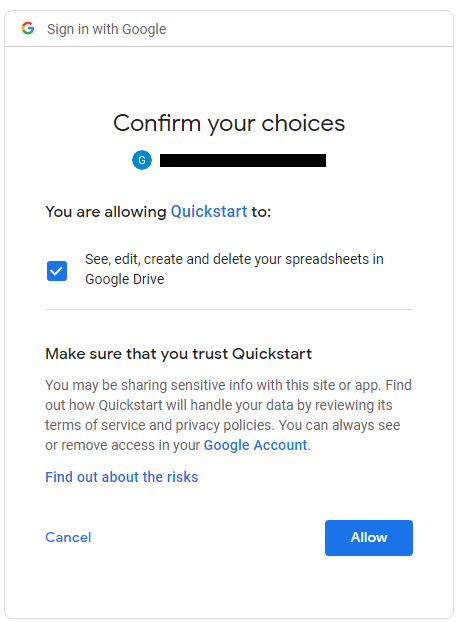
If you grant the permission and confirmed it, the "Last Played Logger" will work and add players to your spreadsheet.
If you want to enlarge the formatted area, here is a tutorial: https://spreadsheetpoint.com/color-alternate-rows-google-sheets/
Thanks for the logo to Muse31.
You can use this mod in non-commercial modpacks without asking.
You can find more mods from me on CurseForge and Modrinth.

Project description from CurseForge.
Pick your setup
Last Played Logger by Minecraft version and loader
Choose the version and loader you play, then open the matching release.
Minecraft version
26.2
1 loader buildMinecraft version
26.1.2
1 loader buildMinecraft version
26.1.1
1 loader buildMinecraft version
26.1
1 loader buildMinecraft version
1.21.11
1 loader buildMinecraft version
1.21.10
1 loader buildMinecraft version
1.21.9
1 loader buildMinecraft version
1.21.8
1 loader buildMinecraft version
1.21.7
1 loader buildMinecraft version
1.21.6
1 loader buildMinecraft version
1.21.5
1 loader buildShowing the newest 12 of 38 game versions. Older files are in the list below.
Check the dependencies, then try the file in a copied instance before changing a world you care about.
Recent files
Last Played Logger versions and loaders
Last Played Logger 26.1-3.0.1
LastPlayedLogger-26.1-3.0.1.jar
1 Oct 2026
Client Source doesn’t say Server Source doesn’t say Dependencies No extras listed Listed on Release listing
Check the 26.3 · NeoForge setup NeoForge26.126.1.126.1.2 release
Last Played Logger 1.21.11-3.0.1
LastPlayedLogger-1.21.11-3.0.1.jar
1 Oct 2026
Client Source doesn’t say Server Source doesn’t say Dependencies No extras listed Listed on Release listing
Check the 1.21.11 · NeoForge setup NeoForge1.21.11 release
Last Played Logger 1.21.1-3.0.1
LastPlayedLogger-1.21.1-3.0.1.jar
2 May 2026
Client Source doesn’t say Server Source doesn’t say Dependencies No extras listed Listed on Release listing
Check the 1.21.10 · NeoForge setup 1.21.81.21.51.21.41.21.1 release
Last Played Logger 1.21.1-3.0.0
LastPlayedLogger-1.21.1-3.0.0.jar
11 Dec 2025
Client Source doesn’t say Server Source doesn’t say Dependencies No extras listed Listed on Release listing
Check the 1.21.1 · NeoForge setup 1.21.1NeoForge release
Last Played Logger 1.21.1-2.0.1
LastPlayedLogger-1.21.1-2.0.1.jar
1 Sept 2024
Client Source doesn’t say Server Source doesn’t say Dependencies No extras listed Listed on Release listing
Check the 1.21.1 · Forge setup Forge1.21.1 release
Last Played Logger 1.21-2.0.1
LastPlayedLogger-1.21-2.0.1.jar
30 Aug 2024
Client Source doesn’t say Server Source doesn’t say Dependencies No extras listed Listed on Release listing
Check the 1.21 · Forge setup 1.21Forge release
Last Played Logger 1.20.6-2.0.1
LastPlayedLogger-1.20.6-2.0.1.jar
1 Jun 2024
Client Source doesn’t say Server Source doesn’t say Dependencies No extras listed Listed on Release listing
Check the 1.20.6 · Forge setup Forge1.20.6 release
Last Played Logger 1.20.4-2.0.1
LastPlayedLogger-1.20.4-2.0.1.jar
13 Dec 2023
Client Source doesn’t say Server Source doesn’t say Dependencies No extras listed Listed on Release listing
Check the 1.20.4 · Forge setup Forge1.20.4 release
Last Played Logger 1.20.2-2.0.1
LastPlayedLogger-1.20.2-2.0.1.jar
19 Oct 2023
Client Source doesn’t say Server Source doesn’t say Dependencies No extras listed Listed on Release listing
Check the 1.20.2 · Forge setup 1.20.2Forge release
Last Played Logger 1.20.1-2.0.1
LastPlayedLogger-1.20.1-2.0.1.jar
6 Jul 2023
Client Source doesn’t say Server Source doesn’t say Dependencies No extras listed Listed on Release listing
Check the 1.20.1 · Forge setup 1.20.1Forge release
Last Played Logger 1.20-2.0.1
LastPlayedLogger-1.20-2.0.1.jar
2 Jul 2023
Client Source doesn’t say Server Source doesn’t say Dependencies No extras listed Listed on Release listing
Check the 1.20 · Forge setup Forge1.20 release
1.19.4-2.0.1
LastPlayedLogger-1.19.4-2.0.1.jar
14 Apr 2023
Client Not supported Server Required Dependencies No extras listed Listed on Release listing
Check the 1.19.4 · Forge setup 1.19.4Forge release
Looking for an older file? The official CurseForge project page is in Resources.
 mod
mod CurseForge · Minecraft
Custom Races Framework
Races and origins no matter the need, you can create one with ease.
 mod
mod CurseForge · Minecraft
Thut Essentials
An Essentials for Forge, With Built in Claiming.
 mod
mod CurseForge + Modrinth · Minecraft
OpenComputers II
Computers and robots for automating things via in-game scripting.