Coffee Spawner Optional for Somnia Awoken 1.20.4-3.4.0
optionalNo matching file

CurseForge · Minecraft mod
Simulating the world while you sleep
Quick answer
Somnia Awoken 1.20.4-3.4.0 targets 1.20.4 with NeoForge, Forge. The project page does not say whether it belongs on the client. The project page does not say whether it belongs on the dedicated server. All 1 required mods have matching files.
Where it goes
The project page does not say whether it belongs on the client. The project page does not say whether it belongs on the dedicated server.
The source does not explicitly classify this release as client-only or server-only.
Somnia Awoken 1.20.4-3.4.0. Change the file and its required mods may change too.
Install Koremods first. We found matching files for this game-version and loader setup.
We only count dependency files that match this setup. A file for another loader does not fill the gap.
Before you install it
Built for Somnia Awoken 1.20.4-3.4.0. Pick another file and the loader, install side or required mods may change.
Use Somnia Awoken 1.20.4-3.4.0. It targets 1.20.4 with NeoForge, Forge; another release may have different loader, side or dependency requirements.
Install Koremods first. We found matching files for this game-version and loader setup.
The project page does not say whether it belongs on the client. The project page does not say whether it belongs on the dedicated server.
Use the “Get this file” button beside Somnia Awoken 1.20.4-3.4.0. It opens that exact file at the source.
About this project
Somnia Awoken is a Minecraft mod that simulates the world while you sleep. It is a port/rewrite of the mod Somnia, which was initially released in 2011.
Imagine skipping the night and wasting 10 hours of Minecraft time. Your furnaces won't smelt anything, and your crops won't grow. With Somnia, you make use of every tick. Put some ores into the furnace, sleep for a bit, then wake up to see them smolten.
Fatigue is a game mechanic used to control the player's sleep, ranging from 0 to 100. You can enter sleep at any time, but only if you have enough fatigue. It is displayed on the screen, in the position of your choice (bottom right by default). While the player's fatigue is updated every tick, the display is only updated every 5 seconds. If it drops below the required amount during sleep, you won't wake up.
It's recommended to watch your fatigue regularly, as getting too tired will result in some debuffs. These debuff will be applied only once for a certain period of time when you enter a new side effect stage. The last side effect is permanent.
The default side effects are:
Instead of skipping the night, the world is sped up while you sleep. This includes mob spawns, so it's recommended to find a shelter for the night. Alternatively, you can disable mob spawning while you're alseep in the config.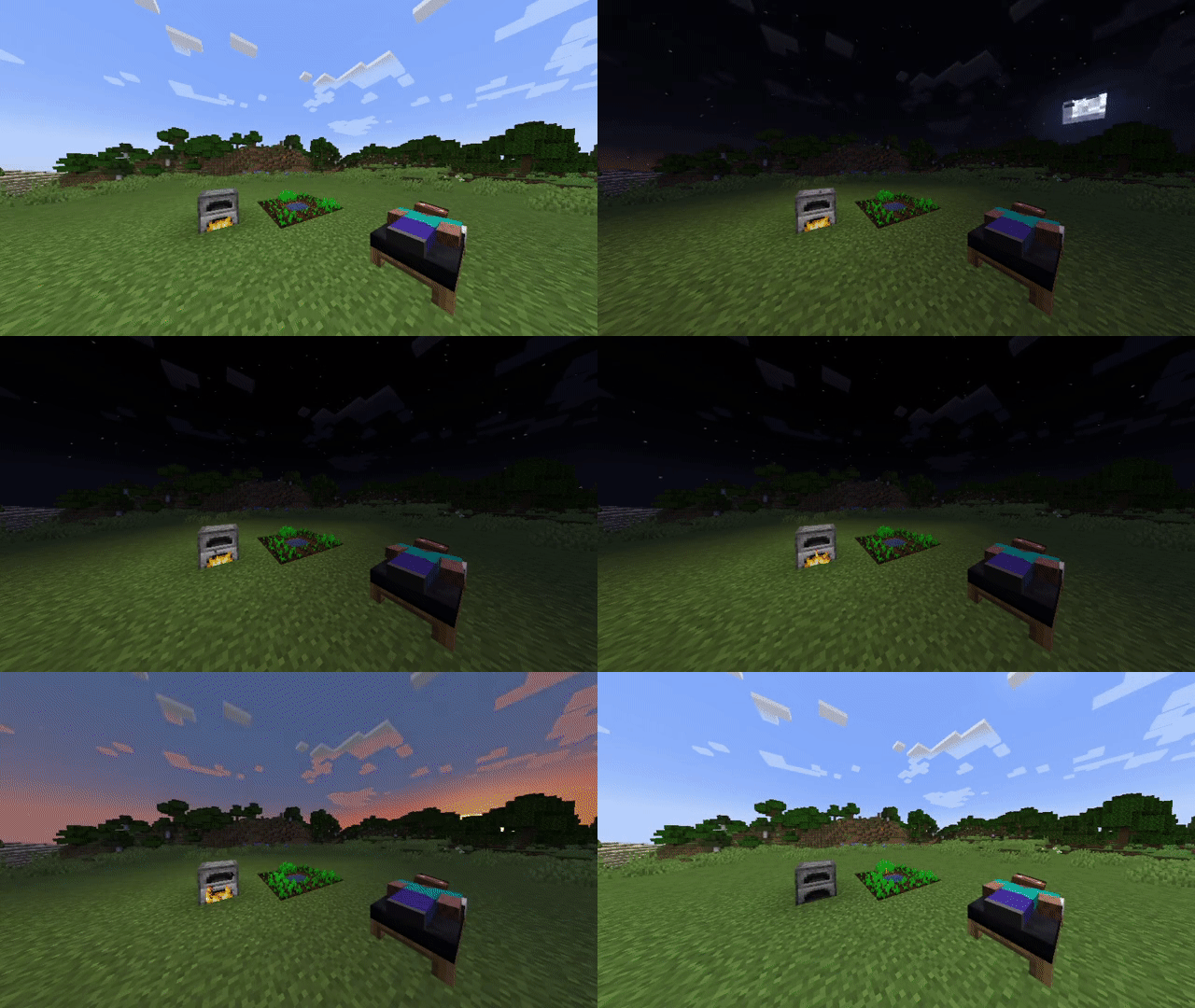
Somnia Awoken provides a way to select your wake time by right clicking a bed using a certain item (Default: clock). The Wake Time Selection GUI also lets you sleep without resetting your respawn point.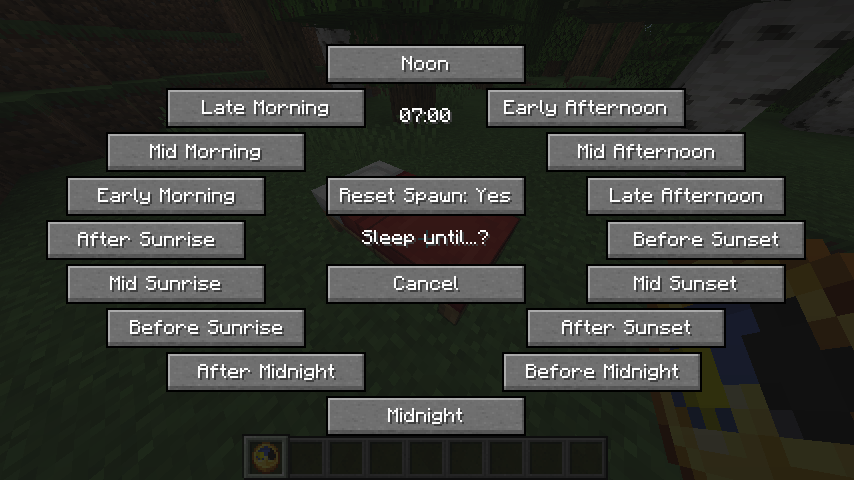
Somnia provides an enhanced sleeping GUI for tracking the sleep progress, simulation tick multiplier and ETA remaining sleep time.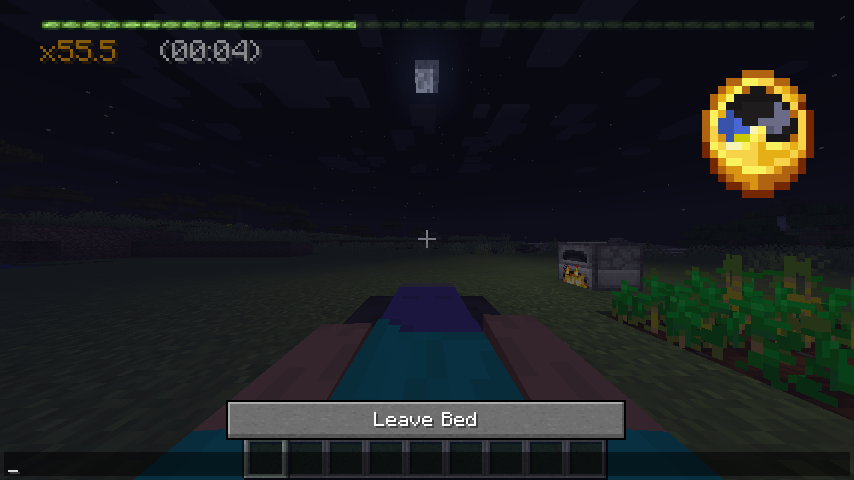
Somnia adds an option to sleep normally, disabling simulation and skipping the night. To achieve this, sneak while entering a bed. This re-enables the default time check, so that you can only sleep at night. However, Somnia checks, such as the minimum fatigue to sleep, ignore monsters and armor, still apply. In multiplayer, Somnia will deactivate if most players choose to sleep normally.
The original author of Somnia is MALfunction84, who released it in 2011. Original thread here.
In around 2014, kingrunes ported the mod to newer minecraft versions 1.5, 1.6 and 1.7. Their thread is available via the Wayback machine.
Project description from CurseForge.
Pick your setup
Choose the version and loader you play, then open the matching release.
Check the dependencies, then try the file in a copied instance before changing a world you care about.
Recent files
Somnia-Awoken-1.20.4-3.4.0.jar
27 Dec 2023
Somnia-Awoken-1.20.1-3.3.0.jar
3 Jul 2023
Somnia-Awoken-1.19.2-3.1.7.jar
13 May 2023
Somnia-Awoken-1.19.3-3.2.4.jar
13 May 2023
Somnia-Awoken-1.19.2-3.1.6.jar
10 Apr 2023
Somnia-Awoken-1.19.2-3.1.5.jar
7 Apr 2023
Somnia-Awoken-1.18.2-3.0.105.jar
5 Apr 2023
Somnia-Awoken-1.18.2-3.0.105.jar
5 Apr 2023
Somnia-Awoken-1.18.2-3.0.104.jar
18 Mar 2023
Somnia-Awoken-1.18.2-3.0.104.jar
18 Mar 2023
Somnia-Awoken-1.19.3-3.2.1.jar
4 Feb 2023
Somnia-Awoken-1.19.3-3.2.1.jar
4 Feb 2023
Looking for an older file? The official CurseForge project page is in Resources.
 mod
modTurn Blockbench models into simple Minecraft entities without writing Java code.
 mod
modUnofficial port of Druidcraft; a nature-themed mod with some some magic elements
 mod
modPower it, process it, automate it — industrial machines for the Neroland universe, where throughput runs hot and dirty.