Minecraft version
Back to mods 
CurseForge · Minecraft mod
RandomLib
A library to create customizable random pools. Originally from the oneblock mod.
Choose a version Pick your version below, then grab the matching file.
Quick answer
Which RandomLib release should I use?
beta file randomlib-1.16.x-1.1.0.jar
Game version 1.16.5
Loader Forge
randomlib-1.16.x-1.1.0.jar targets 1.16.5 with Forge. The project page does not say whether this file belongs on the client, dedicated server, or both. No extra mods listed for this file.
Where it goes
Is RandomLib required on the client, server, or both?
The project page does not say whether this file belongs on the client, dedicated server, or both.
Client Source doesn’t say
Dedicated server Source doesn’t say
Loader for this release Forge
Required install it here Optional supported, not mandatory Not supported do not install here Source doesn’t say do not assume
The source does not explicitly classify this release as client-only or server-only.
What else does randomlib-1.16.x-1.1.0.jar need?
randomlib-1.16.x-1.1.0.jar. Change the file and its required mods may change too.
This file does not list any required mods. Do not add a library just because a different file uses it.
This file does not list any required or optional mods.
Before you install it
Add RandomLib without breaking your instance.
Built for randomlib-1.16.x-1.1.0.jar. Pick another file and the loader, install side or required mods may change.
- 01
Stick to this file
Use randomlib-1.16.x-1.1.0.jar. It targets 1.16.5 with Forge; another release may have different loader, side or dependency requirements.
- 02
Bring the mods it needs
This file does not list any required mods. Do not add a library just because a different file uses it.
- 03
Put it on the correct side
The project page does not say whether this file belongs on the client, dedicated server, or both.
- 04
Pick the file you checked
Use the “Get this file” button beside randomlib-1.16.x-1.1.0.jar. It opens that exact file at the source.
About this project
What does RandomLib add?
Originally a part of the One Block Plus mod, RandomLib is now a standalone library allowing your mod to create config files for weighted random generation.
Developer documentation. (WIP)
(This will likely be replaced later by a github repository)
RandomLibUtils.setup during FMLCommonSetupEvent to setup your config files.
<T extends ExtraData> RandomLibUtils.setup(ResourceLocation registryKey, Supplier<T> extra, Consumer<Map<String, RandomPool<T>>> afterDeserialization)
As an example, your config files will be generated in configs/oneblock/phases/ folder if registryKey = oneblock:phases.
extra is a supplier for an instance of an ExtraData implementation. This allows you to save more information about a random pool, in addition to the weighted items.
Once your config files are deserialized, they are saved in a map with their file name as a key but you likely would like to store them in a more convenient structure for your mod using the afterDeserialization consumer.
RandomLibUtils.registerCommand during FMLServerStartingEvent to setup a command to manage config files generated by RandomLib.
RandomLibUtils.registerCommand(FMLServerStartingEvent event, String commandname, ResourceLocation registryKey)
RandomLibUtils.registerCommand(FMLServerStartingEvent event, String commandname, ResourceLocation registryKey, ExtraDataCommand<? extends ExtraData> extraDataCommand)
registryKey is the same as for RandomLibUtils.setup
extraDataCommand completes brigadier for your ExtraData implementation.
RandomPool#getExtra() to get your deserialized ExtraData.
RandomPool#getRandom()#generateAndReplace(ServerWorld, BlockPos) to destroy block and generate an item from the random pool in the given world at the given position.
RandomPool#getRandom()#generate(ServerWorld, BlockPos) to generate an item from the random pool in the given world at the given position.
RandomPool#getRandom()#vgenerate(RandomContainer, ServerWorld, BlockPos, ItemStack) to generate an item from the random pool for an object implementing RandomContainer (likely a tile entity) in the given world at the given position and for the given held item (if any).
User documentation. (WIP)
Help command : /<RandomLib command name for this mod> help
example:
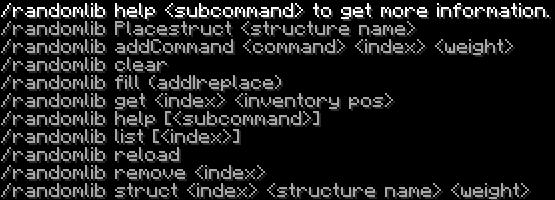
Project description from CurseForge.
Pick your setup
RandomLib by Minecraft version and loader
Choose the version and loader you play, then open the matching release.
Check the dependencies, then try the file in a copied instance before changing a world you care about.
Recent files
RandomLib versions and loaders
randomlib-1.16.x-1.1.0.jar
26 Dec 2024
Client Source doesn’t say Server Source doesn’t say Dependencies No extras listed Listed on Release listing
Check the 1.16.5 · Forge setup 1.16.5Forge beta
randomlib-1.16.x-1.0.0.jar
25 Mar 2022
Client Source doesn’t say Server Source doesn’t say Dependencies No extras listed Listed on Release listing
Check the 1.16.5 · Forge setup 1.16.5Forge beta
Looking for an older file? The official CurseForge project page is in Resources.
 mod
mod CurseForge · Minecraft
Faktocraft
A modern successor of IndustrialCraft 2, BuildCraft and Logistics Pipes, brought together into a single mod: electrical machines, power grids, item and fluid pipes, and logistics.
 mod
mod CurseForge · Minecraft
Silicon Age: From Wafer to ExoTech
A tech mod for Minecraft 1.7.10: the way from a silicon wafer to ExoTech.
 mod
mod CurseForge · Minecraft
SecurityCraft (Fabric)
A Fabric port of SecurityCraft