Architectury API Needed by Hopper X-Treme [Fabric] 26.2-4.1.0
requiredMatching file found Matched file: [Fabric 26.2] v21.0.7

CurseForge · Minecraft mod
Upgrade your hoppers!
Quick answer
Hopper X-Treme [Fabric] 26.2-4.1.0 targets 26.2 with Fabric. The project page does not say whether this file belongs on the client, dedicated server, or both. All 3 required mods have matching files.
Where it goes
The project page does not say whether this file belongs on the client, dedicated server, or both.
The source does not explicitly classify this release as client-only or server-only.
[Fabric] 26.2-4.1.0. Change the file and its required mods may change too.
Install Architectury API, ChimericLib, Fabric API first. We found matching files for this game-version and loader setup. 1 comes through another mod in the chain.
1 extra mod was pulled in by another dependency. Indented rows show who needs each one. We only count dependency files that match this setup. A file for another loader does not fill the gap.
Before you install it
Built for Hopper X-Treme [Fabric] 26.2-4.1.0. Pick another file and the loader, install side or required mods may change.
Use [Fabric] 26.2-4.1.0. It targets 26.2 with Fabric; another release may have different loader, side or dependency requirements.
Install Architectury API, ChimericLib, Fabric API first. We found matching files for this game-version and loader setup. 1 comes through another mod in the chain.
The project page does not say whether this file belongs on the client, dedicated server, or both.
Use the “Get this file” button beside [Fabric] 26.2-4.1.0. It opens that exact file at the source.
About this project




This mod provides variant hoppers with faster (or slower!) transfer speeds, giving you ultimate control over your builds!
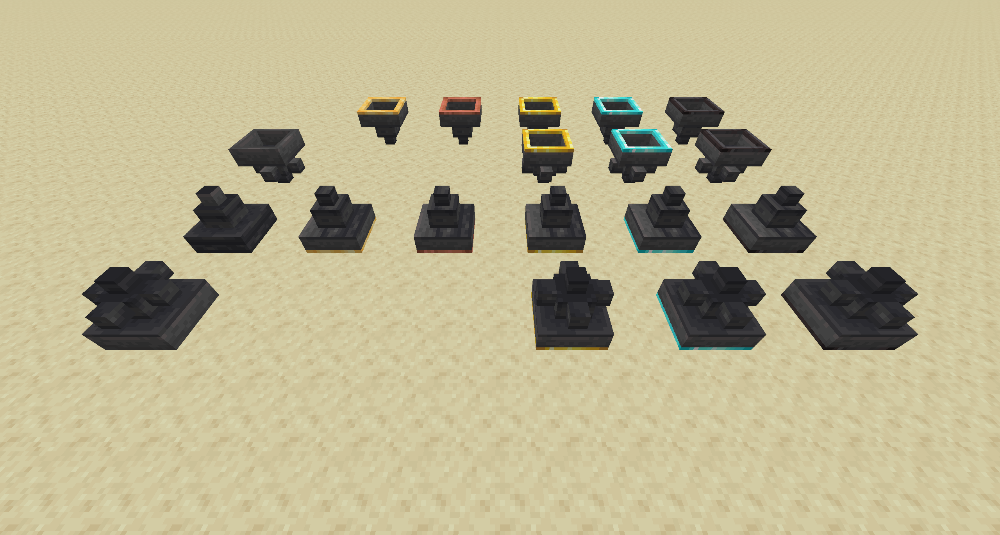
Honeyed hopper
Cooldown: 20 game ticks (1 item / second)
The honeyed hopper is super handy for use in clocks and other timers!
Copper hopper
Cooldown: 8 game ticks (2.5 items / second; same as the vanilla hopper)
If you have ever run into problems with hopper locking in a tight build, the copper hopper is for you! Due to the conductive nature of copper, it efficiently transfers a redstone signal without blocking the transfer of items! (In other words, copper hoppers cannot be locked.)
Golden hopper
Cooldown: 4 game ticks (5 items / second)
Diamond hopper
Cooldown: 2 game ticks (10 items / second)
Netherite hopper
Cooldown: 1 game tick (20 items / second)
Huppers
Like hoppers, but up! All hoppers have a corresponding hupper.
Multi-hoppers
Need to send items in multiple directions? Try a multi-hopper! Items are sent to each enabled direction in a round-robin fashion. All hoppers except honeyed and copper have mutil-hopper variants.
When placed, a multi-hopper does not output in any direction. Directions can be toggled on or off with a wrench. The mod includes a wrench, but most should work.
(Any tool in the c:tools/wrenches tag will work.)
Multi-huppers
Like huppers, but multi! All multi-hoppers have a corresponding multi-hupper.
Multi-huppers' behavior is the same as multi-hoppers.
Filtered hoppers and multi-hoppers
Hoppers and multi-hoppers that are golden-tier and above can be converted to filterable hoppers! Check out the in-game guide for more information.
Glazed hoppers and multi-hoppers
Glazed hoppers and multi-hoppers take advantage of glazed terracotta's naturally low friction, tossing items into the world as soon as they are picked up. Higher tier glazed hoppers not only pick up and eject items faster, but they do so with more velocity!
Can I use this mod in a pack?
Yep
Will you make a Forge version of this?
No, but as of 1.21, the mod supports both Fabric and NeoForge.
Is the name a reference to "Wormhole X-Treme!", the Stargate: SG-1 parody that appeared in the Stargate: SG-1 series itself?
Yes. Yes it is.
Will you add (insert feature here)?
Maybe. I won't promise anything. But I welcome suggestions and feature requests via the issue tracker on GitHub.


Project description from CurseForge.
Pick your setup
Choose the version and loader you play, then open the matching release.
Check the dependencies, then try the file in a copied instance before changing a world you care about.
Recent files
hopperxtreme-fabric-26.2-4.1.0.jar
2 Sept 2026
hopperxtreme-neoforge-26.2-4.1.0.jar
2 Sept 2026
hopperxtreme-fabric-26.2-4.0.2.jar
12 Aug 2026
hopperxtreme-neoforge-26.2-4.0.2.jar
12 Aug 2026
hopperxtreme-fabric-26.2-4.0.1.jar
28 Jul 2026
hopperxtreme-neoforge-26.2-4.0.1.jar
28 Jul 2026
hopperxtreme-neoforge-26.1.2-3.0.1.jar
28 Jul 2026
hopperxtreme-fabric-26.1.2-3.0.1.jar
28 Jul 2026
hopperxtreme-fabric-1.21-2.2.3.jar
20 Jan 2025
hopperxtreme-neoforge-1.21-2.2.3.jar
20 Jan 2025
hopperxtreme-fabric-1.21.4-2.2.3.jar
20 Jan 2025
hopperxtreme-neoforge-1.21.4-2.2.3.jar
20 Jan 2025
Looking for an older file? The official CurseForge project page is in Resources.
 mod
modSmall, vanilla-inspired tweaks to Minecraft's archaeology system.
 mod
modSmall quality-of-life tweaks and bonuses for player armor, weapons, and tools.
 mod
modAbsurdity of the highest order, sourced from random suggestions by our non-Minecraft-playing spouses, our kids, and others.

