KubeJS Optional for melter-1.21.1-1.8.2
optionalMatching file found Matched file: KubeJS NeoForge 2101.7.2-build.381
CurseForge · Minecraft mod
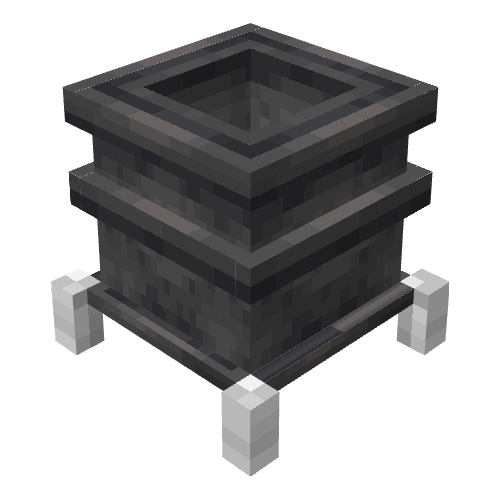
Simple machine that transforms blocks into liquids.
Quick answer
melter-1.21.1-1.8.2 targets 1.21.1 with NeoForge. The project page does not say whether this file belongs on the client, dedicated server, or both. No extra mods listed for this file.
Where it goes
The project page does not say whether this file belongs on the client, dedicated server, or both.
The source does not explicitly classify this release as client-only or server-only.
melter-1.21.1-1.8.2. Change the file and its required mods may change too.
This file does not list any required mods. Do not add a library just because a different file uses it.
4 extra mods were pulled in by other dependencies. Indented rows show who needs each one. We only count dependency files that match this setup. A file for another loader does not fill the gap.
Before you install it
Built for melter-1.21.1-1.8.2. Pick another file and the loader, install side or required mods may change.
Use melter-1.21.1-1.8.2. It targets 1.21.1 with NeoForge; another release may have different loader, side or dependency requirements.
This file does not list any required mods. Do not add a library just because a different file uses it.
The project page does not say whether this file belongs on the client, dedicated server, or both.
Use the “Get this file” button beside melter-1.21.1-1.8.2. It opens that exact file at the source.
About this project
A simple melter block that turn blocks into liquid.
Intended for modpacks. Use as you see fit.
Not providing any recipe at the moment.
Designed to work with create but it's optional.
High tier heat sources are from Create.
Huge thanks to MihajloNesic for the big contribution to the mod.
#Settings for the melter
[melter]
#How much liquid fits into the melter, in mB
#Range: > 1
capacity = 1000
#How much liquid generates per tick, in mB
#Range: > 1
liquidPerTick = 2
#List of heat source blocks or fluids. Each element in a list must follow the order: type (block, fluid), name, heat level (1-10), additional information shown in JEI
heatSources = [
    ["block", "minecraft:torch", "1", ""],
    ["block", "minecraft:soul_torch", "1", ""],
    ["block", "minecraft:wall_torch", "1", ""],
    ["block", "minecraft:soul_wall_torch", "1", ""],
    ["block", "minecraft:fire", "2", ""],
    ["block", "minecraft:soul_fire", "2", ""],
    ["block", "minecraft:campfire", "2", ""],
    ["block", "minecraft:soul_campfire", "2", ""],
    ["block", "minecraft:magma_block", "3", ""],
    ["fluid", "minecraft:lava", "4", ""],
    ["block", "create:lit_blaze_burner", "2", "Lit"],
    ["block", "create:blaze_burner/fading", "3", "Heated"],
    ["block", "create:blaze_burner/kindled", "3", "Heated"],
    ["block", "create:blaze_burner/seething", "5", "Super-Heated"]
]
{
  "type": "melter:melting",
  "input": {
    "tag": "forge:cobblestone",
    "count": 1
  },
  "output": {
    "fluid": "minecraft:lava",
    "amount": 250
  },
  "processingTime": 500
}
{
  "type": "melter:melting",
  "input": {
    "tag": "forge:cobblestone",
    "count": 1
  },
  "output": {
    "fluid": "minecraft:lava",
    "amount": 250
  },
  "processingTime": 500,
  "minimumHeat": 8
}
//.melterMelting(OUTPUT_FLUID,INPUT_BLOCK).processingTime(INT);
//.minimumHeat(INT) OPTIONAL
event.recipes.melterMelting(Fluid.of('minecraft:water', 200),"#minecraft:leaves").processingTime(200); //Water generator
event.recipes.melterMelting(Fluid.of('minecraft:lava', 250),"#forge:cobblestone").processingTime(1000); //Lava generator
event.recipes.melterMelting(Fluid.of('minecraft:lava', 250),"#forge:cobblestone").processingTime(1000).minimumHeat(8); //Lava generator
addRecipe(String name, FluidStack outputFluid,Item inputItem, int processingTime, int minimumHeat)
<recipetype:melter:melting>.addRecipe("test_recipe",<fluid:minecraft:water> * 500,<item:minecraft:gravel>, 1000,8);
<recipetype:melter:melting>.addRecipe("test_recipe_2",<fluid:minecraft:lava> * 500,<item:minecraft:sand>, 200,2);
Project description from CurseForge.
Pick your setup
Choose the version and loader you play, then open the matching release.
Check the dependencies, then try the file in a copied instance before changing a world you care about.
Recent files
melter-1.21.1-1.8.2.jar
21 Jun 2026
melter-1.21.1-1.8.1.jar
21 Apr 2025
melter-1.21.1-1.8.0.jar
11 Apr 2025
melter-1.21.1-1.7.2.jar
24 Aug 2024
melter-1.21.1-1.7.1.jar
24 Aug 2024
melter-1.21.1-1.7.0.jar
24 Aug 2024
melter-1.21-1.6.1.jar
17 Aug 2024
melter-1.20.1-1.6.1.jar
12 Aug 2024
melter-1.20.1-1.6.1.jar
12 Aug 2024
melter-1.20.1-1.6.0.jar
14 Jul 2024
melter-1.20.1-1.5.1.jar
22 Sept 2023
melter-1.19.2-1.3.3.jar
22 Sept 2023
Looking for an older file? The official CurseForge project page is in Resources.
 mod
💩 Animals periodically drop manure, by default twice a day. Can be used as a bone meal substitute.
 mod
Discover, highlight, inspect, modify - your vanilla & modded mob encyclopedia
 mod
🗿 Adds a configurable chance for mobs to drop their head, using vanilla resources only.