Quick answer
Which EiraIRC (Discontinued) release should I use?
Latest stable file eirairc-mc1.8.9-4.9.12.jar
Game version 1.8.9
Loader Not required
EiraIRC (Discontinued) eirairc-mc1.8.9-4.9.12.jar targets 1.8.9. The project page does not say whether this file belongs on the client, dedicated server, or both. No extra mods listed for this file.
Where it goes
Is EiraIRC (Discontinued) required on the client, server, or both?
The project page does not say whether this file belongs on the client, dedicated server, or both.
Client Source doesn’t say
Dedicated server Source doesn’t say
Loader for this release No loader listed
Required install it here Optional supported, not mandatory Not supported do not install here Source doesn’t say do not assume
The source does not explicitly classify this release as client-only or server-only.
What else does EiraIRC (Discontinued) eirairc-mc1.8.9-4.9.12.jar need?
eirairc-mc1.8.9-4.9.12.jar. Change the file and its required mods may change too.
This file does not list any required mods. Do not add a library just because a different file uses it.
1 listed on this file 1 pulled in by one of those mods
Matching file found Matched file: eiramoticons-mc1.8.9-3.2.4.jar
Matching file found Matched file: eirairc-mc1.8.9-4.9.12.jar
1
extra mod was pulled in by another dependency.
Indented rows show who needs each one. We only count dependency files that match this setup. A file for another loader does not fill the gap.
Before you install it
Add EiraIRC (Discontinued) without breaking your instance.
Built for EiraIRC (Discontinued) eirairc-mc1.8.9-4.9.12.jar. Pick another file and the loader, install side or required mods may change.
- 01
Stick to this file
Use eirairc-mc1.8.9-4.9.12.jar. It targets 1.8.9; another release may have different loader, side or dependency requirements.
- 02
Bring the mods it needs
This file does not list any required mods. Do not add a library just because a different file uses it.
- 03
Put it on the correct side
The project page does not say whether this file belongs on the client, dedicated server, or both.
- 04
Pick the file you checked
Use the “Get this file” button beside eirairc-mc1.8.9-4.9.12.jar. It opens that exact file at the source.
About this project
What does EiraIRC (Discontinued) add?
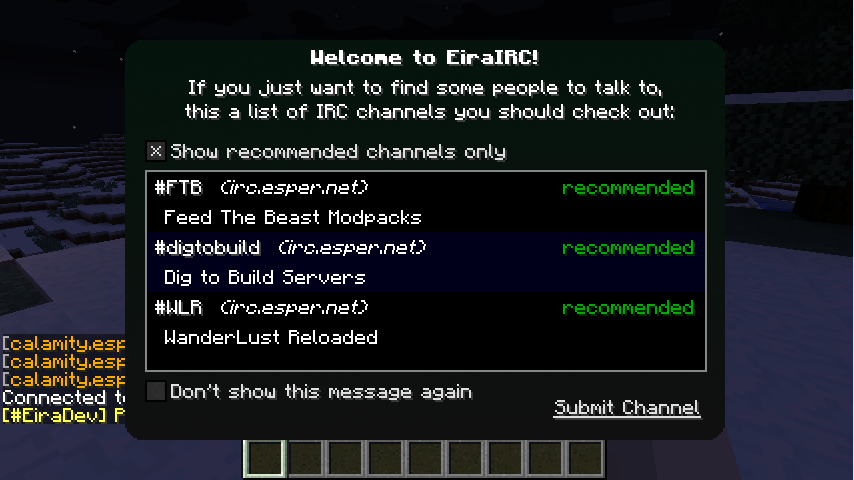
This mod connects Minecraft to IRC (Internet Relay Chat) channels. On a Minecraft client it acts like any other IRC client, on the server it turns into a bridge-bot. Configuration is highly customizable and the mod includes a few special features such as name colors, Twitch chat and screenshot upload.
If you enjoy my mods, please help me out on Patreon.
Features
- IRC Client (supports multiple servers/channels)
- Bridge Bot (IRC for Servers - relays Minecraft Chat <=> IRC)
- Twitch Chat (Integrate Twitch Chat into Minecraft, including name colors and emotes)
- Screenshot Upload & Share (automatically upload taken screenshots and share them in Minecraft or IRC)
- Screenshot Gallery (sorted by time taken, supports favorites and easy upload)
- Configurable Bridge Bot Commands (run ingame commands using IRC, such as /forge tps)
- Server Control (authenticated users can be given permission to run Minecraft OP commands and vice-versa)
- NickServ, Private Messages, Name Colors, !who command
Useful Links
Getting Started / Compatibility
Development Versions
Source Code on Github
Future Plans & Issues on GitHub
Minecraft Forum Thread
@BlayTheNinth on Twitter
EiraMoticons - get Twitch emotes and more for your Minecraft chat!
Installation Instructions
- Download and install the recommended Minecraft Forge for your Minecraft version.
- Download the latest EiraIRC version for your Minecraft version.
- Put the .jar file into the mods folder of your Minecraft installation.
- Start the game and use the GUI (default: I - or open chat and press Options in the corner) to set up your IRC connection
License
This mod along with it’s sourcecode is licensed under the MIT License:
Yes, you may redistribute it in your modpack.
Project description from CurseForge.
Pick your setup
EiraIRC (Discontinued) by Minecraft version and loader
Choose the version and loader you play, then open the matching release.
Minecraft version
1.8.9
1
loader build Minecraft version
1.8.8
1
loader build Minecraft version
1.8
1
loader build Minecraft version
1.7.10
1
loader build Minecraft version
1.7.2
1
loader build Minecraft version
1.6.4
1
loader build Check the dependencies, then try the file in a copied instance before changing a world you care about.
Recent files
EiraIRC (Discontinued) versions and loaders
10 Feb 2016
Client Source doesn’t say Server Source doesn’t say Dependencies No extras listed Listed on Release listing
Check the 1.8.9 setup → 10 Feb 2016
Client Source doesn’t say Server Source doesn’t say Dependencies No extras listed Listed on Release listing
Check the 1.7.10 setup → 9 Feb 2016
Client Source doesn’t say Server Source doesn’t say Dependencies No extras listed Listed on Release listing
Check the 1.8.9 setup → 9 Feb 2016
Client Source doesn’t say Server Source doesn’t say Dependencies No extras listed Listed on Release listing
Check the 1.7.10 setup → 6 Jan 2016
Client Source doesn’t say Server Source doesn’t say Dependencies No extras listed Listed on Release listing
Check the 1.8.9 setup → 6 Dec 2015
Client Source doesn’t say Server Source doesn’t say Dependencies No extras listed Listed on Release listing
Check the 1.8.8 setup → 6 Dec 2015
Client Source doesn’t say Server Source doesn’t say Dependencies No extras listed Listed on Release listing
Check the 1.8 setup → 6 Dec 2015
Client Source doesn’t say Server Source doesn’t say Dependencies No extras listed Listed on Release listing
Check the 1.7.10 setup → 26 Sept 2015
Client Source doesn’t say Server Source doesn’t say Dependencies No extras listed Listed on Release listing
Check the 1.8 setup → 26 Sept 2015
Client Source doesn’t say Server Source doesn’t say Dependencies No extras listed Listed on Release listing
Check the 1.7.10 setup → 8 Sept 2015
Client Source doesn’t say Server Source doesn’t say Dependencies No extras listed Listed on Release listing
Check the 1.8 setup → 8 Sept 2015
Client Source doesn’t say Server Source doesn’t say Dependencies No extras listed Listed on Release listing
Check the 1.7.10 setup →