Minecraft version
Back to mods 
CurseForge · Minecraft mod
JSON Paintings
Easily add custom paintings through a json file!
Choose a version Pick your version below, then grab the matching file.
Quick answer
Which JSON Paintings release should I use?
Latest stable file JSON-Paintings-v1.5.0-mc1.12.2.jar
Game version 1.12.2
Loader Forge
JSON Paintings JSON-Paintings-v1.5.0-mc1.12.2.jar targets 1.12.2 with Forge. The project page does not say whether this file belongs on the client, dedicated server, or both. No extra mods listed for this file.
Where it goes
Is JSON Paintings required on the client, server, or both?
The project page does not say whether this file belongs on the client, dedicated server, or both.
Client Source doesn’t say
Dedicated server Source doesn’t say
Loader for this release Forge
Required install it here Optional supported, not mandatory Not supported do not install here Source doesn’t say do not assume
The source does not explicitly classify this release as client-only or server-only.
What else does JSON Paintings JSON-Paintings-v1.5.0-mc1.12.2.jar need?
JSON-Paintings-v1.5.0-mc1.12.2.jar. Change the file and its required mods may change too.
This file does not list any required mods. Do not add a library just because a different file uses it.
This file does not list any required or optional mods.
Before you install it
Add JSON Paintings without breaking your instance.
Built for JSON Paintings JSON-Paintings-v1.5.0-mc1.12.2.jar. Pick another file and the loader, install side or required mods may change.
- 01
Stick to this file
Use JSON-Paintings-v1.5.0-mc1.12.2.jar. It targets 1.12.2 with Forge; another release may have different loader, side or dependency requirements.
- 02
Bring the mods it needs
This file does not list any required mods. Do not add a library just because a different file uses it.
- 03
Put it on the correct side
The project page does not say whether this file belongs on the client, dedicated server, or both.
- 04
Pick the file you checked
Use the “Get this file” button beside JSON-Paintings-v1.5.0-mc1.12.2.jar. It opens that exact file at the source.
About this project
What does JSON Paintings add?
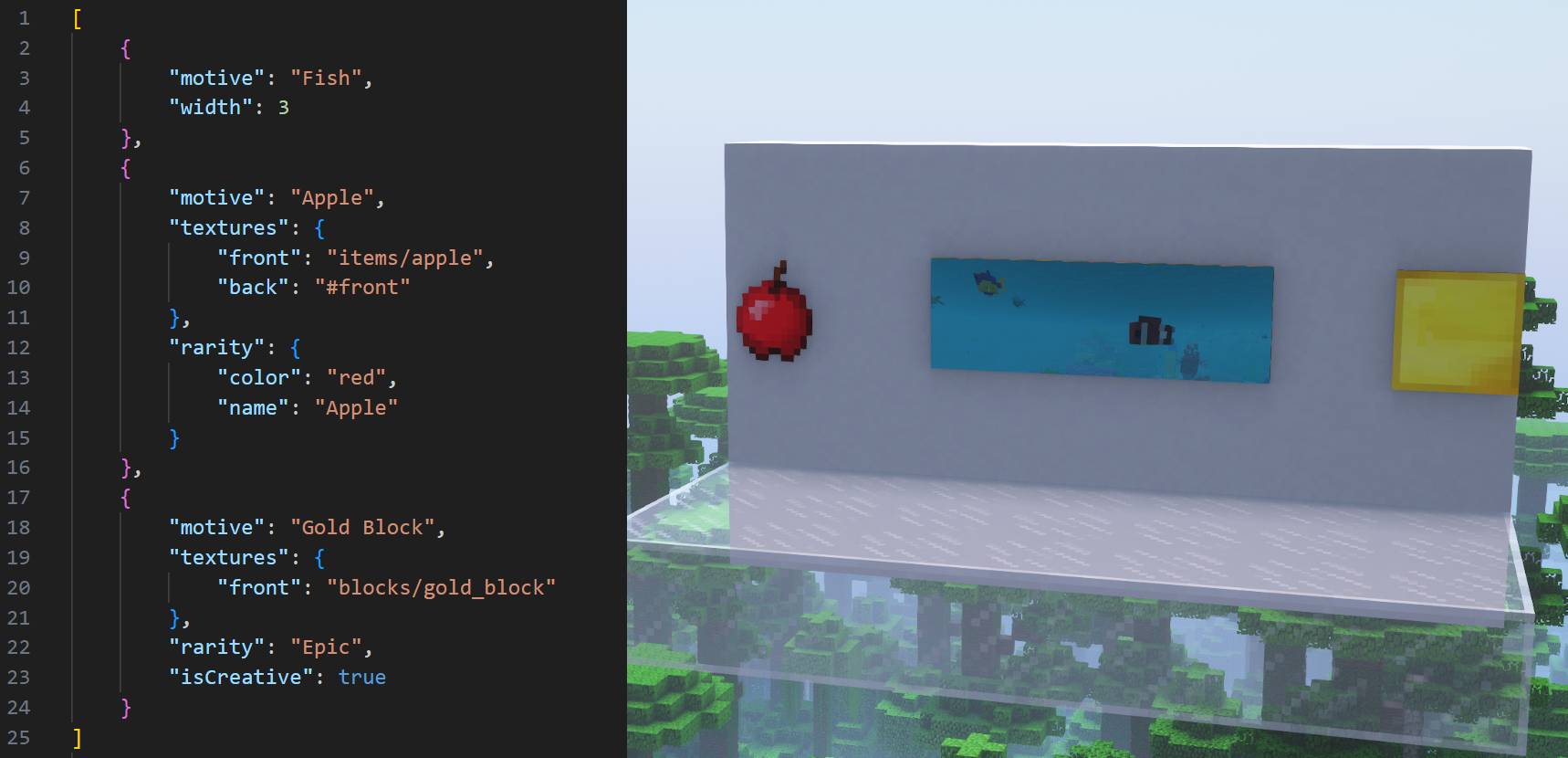
A mod that allows custom paintings to be added through a json file!


If you're a modpack developer wanting to add JSON Paintings to a modpack distributed outside of CurseForge or Modrinth, use File Director to avoid reuploading JSON Paintings' files.
JSON Paintings doesn't add any new painting entities/items or painting type handlers, but rather expands on vanilla's system, which means that this mod will work nicely with all other mods that don't override how paintings work!
Paintings added through this mod use their own textures instead of being stuck to using vanilla's painting atlas texture! This means that an infinite amount of paintings can be added, and that they can have larger sizes!
Paintings can also have their properties overridden! This could be used for example to give certain vanilla paintings custom item models or back and side textures that match the front.
More info about how to use JSON Paintings, including all possible customizations, can be found under the README.md on this mod's github page.
JSON Paintings added a new feature in v1.5.0 called Painting Packs (more info here), which serve as a convenient way to share your paintings or use paintings made by other players! These also support datapacks and mods for 1.21+ that add paintings! Tested datapacks and mods include:
- Absolem's Base Painting Pack
- Dark Paintings
- Macaw's Paintings (Note: don't use the 1.12 version)
- New Custom Paintings
Captured Paintings:
- When a player breaks a painting while sneaking, its painting's art type will be captured!
- When a player is using the pick-block feature on a painting, they can hold ctrl to capture its art type.
- Painting items with a captured art type have a tooltip, similar to 1.21+.
- All captured paintings appear in JEI, and in their own designated creative tab.
It's heavily recommended to use the Standalone Paintings++ "Painting Selection Gui" Module along side this, since it makes the process of selecting paintings far easier.
This mod is incompatible with the full Paintings++ mod because it overrides vanilla's painting system, but adding compatibility is planned in the future.
Direct contact: jbred.dev@gmail.com
Project description from CurseForge.
Pick your setup
JSON Paintings by Minecraft version and loader
Choose the version and loader you play, then open the matching release.
Check the dependencies, then try the file in a copied instance before changing a world you care about.
Recent files
JSON Paintings versions and loaders
JSON-Paintings-v1.5.0-mc1.12.2.jar
24 Aug 2026
Client Source doesn’t say Server Source doesn’t say Dependencies No extras listed Listed on Release listing
Check the 1.12.2 · Forge setup Forge1.12.2 release
JSON-Paintings-v1.4.0-mc1.12.2.jar
24 Oct 2025
Client Source doesn’t say Server Source doesn’t say Dependencies No extras listed Listed on Release listing
Check the 1.12.2 · Forge setup Forge1.12.2 release
1.3.0
JSON-Paintings-v1.3.0-mc1.12.2.jar
10 Jan 2024
Client Optional Server Optional Dependencies No extras listed Listed on Release listing
Check the 1.12.2 · Forge setup 1.12.2Forge release
JSON-Paintings-v1.2-mc1.12.2.jar
2 Nov 2022
Client Source doesn’t say Server Source doesn’t say Dependencies No extras listed Listed on Release listing
Check the 1.12.2 · Forge setup Forge1.12.2 release
JSON-Paintings-v1.1-mc1.12.2.jar
21 Oct 2022
Client Source doesn’t say Server Source doesn’t say Dependencies No extras listed Listed on Release listing
Check the 1.12.2 · Forge setup Forge1.12.2 release
JSON-Paintings-v1.0-mc1.12.2.jar
16 Oct 2022
Client Source doesn’t say Server Source doesn’t say Dependencies No extras listed Listed on Release listing
Check the 1.12.2 · Forge setup Forge1.12.2 release
Looking for an older file? The official CurseForge project page is in Resources.
 mod
mod Modrinth · Minecraft
Custom Totem Particles ported
Fanciest totem particles in the west! Ported
 mod
mod Modrinth · Minecraft
Modonomicon
Modonomicon is an in-game documentation mod inspired by Thaumcraft's Thaumonomicon and Patchouli, and aims to provide the best of both, with some unique flavors.
 mod
mod Modrinth · Minecraft
VFXWeaver API
Cinematic VFX library for Fabric. Create screen post-processing, camera shake, and block/entity highlights from your datapacks or server-side mods via a simple Java API.