Fabric Language Kotlin Needed by Good Flags b1.7.3-1.2.1
requiredNo matching file

Modrinth · Minecraft mod
Beta 1.7.3 mod that adds placeable flags that you can paint on.
Quick answer
Good Flags b1.7.3-1.2.1 targets b1.7.3 with babric, Fabric. Installation on the client is optional. Installation on the dedicated server is optional. 1 required mod needs a matching file.
Where it goes
Installation on the client is optional. Installation on the dedicated server is optional.
The source marks this as usable on both the client and server.
b1.7.3-1.2.1. Change the file and its required mods may change too.
Install Fabric Language Kotlin, Glass Networking, Glass Config API, StationAPI first, but 1 required mod has no matching file for this setup. Do not mix loader builds to force a match. 1 comes through another mod in the chain.
1 extra mod was pulled in by another dependency. Indented rows show who needs each one. We only count dependency files that match this setup. A file for another loader does not fill the gap.
Before you install it
Built for Good Flags b1.7.3-1.2.1. Pick another file and the loader, install side or required mods may change.
Use b1.7.3-1.2.1. It targets b1.7.3 with babric, Fabric; another release may have different loader, side or dependency requirements.
Install Fabric Language Kotlin, Glass Networking, Glass Config API, StationAPI first, but 1 required mod has no matching file for this setup. Do not mix loader builds to force a match. 1 comes through another mod in the chain.
Installation on the client is optional. Installation on the dedicated server is optional.
Use the “Get this file” button beside b1.7.3-1.2.1. It opens that exact file at the source.
About this project
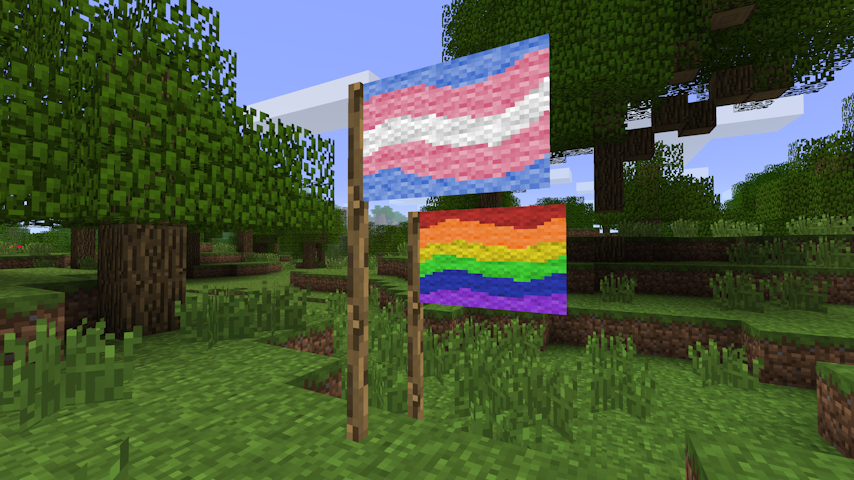
Beta 1.7.3 mod to add flags to the game. Flags have a 48×32 canvas supporting the 16 colours of
wool, and can be painted on by players by right-clicking the flag.
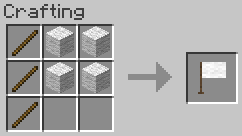
3x Stick + 4x Wool → 1x Flag. Any wool can be used.
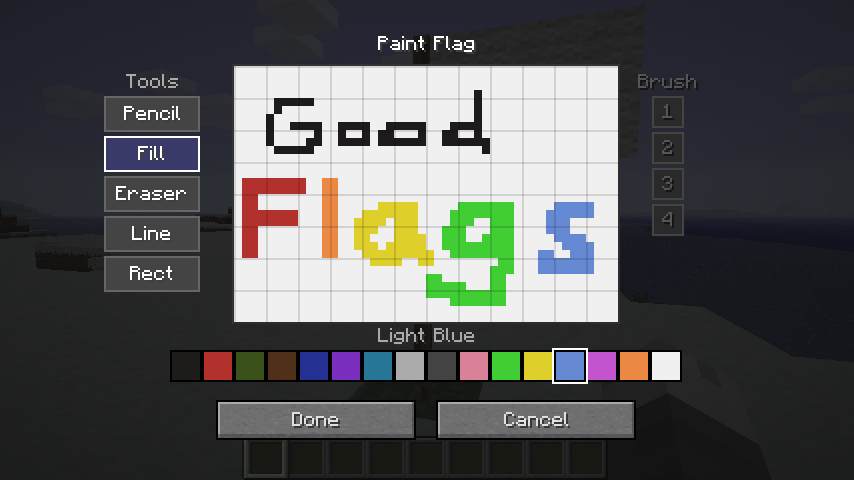
Right-clicking a placed flag pole opens the paint editor.
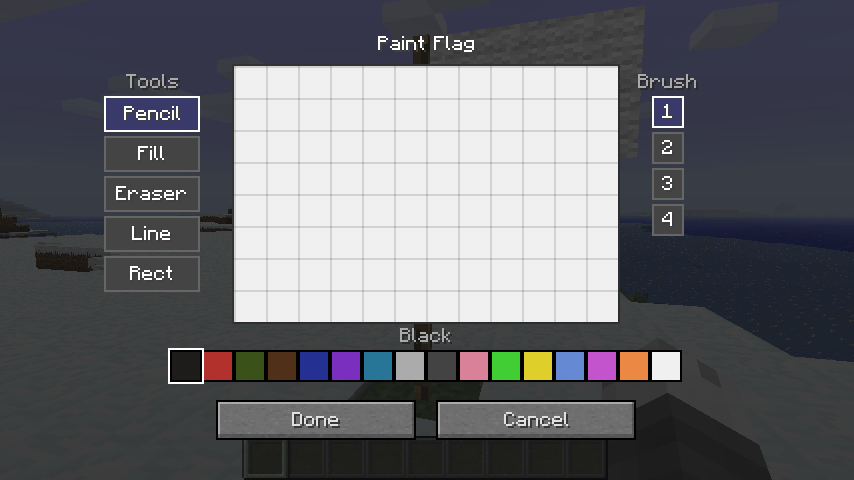
The flag's canvas is 48 × 32 pixels using the 16 wool colours as a palette.
| Tool | Description |
|---|---|
| Pencil | Freehand drawing. Respects brush size. |
| Eraser | Erases pixels back to white. Respects brush size. |
| Fill | Flood-fills a contiguous region with the selected colour. |
| Line | Draws a straight line between two points. Respects brush size. |
| Rect | Draws a filled rectangle. |
| Circle | Draws a filled ellipse. |
The paint screen supports up to 32 levels of undo/redo history.
| Action | Shortcut |
|---|---|
| Undo | Ctrl+Z |
| Redo | Ctrl+Y or Ctrl+Shift+Z |
Breaking a painted flag drops it as an item that carries the full pixel data. Placing the item
down restores the original design exactly.
A downsampled miniature of the flag's design is rendered on top of the item icon in inventory
slots, giving you a quick visual reference without needing to place the flag.
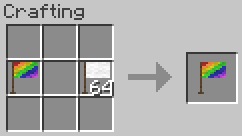
Place a blank flag and a painted flag together anywhere in the crafting grid to produce a
copy of the painted flag. The painted source is not consumed.
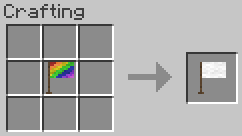
Place a painted flag alone in the crafting grid to receive a blank flag back.
Configuration is exposed via Glass Config API and
can be edited in-game with Mod Menu Babric.
| Option | Default | Description |
|---|---|---|
| Item Renderer Enabled | true |
Draw the flag preview on the item icon in inventory. |
| Item Texture Resolution | 16 |
Base icon resolution in pixels; increase for HD texture packs. |
| Flag Preview X | 3 |
X offset of the preview region within the item icon. |
| Flag Preview Y | 0 |
Y offset of the preview region within the item icon. |
| Flag Preview Width | 12 |
Width of the preview region (item pixels). |
| Flag Preview Height | 8 |
Height of the preview region (item pixels). |
This mod has no known compatibility issues. It adds explicit compatibility with
Always More Items and
Entity Culling.
This mod is licensed under the MIT license.
Project description from Modrinth.
Pick your setup
Choose the version and loader you play, then open the matching release.
Check the dependencies, then try the file in a copied instance before changing a world you care about.
Recent files
good-flags-1.2.1.jar
13 Jun 2026
good-flags-1.2.0.jar
13 Jun 2026
good-flags-1.1.1.jar
12 Apr 2026
good-flags-1.1.0.jar
11 Apr 2026
good-flags-1.0.2.jar
8 Apr 2026
good-flags-1.0.1.jar
8 Apr 2026
good-flags-1.0.0.jar
8 Apr 2026
Looking for an older file? The official Modrinth project page is in Resources.
 mod
The Mod/Plugin Introduces Nexa Ai Agent into the Minecraft. Your sidekick in minecraft! Accessible from the chat. You can talk to it anytime, even ask it to do actions. it has all context of you and environment so when it talks, you better listen.
 mod
Display GIFs PNGs & JPG in Screen
 mod
Collect fossils, insects, meteorites and more! A mod made for collectors


