

Minecraft version
Back to mods 
CurseForge · Minecraft mod
AzureLib
Java Minecraft mod using Bedrock models to create custom models and animations for items, blocks, entities
Choose a version Pick your version below, then grab the matching file.
Quick answer
Which AzureLib release should I use?
Latest stable file azurelib-neo-26.3-4.1.4.jar
Game version 26.3
Loader NeoForge
azurelib-neo-26.3-4.1.4.jar targets 26.3 with NeoForge. The project page does not say whether this file belongs on the client, dedicated server, or both. No extra mods listed for this file.
Where it goes
Is AzureLib required on the client, server, or both?
The project page does not say whether this file belongs on the client, dedicated server, or both.
Client Source doesn’t say
Dedicated server Source doesn’t say
Loader for this release NeoForge
Required install it here Optional supported, not mandatory Not supported do not install here Source doesn’t say do not assume
The source does not explicitly classify this release as client-only or server-only.
What else does azurelib-neo-26.3-4.1.4.jar need?
azurelib-neo-26.3-4.1.4.jar. Change the file and its required mods may change too.
This file does not list any required mods. Do not add a library just because a different file uses it.
This file does not list any required or optional mods.
Before you install it
Add AzureLib without breaking your instance.
Built for azurelib-neo-26.3-4.1.4.jar. Pick another file and the loader, install side or required mods may change.
- 01
Stick to this file
Use azurelib-neo-26.3-4.1.4.jar. It targets 26.3 with NeoForge; another release may have different loader, side or dependency requirements.
- 02
Bring the mods it needs
This file does not list any required mods. Do not add a library just because a different file uses it.
- 03
Put it on the correct side
The project page does not say whether this file belongs on the client, dedicated server, or both.
- 04
Pick the file you checked
Use the “Get this file” button beside azurelib-neo-26.3-4.1.4.jar. It opens that exact file at the source.
About this project
What does AzureLib add?



AzureLib is an animation and rendering engine for Minecraft mods. It started as a fork of GeckoLib 4.x and has since grown into its own library, with a reworked rendering pipeline, an extended Molang runtime, per-bone hitboxes, procedural animation tools and its own Blockbench plugin. If you've seen a creature in a modpack that crawls, lunges, bursts out of the ground or swings a weapon with real weight, there's a good chance AzureLib is animating it.
Players: you don't need to do anything with this mod. Install it if a mod you use requires it.

Features
Animation
- Keyframe animation from Blockbench: rotation, position and scale on any bone, for entities, items, armor and block entities.
- 30+ easing functions plus per-keyframe interpolation.
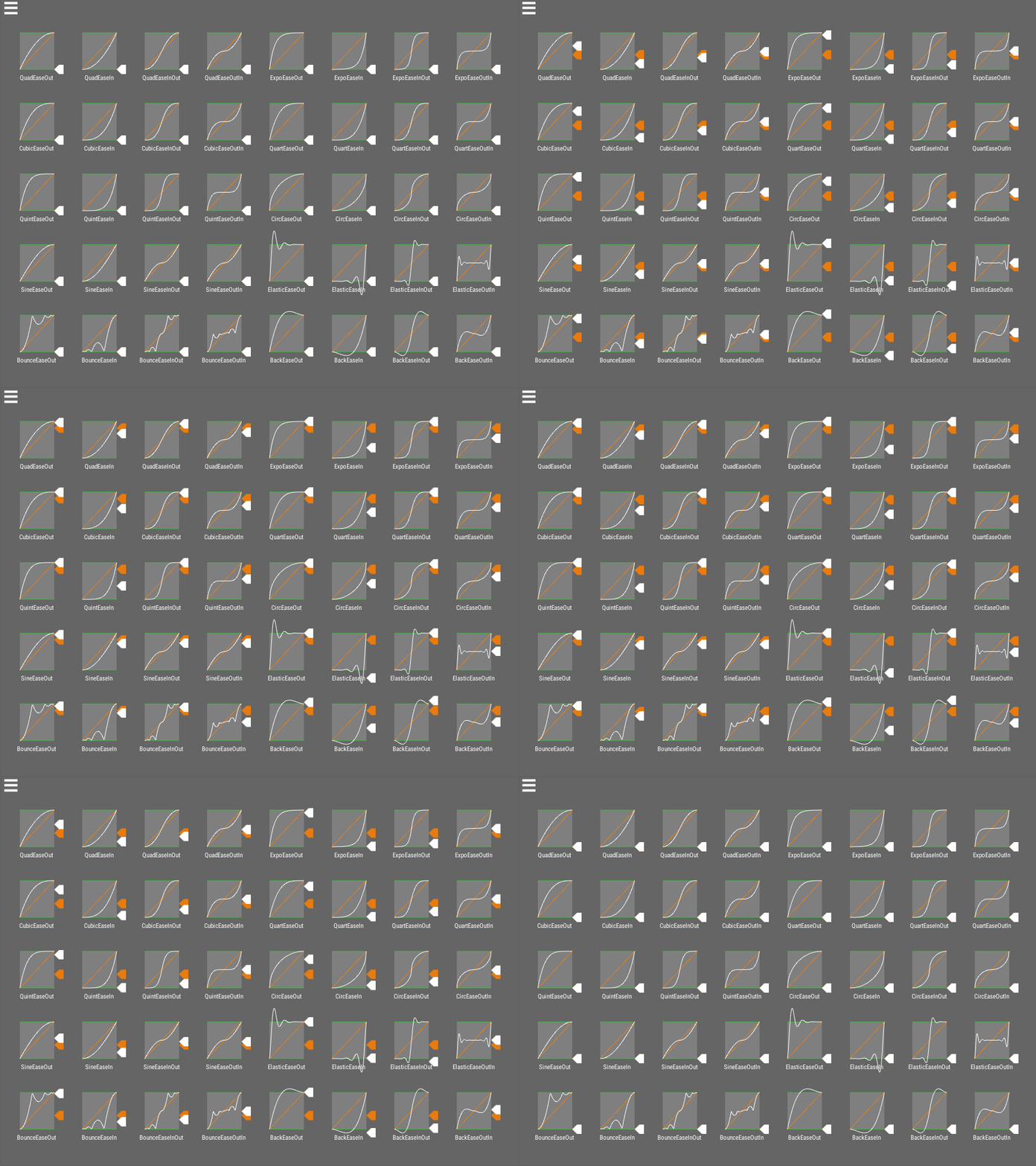 *Easing visualization by [noisecrime](https://github.com/noisecrime/Unity-EasingLibraryVisualisation)*
 - Multiple controllers at once: run a walk cycle, an attack and a head-look together without them fighting each other.
- Sound, particle and custom event keyframes: trigger effects and your own code at exact moments in an animation.
- Molang support extended toward Bedrock parity: strings, arrays,
for_each,this, and many additional entity queries.
Procedural & Gameplay Tools
- Multi-hitbox system: define hitboxes per bone that follow your animated model, so a long tail or a burrowing worm can be hit where it actually is.

- Bone transform & procedural pose API: drive bones from code on top of keyframed animation, including IK and bone constraints, spring-bone secondary motion, bone sockets/attachments, and 1D/2D blend spaces.

- Morph mod compatibility with Walkers and ReMorphed, so morphed players play your mob's animations.
Performance
- Reduced per-frame allocations and object pooling in the animation pipeline.
- Binary-search keyframe lookup for long animations.
- Optional bone and animation LOD to keep crowded scenes smooth (opt-in per renderer).
Tooling
- AzureLib Blockbench plugin with exports matched to the library, including baking IK into keyframes.
- Examples mod showing entities, items, armor and block entities working end to end.
Made with AzureLib
A few of the mods using AzureLib (see the Gallery tab for more):
- Arachnids
- Aftershock
- JCRAFT: Eyes of Ender (JoJo)
- Legends: Superheroes Unlimited
- Discerning The Eldritch
- Celestial Exploration
- Helios Divinity
Using AzureLib in your mod? Let me know on Discord and I'll add it here.
Supported Versions
| Minecraft | Loaders | AzureLib |
|---|---|---|
| 26.3 | NeoForge / Fabric | 4.1.x |
| 1.21.1 | NeoForge / Fabric | 3.2.x |
| 1.20.1 | Forge / Fabric | 3.2.x |
| 1.18.2 | Forge / Fabric | 3.3.x |
| 1.12.2 | Forge | 1.1.x |
| 1.7.10 | Forge | 1.1.x |
| Beta 1.7.3 | Babric / Ornithe | 1.1.x |
For Developers
Full setup for each loader, plus guides for entities, items, armor and block entities and migrating from GeckoLib, is on the AzureLib wiki.
Support: AzureLib is maintained independently. Questions and bug reports are welcome on Discord or the issue tracker, but I can only help with AzureLib, not GeckoLib.
Need a server to play with friends? Rent a ready-to-go server from BisectHosting!
Pick a plan (4GB or more) and use code azuredoom for 25% off your first month.
Project description from CurseForge.
Pick your setup
AzureLib by Minecraft version and loader
Choose the version and loader you play, then open the matching release.
Minecraft version
26.3
2 loader buildsMinecraft version
26.2
2 loader buildsMinecraft version
26.1.2
2 loader buildsMinecraft version
1.21.1
3 loader buildsMinecraft version
1.20.1
4 loader buildsForge azurelib-neo-1.20.1-3.2.4.jar 7
stable files
· 7 total · 30 Oct 2026Fabric azurelib-fabric-1.20.1-3.2.4.jar 7
stable files
· 7 total · 30 Oct 2026Quilt azurelib-fabric-1.20.1-3.2.4.jar 7
stable files
· 7 total · 30 Oct 2026NeoForge azurelib-neo-1.20.1-3.2.4.jar 7
stable files
· 7 total · 30 Oct 2026
Minecraft version
1.19.2
3 loader buildsMinecraft version
1.18.2
3 loader buildsMinecraft version
1.12.2
1 loader buildMinecraft version
1.7.10
1 loader buildCheck the dependencies, then try the file in a copied instance before changing a world you care about.
Recent files
AzureLib versions and loaders
azurelib-neo-26.3-4.1.4.jar
30 Oct 2026
Client Source doesn’t say Server Source doesn’t say Dependencies No extras listed Listed on Release listing
Check the 26.3 · NeoForge setup NeoForge26.3 release
azurelib-fabric-26.3-4.1.4.jar
30 Oct 2026
Client Source doesn’t say Server Source doesn’t say Dependencies 1 required · 1 unchecked Listed on Release listing
Check the 26.3 · Fabric setup Fabric26.3 release
azurelib-fabric-1.21.1-3.2.4.jar
30 Oct 2026
Client Source doesn’t say Server Source doesn’t say Dependencies 1 required · 1 unchecked Listed on Release listing
Check the 1.21.1 · Fabric setup Fabric1.21.1Quilt release
azurelib-neo-1.21.1-3.2.4.jar
30 Oct 2026
Client Source doesn’t say Server Source doesn’t say Dependencies No extras listed Listed on Release listing
Check the 1.21.1 · NeoForge setup 1.21.1NeoForge release
azurelib-neo-1.20.1-3.2.4.jar
30 Oct 2026
Client Source doesn’t say Server Source doesn’t say Dependencies No extras listed Listed on Release listing
Check the 1.20.1 · Forge setup 1.20.1ForgeNeoForge release
azurelib-fabric-1.20.1-3.2.4.jar
30 Oct 2026
Client Source doesn’t say Server Source doesn’t say Dependencies 2 required · 2 unchecked Listed on Release listing
Check the 1.20.1 · Fabric setup Fabric1.20.1Quilt release
azurelib-fabric-1.18.2-3.3.4.jar
30 Oct 2026
Client Source doesn’t say Server Source doesn’t say Dependencies 2 required · 2 unchecked Listed on Release listing
Check the 1.18.2 · Fabric setup Fabric1.18.2Quilt release
azurelib-forge-1.18.2-3.3.4.jar
30 Oct 2026
Client Source doesn’t say Server Source doesn’t say Dependencies No extras listed Listed on Release listing
Check the 1.18.2 · Forge setup Forge1.18.2 release
1.1.5
azurelib-forge-1.12.2-1.1.5.jar
30 Oct 2026
Client Optional Server Optional Dependencies No extras listed Listed on Release listing
Check the 1.12.2 · Forge setup 1.12.2Forge release
1.1.5
azurelib-forge-1.12.2-1.1.5.jar
30 Oct 2026
Client Source doesn’t say Server Source doesn’t say Dependencies No extras listed Listed on Release listing
Check the 1.12.2 · Forge setup Forge1.12.2 release
azurelib-forge-1.7.10-1.1.5.jar
30 Oct 2026
Client Source doesn’t say Server Source doesn’t say Dependencies No extras listed Listed on Release listing
Check the 1.7.10 · Forge setup Forge1.7.10 release
1.1.3
azurelib-ornithe-b1.7.3-1.1.3.jar
30 Oct 2026
Client Optional Server Optional Dependencies 1 required · 1 unchecked Listed on Release listing
Check the b1.7.3 · ornithe setup b1.7.3ornithe release
Looking for an older file? The official CurseForge project page is in Resources.
 mod
mod CurseForge + Modrinth · Minecraft
Cobblemon Pokedex Network
The mod introduces shared Pokémon discovery data, allowing players to see complete information about Pokémon scanned by others. It also adds catch info to the Pokédex, including who caught each Pokémon first and when
 mod
mod CurseForge + Modrinth · Minecraft
Super Factory Manager Retro
Build Super Factory Manager programs on a visual node canvas instead of writing SFML by hand. Drag nodes, wire them together, search items and fluids by name, and import/export programs you have already written.
 mod
mod CurseForge + Modrinth · Minecraft
Advanced Memory Card
Advanced memory card provides powerful automatic configuration capability for Applied Energistics 2 system. It can simplify repetitive configuration tasks and realize efficient batch deployment of equipment settings.