Minecraft version
Back to mods 
CurseForge · Minecraft mod
Custom Cursor
Give yourself the powers of a custom cursor! Upload an image, adjust, and enjoy!
Choose a version Pick your version below, then grab the matching file.
Quick answer
Which Custom Cursor release should I use?
beta file Custom cursorNeoforge 26.3-4.0.1
Game version 26.3
Loader NeoForge
Custom cursorNeoforge 26.3-4.0.1 targets 26.3 with NeoForge. The project page does not say whether this file belongs on the client, dedicated server, or both. No extra mods listed for this file.
Where it goes
Is Custom Cursor required on the client, server, or both?
The project page does not say whether this file belongs on the client, dedicated server, or both.
Client Source doesn’t say
Dedicated server Source doesn’t say
Loader for this release NeoForge
Required install it here Optional supported, not mandatory Not supported do not install here Source doesn’t say do not assume
The source does not explicitly classify this release as client-only or server-only.
What else does Custom cursorNeoforge 26.3-4.0.1 need?
Custom cursorNeoforge 26.3-4.0.1. Change the file and its required mods may change too.
This file does not list any required mods. Do not add a library just because a different file uses it.
This file does not list any required or optional mods.
Before you install it
Add Custom Cursor without breaking your instance.
Built for Custom cursorNeoforge 26.3-4.0.1. Pick another file and the loader, install side or required mods may change.
- 01
Stick to this file
Use Custom cursorNeoforge 26.3-4.0.1. It targets 26.3 with NeoForge; another release may have different loader, side or dependency requirements.
- 02
Bring the mods it needs
This file does not list any required mods. Do not add a library just because a different file uses it.
- 03
Put it on the correct side
The project page does not say whether this file belongs on the client, dedicated server, or both.
- 04
Pick the file you checked
Use the “Get this file” button beside Custom cursorNeoforge 26.3-4.0.1. It opens that exact file at the source.
About this project
What does Custom Cursor add?
Custom Cursor
This allows you to personalize your mouse icon to suit your style. You can configure click location, size, rotation, mirrorring. You can either add cursors to cursor folder, or access any texture from minecraft/any installed mod/resourcepack
On Minecraft versions >= 1.21.9 you can use dynamic cursor feature that allows you to have different cursor depending on context
Configuration screen 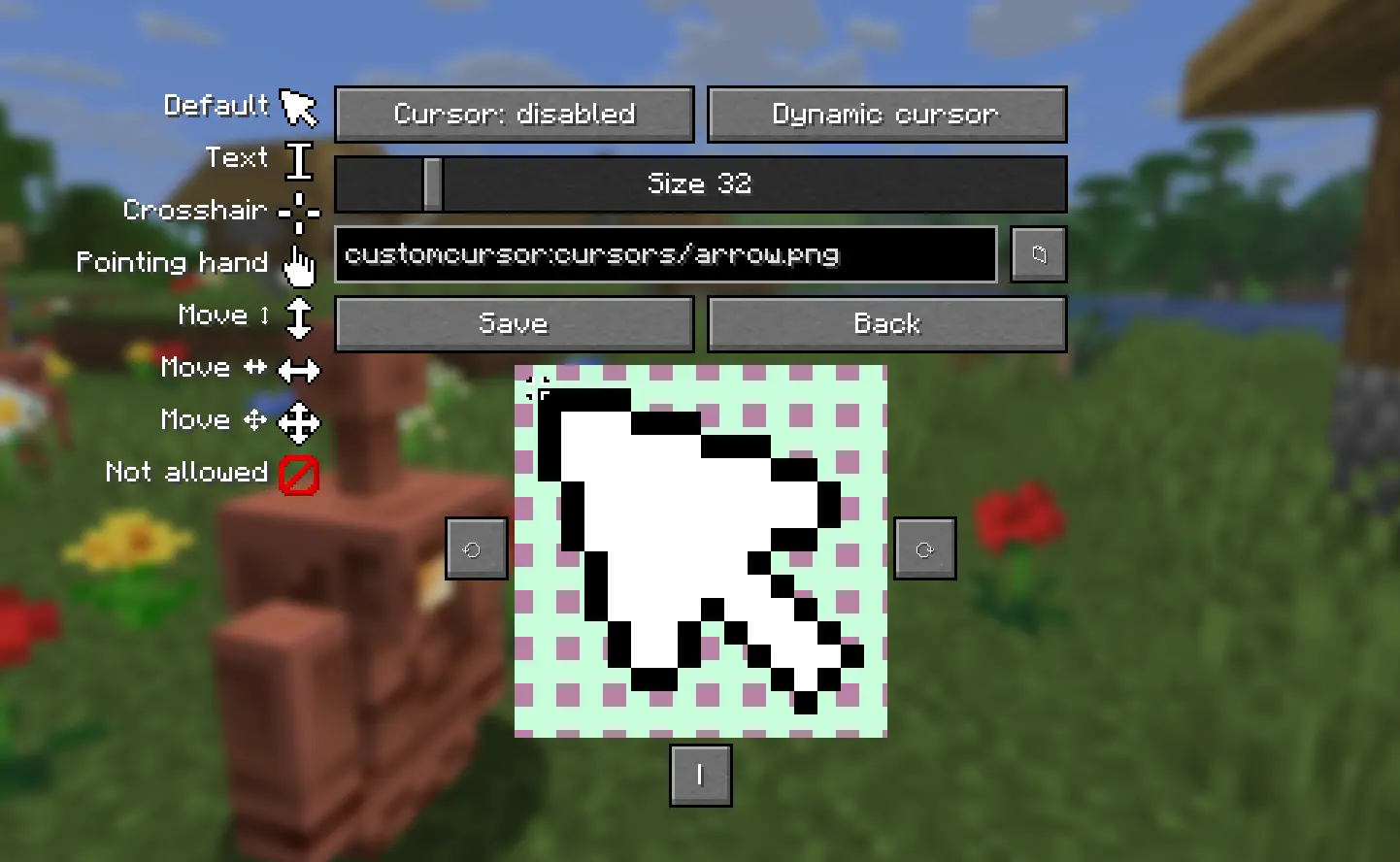
Compatibility warning
Even though mod provides builds for all minecraft versions since 1.21.1 only versions on list below are tested: 1.20.1, 1.20.4, 1.21.1, 1.21.4, 1.21.8, latest mc version
List may be adjusted in future based on statistics. Please report on github or discord if you found any issue
Project description from CurseForge.
Pick your setup
Custom Cursor by Minecraft version and loader
Choose the version and loader you play, then open the matching release.
Minecraft version
26.2
2 loader buildsMinecraft version
26.1.2
2 loader buildsMinecraft version
26.1.1
2 loader buildsMinecraft version
26.1
2 loader buildsMinecraft version
1.21.10
2 loader buildsMinecraft version
1.21.9
2 loader buildsMinecraft version
1.21.8
2 loader buildsMinecraft version
1.21.7
2 loader buildsMinecraft version
1.21.6
2 loader buildsMinecraft version
1.21.5
2 loader buildsMinecraft version
1.21.4
2 loader buildsShowing the newest 12 of 18 game versions. Older files are in the list below.
Check the dependencies, then try the file in a copied instance before changing a world you care about.
Recent files
Custom Cursor versions and loaders
Custom cursorNeoforge 26.3-4.0.1
customcursor-neoforge-4.0.1+26.3.jar
18 Oct 2026
Client Source doesn’t say Server Source doesn’t say Dependencies No extras listed Listed on Release listing
Check the 26.3 · NeoForge setup NeoForge26.3 beta
Custom cursorFabric 26.3-4.0.1
customcursor-fabric-4.0.1+26.3-dev.jar
18 Oct 2026
Client Source doesn’t say Server Source doesn’t say Dependencies 1 required · 1 unchecked Listed on Release listing
Check the 26.3 · Fabric setup Fabric26.3 beta
Custom cursorNeoforge 26.2-4.0.1
customcursor-neoforge-4.0.1+26.2.jar
18 Oct 2026
Client Source doesn’t say Server Source doesn’t say Dependencies No extras listed Listed on Release listing
Check the 26.2 · NeoForge setup NeoForge26.2 beta
Custom cursorFabric 26.2-4.0.1
customcursor-fabric-4.0.1+26.2-dev.jar
18 Oct 2026
Client Source doesn’t say Server Source doesn’t say Dependencies 1 required · 1 unchecked Listed on Release listing
Check the 26.2 · Fabric setup Fabric26.2 beta
Custom cursorNeoforge 26.1-4.0.1
customcursor-neoforge-4.0.1+26.1.jar
18 Oct 2026
Client Source doesn’t say Server Source doesn’t say Dependencies No extras listed Listed on Release listing
Check the 26.1.2 · NeoForge setup NeoForge26.126.1.126.1.2 beta
Custom cursorFabric 26.1-4.0.1
customcursor-fabric-4.0.1+26.1-dev.jar
18 Oct 2026
Client Source doesn’t say Server Source doesn’t say Dependencies 1 required · 1 unchecked Listed on Release listing
Check the 26.1.2 · Fabric setup Fabric26.126.1.126.1.2 beta
Custom cursorNeoforge 26.3-4.0.0
customcursor-neoforge-4.0.0+26.3.jar
17 Oct 2026
Client Source doesn’t say Server Source doesn’t say Dependencies No extras listed Listed on Release listing
Check the 26.3 · NeoForge setup NeoForge26.3 beta
Custom cursorFabric 26.3-4.0.0
customcursor-fabric-4.0.0+26.3-dev.jar
17 Oct 2026
Client Source doesn’t say Server Source doesn’t say Dependencies 1 required · 1 unchecked Listed on Release listing
Check the 26.3 · Fabric setup Fabric26.3 beta
Custom cursorNeoforge 26.2-4.0.0
customcursor-neoforge-4.0.0+26.2.jar
17 Oct 2026
Client Source doesn’t say Server Source doesn’t say Dependencies No extras listed Listed on Release listing
Check the 26.2 · NeoForge setup NeoForge26.2 beta
Custom cursorFabric 26.2-4.0.0
customcursor-fabric-4.0.0+26.2-dev.jar
17 Oct 2026
Client Source doesn’t say Server Source doesn’t say Dependencies 1 required · 1 unchecked Listed on Release listing
Check the 26.2 · Fabric setup Fabric26.2 beta
Custom cursorNeoforge 26.1-4.0.0
customcursor-neoforge-4.0.0+26.1.jar
17 Oct 2026
Client Source doesn’t say Server Source doesn’t say Dependencies No extras listed Listed on Release listing
Check the 26.1.2 · NeoForge setup NeoForge26.126.1.126.1.2 beta
Custom cursorFabric 26.1-4.0.0
customcursor-fabric-4.0.0+26.1-dev.jar
17 Oct 2026
Client Source doesn’t say Server Source doesn’t say Dependencies 1 required · 1 unchecked Listed on Release listing
Check the 26.1.2 · Fabric setup Fabric26.126.1.126.1.2 beta
Looking for an older file? The official CurseForge project page is in Resources.
 mod
CurseForge + Modrinth · Minecraft
World Portal
Create custom world portal to travel between dimensions.
 mod
CurseForge · Minecraft
Orbital Arsenal
Call down cinematic orbital strikes with a remote: erase the world with a sun lance, drop a spike from Saturn, make Orion fall or tear the land into the sky!
 mod
CurseForge · Minecraft
EMF Compat: Iron's Arms 'n Artifice
Fixes incorrect poses in third person when holding the guns from Iron's Arms 'n Artifice when having EMF mods installed