Roughly Enough Items Fabric/Forge/NeoForge (REI) Optional for Satchel Slots - V2.0.0 - Fabric
optionalMatching file found Matched file: [Fabric 1.21.11] v21.11.816
CurseForge · Minecraft mod
Satchel Slots is a mod focused on "physically" extending the inventory (adding slots) by equipping different satchels to grant different perks/benefits.
Quick answer
Satchel Slots - V2.0.0 - Fabric targets 1.21.11 with Fabric, Quilt. The project page does not say whether this file belongs on the client, dedicated server, or both. 1 required mod needs a matching file.
Where it goes
The project page does not say whether this file belongs on the client, dedicated server, or both.
The source does not explicitly classify this release as client-only or server-only.
Satchel Slots - V2.0.0 - Fabric. Change the file and its required mods may change too.
Install Fabric API, Trinkets (Fabric) first, but 1 required mod has no matching file for this setup. Do not mix loader builds to force a match. 2 come through another mod in the chain.
2 extra mods were pulled in by other dependencies. Indented rows show who needs each one. We only count dependency files that match this setup. A file for another loader does not fill the gap.
Before you install it
Built for Satchel Slots - V2.0.0 - Fabric. Pick another file and the loader, install side or required mods may change.
Use Satchel Slots - V2.0.0 - Fabric. It targets 1.21.11 with Fabric, Quilt; another release may have different loader, side or dependency requirements.
Install Fabric API, Trinkets (Fabric) first, but 1 required mod has no matching file for this setup. Do not mix loader builds to force a match. 2 come through another mod in the chain.
The project page does not say whether this file belongs on the client, dedicated server, or both.
Use the “Get this file” button beside Satchel Slots - V2.0.0 - Fabric. It opens that exact file at the source.
About this project


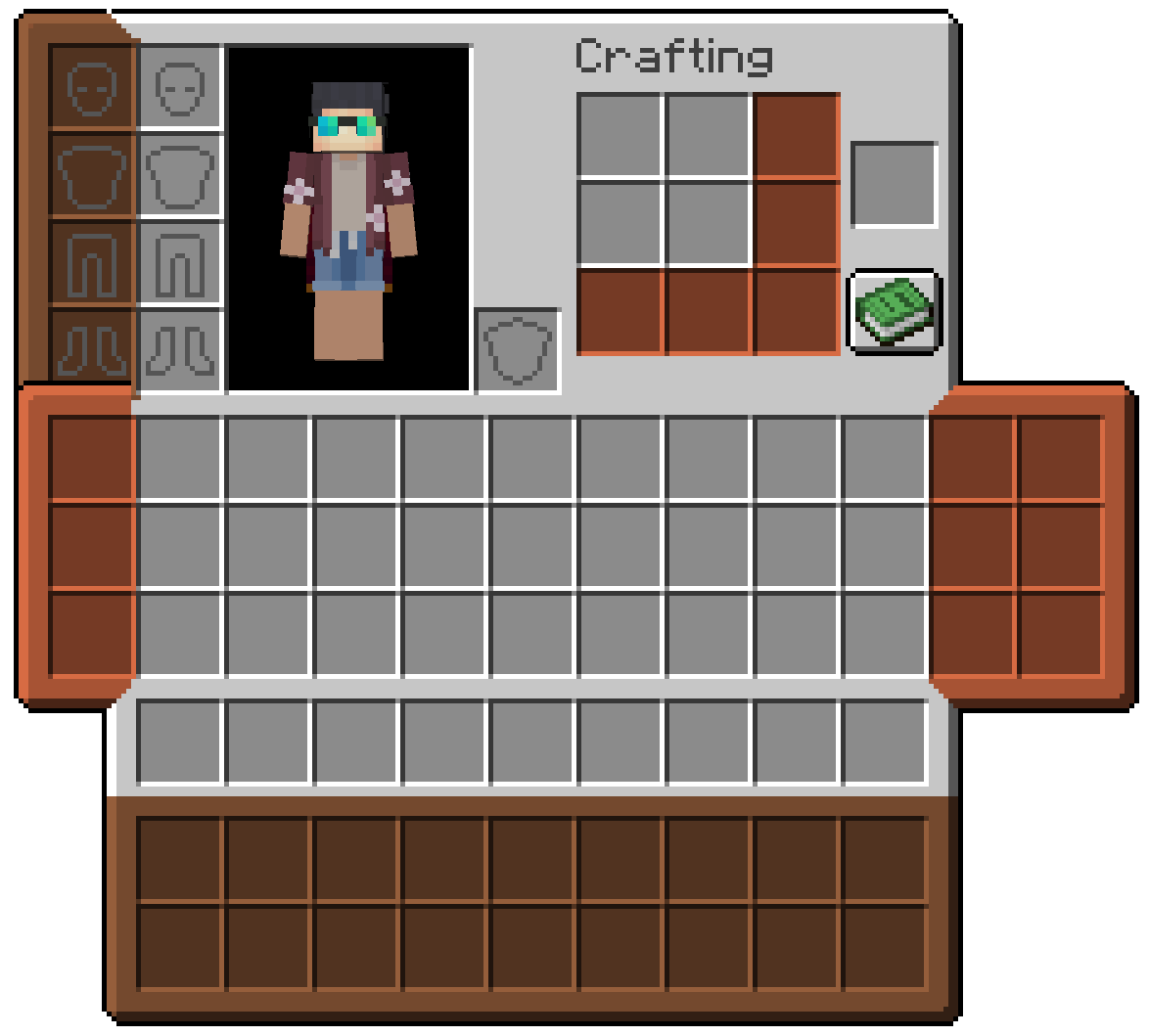
Wear real extra inventory slots on your character. Satchels, pouches, a crafter's bindle, and a cosmetic sheath each equip into a dedicated Trinkets slot and open as part of your inventory screen. Items live inside the bag itself, travel with the item, and work like normal container slots.
Inspired by Scout by Cynosphere and Satchels by makamys.
chest/back). Holds 9 items by default, or 18 when upgraded.legs/pouch). Holds 3 items per pouch by default, or 6 when upgraded. You can wear one on the left, one on the right, or both.chest/bindle). Adds a 3×3 crafting grid to your inventory so you can craft away from a table.head/sheath). Adds four cosmetic armor slots (head, chest, legs, feet) that change how you look without replacing your real armor or stats.Bag slots are disabled in Creative mode so creative inventory stays uncluttered.
Only one Satchel, Bindle, or Sheath can be worn at a time. Up to two Pouches (left and right) can be worn together.
The Satchel sits on your back and adds a row of storage below your main inventory in the player screen.
| Item | Capacity | Slot |
|---|---|---|
| Satchel | 9 slots | chest/back |
| Upgraded Satchel | 18 slots | chest/back |
Craft a Satchel Strap and Tanned Leather, then shape a Satchel from leather, string, and a stone button. Upgrade it at a smithing table.
Pouches clip to your legs and add vertical columns beside your inventory — one column per leg slot.
| Item | Capacity | Slot |
|---|---|---|
| Pouch | 3 slots | legs/pouch (left or right) |
| Upgraded Pouch | 6 slots | legs/pouch (left or right) |
Craft a Pouch from leather, string, and a stone button. Upgrade it at a smithing table.
When a Sheath is also equipped, the left pouch uses a matching frame texture so the two columns line up cleanly.
The Crafter's Bindle adds a portable 3×3 crafting grid to your inventory screen, built from a crafting table, tanned leather, and a satchel strap.
While the bindle is equipped, the recipe book button moves down to sit with the extension row. Craft as you would at a table, without placing a block in the world.
The Sheath adds cosmetic armor slots in a column beside your armor area. Place armor pieces (or compatible cosmetics) in the sheath to override your appearance on that layer only.
| Slot | Purpose |
|---|---|
| Head | Cosmetic helmet appearance |
| Chest | Cosmetic chest appearance |
| Legs | Cosmetic leggings appearance |
| Feet | Cosmetic boots appearance |
Your real armor slots are untouched. Other players see the cosmetic pieces you put in the sheath.
| Item | How to get it |
|---|---|
| Tanned Leather | Cook leather on a campfire |
| Satchel Strap | Tanned leather and string |
Most bag recipes use tanned leather, string, and stone buttons in familiar shaped patterns. Check the recipe book after you pick up the materials.
| Loader | Required |
|---|---|
| Fabric | Fabric API & Trinkets Updated |
Project description from CurseForge.
Pick your setup
Choose the version and loader you play, then open the matching release.
Check the dependencies, then try the file in a copied instance before changing a world you care about.
Recent files
satchel_slots-fabric-1.21.11-2.0.0.jar
31 Aug 2026
scout-1.18.2-1.1.2.jar
29 Dec 2023
scout-1.19-1.1.2.jar
29 Dec 2023
scout-1.19.2-1.1.1.jar
24 Dec 2023
scout-1.18.2-1.1.1.jar
24 Dec 2023
Looking for an older file? The official CurseForge project page is in Resources.
 mod
modA client-side visual chat HUD editor with customizable layouts, text styles, player colors, mentions, notifications, and a persistent command clipboard.
 mod
modProtect your lands using customizable gemstone wards with an intuitive GUI to manage players, flags, and visual borders.
 mod
modEnchantStats is the combat & magic sequel to AppleStats — enchanting your HUD with exact enchantment values, advanced tooltips, and monster combat stats.