Quick answer
Which Litematica Zone Focus release should I use?
beta file 0.1.3+1.21.11
Game version 1.21.11
Loader Fabric
Litematica Zone Focus 0.1.3+1.21.11 targets 1.21.11 with Fabric. It must be installed on the client. Do not install it on the dedicated server. All 3 required mods have matching files.
Where it goes
Is Litematica Zone Focus required on the client, server, or both?
It must be installed on the client. Do not install it on the dedicated server.
Client Required
Dedicated server Not supported
Loader for this release Fabric
Required install it here Optional supported, not mandatory Not supported do not install here Source doesn’t say do not assume
This file is marked client-only.
What else does Litematica Zone Focus 0.1.3+1.21.11 need?
0.1.3+1.21.11. Change the file and its required mods may change too.
Install Fabric API, MaLiLib, Litematica first. We found matching files for this game-version and loader setup. 16 come through another mod in the chain.
5 listed on this file 16 pulled in by those mods
Fabric API Needed by Litematica Zone Focus 0.1.3+1.21.11 requiredMatching file found Matched file: 0.141.6+1.21.11
Matching file found Matched file: 1.0.34+1.21.11
Mod Menu Optional for Litematica Zone Focus 0.1.3+1.21.11 optionalMatching file found Matched file: 17.0.1
MaLiLib Needed by Litematica Zone Focus 0.1.3+1.21.11 requiredMatching file found Matched file: 0.27.20
Litematica Needed by Litematica Zone Focus 0.1.3+1.21.11 requiredMatching file found Matched file: 0.26.16
voxy Needed by Litematica Material HUD & Chest Finder pulled inMatching file found Matched file: 0.2.16-beta
Matching file found Matched file: 2.8.4+1.21.11
Syncmatica Needed by Litematica Material HUD & Chest Finder pulled inMatching file found Matched file: 0.3.20
Matching file found Matched file: 2.8.2+1.21.10
Matching file found Matched file: mc1.21.11-0.8.12-fabric
Matching file found Matched file: 27.55.0.122
WTHIT Needed by Chest Tracker (Unofficial port) pulled inMatching file found Matched file: fabric-18.2.3
Jade 🔍 Needed by Chest Tracker (Unofficial port) pulled inMatching file found Matched file: 21.1.6+fabric
Matching file found Matched file: 3.8.2+1.21.11-fabric
Matching file found Matched file: 21.11.816+fabric
Matching file found Matched file: 5.2.16+1.21.11-fabric
EMI Needed by Chest Tracker (Unofficial port) pulled inNo matching file
Matching file found Matched file: 0.7.1
Matching file found Matched file: mc1.21.11-0.7.1
Matching file found Matched file: 8.10.9+1.21.11-fabric
Matching file found Matched file: fabric-0.11.2
16
extra mods were pulled in by other dependencies.
Indented rows show who needs each one. We only count dependency files that match this setup. A file for another loader does not fill the gap.
Before you install it
Add Litematica Zone Focus without breaking your instance.
Built for Litematica Zone Focus 0.1.3+1.21.11. Pick another file and the loader, install side or required mods may change.
- 01
Stick to this file
Use 0.1.3+1.21.11. It targets 1.21.11 with Fabric; another release may have different loader, side or dependency requirements.
- 02
Bring the mods it needs
Install Fabric API, MaLiLib, Litematica first. We found matching files for this game-version and loader setup. 16 come through another mod in the chain.
- 03
Put it on the correct side
It must be installed on the client. Do not install it on the dedicated server.
- 04
Pick the file you checked
Use the “Get this file” button beside 0.1.3+1.21.11. It opens that exact file at the source.
About this project
What does Litematica Zone Focus add?
Litematica Zone Focus is a client-side Litematica addon for Fabric that lets you build a schematic piece by piece.
A placed schematic is split into zones. You pick the zone you're working on right now, and the schematic is rendered, counted and verified only inside that zone — the rest stays out of the way until you get to it.
Requirements: Fabric Loader, Fabric API, MaLiLib and Litematica. Client-side only — nothing to install on the server, and it works on vanilla servers.
What it does
- Splits a schematic into zones — as a grid (set either the number of zones per axis or the size of one zone in blocks, with a live preview of how many zones you'll get and how big they'll be), by dragging out a zone with your mouse, or from a Litematica selection.
- Works inside the active zone only — rendering, misplaced-block detection, layer-by-layer building and every other calculation are limited to the zone you selected.
- Tracks progress for every zone — percentage, blocks remaining and distance to the zone. The list can be sorted by any of them, or by zone number.
- Reduces the rendering load on large schematics — geometry outside the active zone isn't built at all, so there's less to draw and fewer chunk rebuilds. How much you gain depends on the schematic and your zone size.
- Lets you mark zones with the mouse — a new hotbar slot: hold Attack (left mouse button by default) and drag to mark out a zone, release to save it.
- Verifies the schematic within the zone — the same breakdown as Litematica's Schematic Verifier: missing (red), wrong block (orange), wrong state (yellow), extra (light blue), drawn through walls. Toggled with a keybind.
- Updates in real time — place a block and its marker disappears, the progress bar moves instantly.
- Remembers your zones — zone layout and progress survive leaving a server or switching dimensions.
How to use it
- Place a schematic with Litematica as usual.
- Open the zones screen and split the placement into a grid — or mark a single zone by dragging with the mouse.
- Select a zone. Only that part of the schematic is rendered and counted.
- Build it, watch the progress bar, then move on to the next zone — manually or automatically.
Settings
Open with Ctrl + J, or from the zones screen. Everything above can be turned off individually; on top of that:
| Section |
What you can tweak |
| Zone automation |
Make the zone you're standing in the active one; move on to the next zone once there's nothing left to place in the current one. |
| Whole zone |
Ignore Litematica's layer range and count the entire zone. |
| Rendering |
Outlines for the active zone and for the rest of the grid (completed zones turn green), zone numbers with percentages in the world, visibility through blocks, outline draw distance 16–512. |
| Marking |
Clamp a marked zone to the schematic's bounds, ray distance 8–512. |
| Verification |
Semi-transparent block fill, highlight distance 8–256, marker limit per category 50–20000 — so a huge zone doesn't cost you frames. |
| Scan budget |
How many positions are checked per tick while calculating progress, 10k–4M. |
Keybinds
Only one is bound by default — the rest are up to you.
| Action |
Default |
| Open settings |
Ctrl + J |
| Zones screen |
unbound |
| Next / previous zone |
unbound |
| Mouse marking |
unbound |
| Verify zone |
unbound |
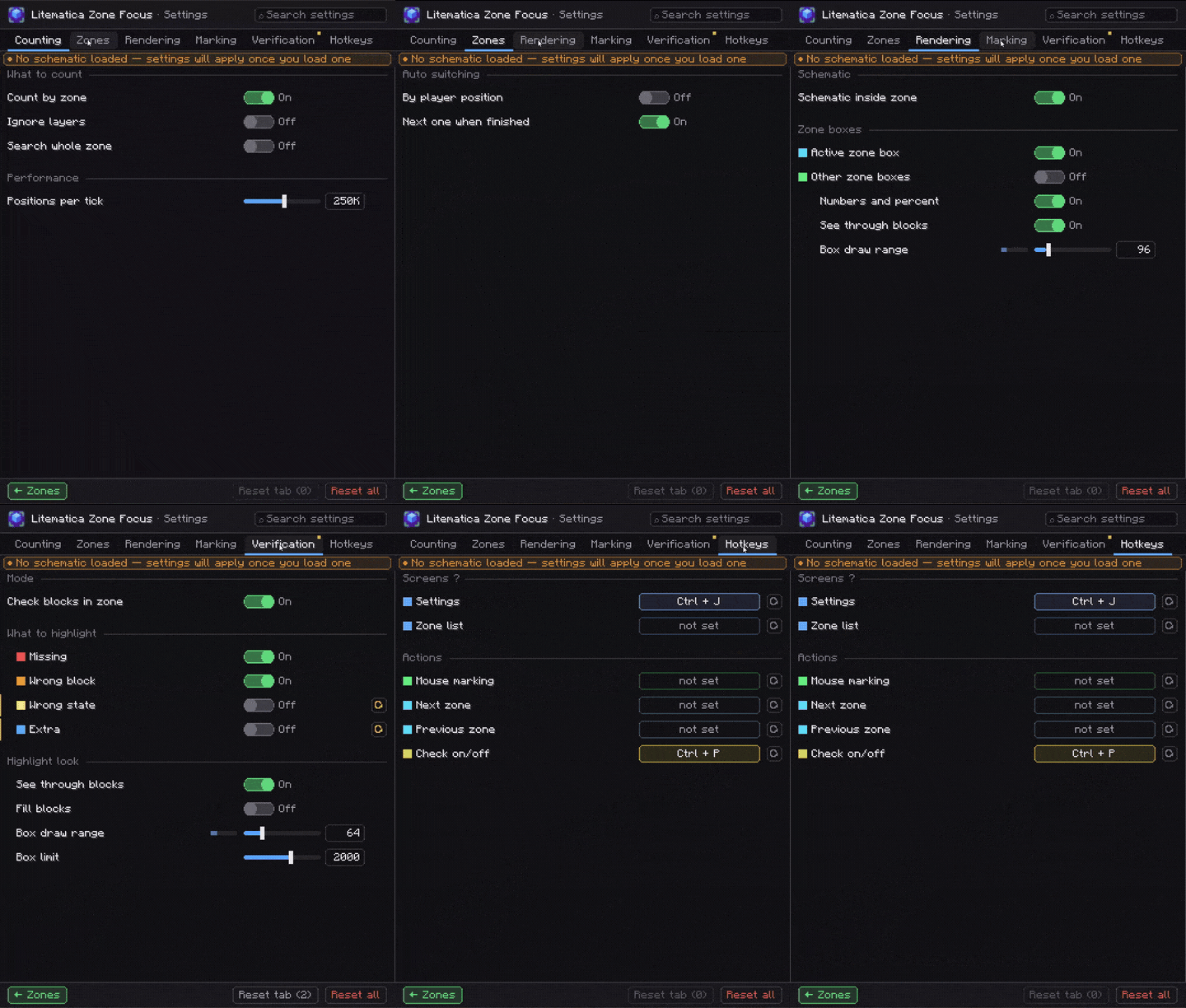
Pairs well with
Litematica Material HUD & Chest Finder — a material list HUD for the layer you're building, plus colored markers on the chests holding those blocks. Zone Focus tells you where to build; Material HUD tells you what to bring.

💬 Questions, bugs or ideas? Join the Discord
Project description from Modrinth.
Pick your setup
Litematica Zone Focus by Minecraft version and loader
Choose the version and loader you play, then open the matching release.
Minecraft version
26.3
1
loader build Minecraft version
26.2
1
loader build Minecraft version
1.21.11
1
loader build Check the dependencies, then try the file in a copied instance before changing a world you care about.
Recent files
Litematica Zone Focus versions and loaders
litematica-zone-focus-0.1.3+1.21.11.jar
23 Nov 2026
Client Required Server Not supported Dependencies 3 required · matched Listed on Release listing
Check the 1.21.11 · Fabric setup → litematica-zone-focus-0.1.3+26.2.jar
23 Nov 2026
Client Required Server Not supported Dependencies 3 required · 3 unchecked Listed on Release listing
Check the 26.2 · Fabric setup → litematica-zone-focus-0.1.3+26.3.jar
23 Nov 2026
Client Required Server Not supported Dependencies 3 required · 3 unchecked Listed on Release listing
Check the 26.3 · Fabric setup → litematica-zone-focus-0.1.2+1.21.11.jar
25 Oct 2026
Client Required Server Not supported Dependencies 3 required · 3 unchecked Listed on Release listing
Check the 1.21.11 · Fabric setup → litematica-zone-focus-0.1.2+26.2.jar
25 Oct 2026
Client Required Server Not supported Dependencies 3 required · 3 unchecked Listed on Release listing
Check the 26.2 · Fabric setup → litematica-zone-focus-0.1.2+26.3.jar
25 Oct 2026
Client Required Server Not supported Dependencies 3 required · 3 unchecked Listed on Release listing
Check the 26.3 · Fabric setup → litematica-zone-focus-0.1.1+26.3.jar
22 Oct 2026
Client Required Server Not supported Dependencies 3 required · 3 unchecked Listed on Release listing
Check the 26.3 · Fabric setup → litematica-zone-focus-0.1.0+26.3.jar
21 Oct 2026
Client Required Server Not supported Dependencies 3 required · 3 unchecked Listed on Release listing
Check the 26.3 · Fabric setup → litematica-zone-focus-0.0.8+26.3.jar
10 Oct 2026
Client Required Server Not supported Dependencies 3 required · 3 unchecked Listed on Release listing
Check the 26.3 · Fabric setup → litematica-zone-focus-0.0.8+26.2.jar
10 Oct 2026
Client Required Server Not supported Dependencies 3 required · 3 unchecked Listed on Release listing
Check the 26.2 · Fabric setup → litematica-zone-focus-0.0.7+26.3.jar
3 Oct 2026
Client Required Server Not supported Dependencies 3 required · 3 unchecked Listed on Release listing
Check the 26.3 · Fabric setup → litematica-zone-focus-0.0.6+26.3.jar
22 Sept 2026
Client Required Server Not supported Dependencies 3 required · 3 unchecked Listed on Release listing
Check the 26.3 · Fabric setup → 
 mod
 mod
 mod