Fabric API Needed by Easy Mod Sync 1.26.6.1
requiredMatching file found Matched file: 0.166.2+26.3

Modrinth · Minecraft mod
Automatically sync files from servers to client or clients to clients upon joining with end to end encryption.
Quick answer
Easy Mod Sync 1.26.6.1 targets 26.2, 26.3, 26.3-pre-1 with Fabric, Quilt. Installation on the client is optional. Installation on the dedicated server is optional. All 2 required mods have matching files.
Where it goes
Installation on the client is optional. Installation on the dedicated server is optional.
The source marks this as usable on both the client and server.
1.26.6.1. Change the file and its required mods may change too.
Install Fabric API, Cloth Config API first. We found matching files for this game-version and loader setup.
We only count dependency files that match this setup. A file for another loader does not fill the gap.
Before you install it
Built for Easy Mod Sync 1.26.6.1. Pick another file and the loader, install side or required mods may change.
Use 1.26.6.1. It targets 26.2, 26.3, 26.3-pre-1 with Fabric, Quilt; another release may have different loader, side or dependency requirements.
Install Fabric API, Cloth Config API first. We found matching files for this game-version and loader setup.
Installation on the client is optional. Installation on the dedicated server is optional.
Use the “Get this file” button beside 1.26.6.1. It opens that exact file at the source.
About this project
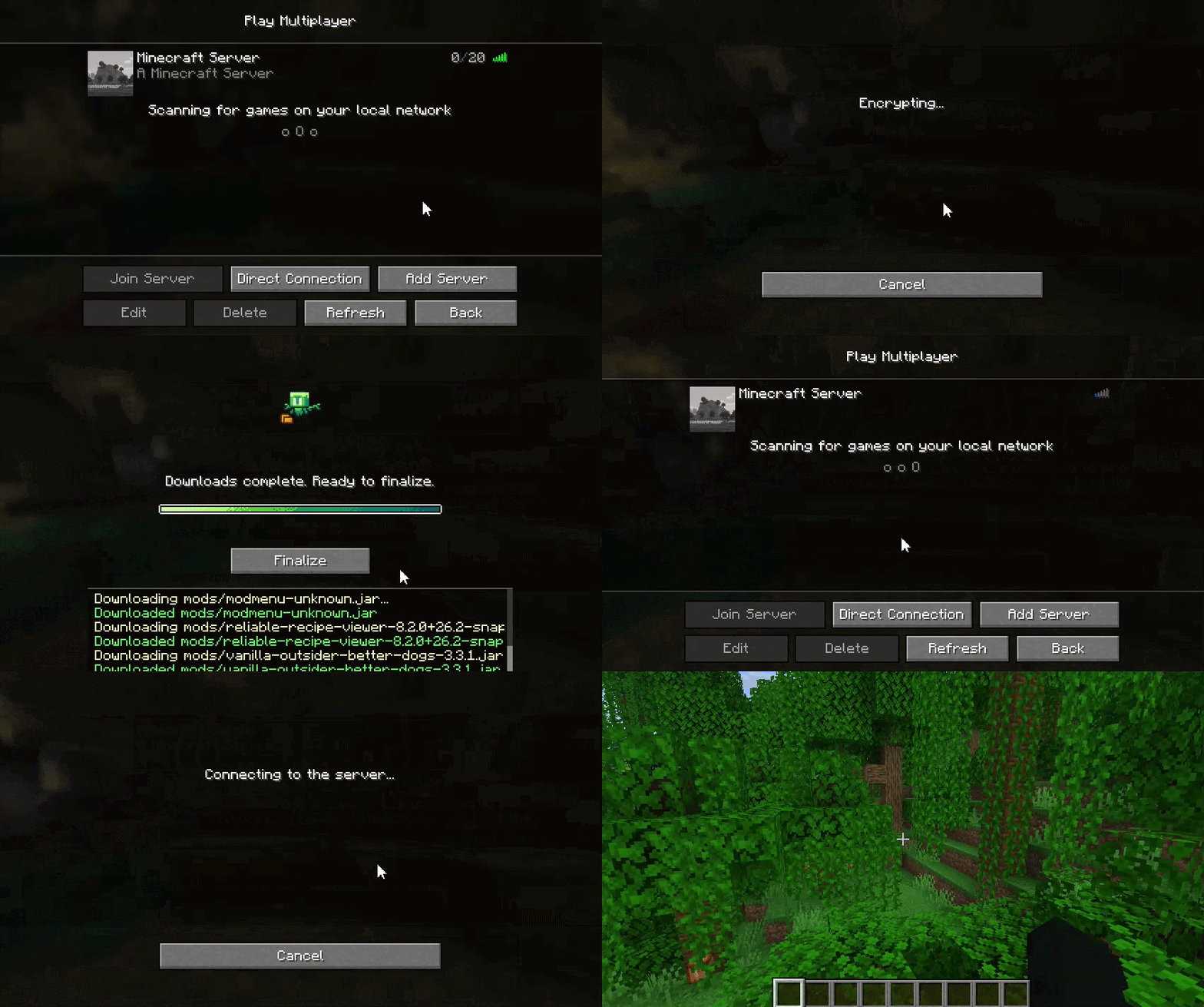
Easy Mod Sync is a Fabric mod designed to synchronize specified files and directories from a Minecraft server or another client to connecting clients. It ensures that players have the necessary configs, mods, resource packs, or other assets required by the server before joining.
EXTERNAL transfer method, file payloads are encrypted using AES-GCM with single-use Session IDs generated per client connection.config/easymodsync/temp/). They are only moved to the active game directory when the transfer is 100% complete without errors and the player clicks "Finalize".EasyModSync includes in-game commands to manage the file sync registry (config/easymodsync/file_tree.json). These commands require Operator (OP) level 3 or higher.
/easymodsync add_files <path>
Adds a specific file or recursively adds a directory to the sync list. The path must be relative to the server's root directory.
Example: /easymodsync add_files config/mypack/
/easymodsync remove_files <path>
Removes a specific file or all files within a directory from the sync list.
Example: /easymodsync remove_files config/old_settings.json
(Note: Command arguments support dynamic tab-completion for both local server files and currently tracked files to reduce lag that might come from recursively checking the full directory tree of the server. Due to this after typing a folder's name press space and then backspace to get an updated list of files and directories within the folder)
The mod's config is stored in config/easymodsync.json and can be edited directly or via Mod Menu/Cloth Config.
| Option | Type | Default | Description |
|---|---|---|---|
offerAdditionalFiles |
Boolean | true |
Toggles whether the server will prompt joining clients to download tracked files. |
fileTransferMethod |
Enum | MINECRAFT |
Determines the protocol used to send files. Options are MINECRAFT (packet-based) or EXTERNAL (HTTP-based). |
externalPort |
Integer | 25652 |
The port utilized by the built-in HTTP server if the EXTERNAL transfer method is selected. This port must be accessible to connecting clients (i.e the port needs to be open on the server or the client offering the files). |
Project description from Modrinth.
Pick your setup
Choose the version and loader you play, then open the matching release.
Showing the newest 12 of 32 game versions. Older files are in the list below.
Check the dependencies, then try the file in a copied instance before changing a world you care about.
Recent files
easymodsync-1.26.6.1.jar
23 Jun 2026
easymodsync-1.26.5.1.jar
16 May 2026
Looking for an older file? The official Modrinth project page is in Resources.
 mod
Farming automation mod. Planters and raised beds grow your crops and trees for you.
 mod
This mod lets you easily change the time and weather!
 mod
Compatibility fixes for running Flashback on NeoForge 1.21.1 through Sinytra Connector.