Back to mods
Search Carefully project artwork

CurseForge · Minecraft mod

Search Carefully

SearchCarefully is a Minecraft mod that adds a tactical search system similar to Tarkov, allowing players to progressively uncover items in containers.

Choose a version Pick your version below, then grab the matching file.

Quick answer

Which Search Carefully release should I use?

Updated 4 months ago
Latest stable file searchcarefully-1201.10.0.jar
Game version 1.20.1
Loader Forge

Search Carefully searchcarefully-1201.10.0.jar targets 1.20.1 with Forge. The project page does not say whether this file belongs on the client, dedicated server, or both. All 1 required mods have matching files.

Where it goes

Is Search Carefully required on the client, server, or both?

The project page does not say whether this file belongs on the client, dedicated server, or both.

Client Source doesn’t say
Dedicated server Source doesn’t say
Loader for this release Forge
Required install it here Optional supported, not mandatory Not supported do not install here Source doesn’t say do not assume

The source does not explicitly classify this release as client-only or server-only.

What else does Search Carefully searchcarefully-1201.10.0.jar need?

searchcarefully-1201.10.0.jar. Change the file and its required mods may change too.

All 1 required mods have matching files

Install RarityCore first. We found matching files for this game-version and loader setup. 19 come through another mod in the chain.

1 listed on this file 19 pulled in by those mods
RarityCore Needed by Search Carefully searchcarefully-1201.10.0.jar
required
Matching file found Matched file: raritycore-1201.14.4.jar

Sophisticated Core Needed by RarityCore
pulled in
Matching file found Matched file: sophisticatedcore-1.20.1-1.5.30.2465.jar
Apotheosis Needed by RarityCore
pulled in
Matching file found Matched file: Apotheosis-1.20.1-7.4.8.jar
Refined Storage Needed by RarityCore
pulled in
Matching file found Matched file: v1.12.4
Game Stages Needed by Apotheosis
pulled in
Matching file found Matched file: GameStages-Forge-1.20.1-15.0.2.jar
Jade 🔍 Needed by Apotheosis
pulled in
Matching file found Matched file: [Forge 1.20.1] 11.13.3
Just Enough Items (JEI) Needed by Apotheosis
pulled in
Matching file found Matched file: 15.74.0.234 for Forge 1.20.1
Placebo Needed by Apotheosis
pulled in
Matching file found Matched file: Placebo-1.20.1-8.6.3.jar
Curios API Needed by Apotheosis
pulled in
Matching file found Matched file: curios-forge-5.14.1+1.20.1.jar
Patchouli Needed by Apotheosis
pulled in
Matching file found Matched file: Patchouli-1.20.1-85-FORGE.jar
Enchantment Descriptions Needed by Apotheosis
pulled in
Matching file found Matched file: EnchantmentDescriptions-Forge-1.20.1-17.1.21.jar
The One Probe Needed by Apotheosis
pulled in
Matching file found Matched file: TheOneProbe - 1.20.1-10.0.5
Max Health Fix Needed by Apotheosis
pulled in
Matching file found Matched file: MaxHealthFix-Forge-1.20.1-12.0.4.jar
Apothic Attributes Needed by Apotheosis
pulled in
Matching file found Matched file: ApothicAttributes-1.20.1-1.3.7.jar
Bookshelf Needed by Game Stages
pulled in
Matching file found Matched file: Bookshelf-Forge-1.20.1-20.2.15.jar
MezzConfigGUI Needed by Just Enough Items (JEI)
pulled in
Matching file found Matched file: MezzConfig GUI mc1.20.1-0.5.11 for Forge
MezzConfig Needed by Just Enough Items (JEI)
pulled in
Matching file found Matched file: MezzConfig 0.7.1 for Forge 1.20.1
Baubles Needed by The One Probe
pulled in
No matching file
Redstone Flux Needed by The One Probe
pulled in
No matching file
TESLA Needed by The One Probe
pulled in
No matching file

19 extra mods were pulled in by other dependencies. Indented rows show who needs each one. We only count dependency files that match this setup. A file for another loader does not fill the gap.

Before you install it

Add Search Carefully without breaking your instance.

Built for Search Carefully searchcarefully-1201.10.0.jar. Pick another file and the loader, install side or required mods may change.

  1. 01

    Stick to this file

    Use searchcarefully-1201.10.0.jar. It targets 1.20.1 with Forge; another release may have different loader, side or dependency requirements.

  2. 02

    Bring the mods it needs

    Install RarityCore first. We found matching files for this game-version and loader setup. 19 come through another mod in the chain.

  3. 03

    Put it on the correct side

    The project page does not say whether this file belongs on the client, dedicated server, or both.

  4. 04

    Pick the file you checked

    Use the “Get this file” button beside searchcarefully-1201.10.0.jar. It opens that exact file at the source.

About this project

What does Search Carefully add?

SearchCarefully

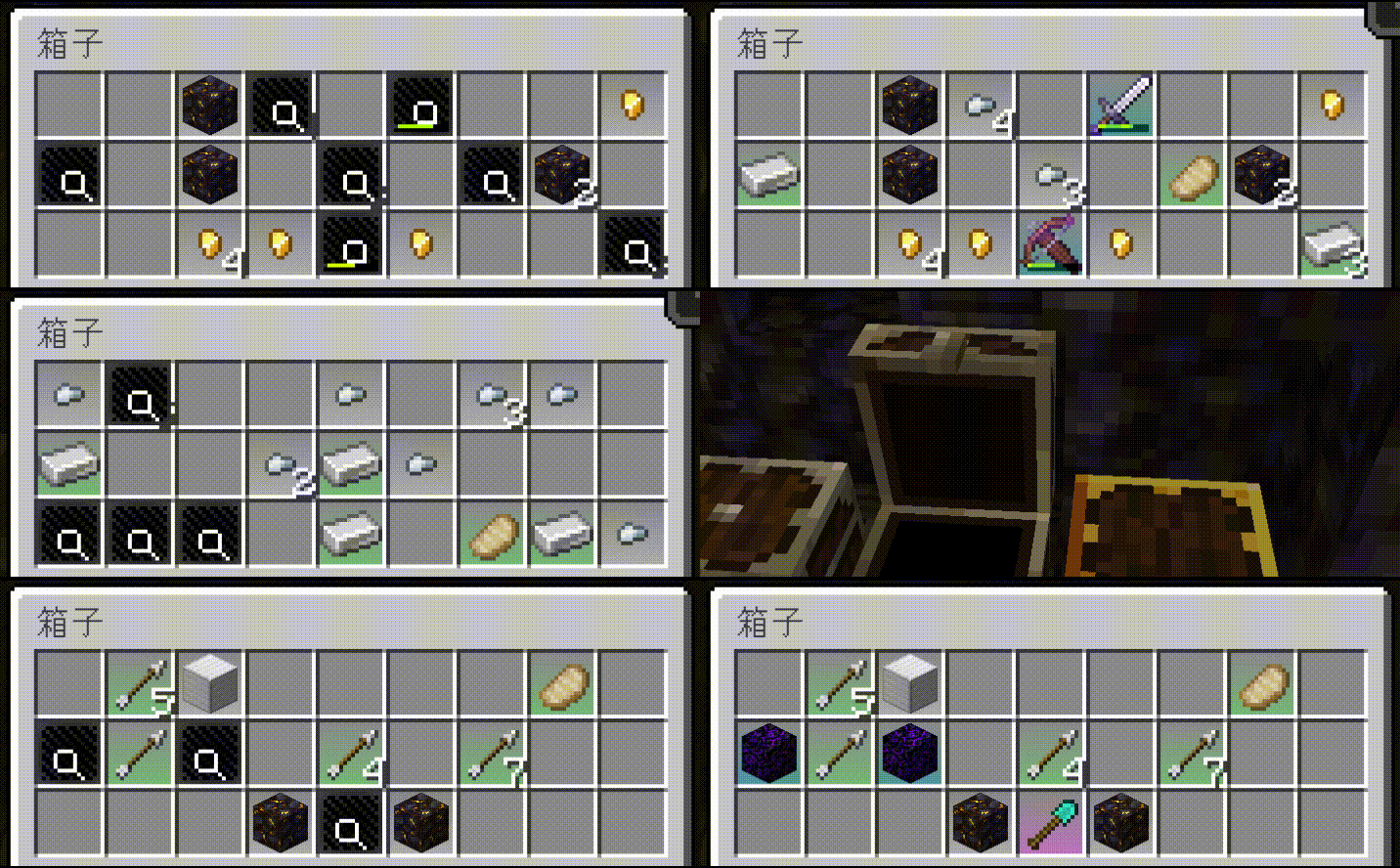
SearchCarefully is a Minecraft mod that adds a tactical search system similar to Tarkov, allowing players to progressively uncover items in containers.
Features

  • Item Search System: Perform step-by-step searches on items within containers to enhance the search experience.
  • Aesthetic Customization: Fully customizable textures and sound effects.
  • Highly Configurable: Supports different search durations for items based on their rarity levels.
  • Excellent Compatibility: Works seamlessly with all structure loot chests.

Prerequisites - RarityCore [GitHub][Curseforge]: Required dependency for item rarity identification.

Effect Preview

alt text

😋Start Use !

Want to apply search time to your loot, or modify the player's search speed?
Want to customize the visuals of SearchCarefully?
Want to use the API of SearchCarefully?
Want to use placeholder items for SearchCarefully?
Please refer to this page -> SearchCarefully Wiki.

Project description from CurseForge.

Pick your setup

Search Carefully by Minecraft version and loader

Choose the version and loader you play, then open the matching release.

1 available setups

Check the dependencies, then try the file in a copied instance before changing a world you care about.

Recent files

Search Carefully versions and loaders

22 of 22 releases match

Looking for an older file? The official CurseForge project page is in Resources.