Minecraft version
Back to mods 
Modrinth · Minecraft mod
Minecart+
Minecart Plus turns minecarts into real trains: chain carts together, upgrade their speed, and build better rail lines without leaving the vanilla Minecraft feel behind.
Choose a version Pick your version below, then grab the matching file.
Quick answer
Which Minecart+ release should I use?
beta file 0.1.0
Game version 26.2
Loader Fabric
Minecart+ 0.1.0 targets 26.2 with Fabric. Installation on the client is optional. Installation on the dedicated server is optional. No extra mods listed for this file.
Where it goes
Is Minecart+ required on the client, server, or both?
Installation on the client is optional. Installation on the dedicated server is optional.
Client Optional
Dedicated server Optional
Loader for this release Fabric
Required install it here Optional supported, not mandatory Not supported do not install here Source doesn’t say do not assume
The source marks this as usable on both the client and server.
What else does Minecart+ 0.1.0 need?
0.1.0. Change the file and its required mods may change too.
This file does not list any required mods. Do not add a library just because a different file uses it.
This file does not list any required or optional mods.
Before you install it
Add Minecart+ without breaking your instance.
Built for Minecart+ 0.1.0. Pick another file and the loader, install side or required mods may change.
- 01
Stick to this file
Use 0.1.0. It targets 26.2 with Fabric; another release may have different loader, side or dependency requirements.
- 02
Bring the mods it needs
This file does not list any required mods. Do not add a library just because a different file uses it.
- 03
Put it on the correct side
Installation on the client is optional. Installation on the dedicated server is optional.
- 04
Pick the file you checked
Use the “Get this file” button beside 0.1.0. It opens that exact file at the source.
About this project
What does Minecart+ add?
Minecart Plus
Minecart Plus turns minecarts into real trains: chain carts together, upgrade their speed, and build better rail lines without leaving the vanilla Minecraft feel behind.
What This Mod Adds
Minecart Plus expands vanilla minecarts with chain coupling, faster minecart tiers, a new Railway Table for upgrades, and built-in access to higher minecart speeds.
The goal is simple: make railways more useful, more satisfying, and more fun to build.
Chain Coupling
Minecarts can be linked together with a regular iron chain.
How to couple two minecarts:
- Hold a chain.
- Sneak and right-click the first minecart.
- Sneak and right-click the second minecart.
Once connected, the minecarts behave like a single train. The chain keeps them close together, and carts in the same train no longer constantly push each other around.
Coupling details:
- Up to 16 minecarts can be linked into one train.
- The chain is consumed when attached, just like a lead-like connection.
- Sneak-right-click the same selected minecart again to cancel the loose chain and get it back.
- Sneak-right-click a coupled minecart with any axe to uncouple it.
- If a coupled minecart is broken, its chain connection is removed.
Faster Minecarts
Minecart Plus adds four upgraded minecart tiers:
| Minecart | Max speed |
|---|---|
| Copper-Rim Minecart | 16 blocks/sec |
| Gold-Rim Minecart | 24 blocks/sec |
| Diamond-Rim Minecart | 32 blocks/sec |
| Netherite-Rim Minecart | 64 blocks/sec |
Each tier has a colored rim so you can recognize it at a glance.
When different minecarts are linked into the same train, the train's max speed is based on the average speed of all carts in that train. Fast carts can pull the average up, while regular carts will bring it down.
Railway Table
The Railway Table is used to upgrade minecarts into the copper, gold, and diamond tiers.
Railway Table crafting recipe:
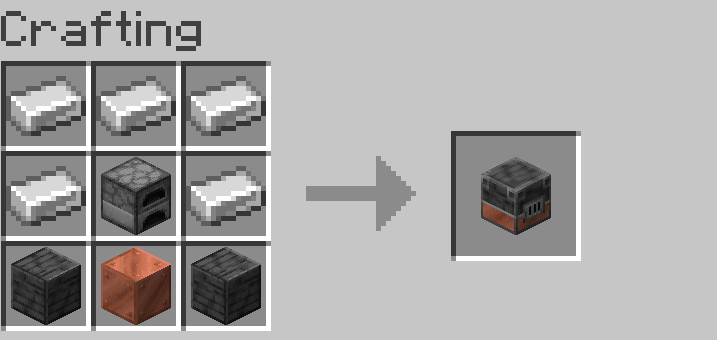
Minecart Upgrades
The Railway Table has one top slot for the minecart and three lower slots for resources.
Place:
- top slot: the minecart you want to upgrade;
- bottom slots: coal, the upgrade material, and iron ingots.
Upgrade recipes:
| Result | Ingredients |
|---|---|
| Copper-Rim Minecart | regular minecart + 1 coal + 6 copper ingots + 6 iron ingots |
| Gold-Rim Minecart | Copper-Rim Minecart + 1 coal + 6 gold ingots + 6 iron ingots |
| Diamond-Rim Minecart | Gold-Rim Minecart + 1 coal + 6 diamonds + 6 iron ingots |
The Netherite-Rim Minecart is upgraded in a Smithing Table:
Netherite Upgrade Smithing Template + Diamond-Rim Minecart + Netherite Ingot
Automation
The Railway Table supports hoppers:
- insert minecarts from the top;
- insert coal, upgrade materials, and iron from the sides;
- extract finished minecarts from the bottom.
This makes it possible to build automated minecart upgrade setups.
Built-In Minecart Improvements
Minecart Plus automatically enables vanilla minecart improvements that normally require an experimental datapack. Players do not need to enable anything manually.
The vanilla minecart speed gamerule is available right away:
/gamerule max_minecart_speed <value>
Minecart Plus upgraded carts already have their own speed tiers. The gamerule is useful for tuning regular vanilla minecarts and world-wide minecart behavior.
Project description from Modrinth.
Pick your setup
Minecart+ by Minecraft version and loader
Choose the version and loader you play, then open the matching release.
Minecraft version
26.1.2
1 loader buildCheck the dependencies, then try the file in a copied instance before changing a world you care about.
Recent files
Minecart+ versions and loaders
0.1.0
minecart-plus-0.1.0.jar
17 Aug 2026
Client Optional Server Optional Dependencies No extras listed Listed on Release listing
Check the 26.2 · Fabric setup 26.2Fabric beta
0.1.0
minecart-plus-0.1.0.jar
14 Jun 2026
Client Optional Server Optional Dependencies No extras listed Listed on Release listing
Check the 26.1.2 · Fabric setup 26.1.2Fabric beta
Looking for an older file? The official Modrinth project page is in Resources.
 mod
mod CurseForge + Modrinth · Minecraft
Chef's Workbench
Build a functional Minecraft kitchen to cook, fry, bake, steam, and boil food with specialized cooking stations.
 mod
mod Modrinth · Minecraft
Latitude
Latitude overhauls world generation so biomes follow realistic latitude bands—from equatorial jungles to polar tundras.
 mod
mod Modrinth · Minecraft
MCA Capitals | A Monarchy Mod for MCA Reborn
A Minecraft Comes Alive Reborn addon that adds a Monarchy system to MCA. Complete with in-game events, titles, and succession!