Minecraft version
Back to mods 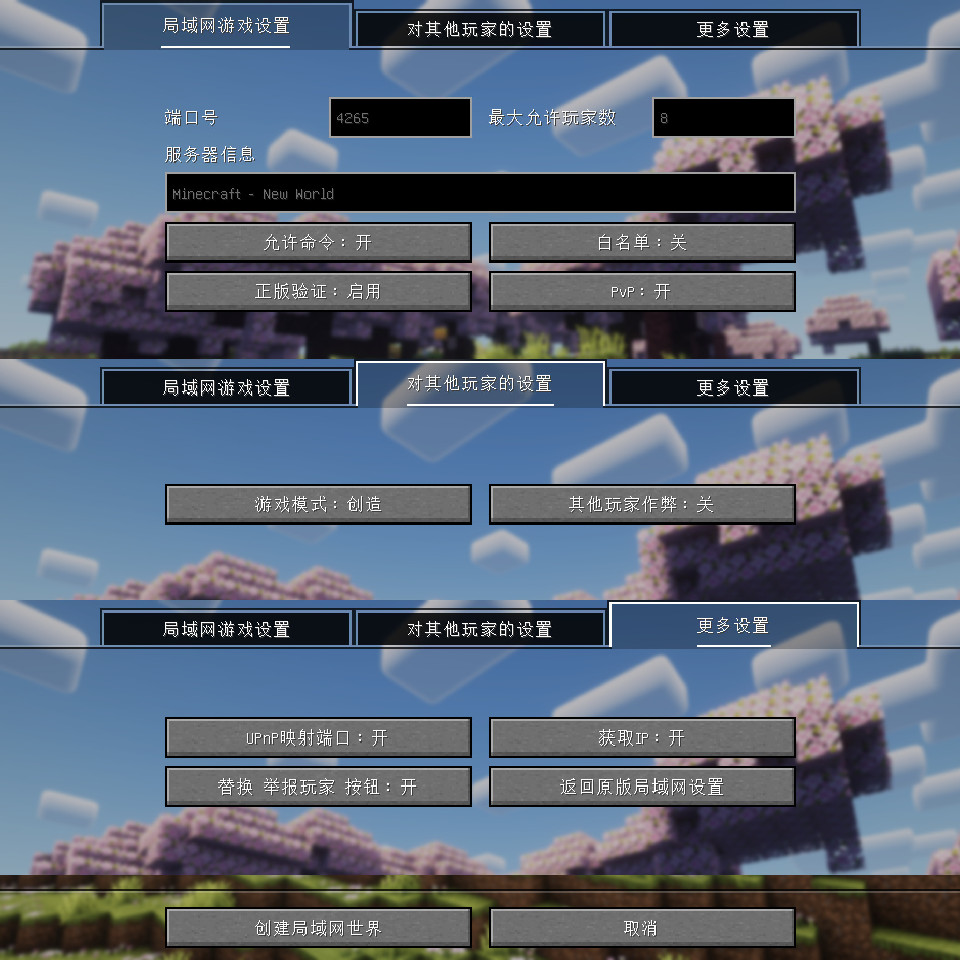
CurseForge · Minecraft mod
LAN World Plug-n-Play
LAN World Plug-n-Play (mcwifipnp)
Choose a version Pick your version below, then grab the matching file.
Quick answer
Which LAN World Plug-n-Play release should I use?
Latest stable file 2.1.3-26.2-neoforge
Game version 26.2
Loader NeoForge
LAN World Plug-n-Play 2.1.3-26.2-neoforge targets 26.2 with NeoForge. The project page does not say whether this file belongs on the client, dedicated server, or both. No extra mods listed for this file.
Where it goes
Is LAN World Plug-n-Play required on the client, server, or both?
The project page does not say whether this file belongs on the client, dedicated server, or both.
Client Source doesn’t say
Dedicated server Source doesn’t say
Loader for this release NeoForge
Required install it here Optional supported, not mandatory Not supported do not install here Source doesn’t say do not assume
The source does not explicitly classify this release as client-only or server-only.
What else does LAN World Plug-n-Play 2.1.3-26.2-neoforge need?
2.1.3-26.2-neoforge. Change the file and its required mods may change too.
This file does not list any required mods. Do not add a library just because a different file uses it.
This file does not list any required or optional mods.
Before you install it
Add LAN World Plug-n-Play without breaking your instance.
Built for LAN World Plug-n-Play 2.1.3-26.2-neoforge. Pick another file and the loader, install side or required mods may change.
- 01
Stick to this file
Use 2.1.3-26.2-neoforge. It targets 26.2 with NeoForge; another release may have different loader, side or dependency requirements.
- 02
Bring the mods it needs
This file does not list any required mods. Do not add a library just because a different file uses it.
- 03
Put it on the correct side
The project page does not say whether this file belongs on the client, dedicated server, or both.
- 04
Pick the file you checked
Use the “Get this file” button beside 2.1.3-26.2-neoforge. It opens that exact file at the source.
About this project
What does LAN World Plug-n-Play add?
LAN World Plug-n-Play
All versions file can Download from Files
What Can It Do - 它的作用
1 对于正版验证按钮,现在有三个选项:
启用:启用正版验证,将会比对Mojang服务器数据库验证登录信息,即只允许使用微软帐户登录的玩家加入;禁用:即不验证登录信息,允许使用离线模式登录的玩家加入;禁用 + 修复UUID:尝试使用离线模式登录的玩家名匹配Mojang服务器用户名称以获取唯一UUID,同时为使用微软帐户登录的用户保留UUID,它也可以防止背包和物品栏内容丢失。禁用 + 修复UUID对应的控制台命令为/onlinemode false与/uuidfixer enabled true。
1 The Online Mode button has three options:
Enable: verify login information against the Mojang server database, only allow players with genuine Microsoft account to join.Disable: no verification, allows anyone, including offline players to join.Disable + UUID Fixer: Similar to above, enables the UUID Fixer. The default behavior of UUID Fixer is that, if a player has his name on the Mojang server, the official unique UUID will be used, just like in the "Online Mode". Exceptions can be added using the/uuidfixer forcecommand. This mode can be useful to preserve backpacks and inventories when switching from "Online Mode" to "Offline Mode".- The
Disable + UUID Fixercorresponding commands are/onlinemode falseand/uuidfixer enabled true.
2 新命令 /uuidfixer 可以控制在 禁用 + 修复UUID 模式下用户名如何映射为UUID。
/uuidfixer enabled用于开启与关闭本功能。/uuidfixer list命令可以查看列表中的规则。/uuidfixer force命令可以添加新规则或替换已有规则。/uuidfixer remove命令可以从列表中移除一个已有规则。/uuidfixer test命令可用于检查一个用户名所适用的规则。
2 The command /uuidfixer controls how usernames are mapped to UUIDs in the Disable + UUID Fixer mode.
- command
/uuidfixer enabledtoggles the UUID fixer on and off. - command
/uuidfixer listlists all mapping rules. - command
/uuidfixer forceadds a new rule or update an existing rule. - command
/uuidfixer removeremoves an existing rule. - command
/uuidfixer testallows you to check the policy applied to a username.
3 允许你修改局域网世界的端口号,并选择是否映射这个端口使用UPnP映射到公网(如果你的路由器支持UPnP)。 使用图形界面或者/upnp命令来开启与关闭UPnP支持。
3 Allows you to change server's port number and you can choose whether to map this port to the public network using UPnP (if your router supports UPnP). Use the GUI button or the /upnp command to toggle UPnP support on and off.
4 允许你启用或禁用PVP。
4 Allows you to enable or disable pvp.
5 允许你自定义MOTD(是玩家客户端的多人游戏服务器列表中显示的服务器信息,显示于名称下方)。
5 Allows you to change server motd (The message displayed below the server name in the server list).
6 你可以控制其他玩家加入时是否有op权限、是否可以作弊,你也可以使用 /op /deop 命令进行控制。你可以使用 /whitelist 命令构建白名单,然后用其控制其他玩家进是否允许加入你的游戏世界。
6 Allows you control other players' permissions when they join your world. Use /op and /deop commands to manipulate the OP list. You can also use command /whitelist to build a whitelist and use it to control players who can join your world.
7 你可以使用 /ban 来封禁玩家、 使用 /ban-ip 来封禁 IP 地址、 /banlist 命令可以查看封禁的玩家列表;你可以使用 /pardon 来解封玩家、 使用 /pardon-ip 来解封 IP地址。
7 You can use command /ban to blacklist players. Use command /ban-ip to add IP addresses to the blacklist. Use command /banlist to list blacklisted players. Use command /pardon to remove players from the blacklist, use command /pardon-ip to remove IP addresses from the blacklist
8 本模组可以自动保存配置文件,并且下次加载世界时会自动载入配置。
8 Your settings will be recorded in a file, and it will be automatically loaded next time.
9 本模组可以获取你的IP地址(比如本地 IPv4,公网 IPv4 或 IPv6),而且你可以选择是否复制IP到剪切板,以方便联机使用。/ip命令可以检索更多IP信息。
9 This mod can get your IP address, and you can choose whether to copy the IP address (such as local IPv4, globe IPv4 or IPv6) to the clipboard. in order to provide the IP address to your friends. The command /ip can retrieve more IP information.
10 服务器启动后,您可以更改上述大部分设置,但某些选项仅适用于新加入的玩家。
10 You can change most of the above settings once the server starts, but some options are only applied to newly joined players.
11 你还可以通过单击更多设置页面【返回原版对局域网设置】按钮返回原版“对局域网开放”屏幕。
11 You can also go back to the vanilla Open to Lan screen by clicking the button [Back to Vanilla Screen] on the Others Settings Tab.
12 你可以打开更多设置页面中选项【替换 举报玩家 按钮】以在游戏菜单中心中替换【举报玩家】按钮
12 You can also turn on the button [Replace Player Reporting Button] on the Others Settings Tab to Replace Player Reporting Button in GameMenu.
13 当本模组安装在服务端上时,只有修复UUID功能可用。只有服务端工作目录下存在uuid_fixer.json时修复UUID才会启用。/uuidfixer命令在服务端上也可用。除此之外,本模组在服务端上什么也不会做。
12 When installed to a dedicated server, only the UUID Fixer function is available. It can only be enabled if uuid_fixer.json exists in the root server folder. The /uuidfixer command is available on the dedicated server side. This mod does nothing otherwise.
Project description from CurseForge.
Pick your setup
LAN World Plug-n-Play by Minecraft version and loader
Choose the version and loader you play, then open the matching release.
Minecraft version
26.3-snapshot-8
1 loader buildMinecraft version
26.3-snapshot-7
1 loader buildMinecraft version
26.3-snapshot-6
1 loader buildMinecraft version
26.3-snapshot-3
1 loader buildMinecraft version
26.2-snapshot-8
1 loader buildMinecraft version
26.2-snapshot-7
1 loader buildMinecraft version
26.2-pre-4
1 loader buildMinecraft version
26.2-pre-3
1 loader buildMinecraft version
26.2-pre-2
1 loader buildMinecraft version
26.2-pre-1
1 loader buildMinecraft version
26.2
3 loader buildsShowing the newest 12 of 43 game versions. Older files are in the list below.
Check the dependencies, then try the file in a copied instance before changing a world you care about.
Recent files
LAN World Plug-n-Play versions and loaders
2.1.3-26.2-neoforge
mcwifipnp-2.1.3-26.2-neoforge.jar
2 Sept 2026
Client Source doesn’t say Server Source doesn’t say Dependencies No extras listed Listed on Release listing
Check the 26.2 · NeoForge setup NeoForge26.2 release
2.1.3-26.2-forge
mcwifipnp-2.1.3-26.2-forge.jar
2 Sept 2026
Client Source doesn’t say Server Source doesn’t say Dependencies No extras listed Listed on Release listing
Check the 26.2 · Forge setup Forge26.2 release
2.1.3-26.2-fabric
mcwifipnp-2.1.3-26.2-fabric.jar
2 Sept 2026
Client Source doesn’t say Server Source doesn’t say Dependencies 2 required · 2 unchecked Listed on Release listing
Check the 26.2 · Fabric setup Fabric26.2 release
2.0.8-1.21.9-neoforge
mcwifipnp-2.0.8-1.21.9-neoforge.jar
31 Aug 2026
Client Source doesn’t say Server Source doesn’t say Dependencies No extras listed Listed on Release listing
Check the 1.21.10 · NeoForge setup NeoForge1.21.91.21.10 release
2.0.8-1.21.9-forge
mcwifipnp-2.0.8-1.21.9-forge.jar
31 Aug 2026
Client Source doesn’t say Server Source doesn’t say Dependencies No extras listed Listed on Release listing
Check the 1.21.10 · Forge setup Forge1.21.91.21.10 release
2.0.8-1.21.9-fabric
mcwifipnp-2.0.8-1.21.9-fabric.jar
31 Aug 2026
Client Source doesn’t say Server Source doesn’t say Dependencies 2 required · 2 unchecked Listed on Release listing
Check the 1.21.10 · Fabric setup Fabric1.21.91.21.10 release
2.0.8-1.21.11-neoforge
mcwifipnp-2.0.8-1.21.11-neoforge.jar
31 Aug 2026
Client Source doesn’t say Server Source doesn’t say Dependencies No extras listed Listed on Release listing
Check the 1.21.11 · NeoForge setup NeoForge1.21.11 release
2.0.8-1.21.11-forge
mcwifipnp-2.0.8-1.21.11-forge.jar
31 Aug 2026
Client Source doesn’t say Server Source doesn’t say Dependencies No extras listed Listed on Release listing
Check the 1.21.11 · Forge setup Forge1.21.11 release
2.0.8-1.21.11-fabric
mcwifipnp-2.0.8-1.21.11-fabric.jar
31 Aug 2026
Client Source doesn’t say Server Source doesn’t say Dependencies 2 required · 2 unchecked Listed on Release listing
Check the 1.21.11 · Fabric setup Fabric1.21.11 release
2.0.8-26.1.2-neoforge
mcwifipnp-2.0.8-26.1.2-neoforge.jar
31 Aug 2026
Client Source doesn’t say Server Source doesn’t say Dependencies No extras listed Listed on Release listing
Check the 26.1.2 · NeoForge setup NeoForge26.126.1.126.1.2 release
2.0.8-26.1.2-forge
mcwifipnp-2.0.8-26.1.2-forge.jar
31 Aug 2026
Client Source doesn’t say Server Source doesn’t say Dependencies No extras listed Listed on Release listing
Check the 26.1.2 · Forge setup Forge26.126.1.126.1.2 release
2.0.8-26.1.2-fabric
mcwifipnp-2.0.8-26.1.2-fabric.jar
31 Aug 2026
Client Source doesn’t say Server Source doesn’t say Dependencies 2 required · 2 unchecked Listed on Release listing
Check the 26.1.2 · Fabric setup Fabric26.126.1.126.1.2 release
Looking for an older file? The official CurseForge project page is in Resources.
 mod
mod CurseForge + Modrinth · Minecraft
Supplementaries
Vanilla+ additions: Jars, signposts, faucets, weather vanes spring launchers, sconces, planters, lights, decoration and automation
 mod
mod CurseForge · Minecraft
ViaFabricPlus
Minecraft Fabric mod which allows you to join EVERY Minecraft server version (Classic, Alpha, Beta, Release, April Fools)
 mod
mod CurseForge · Minecraft
Origins Legacy: NeoForged
Fork of Origins Legacy, what fork of Origins