Back to mods
Blend Frames project artwork

Modrinth · Minecraft mod

Blend Frames

Frame generation for Minecraft: up to 2× FPS on screen. Smoother motion with a generated frame between real frames, camera reprojection and even pacing.

Choose a version Pick your version below, then grab the matching file.

Quick answer

Which Blend Frames release should I use?

Updated today
Latest stable file 1.7.2+1.21.10
Game version 1.21.10, 1.21.9
Loader Fabric

Blend Frames 1.7.2+1.21.10 targets 1.21.10, 1.21.9 with Fabric. It must be installed on the client. Do not install it on the dedicated server. All 1 required mods have matching files.

Where it goes

Is Blend Frames required on the client, server, or both?

It must be installed on the client. Do not install it on the dedicated server.

Client Required
Dedicated server Not supported
Loader for this release Fabric
Required install it here Optional supported, not mandatory Not supported do not install here Source doesn’t say do not assume

This file is marked client-only.

What else does Blend Frames 1.7.2+1.21.10 need?

1.7.2+1.21.10. Change the file and its required mods may change too.

All 1 required mods have matching files

Install Fabric API first. We found matching files for this game-version and loader setup. 4 come through another mod in the chain.

4 listed on this file 4 pulled in by those mods
Mod Menu Optional for Blend Frames 1.7.2+1.21.10
optional
Matching file found Matched file: 16.0.1
Sodium Optional for Blend Frames 1.7.2+1.21.10
optional
Matching file found Matched file: mc1.21.10-0.7.3-fabric
Sodium Extra Optional for Blend Frames 1.7.2+1.21.10
optional
Matching file found Matched file: mc1.21.10-0.7.1+fabric
Fabric API Needed by Blend Frames 1.7.2+1.21.10
required
Matching file found Matched file: [1.21.10] Fabric API 0.138.4+1.21.10
Reese's Sodium Options Needed by Sodium Extra
pulled in
Matching file found Matched file: mc1.21.10-1.8.6+fabric
Iris Shaders Needed by Sodium Extra
pulled in
Matching file found Matched file: 1.9.7+1.21.10-fabric
Sodium Needed by Iris Shaders
pulled in
Matching file found Matched file: mc1.21.10-0.7.3-fabric

4 extra mods were pulled in by other dependencies. Indented rows show who needs each one. We only count dependency files that match this setup. A file for another loader does not fill the gap.

Before you install it

Add Blend Frames without breaking your instance.

Built for Blend Frames 1.7.2+1.21.10. Pick another file and the loader, install side or required mods may change.

  1. 01

    Stick to this file

    Use 1.7.2+1.21.10. It targets 1.21.10, 1.21.9 with Fabric; another release may have different loader, side or dependency requirements.

  2. 02

    Bring the mods it needs

    Install Fabric API first. We found matching files for this game-version and loader setup. 4 come through another mod in the chain.

  3. 03

    Put it on the correct side

    It must be installed on the client. Do not install it on the dedicated server.

  4. 04

    Pick the file you checked

    Use the “Get this file” button beside 1.7.2+1.21.10. It opens that exact file at the source.

About this project
What does Blend Frames add?

Blend Frames

Smoother motion for Minecraft 1.21.9 – 1.21.11, 26.2 and 26.3 by inserting a generated frame between every two real frames.
  • 2× or 1.5× frames on screen, with camera reprojection so turning stays sharp.
  • Helps most when your real FPS is below your monitor's refresh rate.
  • Client-side, works with Sodium, Iris and Voxy.

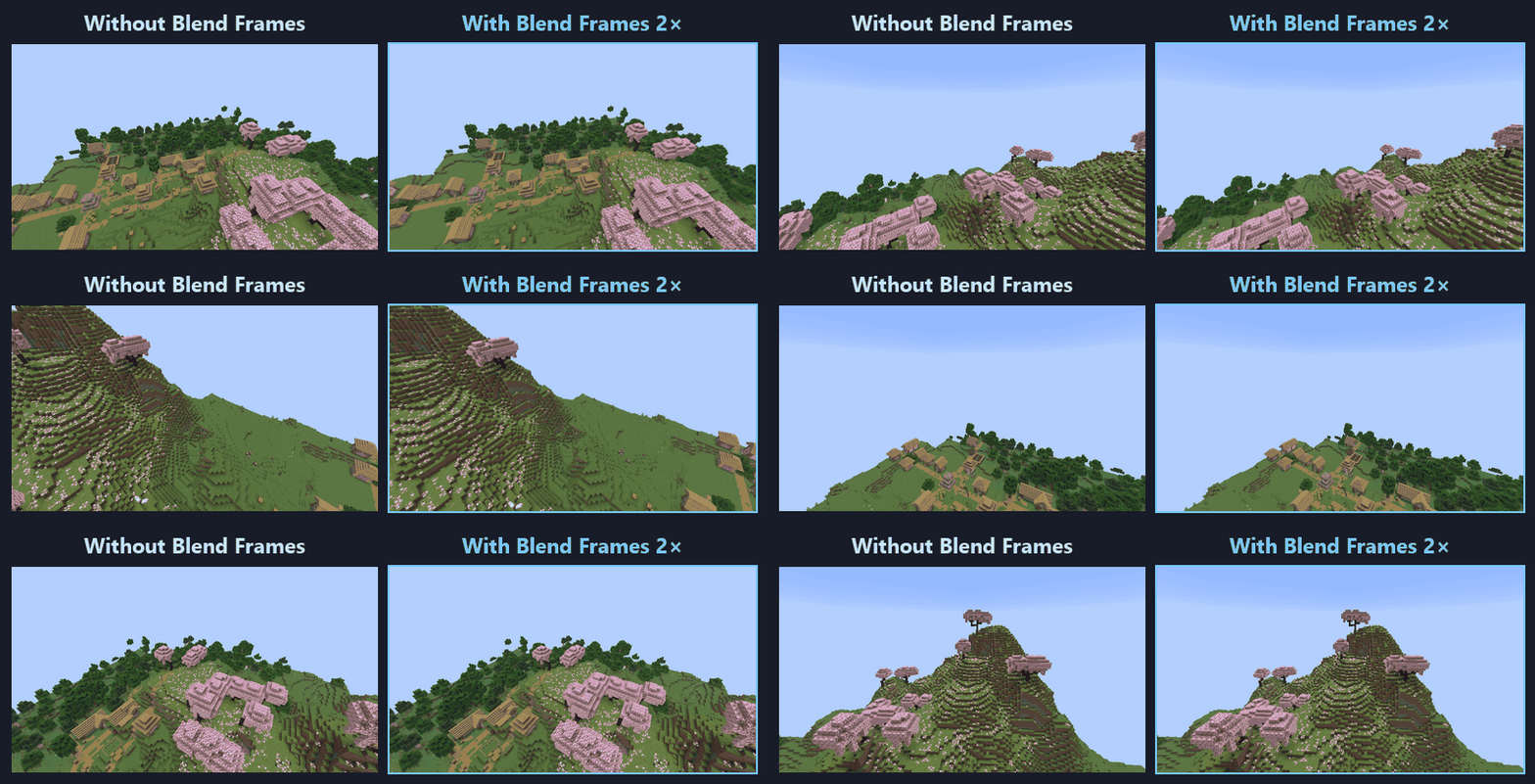
Without vs with Blend Frames

Same moment recorded in game: left shows only the real frames, right shows what reaches your screen with Blend Frames 2×.

Features

  • Frame generation, 2x or 1.5x. A blended in-between frame is inserted after every real frame (2x) or after every other one (1.5x).
  • Camera reprojection. When you turn the camera, the generated frame is rotated to the halfway angle, so the scenery shows up once instead of as a double image. The hand, hotbar and HUD stay sharp and in place.
  • Even frame pacing. The generated frame and the real frame each stay on screen for half the time. Pacing is measured with GPU timestamps and adjusts itself, both with an FPS cap and uncapped, on OpenGL and Vulkan.
  • "Only when needed" mode. Optionally, frames are generated only while your real FPS is below the refresh rate of the monitor the game is on, and generation switches off again when the game keeps up on its own. It never flickers on and off.
  • Toggle key. Press F8 to turn the mod on or off; you can change the key in Options → Controls → Key Binds → Blend Frames.
  • Settings everywhere. Settings are in Video Settings, in a Sodium tab and in Mod Menu.
  • Generated-frame counter. With Sodium Extra's Show FPS on, the overlay shows | +N generated (total) next to the FPS.

What to expect

Frame blending makes motion look more continuous; it does not add real FPS. The F3/FPS counter keeps showing real frames, and generating frames costs a little performance (about 0.25 ms per frame on an RTX 5060).

  • Camera rotation is reprojected. Walking, mobs, particles and water are blended, so fast movement can show a light double image or trail.
  • With an Iris shader pack active, camera reprojection turns itself off and plain blending is used. Iris draws the hand inside its own pipeline, so the hand couldn't be kept out of the reprojection.
  • Iris shaders only work on the OpenGL backend in 26.3; this is an Iris limitation, not a Blend Frames one. Minecraft 1.21.x always uses OpenGL.
  • Best results come from capping the real frame rate at half your refresh rate (for example 120 FPS on a 240 Hz monitor), so Blend Frames fills the rest.

Compatibility

Available for Minecraft 26.3, 26.2, 1.21.11, 1.21.10 and 1.21.9. Tested with Sodium 0.9.2 (0.8.14 on 1.21.11, 0.7.3 on 1.21.9 / 1.21.10), Sodium Extra 0.9.4 / 0.9.5, Iris 1.11.7 (with and without the BSL shader pack), Voxy 0.2.20 (OpenGL and a Vulkan fork) and Mod Menu 21, on both the OpenGL and Vulkan backends.

  • Required: Fabric Loader 0.20.1+, Fabric API.
  • Optional: Sodium (settings tab), Sodium Extra (FPS counter), Mod Menu (settings screen).
  • On 1.21.9 / 1.21.10 Sodium 0.7 has no settings tab support: use Mod Menu or F8 there.
  • Client-side only: you can join any server with it.

Português

Movimento mais suave no Minecraft 1.21.9 a 1.21.11, 26.2 e 26.3, gerando um frame entre cada dois frames reais.

  • Geração de frames 2x ou 1.5x, com o ritmo equilibrado: cada frame fica metade do tempo na tela.
  • Reprojeção de câmera: ao girar a câmera, o cenário aparece uma vez só, sem imagem dupla. A mão e o HUD ficam parados e nítidos.
  • Modo "Só Quando Precisar": gera frames apenas quando o FPS real está abaixo da taxa do monitor.
  • F8 liga e desliga (dá para trocar a tecla em Controles → Atalhos).
  • Configurações nas Configurações de Vídeo, numa aba do Sodium e no Mod Menu.
  • Contador "+N gerados" ao lado do FPS do Sodium Extra.

A mistura de frames deixa o movimento mais contínuo, mas não aumenta o FPS real. Andar, mobs, partículas e água continuam misturados. Com um shaderpack do Iris, a reprojeção se desliga sozinha.


Made by BRUNU · Source code on GitHub · MIT License

Project description from Modrinth.

Pick your setup

Blend Frames by Minecraft version and loader

Choose the version and loader you play, then open the matching release.

5 available setups

Check the dependencies, then try the file in a copied instance before changing a world you care about.

Recent files

Blend Frames versions and loaders

5 of 5 releases match

Looking for an older file? The official Modrinth project page is in Resources.