Minecraft version
Back to mods 
Modrinth · Minecraft mod
Cord Manager
A client-side utility mod that allows you to save, and manage important coordinates with a single hotkey.
Choose a version Pick your version below, then grab the matching file.
Quick answer
Which Cord Manager release should I use?
Latest stable file 1.21.11-a6
Game version 1.21.11
Loader Fabric
Cord Manager 1.21.11-a6 targets 1.21.11 with Fabric. It must be installed on the client. Do not install it on the dedicated server. No extra mods listed for this file.
Where it goes
Is Cord Manager required on the client, server, or both?
It must be installed on the client. Do not install it on the dedicated server.
Client Required
Dedicated server Not supported
Loader for this release Fabric
Required install it here Optional supported, not mandatory Not supported do not install here Source doesn’t say do not assume
This file is marked client-only.
What else does Cord Manager 1.21.11-a6 need?
1.21.11-a6. Change the file and its required mods may change too.
This file does not list any required mods. Do not add a library just because a different file uses it.
This file does not list any required or optional mods.
Before you install it
Add Cord Manager without breaking your instance.
Built for Cord Manager 1.21.11-a6. Pick another file and the loader, install side or required mods may change.
- 01
Stick to this file
Use 1.21.11-a6. It targets 1.21.11 with Fabric; another release may have different loader, side or dependency requirements.
- 02
Bring the mods it needs
This file does not list any required mods. Do not add a library just because a different file uses it.
- 03
Put it on the correct side
It must be installed on the client. Do not install it on the dedicated server.
- 04
Pick the file you checked
Use the “Get this file” button beside 1.21.11-a6. It opens that exact file at the source.
About this project
What does Cord Manager add?
CordManager
CordManager is a lightweight, intuitive Fabric mod designed for players who need a fast and organized way to save important locations without leaving the game or fumbling with messy text files.
Whether you've found a rare structure, a hidden base, or just a cool view, CordManager lets you bookmark it in seconds.
Features
- Quick-Save Keybind: Press F8 (default) to instantly bring up the saving menu.
- Auto-Coordinate Detection: The mod automatically grabs your current X, Y, and Z coordinates. No more typing out long strings of numbers!
- Custom Naming: Give your locations unique names so you never forget why you saved them.
- Escape Menu Integration: Access your entire database of saved locations directly from the standard Minecraft pause menu.
- Simple & Clean UI: Designed to feel like a native part of the Minecraft interface.
How to Use
- Save a Location: Press
F8while in-game. Enter a name for your current spot and hit "Save." - View Your List: Press
ESCto open the pause menu and click the "View Cords" button. - Manage: Browse through all your saved coordinates in one organized list.
Requirements
- Fabric Loader
- Fabric API
- ModMenu (Recommended for managing settings)
- Cloth Config API (Required for the backend configuration)
Compatibility
CordManager is built for Fabric 1.21.11 and is designed to be compatible with most other mods. It is purely client-side, meaning you can use it on any server to keep track of your own personal waypoints!
A Note from the Developer
CordManager was built to solve the simple problem of losing track of locations in survival and creative play. It stays out of your way until you need it.
Project description from Modrinth.
Pick your setup
Cord Manager by Minecraft version and loader
Choose the version and loader you play, then open the matching release.
Minecraft version
1.21.1
1 loader buildCheck the dependencies, then try the file in a copied instance before changing a world you care about.
Recent files
Cord Manager versions and loaders
1.21.11-a6
cordmanager-1.0.0.jar
6 Aug 2026
Client Required Server Not supported Dependencies No extras listed Listed on Release listing
Check the 1.21.11 · Fabric setup 1.21.11Fabric release
0.0.1
CordManager-0.0.2.jar
7 Apr 2026
Client Required Server Not supported Dependencies No extras listed Listed on Release listing
Check the 1.21.1 · Fabric setup 1.21.1Fabric release
Looking for an older file? The official Modrinth project page is in Resources.
 mod
mod CurseForge · Minecraft
Crafting Station Multitier
Adds crafting stations with expandable grids up to 9x9, featuring full JEI/EMI integration and compatibility with major storage mods!
 mod
mod CurseForge · Minecraft
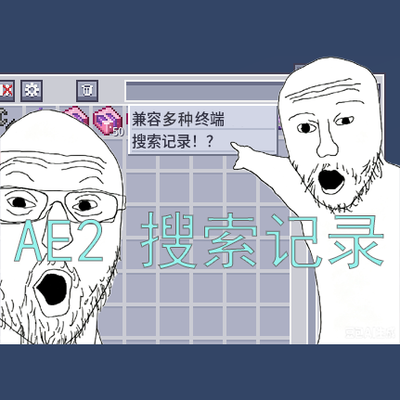
AE2 Recent Search
Adds clickable recent search history to AE2 terminals, making it easier to reuse item names, mod filters, tags, tooltips, and item ID searches.
 mod
mod CurseForge · Minecraft
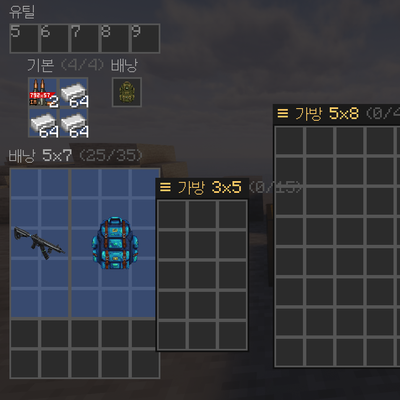
DoxBackpack
Grid-based (Tarkov-style) backpacks where items occupy w×h cells.