MINT Lib Needed by ReCased 2.3.0-Fabric-26.3
requiredMatching file found Matched file: 0.5.1-Fabric-26.3

Modrinth · Minecraft mod
Adds Lucky Cases to your Game
Quick answer
ReCased 2.3.0-Fabric-26.3 targets 26.3 with Fabric, Quilt. Installation on the client is optional. Installation on the dedicated server is optional. All 1 required mods have matching files.
Where it goes
Installation on the client is optional. Installation on the dedicated server is optional.
The source marks this as usable on both the client and server.
2.3.0-Fabric-26.3. Change the file and its required mods may change too.
Install MINT Lib first. We found matching files for this game-version and loader setup.
We only count dependency files that match this setup. A file for another loader does not fill the gap.
Before you install it
Built for ReCased 2.3.0-Fabric-26.3. Pick another file and the loader, install side or required mods may change.
Use 2.3.0-Fabric-26.3. It targets 26.3 with Fabric, Quilt; another release may have different loader, side or dependency requirements.
Install MINT Lib first. We found matching files for this game-version and loader setup.
Installation on the client is optional. Installation on the dedicated server is optional.
Use the “Get this file” button beside 2.3.0-Fabric-26.3. It opens that exact file at the source.
About this project


ReCased adds highly customizable Loot Cases to Minecraft. While there are Ways to find them Through exploration of the World, the main reason for using this mod is to add them as quest rewards for mod packs.
Since Version 2.0.0 you no longer have to manually add cases to the config files. New cases can be Added Via the casing Station if enabled in the Config!
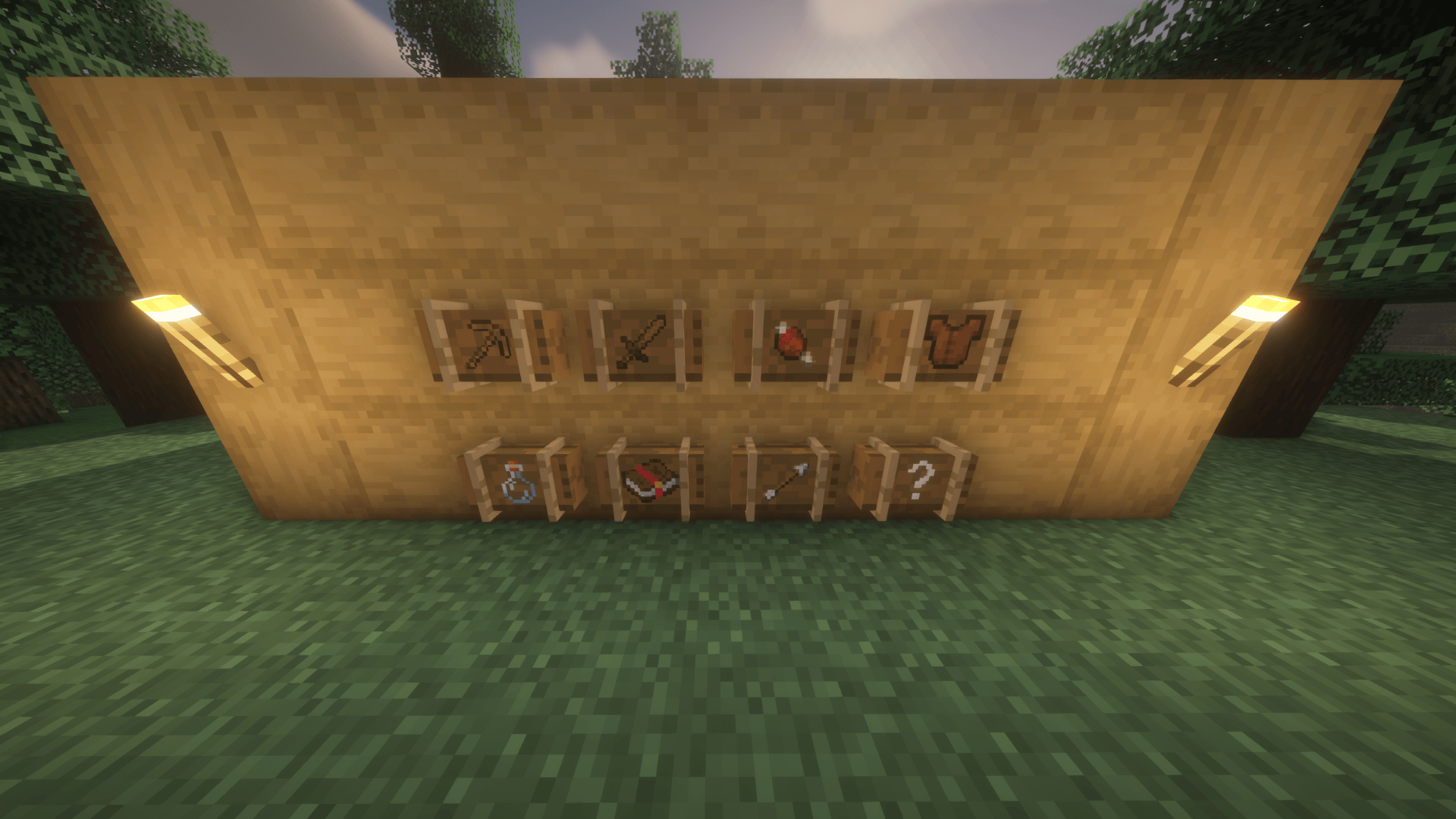
By default, the mod dynamically scans your game (including other mods!) and sorts items into the following crates:
Default Drop Rates:
60% Common | 25% Rare | 10% Epic | 5% Legendary
/give @s recased:<case_name>.
You can now edit existing cases or create entirely new custom ones directly in-game. [ONLY WORKS IF ENABLED IN CONFIG]
.json file in your config/recased/cases/ folder!⚠️ IMPORTANT UPDATING RULES:
- Adding/Editing Cases: If you create a new case or edit an existing one, you must reload your world (Singleplayer) or reconnect to the server (Multiplayer) for the changes to fully sync to your client.
- Deleting Cases: If you manually delete a case
.jsonfile from your config folder, you must fully restart the server/game to clear it from memory!
ReCased is highly configurable to suit any modpack or server. Settings are seperated into two files: config/recased-server.toml for everything that affects gameplay, and config/recased-client.toml for your own personal display options.
General Settings (recased-server.toml, [General])
enableCasingStationGUI: (Default: false) Security toggle. Set this to true to allow players to create and edit cases using the Casing Station block.caseCreationPermissionLevel: (Default: 2) The minimum operator permission level needed to create or modify cases at the Casing Station. 0 = everyone, 1-4 = vanilla op levels.disableStandardCrates: (Default: false) Set to true if you only want your Custom Cases to load, completely removing the default Weapon/Armor/Tool crates from the game.excludedItems: A list of Item IDs (e.g., "minecraft:dirt") to completely ban from dynamically populated base cases.World Generation Settings (recased-server.toml, [WorldGeneration])
enableChestLoot: (Default: true) Master toggle to allow cases to naturally spawn in dungeon and village chests.globalSpawnMultiplier: (Default: 1.0) Scale how often cases spawn. Set to 0.5 for half as many cases, or 2.0 for double.caseSpawnInjections: Define exactly which chests drop which cases. (Format: "case_id | loot_table | chance")Villager Settings (recased-server.toml, [Villager])
enableCaseVillager: (Default: true) Master switch for the Case Trader villager. If false, the villager offers no trades at all and the Case Trader buildings stop being added to village generation.allowSellingCustomCases: (Default: true) Allows the Case Trader villager to sell your custom cases. Each case still needs its own enableVillagerTrade flag set in its JSON; this option can only take trades away, never add them.allowSellingDefaultCases: (Default: true) Allows the Case Trader villager to sell the base cases.defaultEmeraldCost: (Default: 25) The baseline emerald price for purchasing cases.Archaeology Settings (recased-server.toml, [Archaeology])
enableSuspiciousSand: (Default: true) Allows cases to be brushed from suspicious sand.suspiciousSandChance: (Default: 0.1) The percentage chance (0.0 to 1.0) of finding a case via archaeology.Rarity Settings (recased-server.toml, [Rarity])
disableRarityAssumption: (Default: false) ReCased guesses an item's rarity from its stats when that item has no rarity configured in a case. Set to true to switch the guessing off, so anything you have not configured yourself is treated as Common. A rarity you configured is always overwriting the assumed one.Durability Settings (recased-server.toml, [Durability])
disableRandomDurability: (Default: false) Forces all weapons, tools, and armor from cases to drop at 100% durability.excludedDurabilityItems: Specific Item IDs that should always drop with full durability.excludedDurabilityTypes: Entire case types (e.g., "weapon") that should drop items with full durability.Visual Settings (recased-client.toml, [Visuals])
showRarityInTooltip: (Default: false) Adds the item's internal Case Rarity and Type to its hover tooltip.
Want to turn a wooden crate into a sci-fi safe or a rusted lockbox? ReCased now fully supports CustomModelData for infinite custom case textures!
Resource Pack Permissions:
Modpack creators and players have full permission to create, modify, distribute, and upload Resource Packs dependent on ReCased that add or modify custom case textures. To make this as easy as possible, we have provided an official template!
SERVER SYNC You no longer need to force players to manually download and copy config files.
When a player joins your dedicated server, ReCased will automatically sync the server's custom crates and drop rates directly to the player's client.
Can I use this in my Modpack?
YES! We highly encourage you to use ReCased for your modpack's loot or questing system. (If you are hosting outside of CurseForge, a simple credit link back to this page is appreciated!)
If you want to report a bug Please open a Support Ticket on our Discord!
If you enjoy ReCased and want to support our development, please consider leaving a comment or sharing the mod with your friends. Your support motivates us to keep creating!

Project description from Modrinth.
Pick your setup
Choose the version and loader you play, then open the matching release.
Check the dependencies, then try the file in a copied instance before changing a world you care about.
Recent files
recased-2.3.0-26.3-fabric.jar
25 Oct 2026
recased-2.3.0-26.2-fabric.jar
25 Oct 2026
recased-2.3.0-26.1-fabric.jar
25 Oct 2026
recased-2.3.0-1.21.1-fabric.jar
25 Oct 2026
recased-2.3.0-1.20.1-fabric.jar
25 Oct 2026
recased-2.3.0-26.3-neoforge.jar
25 Oct 2026
recased-2.3.0-26.2-neoforge.jar
25 Oct 2026
recased-2.3.0-26.1-neoforge.jar
25 Oct 2026
recased-2.3.0-1.21.1-neoforge.jar
25 Oct 2026
recased-2.3.0-1.20.1-forge.jar
25 Oct 2026
recased-2.2.0-1.21.1.jar
7 Aug 2026
recased-2.2.0-1.20.1.jar
7 Aug 2026
Looking for an older file? The official Modrinth project page is in Resources.
 mod
modAn exploration-focused world map and minimap with cave mapping, waypoints and extensive customization.
 mod
modVarious new medieval fantasy style weapons that fit in nicely with the vanilla style.
 mod
modConfigure visual notifications when music is played in-game