Litematica Needed by Technical Utilities 0.7.1+26.2
requiredMatching file found Matched file: 0.28.3

Modrinth · Minecraft mod
Tech Utils is a mod providing client-side tweaks for Litematica, WorldEdit and other small utilities.
Quick answer
Technical Utilities 0.7.1+26.2 targets 26.2 with Fabric. It must be installed on the client. Do not install it on the dedicated server. All 3 required mods have matching files.
Where it goes
It must be installed on the client. Do not install it on the dedicated server.
This file is marked client-only.
0.7.1+26.2. Change the file and its required mods may change too.
Install Litematica, MaLiLib, MaLiLib first. We found matching files for this game-version and loader setup. 1 comes through another mod in the chain.
1 extra mod was pulled in by another dependency. Indented rows show who needs each one. We only count dependency files that match this setup. A file for another loader does not fill the gap.
Before you install it
Built for Technical Utilities 0.7.1+26.2. Pick another file and the loader, install side or required mods may change.
Use 0.7.1+26.2. It targets 26.2 with Fabric; another release may have different loader, side or dependency requirements.
Install Litematica, MaLiLib, MaLiLib first. We found matching files for this game-version and loader setup. 1 comes through another mod in the chain.
It must be installed on the client. Do not install it on the dedicated server.
Use the “Get this file” button beside 0.7.1+26.2. It opens that exact file at the source.
About this project
Tech Utils is a mod providing client-side tweaks for Litematica, WorldEdit and other small utilities.
To access mod config open Mod Menu and select this mod.
Tech Utils locks to (i.e. requires you to play) a specific version of each of its dependencies (Litematica and WorldEdit) to prevent conflicts from happening when you try to install a newer version of a dependency.
You are on your own if you decide to remove these restrictions using Dependency Overrides. Do not report problems if you do this.
Inventory Verifier addon to Litematica's Schematic Verifier
inventoryScreenOverlay further down). verifyItemComponents will require item components to match and will also visualize them in the item tooltip for you to compare.
Check out the feature's showcase video:
This feature only works if your server has Servux (or PCA Protocol in 1.20.1-4), or you have nbt query permissions (e.g. by being an operator or installing a permissions mod/plugin), or you're in Singleplayer.
On Multiplayer, make sure you have enabled entityDataSync and entityDataSyncBackup in Litematica's settings.
Sync WorldEdit selection
Snap WorldEdit region to active Litematica selection - autoWeSync.
Region synchronizes shortly after you modify a selection, showing you a confirmation message above the hotbar.

Litematic preview (1.21 and below)
Show 3D render of selected litematic in Load Schematics menu - renderPreview.
This only works for .litematic files.

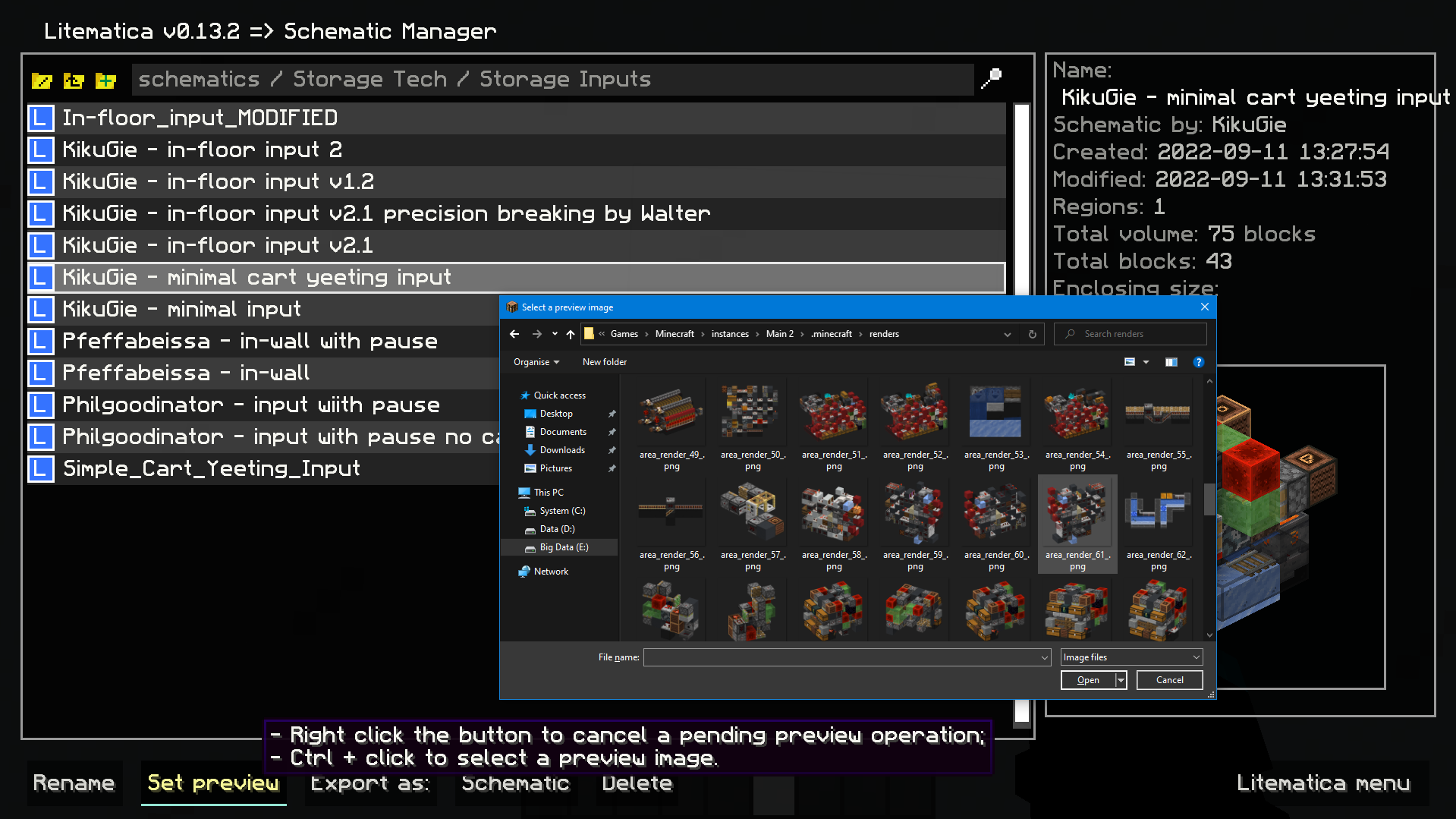
Image selection dialog for litematica preview:
Set litematic preview image to one you select, which unlike the 3D preview feature will be shown to any player, even without this mod.
In main Litematica menu go to Schematic Manager, select a litematic and ctrl + click on Set Preview button to open the prompt.
inventoryScreenOverlay.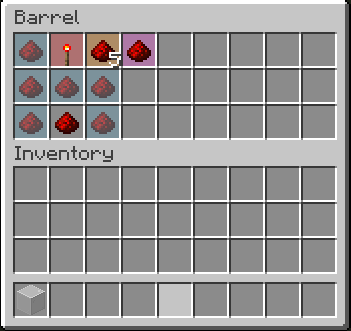
compactScoreboard.autoDisableUpdates.rotatePlacement and mirrorPlacement./isorender selection shortcut for rendering current Litematica selection in Isometric Renders.giveFullInv. Supports boxes, chests, and bundles. Nesting them is possible.refreshMaterialList.Mod logo by Mizeno
Project description from Modrinth.
Pick your setup
Choose the version and loader you play, then open the matching release.
Showing the newest 12 of 20 game versions. Older files are in the list below.
Check the dependencies, then try the file in a copied instance before changing a world you care about.
Recent files
techutils-0.7.1+26.2.jar
7 Jul 2026
techutils-0.7.1+26.1.jar
7 Jul 2026
techutils-0.7.0+1.21.11.jar
7 Jul 2026
techutils-0.6.3+1.21.10.jar
7 Jul 2026
techutils-0.6.3+1.21.8.jar
7 Jul 2026
techutils-0.6.3+1.21.5.jar
7 Jul 2026
techutils-0.6.3+1.21.4.jar
7 Jul 2026
techutils-0.6.4+1.21.1.jar
7 Jul 2026
techutils-0.6.3+1.21.1.jar
7 Jul 2026
techutils-0.7.0+26.2.jar
23 Jun 2026
techutils-0.7.0+26.1.jar
7 Apr 2026
techutils-0.6.3+1.21.11.jar
17 Feb 2026
Looking for an older file? The official Modrinth project page is in Resources.
 mod
modAn AE2 addon that introduces a lightning energy system, advanced machines, and overloaded network components.
 mod
modFully async, multithreaded, predictive, open source, 3.01 reach, 1.005 timer, 0.01% speed, 99.99% antikb, "bypassable" 1.8-1.21 anticheat
 mod
modMoves mob pathfinding off the server thread to cut tick spikes: ~41% lower mean tick time, p99 halved. Ships with compatibility checking OFF — it runs other mods' uninspected pathfinding code on worker threads. Back up your worlds.