Fabric API Needed by Enchantment Switch v26.3.0-mc26.3.x+fabric
requiredMatching file found Matched file: [26.3] Fabric API 0.166.2+26.3

CurseForge · Minecraft mod
Swap active enchantments on your items on the fly! Toggle between otherwise incompatible enchantments.
Quick answer
Enchantment Switch v26.3.0-mc26.3.x+fabric targets 26.3 with Fabric. The project page does not say whether this file belongs on the client, dedicated server, or both. All 3 required mods have matching files.
Where it goes
The project page does not say whether this file belongs on the client, dedicated server, or both.
The source does not explicitly classify this release as client-only or server-only.
v26.3.0-mc26.3.x+fabric. Change the file and its required mods may change too.
Install Fabric API, Puzzles Lib, Forge Config API Port first. We found matching files for this game-version and loader setup. 4 come through another mod in the chain.
4 extra mods were pulled in by other dependencies. Indented rows show who needs each one. We only count dependency files that match this setup. A file for another loader does not fill the gap.
Before you install it
Built for Enchantment Switch v26.3.0-mc26.3.x+fabric. Pick another file and the loader, install side or required mods may change.
Use v26.3.0-mc26.3.x+fabric. It targets 26.3 with Fabric; another release may have different loader, side or dependency requirements.
Install Fabric API, Puzzles Lib, Forge Config API Port first. We found matching files for this game-version and loader setup. 4 come through another mod in the chain.
The project page does not say whether this file belongs on the client, dedicated server, or both.
Use the “Get this file” button beside v26.3.0-mc26.3.x+fabric. It opens that exact file at the source.
About this project




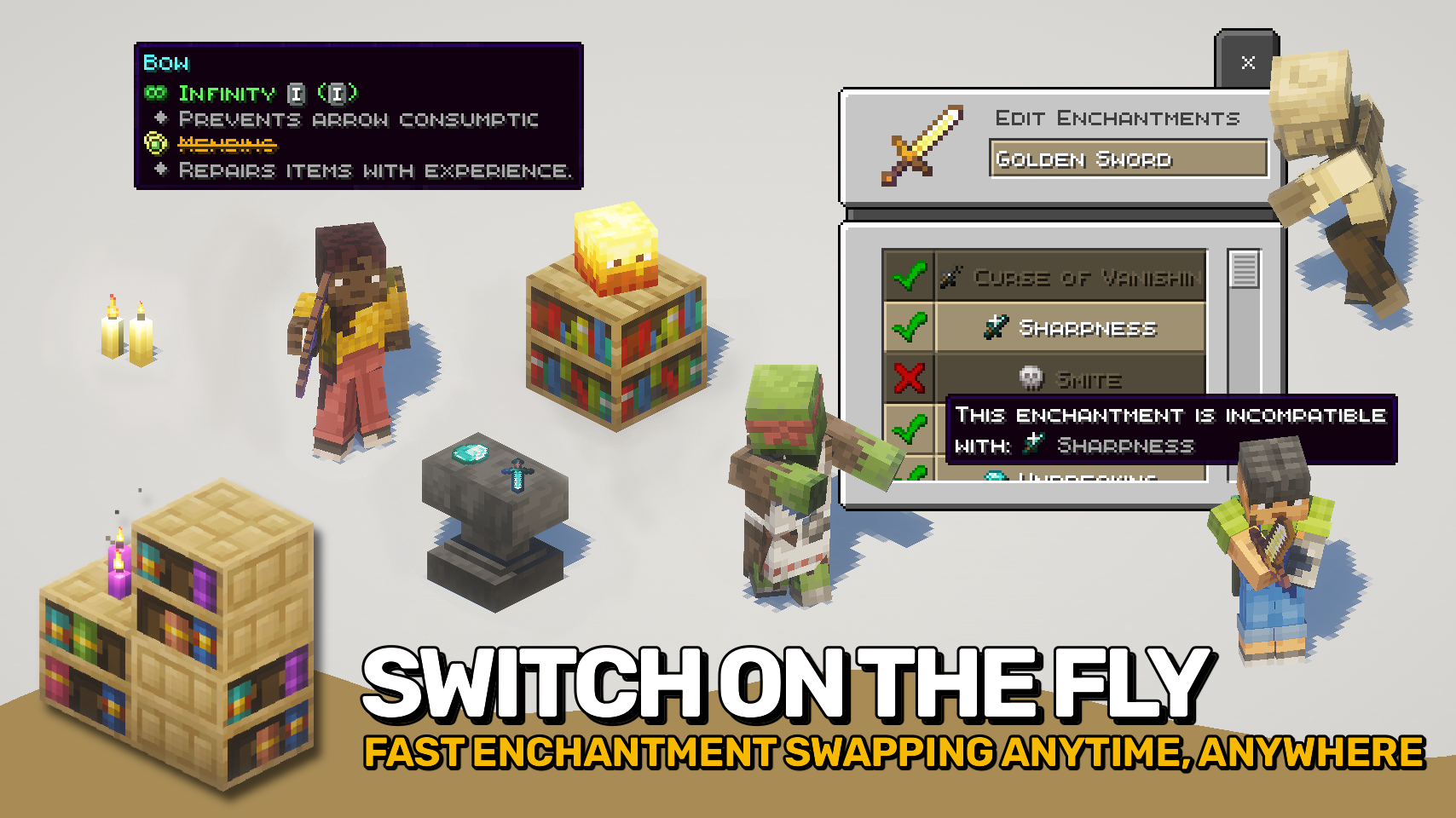
Enchantment Switch lets you control which enchantments are active on your tools, weapons, and armor. With a simple key press while hovering your mouse cursor over an enchanted item, a menu appears showing all enchantments on that item. You can then turn each one on or off to match the situation.
This makes it possible to combine enchantments that normally cannot exist together, as long as only one is active at a time. For example, switch between Mending and Infinity on your bow, or Sharpness and Smite on your sword. Even Frost Walker can be toggled off when you want to go swimming again.
Curses and other special enchantments cannot be turned off, keeping gameplay fair. Disabled enchantments still appear on the tooltip with a clear strike-through effect so you always know what is active.

enchantmentswitch:persistent_enchantments tag.

⏩ INSTALLATION REQUIRED ON CLIENT & REQUIRED ON SERVER
⏩ REQUIRES PUZZLES LIB TO BE INSTALLED (FABRIC & NEOFORGE)
⏩ REQUIRES FABRIC API TO BE INSTALLED (FABRIC)
⏩ REQUIRES FORGE CONFIG API PORT TO BE INSTALLED (FABRIC)

If available for a mod, configuration is possible directly from in-game using the mod menu (requires Mod Menu by Prospector to be installed on Fabric).
For manual configuration using an external text editor all files are found at .minecraft/config, named as MOD_ID-client.toml, MOD_ID-common.toml, or MOD_ID-server.toml, depending on the type of config. Not all types might exist for a mod, if any at all.
 |
 |
|
|---|---|---|
 |
 |
|
 |
 |
|
 |
 |
|
 |
 |
|

© 2026 @heyitsfuzs. All rights reserved. This page was last edited on 11 September 2026, at 06:44 (UTC).
Project description from CurseForge.
Pick your setup
Choose the version and loader you play, then open the matching release.
Check the dependencies, then try the file in a copied instance before changing a world you care about.
Recent files
enchantmentswitch-v26.3.0-mc26.3.x+fabric.jar
26 Sept 2026
enchantmentswitch-v26.3.0-mc26.3.x+neoforge.jar
26 Sept 2026
EnchantmentSwitch-v26.2.0-mc26.2.x-Fabric.jar
18 Jun 2026
EnchantmentSwitch-v26.2.0-mc26.2.x-NeoForge.jar
18 Jun 2026
EnchantmentSwitch-v26.1.0-mc26.1.x-NeoForge.jar
26 Apr 2026
EnchantmentSwitch-v26.1.0-mc26.1.x-Fabric.jar
26 Apr 2026
EnchantmentSwitch-v21.11.0-mc1.21.11-Fabric.jar
17 Dec 2025
EnchantmentSwitch-v21.11.0-mc1.21.11-NeoForge.jar
17 Dec 2025
EnchantmentSwitch-v21.10.2+mc1.21.10-NeoForge.jar
10 Nov 2025
EnchantmentSwitch-v21.10.2+mc1.21.10-Fabric.jar
10 Nov 2025
EnchantmentSwitch-v21.10.1+mc1.21.10-NeoForge.jar
28 Oct 2025
EnchantmentSwitch-v21.10.1+mc1.21.10-Fabric.jar
28 Oct 2025
Looking for an older file? The official CurseForge project page is in Resources.
 mod
Professional CCTV for Minecraft: PTZ security cameras, live monitor screens that auto-switch to whoever is on camera, patrol and motion tracking modules, alarms and permissions. Fabric, NeoForge and Forge, 1.20.1 to 26.3.
 mod
Forge your gear with 18 upgrades. Combine elemental blades, 3×3 mining and double-bladed axes while keeping your enchantments.
 mod
Plant, harvest and use hemp in a new way ! A Vanilla+ and pretty acurate open source cannabis mod for Minecraft with three weed strains – Build and craft with hemp, cook some edibles, get effects from flowers and more...
