Fabric API Needed by Diegesis 1.0.0-beta.10+1.21.1-fabric
requiredMatching file found Matched file: 0.116.18+1.21.1

Modrinth · Minecraft mod
Library for in-world block interfaces: the camera moves to the block and players work with its 3D parts directly, without a GUI.
Quick answer
Diegesis 1.0.0-beta.10+1.21.1-fabric targets 1.21.1 with Fabric. Installation on the client is optional. Installation on the dedicated server is optional. All 1 required mods have matching files.
Where it goes
Installation on the client is optional. Installation on the dedicated server is optional.
The source marks this as usable on both the client and server.
1.0.0-beta.10+1.21.1-fabric. Change the file and its required mods may change too.
Install Fabric API first. We found matching files for this game-version and loader setup.
We only count dependency files that match this setup. A file for another loader does not fill the gap.
Before you install it
Built for Diegesis 1.0.0-beta.10+1.21.1-fabric. Pick another file and the loader, install side or required mods may change.
Use 1.0.0-beta.10+1.21.1-fabric. It targets 1.21.1 with Fabric; another release may have different loader, side or dependency requirements.
Install Fabric API first. We found matching files for this game-version and loader setup.
Installation on the client is optional. Installation on the dedicated server is optional.
Use the “Get this file” button beside 1.0.0-beta.10+1.21.1-fabric. It opens that exact file at the source.
About this project
A library for interfaces that live on the block itself.
Using a block flies the camera to it. The player then works with real 3D objects on that block: moves items, pulls levers, turns knobs, pours liquids. Everyone standing nearby sees it happen.
Diegesis adds nothing to the game on its own. Install it when a mod asks for it, such as Hands-On Delight.
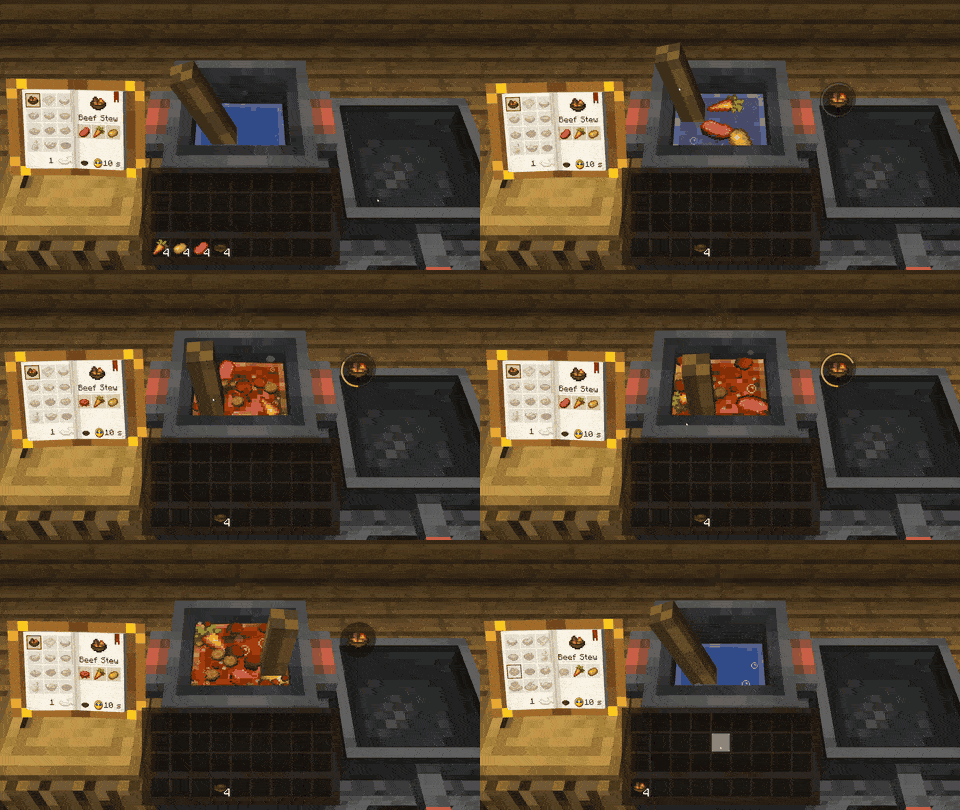
The cooking pot of Hands-On Delight, built with Diegesis.
Put it in the mods folder next to the mod that needs it. Minecraft 1.20.1 on Forge, 1.21.1 on NeoForge, and both on Fabric (with Fabric API).
An interface is two things. A station in Java says which blocks it opens on, what state it keeps and what the rules are. A scene in JSON says what is drawn where and what can be touched. Models come straight from Blockbench, and scenes reload with F3+T while the game runs.
📚 Guides, a cookbook and a JSON schema for scene files are on GitHub.
 ✅ Embeddium and
 ✅ Oculus: scenes, liquids and particles draw as usual, with or without a shader pack
 ✅ Blur (Forge), ✅ ReBlured and
 ✅ Blur+: stations stay sharp, other screens keep their blur
 ✅ Create Aeronautics on 1.21.1: stations on its flying ships open there and stay with the ship as it flies and turns
More mods by Pocky


Made by Pocky. Source on GitHub under the MIT license.
Project description from Modrinth.
Pick your setup
Choose the version and loader you play, then open the matching release.
Check the dependencies, then try the file in a copied instance before changing a world you care about.
Recent files
diegesis-fabric-1.21.1-1.0.0-beta.10.jar
15 Nov 2026
diegesis-neoforge-1.21.1-1.0.0-beta.10.jar
15 Nov 2026
diegesis-fabric-1.20.1-1.0.0-beta.10.jar
15 Nov 2026
diegesis-forge-1.20.1-1.0.0-beta.10.jar
15 Nov 2026
diegesis-fabric-1.21.1-1.0.0-beta.9.jar
13 Nov 2026
diegesis-neoforge-1.21.1-1.0.0-beta.9.jar
13 Nov 2026
diegesis-fabric-1.20.1-1.0.0-beta.9.jar
13 Nov 2026
diegesis-forge-1.20.1-1.0.0-beta.9.jar
13 Nov 2026
diegesis-neoforge-1.21.1-1.0.0-beta.8.jar
13 Nov 2026
diegesis-fabric-1.21.1-1.0.0-beta.8.jar
13 Nov 2026
diegesis-forge-1.20.1-1.0.0-beta.8.jar
13 Nov 2026
diegesis-fabric-1.20.1-1.0.0-beta.8.jar
13 Nov 2026
Looking for an older file? The official Modrinth project page is in Resources.
 mod
A modular, configurable, and slightly invasive modpack core mod.
 mod
Cook in Farmer's Delight with your hands: its menus become interactive in-world stations.
 mod
A continuation of SodiumLeafCulling for Sodium/Embeddium. (Old: SodiumLeafCulling-Unofficial)