Fabric API Needed by Chunkis 4.2.0
requiredMatching file found Matched file: 0.165.2+26.3

Modrinth · Minecraft mod
Chunkis is a high-performance, sparse storage engine for Minecraft. It slashes world save sizes by only persisting player-made changes on top of chunk snapshots, using a custom binary format (CIS) designed for speed and efficiency.
Quick answer
Chunkis 4.2.0 targets 26.3 with Fabric. Installation on the client is optional. Installation on the dedicated server is optional. All 1 required mods have matching files.
Where it goes
Installation on the client is optional. Installation on the dedicated server is optional.
The source marks this as usable on both the client and server.
4.2.0. Change the file and its required mods may change too.
Install Fabric API first. We found matching files for this game-version and loader setup.
We only count dependency files that match this setup. A file for another loader does not fill the gap.
Before you install it
Built for Chunkis 4.2.0. Pick another file and the loader, install side or required mods may change.
Use 4.2.0. It targets 26.3 with Fabric; another release may have different loader, side or dependency requirements.
Install Fabric API first. We found matching files for this game-version and loader setup.
Installation on the client is optional. Installation on the dedicated server is optional.
Use the “Get this file” button beside 4.2.0. It opens that exact file at the source.
About this project
Your world grows with every area you explore. Chunkis gives Minecraft a different way to store those chunks: CIS, a compact format designed for safe, predictable saving and loading.
It doesn't add blocks, change recipes, or alter rendering. Your world still plays like Minecraft.
In one unpinned test, Chunkis used 31% less disk space and 26% less retained heap than vanilla storage. Results were mixed: tick p99 and reload latency were lower, while tick p50, tick p90, and unload p50 were higher (This is an intetional design to spread the load so the game might run slightly slower on avg but feels overall more consistent).
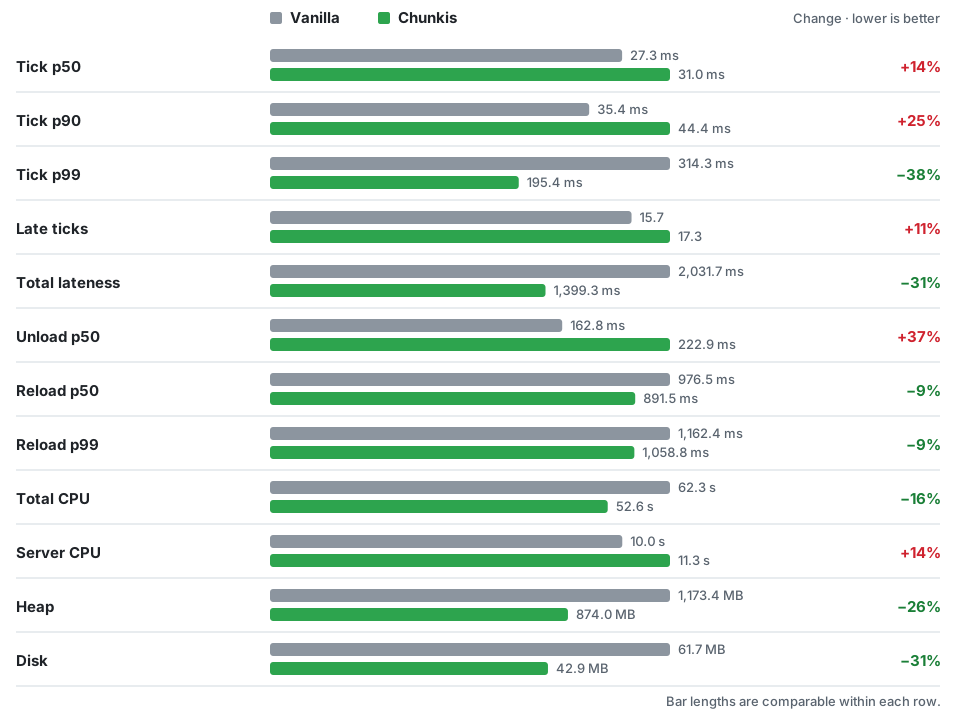
The test unloaded, reloaded, edited, and saved a 64 × 64 chunk area of natural terrain. Each result is the average of three alternating runs per side. The machine had a Ryzen 7 5700X at 4.6 GHz and 32 GB DDR4-3600 RAM. Vanilla storage was tested with Chunkis still loaded; disk was measured before shutdown compaction. Your results will vary with your world, hardware, and other mods.
See the full results · How the test works
Requires: Minecraft 1.21.11, Java 21+, Fabric Loader 0.16.5+, and Fabric API.
.jar in your .minecraft/mods folder.Migration is one-way. Removing Chunkis does not turn a CIS world back into a vanilla save. To go back, restore the backup you made before migration.
Chunkis is beta software: try it on a copy or new world first, restart it, and check your blocks, chests, entities, and dimensions before relying on it.
.mca files directly or changes chunk saving and loading.Will every world be smaller? Not necessarily. Savings depend on terrain, builds, entities, and installed mods.
Will it improve FPS? Chunkis targets storage, not rendering. Its effect on frame rate and tick performance depends on the workload.
Can I use an existing world? Yes, in singleplayer. Back it up first and keep the backup if you may want to return to vanilla.
Found a problem? Open an issue with your Minecraft and Fabric versions, mod list, reproduction steps, and latest.log (plus a crash report if available).
Project description from Modrinth.
Pick your setup
Choose the version and loader you play, then open the matching release.
Check the dependencies, then try the file in a copied instance before changing a world you care about.
Recent files
Chunkis-26.3-4.2.0.jar
7 Nov 2026
Chunkis-26.2-4.2.0.jar
7 Nov 2026
Chunkis-26.1.2-4.2.0.jar
7 Nov 2026
Chunkis-1.21.11-4.1.1.jar
6 Nov 2026
Chunkis-fabric-2.2.0-1.21.1.jar
24 Apr 2026
Looking for an older file? The official Modrinth project page is in Resources.
 mod
A mod that expands ParCool actions into combat skills.
 mod
AliveCombat makes Minecraft combat more alive by refining vanilla mechanics with smoother attacks and smarter targeting in a lightweight, fully client-side mod.
 mod
Fix bugs and add useful patches for various mods.