Mod Menu Optional for Auto HUD [Fabric 1.21.9] Auto HUD 8.11
optionalMatching file found Matched file: v16.0.1 for 1.21.9
CurseForge · Minecraft mod
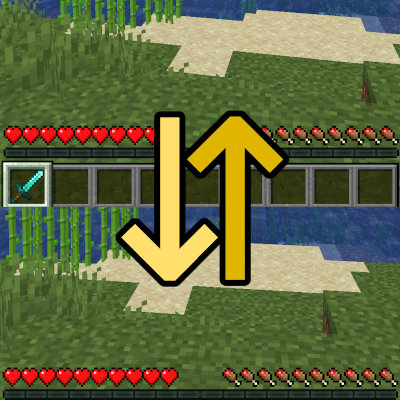
A mod which dynamically hides parts of the user interface
Quick answer
Auto HUD [Fabric 1.21.9] Auto HUD 8.11 targets 1.21.9 with Fabric. The project page does not say whether it belongs on the client. The project page does not say whether it belongs on the dedicated server. 1 required mod needs a matching file.
Where it goes
The project page does not say whether it belongs on the client. The project page does not say whether it belongs on the dedicated server.
The source does not explicitly classify this release as client-only or server-only.
[Fabric 1.21.9] Auto HUD 8.11. Change the file and its required mods may change too.
Install Fabric API first, but 1 required mod has no matching file for this setup. Do not mix loader builds to force a match. 2 come through another mod in the chain.
2 extra mods were pulled in by other dependencies. Indented rows show who needs each one. We only count dependency files that match this setup. A file for another loader does not fill the gap.
Before you install it
Built for Auto HUD [Fabric 1.21.9] Auto HUD 8.11. Pick another file and the loader, install side or required mods may change.
Use [Fabric 1.21.9] Auto HUD 8.11. It targets 1.21.9 with Fabric; another release may have different loader, side or dependency requirements.
Install Fabric API first, but 1 required mod has no matching file for this setup. Do not mix loader builds to force a match. 2 come through another mod in the chain.
The project page does not say whether it belongs on the client. The project page does not say whether it belongs on the dedicated server.
Use the “Get this file” button beside [Fabric 1.21.9] Auto HUD 8.11. It opens that exact file at the source.
About this project
Auto HUD is a Minecraft mod which hides parts of the user interface (HUD) that are currently not interesting.
It is inspired by similar mods ("immersive hud") for other games. I personally really like the clean view of no visible HUD, but get frustrated by the limitations of using F1 mode.
This is an opinionated rewrite of Head-down Display that never got updated.
Found a bug or have feedback? Leave a comment, open an issue on GitHub or join my Discord!
This mod includes a modified version of magicus' Status Effect Timer, because I could not figure out how to dynamically insert my modifications into it. Since this mod allows for status effect icons to be hidden individually, the non-modified version will draw the timers in the wrong place.
Known to be compatible:
Known to be incompatible:
screenSafeArea mixin.Project description from CurseForge.
Pick your setup
Choose the version and loader you play, then open the matching release.
Showing the newest 12 of 18 game versions. Older files are in the list below.
Check the dependencies, then try the file in a copied instance before changing a world you care about.
Recent files
autohud-8.11+1.21.9-fabric.jar
4 Jan 2026
autohud-8.11+1.21.5-fabric.jar
4 Jan 2026
autohud-8.11+1.21.7-fabric.jar
4 Jan 2026
autohud-8.11+1.20.1-fabric.jar
4 Jan 2026
autohud-8.11+1.21.1-neoforge.jar
4 Jan 2026
autohud-8.11+1.21.3-neoforge.jar
4 Jan 2026
autohud-8.11+1.21.1-fabric.jar
4 Jan 2026
autohud-8.11+1.21.3-fabric.jar
4 Jan 2026
autohud-8.11+1.21.11-fabric.jar
4 Jan 2026
autohud-8.10+1.21.11-fabric.jar
14 Dec 2025
autohud-8.10+1.21.9-fabric.jar
1 Oct 2025
autohud-8.9+1.21.7-fabric.jar
1 Aug 2025
Looking for an older file? The official CurseForge project page is in Resources.
 mod
modIn-game advancement editing and improvements to the advancement screen!
 mod
modReplace dried kelp in Create with a tidy rubber factory
 mod
modAn add-on for Neapolitan and Farmer's Respite, adding flavors from Farmer's Respite's teas and coffee.