MezzConfigGUI Optional for Just Enough Items (JEI) 11.81.0.1102 for Fabric 1.19.2
optionalMatching file found Matched file: MezzConfig GUI mc1.19.2-0.7.1 for Fabric

CurseForge · Minecraft mod
View Items and Recipes
Quick answer
Just Enough Items (JEI) 11.81.0.1102 for Fabric 1.19.2 targets 1.19.2 with Fabric. The project page does not say whether this file belongs on the client, dedicated server, or both. All 2 required mods have matching files.
Where it goes
The project page does not say whether this file belongs on the client, dedicated server, or both.
The source does not explicitly classify this release as client-only or server-only.
11.81.0.1102 for Fabric 1.19.2. Change the file and its required mods may change too.
Install MezzConfig, Fabric API first. We found matching files for this game-version and loader setup. 2 come through another mod in the chain.
2 extra mods were pulled in by other dependencies. Indented rows show who needs each one. We only count dependency files that match this setup. A file for another loader does not fill the gap.
Before you install it
Built for Just Enough Items (JEI) 11.81.0.1102 for Fabric 1.19.2. Pick another file and the loader, install side or required mods may change.
Use 11.81.0.1102 for Fabric 1.19.2. It targets 1.19.2 with Fabric; another release may have different loader, side or dependency requirements.
Install MezzConfig, Fabric API first. We found matching files for this game-version and loader setup. 2 come through another mod in the chain.
The project page does not say whether this file belongs on the client, dedicated server, or both.
Use the “Get this file” button beside 11.81.0.1102 for Fabric 1.19.2. It opens that exact file at the source.
About this project
JEI is an item and recipe viewing mod for Minecraft, built from the ground up for stability and performance.
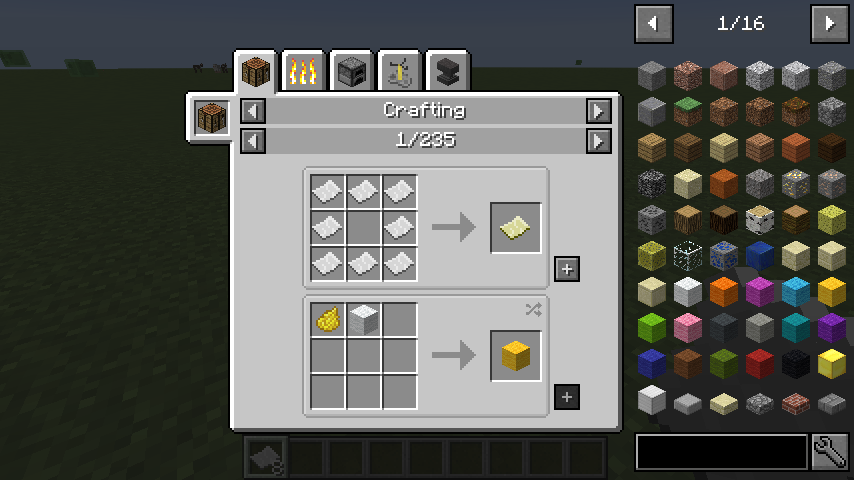
Inventory: (Minecraft Options -> Controls)
Show Recipes: Hover over item + R
Show Uses: Hover over item + U
Toggle Item List Overlay: Control + O
Item List:
Show Recipes Click Item or type R
Show Uses : Right-Click Item or type U
Next/Previous page: Scroll Wheel
Open Config Menu: Click Wrench at bottom-right
Toggle Cheat mode: Control-Click Wrench at bottom-right
Search:
Select Search Bar: Click or Control + F
Clear Search: Right Click Previous Search: Up Arrow
Search by Mod Name: Type @ in front of a word (@thaum)
Multiple terms work together (wand @thaum)
Exclude search terms: Type - in front of a word (@thaum -wand)
Search terms that have spaces in them: Type "" around the words ("two words")
Recipe View: Next/Previous page: Scroll Wheel Show all Recipes: Click the recipe category's name
Move items into crafting area: Click the [+] button. Shift-Click to move multiple sets of items.
Advanced Search:
Search by Tooltip Only: Type # in front of a word
Search by OreDict name: Type $ in front of a word
Search by Creative Tab: Type % in front of a word
Multiple Searches: Separate terms with | characters, like "wrench|hammer"
**With Cheat Mode Active:**Get a full stack of Items: Click Item Get one Item: Right-Click Item Delete Item: Drop an Item into the Item List
With Item List Edit Mode Active: (These controls are shown in-game on the item tooltip) Hide Item: Control-Click Item Hide Items and Sub-Items: Control-Right-Click ItemHide all Items from a mod: Control-Shift-Click Item
Project description from CurseForge.
Pick your setup
Choose the version and loader you play, then open the matching release.
Check the dependencies, then try the file in a copied instance before changing a world you care about.
Recent files
jei-1.19.2-fabric-11.81.0.1102.jar
22 Nov 2026
jei-1.19.2-forge-11.81.0.1102.jar
22 Nov 2026
jei-1.21.11-neoforge-27.55.0.122.jar
22 Nov 2026
jei-1.21.11-fabric-27.55.0.122.jar
22 Nov 2026
jei-26.1.2-neoforge-29.54.0.123.jar
22 Nov 2026
jei-26.1.2-fabric-29.54.0.123.jar
22 Nov 2026
jei-26.3-neoforge-31.23.0.129.jar
22 Nov 2026
jei-26.3-fabric-31.23.0.129.jar
22 Nov 2026
jei-26.3-neoforge-31.23.0.128.jar
22 Nov 2026
jei-26.3-fabric-31.23.0.128.jar
22 Nov 2026
jei-1.20.1-fabric-15.75.0.242.jar
22 Nov 2026
jei-1.20.1-forge-15.75.0.242.jar
22 Nov 2026
Looking for an older file? The official CurseForge project page is in Resources.
 mod
GameStages-style chapter progression for NeoForge. Lock items, fluids, recipes, and more behind named stages. For Minecraft 1.21 and 26.
 mod
View Items and Recipes
 mod
Simple Location Marking is a lightweight, client-side location marking mod for Minecraft Fabric, directly inspired by the Waypoints feature of Xaero's Minimap.