Vintage Story version
Back to mods 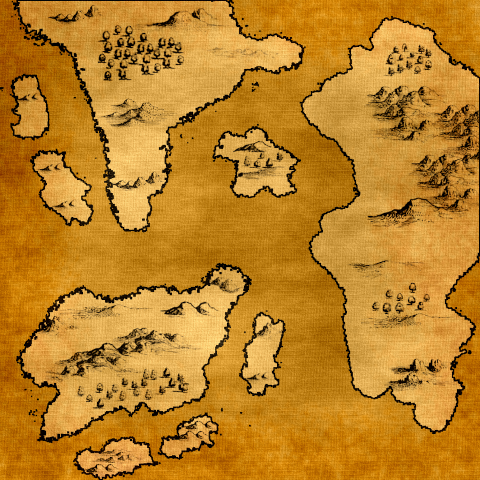
Vintage Story Mod DB · Vintage Story mod
WebCartographer
This is a utility to export a web map from a savegame file (.vcdbs). The final output can be hosted using nginx or apache or any other webserver. Thanks to Drakker who made the website part of this project. vs-webmap For help, discussion or suggestions join
Choose a version Pick your version below, then grab the matching file.
Quick answer
Which WebCartographer release matches 1.22.4?
Best match for your filters 0.11.4
Game version 1.22.0-rc.2, 1.22.0-rc.3, 1.22.0-rc.4
Loader Built-in Vintage Story mod system
WebCartographer 0.11.4 targets 1.22.0-rc.2, 1.22.0-rc.3, 1.22.0-rc.4. Do not install it on the client. It must be installed on the dedicated server. No extra mods listed for this file.
Where it goes
Is WebCartographer required on the client, server, or both?
Do not install it on the client. It must be installed on the dedicated server.
Client Not supported
Dedicated server Required
Loader for this release Built-in Vintage Story mod system
Required install it here Optional supported, not mandatory Not supported do not install here Source doesn’t say do not assume
This Vintage Story file is marked server-only.
What else does WebCartographer 0.11.4 need?
0.11.4 on 1.22.4. Every mod below is checked against that same setup.
This file does not list any required mods. Do not add a library just because a different file uses it.
This file does not list any required or optional mods.
Before you install it
Add WebCartographer without breaking your instance.
Built for WebCartographer 0.11.4 on 1.22.4. Pick another file and the loader, install side or required mods may change.
- 01
Stick to this file
Use 0.11.4. It targets 1.22.0-rc.2, 1.22.0-rc.3, 1.22.0-rc.4; another release may have different loader, side or dependency requirements.
- 02
Bring the mods it needs
This file does not list any required mods. Do not add a library just because a different file uses it.
- 03
Put it on the correct side
Do not install it on the client. It must be installed on the dedicated server.
- 04
Pick the file you checked
Use the “Get this file” button beside 0.11.4. It opens that exact file at the source.
About this project
What does WebCartographer add?
This is a utility to export a web map from a savegame file (.vcdbs).
The final output can be hosted using nginx or apache or any other webserver.
Thanks to Drakker who made the website part of this project. vs-webmap
For help, discussion or suggestions join the Discord Server
Demo: TOPS Webmap
To create a webmap you will also need the client side color exported found here
WebCartographer color exporter
Further instructions on how to use it and set it up can be found on the repository readme.
Export instructions
1. Add the Webcartographer mod to your server
2. Start the server - it will initialize the config with default values
3. Configure what the mod should do using the generated `Webcartographerconfig.json`
- by default it will export to the data path of your vs server or client into the "webmap" folder
- if you want to export when the server starts change `"ExportOnStart": true`
4. If you use a Mode other then 4 you need to add the https://mods.vintagestory.at/wcce to your client and run `.exportcolors` to start a export, this will send the block colors needed to construct the map to the server and start a export. If you use Mode 4 you can still use this to start a export. Once the server has the colors or in Mode 4 you can also use ExportOnStart to export when the server start. You only need to run `.exportcolors` again when changing or updating mods/game to ensure they have the correct color.
5. Wait till it is done, see server console, Note it will by default lock the server and kick players since the server is unusable while exporting
6. In the output directory you will find a html folder that is ready to be hosted using any webserver (nginx, apache, ...) or just open the index.html file in your webbrowser to see the map (markers wont work using that method)
Since version 0.9.0 the mod includes a integrated web server.
That means in singeplayer you only need to add the mod.
Start the world once to generate the conig, stop the world again and enable the webserver in the config EnableWebserver: true
Load back into the game
type /webc export
then wait till it is done, check youer server-main.log when it is done and it will tell you the web address of your web map when the server starts
it should say something like "Webmap server started on http://localhost:42422/"
usually that should be (game port + 2)
http://localhost:42422
If you host the server publically and want it to be accessible from anywhere you will need to change the Host in the config from "localhost" to "*".
2. Start the server - it will initialize the config with default values
3. Configure what the mod should do using the generated `Webcartographerconfig.json`
- by default it will export to the data path of your vs server or client into the "webmap" folder
- if you want to export when the server starts change `"ExportOnStart": true`
4. If you use a Mode other then 4 you need to add the https://mods.vintagestory.at/wcce to your client and run `.exportcolors` to start a export, this will send the block colors needed to construct the map to the server and start a export. If you use Mode 4 you can still use this to start a export. Once the server has the colors or in Mode 4 you can also use ExportOnStart to export when the server start. You only need to run `.exportcolors` again when changing or updating mods/game to ensure they have the correct color.
5. Wait till it is done, see server console, Note it will by default lock the server and kick players since the server is unusable while exporting
6. In the output directory you will find a html folder that is ready to be hosted using any webserver (nginx, apache, ...) or just open the index.html file in your webbrowser to see the map (markers wont work using that method)
Since version 0.9.0 the mod includes a integrated web server.
That means in singeplayer you only need to add the mod.
Start the world once to generate the conig, stop the world again and enable the webserver in the config EnableWebserver: true
Load back into the game
type /webc export
then wait till it is done, check youer server-main.log when it is done and it will tell you the web address of your web map when the server starts
it should say something like "Webmap server started on http://localhost:42422/"
usually that should be (game port + 2)
http://localhost:42422
If you host the server publically and want it to be accessible from anywhere you will need to change the Host in the config from "localhost" to "*".
Project description from Vintage Story Mod DB.
Pick your setup
WebCartographer releases for each Vintage Story version.
Choose the version and loader you play, then open the matching release.
Vintage Story version
1.22.3
1 loader buildVintage Story version
1.22.2
1 loader buildVintage Story version
1.22.1
1 loader buildVintage Story version
1.22.0-rc.10
1 loader buildVintage Story version
1.22.0-rc.9
1 loader buildVintage Story version
1.22.0-rc.8
1 loader buildVintage Story version
1.22.0-rc.7
1 loader buildVintage Story version
1.22.0-rc.6
1 loader buildVintage Story version
1.22.0-rc.5
1 loader buildVintage Story version
1.22.0-rc.4
1 loader buildVintage Story version
1.22.0-rc.3
1 loader buildShowing the newest 12 of 59 game versions. Older files are in the list below.
Check the dependencies, then try the file in a copied instance before changing a world you care about.
Recent files
WebCartographer versions and loaders
0.11.4
webcartographer_0.11.4.zip
24 Jul 2026
Client Not supported Server Required Dependencies No extras listed Listed on Release listing
Check the 1.22.4 setup 1.22.0-rc.21.22.0-rc.31.22.0-rc.41.22.0-rc.5 release
Looking for an older file? The official Vintage Story Mod DB project page is in Resources.