libGUI Needed by Scribe: Notes & Tasks 0.2.0
requiredMatching file found Matched file: 3.1.0
Vintage Story Mod DB · Vintage Story mod
⚠️ Requires LibGUI — Scribe won't load without it. Install LibGUI from the mod DB. The most up to date version of Scribe needs LibGUI 3.1.0. If you're using LibGUI 2.0.0, use Scribe 0.1.1 Vintage Story is an epic journey—and a logistical nightmare
Quick answer
Scribe: Notes & Tasks 0.2.0 targets 1.22.0, 1.22.1, 1.22.2. It must be installed on the client. Installation on the dedicated server is optional. All 1 required mods have matching files.
Where it goes
It must be installed on the client. Installation on the dedicated server is optional.
This release supports both sides, but the source does not require it on the server.
0.2.0 on 1.22.1. Every mod below is checked against that same setup.
Install libGUI first. We found matching files for this game-version and loader setup.
We only count dependency files that match this setup. A file for another loader does not fill the gap.
Before you install it
Built for Scribe: Notes & Tasks 0.2.0 on 1.22.1. Pick another file and the loader, install side or required mods may change.
Use 0.2.0. It targets 1.22.0, 1.22.1, 1.22.2; another release may have different loader, side or dependency requirements.
Install libGUI first. We found matching files for this game-version and loader setup.
It must be installed on the client. Installation on the dedicated server is optional.
Use the “Get this file” button beside 0.2.0. It opens that exact file at the source.
About this project
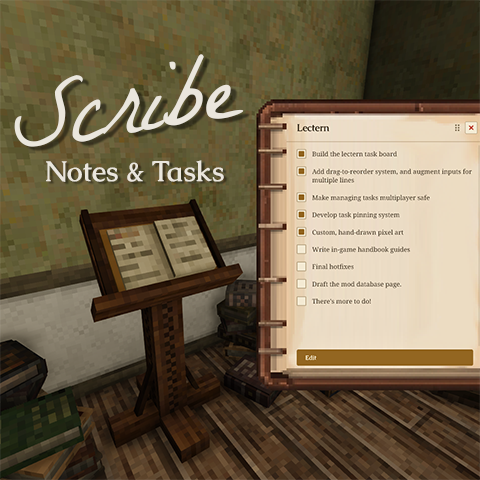
Vintage Story is an epic journey—and a logistical nightmare. You log off mid-project, trek 3,000 blocks for ore, and by the time you return, that vital mental note to 'smelt bronze before winter' has completely evaporated somewhere between baking pies and clayforming.
Scribe is my attempt to bridge that gap — a mod for keeping your goals inside the world, instead of on a sticky note next to your monitor.
Version 0.2
/worldconfig scribeClockmakerRequiresTrait false
Version 0.1
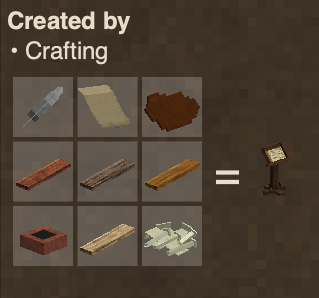
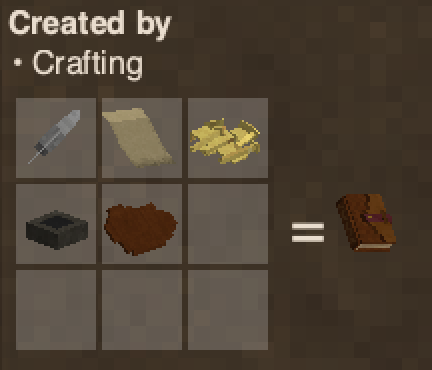
For keyboard shortcuts, completion policies, and the full settings reference, see the Scribe wiki on GitHub.
Pinned tasks show as a compact, glow-outlined list over the game world — no background plate, just readable text wherever you've anchored it. It defaults to the top-right corner with enough clearance for the minimap (and automatically removes that clearance if you've hidden the minimap).
Checking a task off from the HUD starts a 1.5-second undo window — the text fades as a countdown. Uncheck within the window to fully cancel (nothing is sent to the server). When the window elapses, your chosen completion policy fires: keep it pinned, keep and sink to bottom, unpin, unpin and sink to bottom, or delete the task from the document entirely.
Press P (rebindable under Controls → Scribe) or click the ▾ header to collapse the HUD to just its header. Position, size, row cap, and text scale are all configurable in Scribe Settings.
Open from the gear icon in the Lectern sidebar or the gear on the HUD header — same panel either way. Notable options:
The Lectern is just the first tier. The plan is for note-taking tools to grow with your tech tree — scratchy clay in the stone age, paper and parchment later, shared boards for multiplayer.
If you're into putting your mark on the world, these mods pair well with Scribe:
| Billposting by Moby_ Pin written parchments to walls as in-world notices and announcements. |
Wanderer's Sketchbook by JeanPierre An in-game sketchbook for freehand drawing, journaling, and sharing between worlds. |
| Frontier's Map by JeanPierre A physical map with drawing tools and 130+ hand-drawn stamps for charting your world. |
Vintage Canvas by TonyMurchison Oil painting on canvas and directly onto walls as frescos. |
Source and issue tracker: github.com/EdzyWhat/vintagestory-scribe-libgui
Bundled fonts: Caudex (SIL OFL), La Belle Aurore (SIL OFL), Noto Sans (SIL OFL), Noto Serif (SIL OFL), Scapholène (Scapholène Font License v1.0). All shipped unmodified. Playfair Display and Cormorant Unicase provided by LibGUI.
Project description from Vintage Story Mod DB.
Pick your setup
Choose the version and loader you play, then open the matching release.
Check the dependencies, then try the file in a copied instance before changing a world you care about.
Recent files
scribe_0.2.0.zip
2 Aug 2026
scribe_0.1.2.zip
29 Jul 2026
scribe_0.1.1.zip
29 Jul 2026
scribe_0.1.0.zip
28 Jul 2026
Looking for an older file? The official Vintage Story Mod DB project page is in Resources.
 mod
modAdds termites, ants, more flies (they show you rot in containers), spiders and jumping spiders :3
 mod
modA redo of the background for the UI and sliders dots etc for in game this is an earthy rusty tone.
 mod
mod(ALPHA) Telescope mod in development