Chisel Wiz - Powerful chisel shortcuts Optional for ChiselControl 0.1.40
optionalMatching file found Matched file: 5.1.0

Vintage Story Mod DB · Vintage Story mod
CHISEL CONTROL Selection tools · Block modes · Any server A CHISEL MOD FOR VINTAGE STORY 1.22 Chisel with control. Select whole faces, loops and boxes of voxels, preview a shave or extrude, then apply it in one go. Push, flip and rotate whole blocks, wit
Quick answer
ChiselControl 0.1.40 targets 1.22.0-pre.1, 1.22.0-pre.2, 1.22.0-pre.3. It must be installed on the client. Installation on the dedicated server is optional. No extra mods listed for this file.
Where it goes
It must be installed on the client. Installation on the dedicated server is optional.
This release supports both sides, but the source does not require it on the server.
0.1.40. Change the file and its required mods may change too.
This file does not list any required mods. Do not add a library just because a different file uses it.
We only count dependency files that match this setup. A file for another loader does not fill the gap.
Before you install it
Built for ChiselControl 0.1.40. Pick another file and the loader, install side or required mods may change.
Use 0.1.40. It targets 1.22.0-pre.1, 1.22.0-pre.2, 1.22.0-pre.3; another release may have different loader, side or dependency requirements.
This file does not list any required mods. Do not add a library just because a different file uses it.
It must be installed on the client. Installation on the dedicated server is optional.
Use the “Get this file” button beside 0.1.40. It opens that exact file at the source.
About this project
| CHISEL CONTROL | Selection tools · Block modes · Any server |
| A CHISEL MOD FOR VINTAGE STORY 1.22
Chisel with
control. Select whole faces, loops and boxes of voxels, preview a shave or extrude, then apply it in one go. Push, flip and rotate whole blocks, with undo and redo. It even works on servers that don't have the mod.
⬇ DownloadGet started
Needed on the client · optional on the server
|
Preview: Shave −22 / +8 voxels · then APPLY
|
|
4
selection tools
|
5
block modes
|
Undo
and redo
|
Any
server, even vanilla
|
|
THE F MENU
The F menu, upgraded.
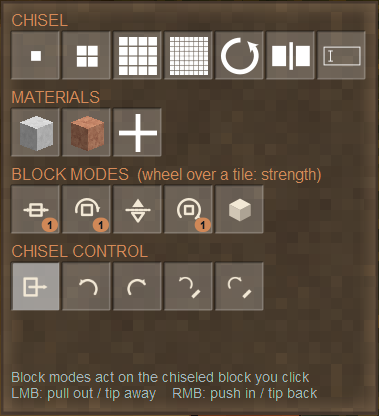
Hold a chisel and press F. Chisel Control's menu replaces vanilla's, with the same chisel sizes and materials plus block modes, undo and the selection tools. Those open a side panel with their own options.
Every material in the block gets a tile, even when it has only one
Scroll over a block mode to set its strength
Undo and redo for ordinary chisel clicks too
|
 |
|
FaceCoplanarBoxLoop
Selected: 24 faces / 24 voxels · LMB add RMB remove
|
SELECTION TOOLS
Pick surfaces, not single voxels.
LMB adds to the selection and RMB removes from it. There are no modifier keys to remember.
Face: one voxel face at a time
Coplanar: a whole flat area, with a tolerance
Box: two clicks, as a flat area or a 3D volume (optionally including air)
Loop: a one-face belt that wraps around the shape
Grow, shrink, invert and clear from the panel
|
|
SHAVE · EXTRUDE · SWAP
See it first. Then apply.
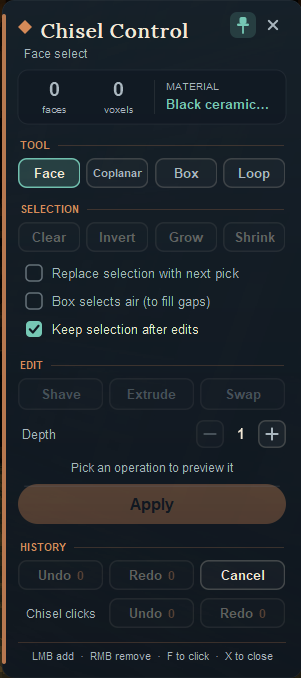
The side panel docks next to the F menu. Choose an operation and the preview shows exactly what will happen: red voxels go and green ones are added. Nothing changes until you press APPLY.
Shave cuts in by the depth you set
Extrude builds out, in the chisel's selected material
Swap repaints the selection with another material
Undo and redo your recent edits
|
 |
|
BLOCK MODES
Block mode: Push/Pull 2 · LMB pull out RMB push in · scroll to change strength
|
BLOCK MODES
Move a whole block in one click.
Pick a block mode in the F menu, then click any chiseled block. The face you click sets the direction.
Push/Pull 1–15 voxels, or wrap so nothing falls off
Flip upside down, Rotate by quarter turns
Reset fills the block solid again
|
|
ANY SERVER
Works where the server doesn't have it.
On a server with Chisel Control, each edit is a single change checked by the server. On a vanilla server, the mod replays your edit through the same chisel packets vanilla uses, so the server applies and saves it like normal chiseling, within vanilla limits.
Walk out of reach and it pauses until you come back
Missed clicks are worked out again and resent
Missing material is added from your inventory
Press Backspace to stop it at any time
|
Replaying 184/412 (paused: move closer)
|
|
1
Install it
Add the mod on your computer. The server doesn't need it.
|
2
Press F
Hold a chisel, look at a chiseled block and press F.
|
3
Select
Pick Selection tools, then click faces with LMB.
|
4
Apply
Choose Shave, Extrude or Swap, check the preview, press APPLY.
|
|
🛡
Server rules apply
With Chisel Control on the server, every edit is checked for reach, land claims and reinforcement, and survival needs a hammer in your off hand. On a vanilla server, the server uses its own chisel checks.
|
🧹
Safe to remove
Chisel Control stores nothing extra on items or blocks. Remove it and your chiseled blocks stay ordinary vanilla chisel work.
|
⚙
Your limits
Server owners set the depth, selection size, edit distance, history length and survival use in ModConfig/chiselcontrol.json.
|
No. Without it, your edits are sent as ordinary chisel clicks, which the server checks and saves. With it, each edit is one change the server checks, and big edits go through at once. Client and server must then run the same version.
Yes. You need a hammer in your off hand, the chisel takes durability damage, and extruding uses the block's material budget, just like vanilla. Server owners can turn survival use off in the config.
Every Apply, block-mode click and swap is one undo step (20 by default), with Ctrl+Z and Ctrl+Y. History is kept in memory and is lost when you leave the world. An undo is refused if the blocks have changed since. The F menu also has Undo chisel click for ordinary vanilla clicks.
While Chisel Control mode is on, LMB selects instead of breaking. Pick a chisel size in the F menu or press K to go back to the plain chisel.
Yes, in ModConfig/chiselcontrol.json: depth, selection size, box size, tolerance, history length, edit distance, preview size, and whether survival may use it.
Project description from Vintage Story Mod DB.
Pick your setup
Choose the version and loader you play, then open the matching release.
Showing the newest 12 of 23 game versions. Older files are in the list below.
Check the dependencies, then try the file in a copied instance before changing a world you care about.
Recent files
ChiselControl_0.1.40.zip
27 Oct 2026
ChiselControl_0.1.39.zip
26 Oct 2026
Looking for an older file? The official Vintage Story Mod DB project page is in Resources.
 mod
Pickup animal carcasses, carry them in a backpack slot, and place them down elsewhere.
 mod
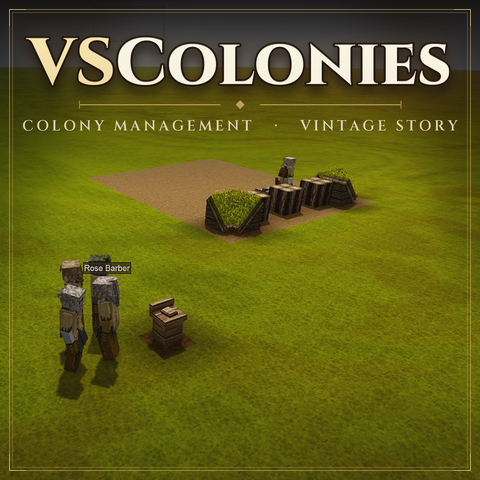
Build ur own colone with villagers who harvest resources, mine and build town!
 mod
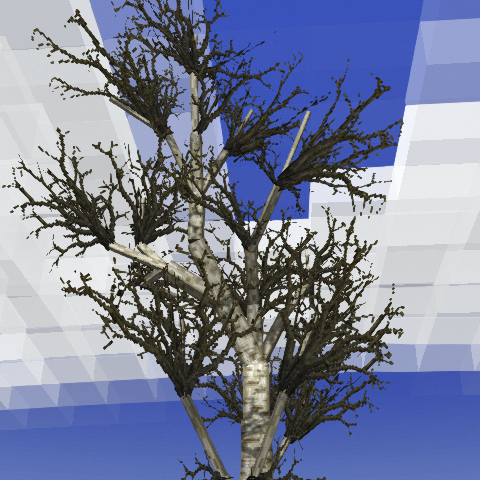
Lightweight mod where trees shed their leaves based on temperature. MAJOR 2.0 UPDATE!