Vintage Story version
Back to mods 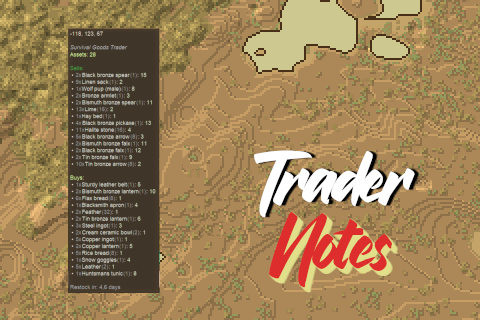
Vintage Story Mod DB · Vintage Story mod
Trader Notes
What this mod does: ♣ Adds an icon to the worldmap, showing the live position of an trader (after opening the trade menu for the first time). ♣ Hovering over the icon with the mouse will show a list of current goods that the trader is either sellin
Choose a version Pick your version below, then grab the matching file.
Quick answer
Which Trader Notes release should I use?
Latest stable file 1.0.7
Game version 1.22.0-rc.1, 1.22.0-rc.2, 1.22.0-rc.3
Loader Built-in Vintage Story mod system
Trader Notes 1.0.7 targets 1.22.0-rc.1, 1.22.0-rc.2, 1.22.0-rc.3. It must be installed on the client. Installation on the dedicated server is optional. No extra mods listed for this file.
Where it goes
Is Trader Notes required on the client, server, or both?
It must be installed on the client. Installation on the dedicated server is optional.
Client Required
Dedicated server Optional
Loader for this release Built-in Vintage Story mod system
Required install it here Optional supported, not mandatory Not supported do not install here Source doesn’t say do not assume
This release supports both sides, but the source does not require it on the server.
What else does Trader Notes 1.0.7 need?
1.0.7. Change the file and its required mods may change too.
This file does not list any required mods. Do not add a library just because a different file uses it.
This file does not list any required or optional mods.
Before you install it
Add Trader Notes without breaking your instance.
Built for Trader Notes 1.0.7. Pick another file and the loader, install side or required mods may change.
- 01
Stick to this file
Use 1.0.7. It targets 1.22.0-rc.1, 1.22.0-rc.2, 1.22.0-rc.3; another release may have different loader, side or dependency requirements.
- 02
Bring the mods it needs
This file does not list any required mods. Do not add a library just because a different file uses it.
- 03
Put it on the correct side
It must be installed on the client. Installation on the dedicated server is optional.
- 04
Pick the file you checked
Use the “Get this file” button beside 1.0.7. It opens that exact file at the source.
About this project
What does Trader Notes add?
What this mod does:
♣ Adds an icon to the worldmap, showing the live position of an trader (after opening the trade menu for the first time).
♣ Hovering over the icon with the mouse will show a list of current goods that the trader is either selling or buying. Also displays their funds.
♣ The popup-list will update, everytime you are interacting with the trade menu - including marking items that have been sold out.
♣ It will also count down the remaining days until the trader is restocking and inform once new items have arrived and the list is outdated.
What this mod partly does:
♣ The list won't update (by default), if another player is buying or selling items. It will only store the items that YOU have last "seen" in the trader inventory while visiting. It will only update to the latest state, once you are visiting the trader again.
However, you may enable "LiveUpdate" in the configuration-file of the mod. This will update the trader automatically BUT only if the player is within render range of the trader (that's usually between 80-120 blocks).
So...
Think of it as a personal note of items that the trader had in stock while you where there (but you don't know what has changed meanwhile).
The mod is client-side only and by default only works in single player. Servers may install it, to enable the mods features in their multiplayer world, though.
It will then force-download the mod to all players that don't have it yet.
Config Options:
The mod will create a "TraderNotesConfig.json" inside the ModConfig folder on your hard drive.
You are free to fork, modify, expand or improve.
The source code is available via the tab above.
Originally developed for the Conquest of Blocks multiplayer server.
Project description from Vintage Story Mod DB.
Pick your setup
Trader Notes releases for each Vintage Story version.
Choose the version and loader you play, then open the matching release.
Vintage Story version
1.22.1
1 loader buildVintage Story version
1.22.0-rc.10
1 loader buildVintage Story version
1.22.0-rc.9
1 loader buildVintage Story version
1.22.0-rc.8
1 loader buildVintage Story version
1.22.0-rc.7
1 loader buildVintage Story version
1.22.0-rc.6
1 loader buildVintage Story version
1.22.0-rc.5
1 loader buildVintage Story version
1.22.0-rc.4
1 loader buildVintage Story version
1.22.0-rc.3
1 loader buildVintage Story version
1.22.0-rc.2
1 loader buildVintage Story version
1.22.0-rc.1
1 loader buildShowing the newest 12 of 14 game versions. Older files are in the list below.
Check the dependencies, then try the file in a copied instance before changing a world you care about.
Recent files
Trader Notes versions and loaders
1.0.7
TraderNotes_1.0.7.zip
28 May 2026
Client Required Server Optional Dependencies No extras listed Listed on Release listing
Check the 1.22.2 setup 1.22.0-rc.11.22.0-rc.21.22.0-rc.31.22.0-rc.4 release
1.0.6
TraderNotes_1.0.6.zip
17 Mar 2026
Client Required Server Optional Dependencies No extras listed Listed on Release listing
Check the 1.22.0-rc.2 setup 1.22.0-rc.11.22.0-rc.2 release
1.0.5
TraderNotes_1.0.5.zip
15 Feb 2026
Client Required Server Optional Dependencies No extras listed Listed on Release listing
Check the 1.21.6 setup 1.21.6 release
1.0.4
TraderNotes_1.0.4.zip
11 Feb 2026
Client Required Server Optional Dependencies No extras listed Listed on Release listing
Check the 1.21.6 setup 1.21.6 release
1.0.3
TraderNotes_1.0.3.zip
25 Jan 2026
Client Required Server Optional Dependencies No extras listed Listed on Release listing
Check the 1.21.6 setup 1.21.6 release
1.0.2
TraderNotes_1.0.2.zip
25 Jan 2026
Client Required Server Optional Dependencies No extras listed Listed on Release listing
Check the 1.21.6 setup 1.21.6 release
1.0.1
TraderNotes_1.0.1.zip
20 Jan 2026
Client Required Server Optional Dependencies No extras listed Listed on Release listing
Check the 1.21.6 setup 1.21.6 release
1.0.0
TraderNotes_1.0.0.zip
20 Jan 2026
Client Required Server Optional Dependencies No extras listed Listed on Release listing
Check the 1.21.6 setup 1.21.6 release
Looking for an older file? The official Vintage Story Mod DB project page is in Resources.
 mod
mod Vintage Story
eViSTool — Linux
Mod manager and dedicated server tool: updates, rollback, ModDB catalog, backups, remote control
mod Vintage Story
eViSTool — Windows
Mod manager and dedicated server tool: updates, rollback, ModDB catalog, backups, remote control
 mod
mod Vintage Story
BATS!
Adds realistic flying bats to the game (They don't get stuck!). Also, renewable saltpeter.