

Vintage Story version
Back to mods 
Vintage Story Mod DB · Vintage Story mod
BetterRuins
BetterRuins Team BetterRuins expands your world with a large variety of handcrafted ruins, hidden places, story locations, loot spots, and atmospheric discoveries. Instead of making exploration feel repetitive, the mod aims to make every journey more interes
Choose a version Pick your version below, then grab the matching file.
Quick answer
Which BetterRuins release matches 1.22.1?
Best match for your filters 0.6.3
Game version 1.22.0, 1.22.1, 1.22.2
Loader Built-in Vintage Story mod system
BetterRuins 0.6.3 targets 1.22.0, 1.22.1, 1.22.2. It must be installed on the client. Installation on the dedicated server is optional. No extra mods listed for this file.
Where it goes
Is BetterRuins required on the client, server, or both?
It must be installed on the client. Installation on the dedicated server is optional.
Client Required
Dedicated server Optional
Loader for this release Built-in Vintage Story mod system
Required install it here Optional supported, not mandatory Not supported do not install here Source doesn’t say do not assume
This release supports both sides, but the source does not require it on the server.
What else does BetterRuins 0.6.3 need?
0.6.3 on 1.22.1. Every mod below is checked against that same setup.
This file does not list any required mods. Do not add a library just because a different file uses it.
This file does not list any required or optional mods.
Before you install it
Add BetterRuins without breaking your instance.
Built for BetterRuins 0.6.3 on 1.22.1. Pick another file and the loader, install side or required mods may change.
- 01
Stick to this file
Use 0.6.3. It targets 1.22.0, 1.22.1, 1.22.2; another release may have different loader, side or dependency requirements.
- 02
Bring the mods it needs
This file does not list any required mods. Do not add a library just because a different file uses it.
- 03
Put it on the correct side
It must be installed on the client. Installation on the dedicated server is optional.
- 04
Pick the file you checked
Use the “Get this file” button beside 0.6.3. It opens that exact file at the source.
About this project
What does BetterRuins add?
BetterRuins Team

BetterRuins expands your world with a large variety of handcrafted ruins, hidden places, story locations, loot spots, and atmospheric discoveries.
Instead of making exploration feel repetitive, the mod aims to make every journey more interesting by adding structures that feel rewarding to find and worth checking out.
You can discover everything from small ruins and underground passages to larger landmarks, story-related locations, unique loot, blueprints, and lore that adds more depth to the world.
BetterRuins is built for players who enjoy exploration, worldbuilding, and finding meaningful content across survival worlds, whether playing alone or on a server.
✨ Features
Structures
Adds over 600 new structures to the world, from small ruins and graves to larger landmarks, underground areas, villages, story locations, and other points of interest.
Story content
Includes unique story locations with maps, trader dialogue, connected structures, and exploration-focused progression with worthwhile rewards.
Blueprints
Adds collectible blueprints that unlock special crafting options for rare, useful, or otherwise unobtainable blocks and items.
Lore
Many locations include custom lore and worldbuilding elements to make exploration feel more immersive and connected to the world.
Loot
Expands loot with valuable, useful, and unusual rewards that make exploration more interesting throughout the game.
Compatibility
Works alongside many landform and content mods, while also supporting modded loot integration in many places.
Configurable
A lot of features can be adjusted to better fit your world, server setup, and preferred exploration experience.
📢 Latest Content Showcases
🛠 Installing or Updating on existing worlds and servers
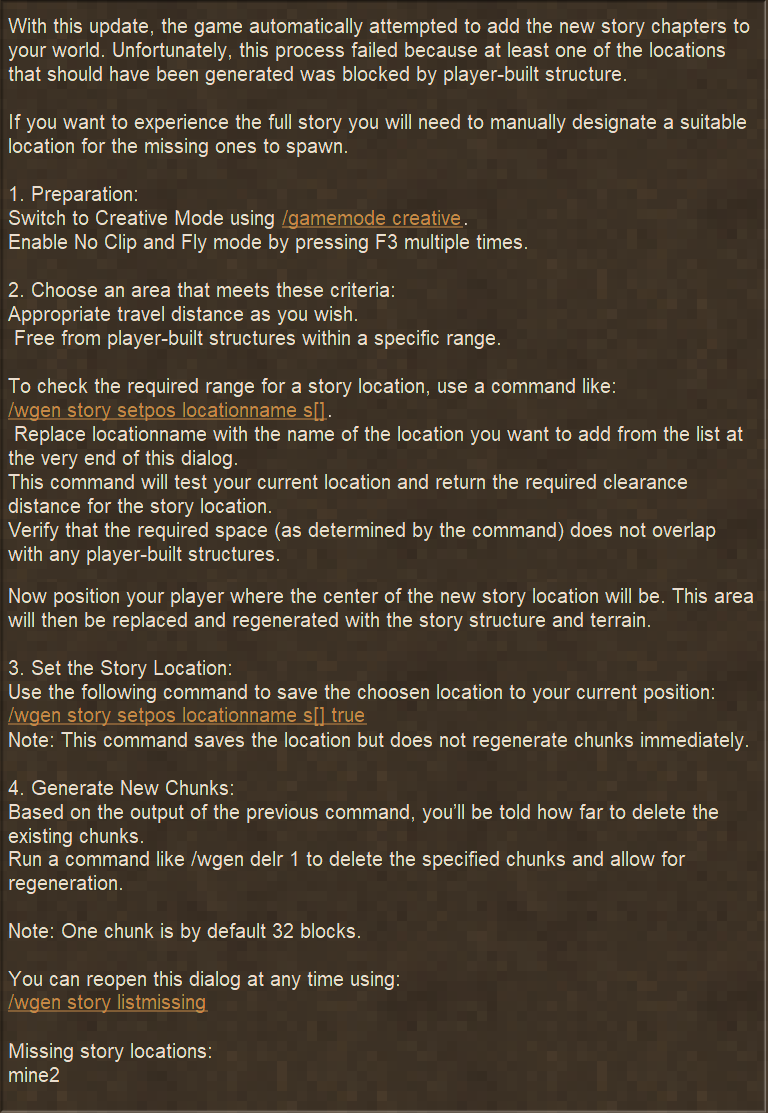
BetterRuins can be added to existing worlds and updated later, but newly added or changed content will only appear in chunks generated after installation or update.
If the location of a newly added story location is blocked by already generated terrain, you may have to do some manual cleanup or adjustments like this:
⭐ Mod Compatibility
Warning:
Due to missing compatibility patches, using RiverGen alongside BetterRuins updates on existing worlds is risky. Significant terrain glitches or "cliff" chunk borders may occur if vanilla or BetterRuins updates change story structure generation.
To prevent world corruption or ugly borders, always back up your save and manually inspect new chunk transitions after updating vanilla or BetterRuins.
To prevent world corruption or ugly borders, always back up your save and manually inspect new chunk transitions after updating vanilla or BetterRuins.
Note:
The original Rivers Mod is unaffected, as it already includes a fix for these versioning issues.
Any mod that touches landforms will affect how story locations generate because they change the landforms that those story locations are depending on. BetterRuins adds compatibility patches to its story locations for all known landform mods to allow them to generate as good as possible. Some landform mods have more fitting landforms for story locations than others so keep that in mind.
- FieldsAndPlateaus: Compatible
- PlainsAndValleys: Compatible
- Vanilla_PlusWorldGen: Compatible
- Worldgenfix: Compatible
- Worldgenfixremix: Compatible
- Conquest Landform Overhaul: Compatible
- TerraPrety: Compatible but not ideal terrain gen for story locations
Optional Mod Compatibility
- Primitive Survival: Primitive Survival loot in BetterRuins
🏛️ Our Vision
BetterRuins is more than just a content mod. The idea behind it is to create a project where builders can share their work in a way that feels naturally integrated into the world and can be experienced by all players during normal gameplay.
A big part of the mod comes from hobby builders and creative people who contribute whenever they feel inspired. Most contributions are driven by self-motivation, personal ideas, and the wish to create something memorable for others to discover.
At the same time, community feedback plays a huge role in pushing the project forward. Player reactions, suggestions, and support help shape new ideas, improvements, and future additions. Being one of the most popular mods also gives the project visibility that helps it keep growing.
We try to keep the team open and approachable, so joining the project is relatively easy for people who want to contribute with building, ideas, testing, writing, or other creative work.
Most of the coordination happens through our Discord, where we organize tasks, discuss ideas, review progress, and manage the many details behind the scenes. We also use our creative server as the main place where a lot of structures are planned, built, and refined together.
Contributors: Everyone who has contributed to BetterRuins is credited at the top of this page. Without this team, the mod would not exist in its current form. Huge thanks to everyone who invests time, ideas, and effort into the project.
❓ FAQ
What will happen if I remove the mod?
All structures that have already been generated will remain in the world without any ? blocks. The main issues you might notice are missing lore entries if you collected BetterRuins lore, and blueprint items may disappear or turn into ? items.
Can I add this mod after world creation?
Yes, but structures from this mod will only generate in chunks that are newly generated while the mod is active.
Can I update this mod after world creation?
Yes, but new or adjusted structures will only appear in chunks generated with the updated version active. If you are using the original Rivers mod, updating is not always fully safe, so check the top of each changelog for important notes.
Why are there so many structures spawning with this mod?
Structures are more likely to generate on flat and sea-level terrain. If you use a lower world height or worldgen mods like Plains and Valleys, you may need to reduce the spawn chances because structures can appear more often there.
How do I know what I can do with the blueprints?
Hover over the item in your inventory and press H to open the recipe browser for that item.
My treasure map said “no location on map found”. Did I waste my rusty gears?
Yes. This is a rare bug where no nearby structure of the required type was found, which results in an empty treasure map.
Do mobs respawn in structures, and if yes, how often?
Yes. They can respawn between 3 and 8 times depending on the spawners. These spawners are invisible and remove themselves after spawning all mobs.
Will vanilla ruins still be present if I install this mod?
Yes. BetterRuins and vanilla ruins will generate alongside each other.
Can I configure the mod on my server? The config UI seems to be client-side only.
Yes. Server configs need to be changed directly in the server’s
config folder. You will find a .yaml file for BetterRuins there. You can edit it with a text editor, or configure the mod in singleplayer and copy the edited .yaml file over to the server.Why do some chests in ruins appear to be unopenable and empty?
If a chest, especially one of the ruined trunk variants, cannot be opened in a BetterRuins structure, it is intended to be empty. This is not a bug, but a visual way to show abandoned or already-looted containers.
How deep are the hidden passages marked on trader maps?
They can be quite deep. If there is no teleporter inside, try digging further down — it should usually be located right below the map marker.
⚙️ Configuration
BetterRuins includes a range of configurable settings so you can adjust structure frequency, balancing, and other parts of the experience to better fit your world or server setup.
To generate and edit the config through the in-game interface, you need both ConfigLib and ImGui. Without these two mods, the config file will not be generated and you will not have access to the configuration UI.
Important: If you are playing on a server, the BetterRuins config needs to be changed on the server side. The in-game UI is useful for generating and editing the file, but the active settings must come from the server's config folder.
A common setup is to install the required config mods in singleplayer first, generate and adjust the BetterRuins config there, and then copy the created .yaml file into your server config folder.
Example of the BetterRuins config file:

🎥 Useful Videos
These videos can help with some of the most common BetterRuins tasks, including configuration, manually spawning structures, and working with story structures.
Tip: These are especially useful if you are setting up BetterRuins for admin work on servers, setting up the mod for the first time for specific settings, testing structures, or adjusting your world after an update.
🌍 Translation
BetterRuins is supported by community translations to make the mod more accessible for players across different languages.
Translators:
Xandoria, macoto_hino, Yanazake, Knave2000, Grigoriewich, Jefferzon, Srloboalbino, Vilderos, Adrian Misiak, hellcatcher228, Richard Rokyta, Japuk, RomainOdeval, Justice_shrimp, FoxMage3243, correobasuratx, Kiroyoku Kiara, DejVIIK
Thank you: Huge thanks to all translation contributors for helping make BetterRuins available to more players. Translating and keeping entries updated takes time and effort, and every contribution helps.
If you want to help as well, you can contribute through the public Crowdin web editor:
Moddb Page design inspired by Algernon's Watersheds
Keywords: betterruins, better ruins, Ruins mod, Structures mod, Buildings mod, Exploration mod, Worldgen mod, World generation mod, Terrain mod, Environment mod, Adventure mod, Loot mod, Treasure mod, More ruins, Improved ruins, Enhanced ruins, Varied ruins, Different ruins, Unique ruins, Interesting ruins, Random ruins, Procedural ruins, Natural ruins, Realistic ruins, Immersive ruins, Lore structures, Historical buildings, Ancient ruins, Old structures, Abandoned places, Overworld structures, Underground ruins, Remains, Relics, Sites, Discovery mod, Procedural generation structures, Random world structures, Exploration and discovery mod, World expansion mod, worldgen mods, exploration mods, building mods, adventure mods, lore mods
Project description from Vintage Story Mod DB.
Pick your setup
BetterRuins releases for each Vintage Story version.
Choose the version and loader you play, then open the matching release.
Vintage Story version
1.22.4
1 loader buildVintage Story version
1.22.3
1 loader buildVintage Story version
1.22.2
1 loader buildVintage Story version
1.22.1
1 loader buildVintage Story version
1.22.0-rc.10
1 loader buildVintage Story version
1.22.0-rc.9
1 loader buildVintage Story version
1.22.0-rc.8
1 loader buildVintage Story version
1.22.0-rc.7
1 loader buildVintage Story version
1.22.0-rc.6
1 loader buildVintage Story version
1.22.0-rc.5
1 loader buildVintage Story version
1.22.0-rc.4
1 loader buildShowing the newest 12 of 137 game versions. Older files are in the list below.
Check the dependencies, then try the file in a copied instance before changing a world you care about.
Recent files
BetterRuins versions and loaders
0.6.3
BetterRuinsv0.6.3.zip
13 Jun 2026
Client Required Server Optional Dependencies No extras listed Listed on Release listing
Check the 1.22.1 setup 1.22.01.22.11.22.21.22.3 release
0.6.2
BetterRuinsv0.6.2.zip
17 May 2026
Client Source doesn’t say Server Source doesn’t say Dependencies No extras listed Listed on Release listing
Check the 1.22.1 setup 1.22.01.22.11.22.21.22.3 release
0.6.1
BetterRuinsv0.6.1.zip
5 May 2026
Client Source doesn’t say Server Source doesn’t say Dependencies No extras listed Listed on Release listing
Check the 1.22.1 setup 1.22.01.22.11.22.2 release
0.6.0
BetterRuinsv0.6.0.zip
21 Apr 2026
Client Source doesn’t say Server Source doesn’t say Dependencies No extras listed Listed on Release listing
Check the 1.22.1 setup 1.22.01.22.11.22.2 release
Looking for an older file? The official Vintage Story Mod DB project page is in Resources.
 mod
mod Vintage Story
Ritual Apotheosis
Build ancient rites from fragments. The world is your altar. Dig deep. Seek truth. Light the fires.
 mod
mod Vintage Story
Pure Strata
Stops bad rock types from generating, resulting in less diversity.
 mod
mod Vintage Story
Eternal Seraph: Patch
Патч для серверу Вічний Серафим. Patch for the server Eternal Seraph.