Hytale version
Back to mods 
CurseForge · Hytale mod
BetterMap
Enhance Hytale World Map by adding persistent map, cave map and more!
Choose a version Pick your version below, then grab the matching file.
Quick answer
Which BetterMap release should I use?
Latest stable file BetterMap-1.3.7.jar
Game version 0.5
Mod system Built-in Hytale mod system
BetterMap-1.3.7.jar targets 0.5. Do not install it as a separate client mod. Enable it on the world host—the local server in singleplayer or the dedicated server in multiplayer. No required dependencies listed for this file.
Where it goes
Where should BetterMap be installed in Hytale?
Do not install it as a separate client mod. Enable it on the world host—the local server in singleplayer or the dedicated server in multiplayer.
Separate client mod Not supported
World host / dedicated server Required
Mod system for this release Built-in Hytale mod system
Required install it here Optional supported, not mandatory Not supported do not install here Source doesn’t say do not assume
Put Hytale mods on the world host or dedicated server. Singleplayer runs a local server too; Hytale does not use separate client mods.
What else does BetterMap-1.3.7.jar need?
BetterMap-1.3.7.jar. Change the file and its required mods may change too.
This file does not list any required mods. Do not add a library just because a different file uses it.
This file does not list any required or optional project dependencies. Check the creator notes before changing an existing world.
Before you install it
Add BetterMap without breaking your instance.
Built for BetterMap-1.3.7.jar. Pick another file and the loader, install side or required mods may change.
- 01
Stick to this file
Use BetterMap-1.3.7.jar. It targets 0.5; another release may target a different game build or dependency set.
- 02
Bring the mods it needs
This file does not list any required mods. Do not add a library just because a different file uses it.
- 03
Enable it on the world host
Do not install it as a separate client mod. Enable it on the world host—the local server in singleplayer or the dedicated server in multiplayer.
- 04
Pick the file you checked
Use the “Get this file” button beside BetterMap-1.3.7.jar. It opens that exact file at the source.
About this project
What does BetterMap add?
Hytale BetterMap Plugin
Enhance your world exploration with saved map data, cave map rendering, customizable zoom, waypoints, shared mapping, and performance-optimized rendering.
Hstats tracking
We are using hstats (link) to know how many server/players play our mod, you can opt-out inside the admin ui menu or edit hstats-server-uuid.txt file which can be found in your mod folder and set enable=false.
What is this?
By default, the Hytale in-game map is fleeting. It only displays a small circular area around the player, and as soon as you walk away, the map "forgets" where you have been.
Hytale BetterMap changes this. This server plugin introduces a saved exploration feature. As you travel through the world, the plugin records the areas you have visited, effectively removing the "fog of war" permanently. Your map grows bigger the more you explore, allowing you to retrace your steps and navigate with ease.
Key Features
- Persistent Exploration: The map retains all previously visited areas across sessions. Data is saved automatically to prevent loss during server crashes.
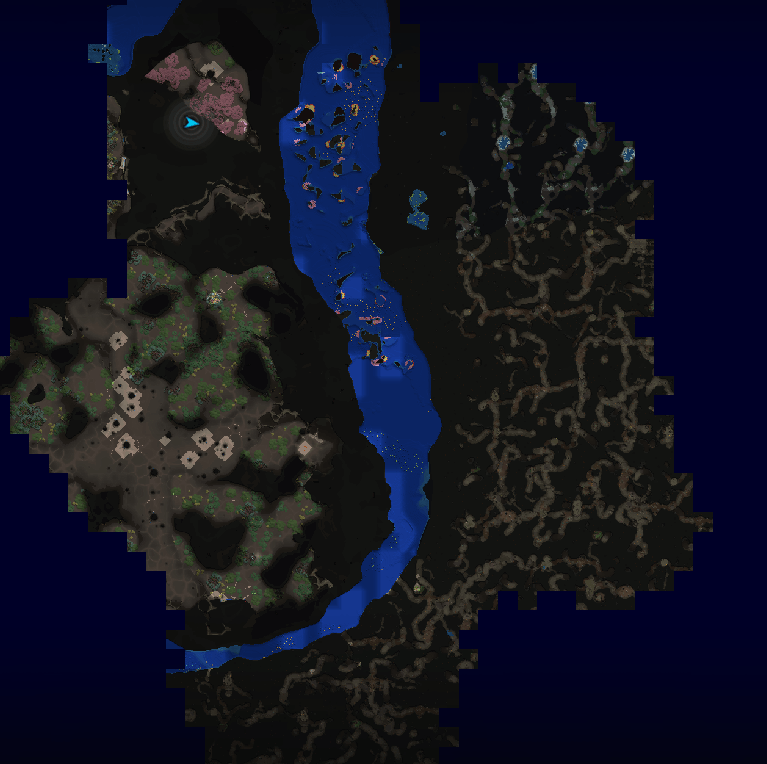
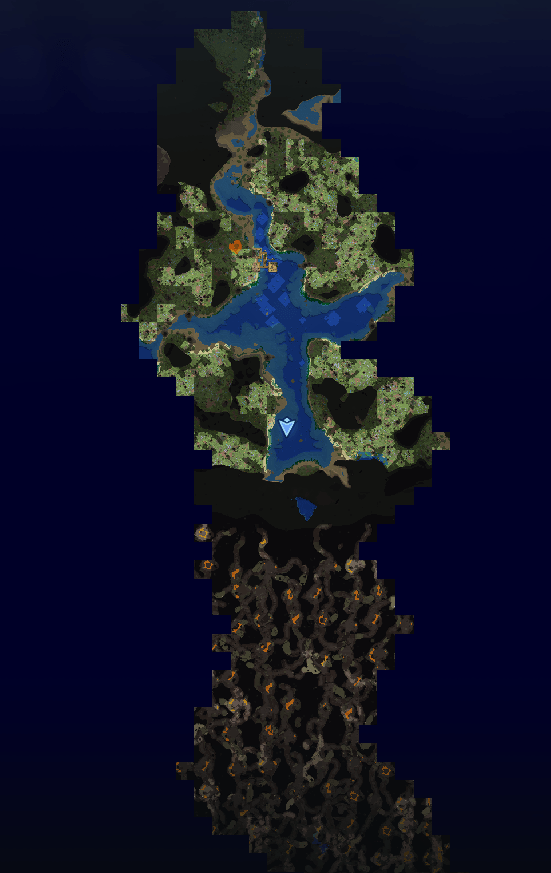
- Cave Mode: Seamlessly switch to cave chunks when entering underground areas. Includes options to view surface data while mining or use a specific "Fog of War" for caves.
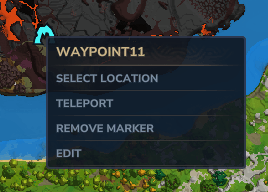
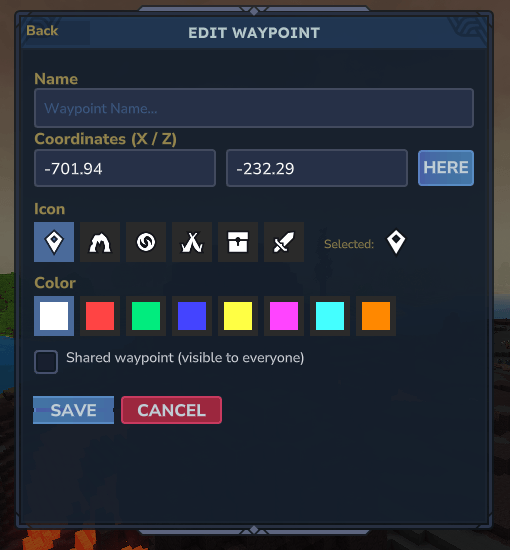
- Enhanced Waypoint System: Manage locations using Hytale's native markers. Includes a user-friendly menu, "Here" button for quick updates, and context-menu editing options.
- Interactive Teleportation: Players with permission can teleport to waypoints via the UI or by simply right-clicking a location on the map.
- World Border Visualization: View the server's world border limits directly on your map.
- Linked Exploration (Shared Map): Optionally enable a shared map mode where all players contribute to a single global map, allowing you to see areas discovered by friends in real-time.
- Compass/Map player Radar: Easily locate other players nearby directly on your compass. The range can be customized or toggled off by admins.
- Customizable HUD & UI: A new in-game configuration menu (
/bm) allows you to adjust settings, manage waypoints, and access help without doing other commands. - Position HUD: A Position HUD (compatible with MultipleHUD) that displays your coordinates on-screen.
- Map Anchors: Quick-access shortcuts on the map UI for opening the waypoint and configuration menus.
- Multi-World Support: Whitelist specific worlds for the mod to track, resolving compatibility issues with server hosts that change default world names. Auto-tracks the world on first join.
Performance & Optimization
Thanks to major optimizations, the map can now handle significantly higher chunk counts without performance loss.
- Dynamic Chunk Loading: The plugin intelligently manages memory by loading only the explored chunks nearest to the player and unloading distant ones.
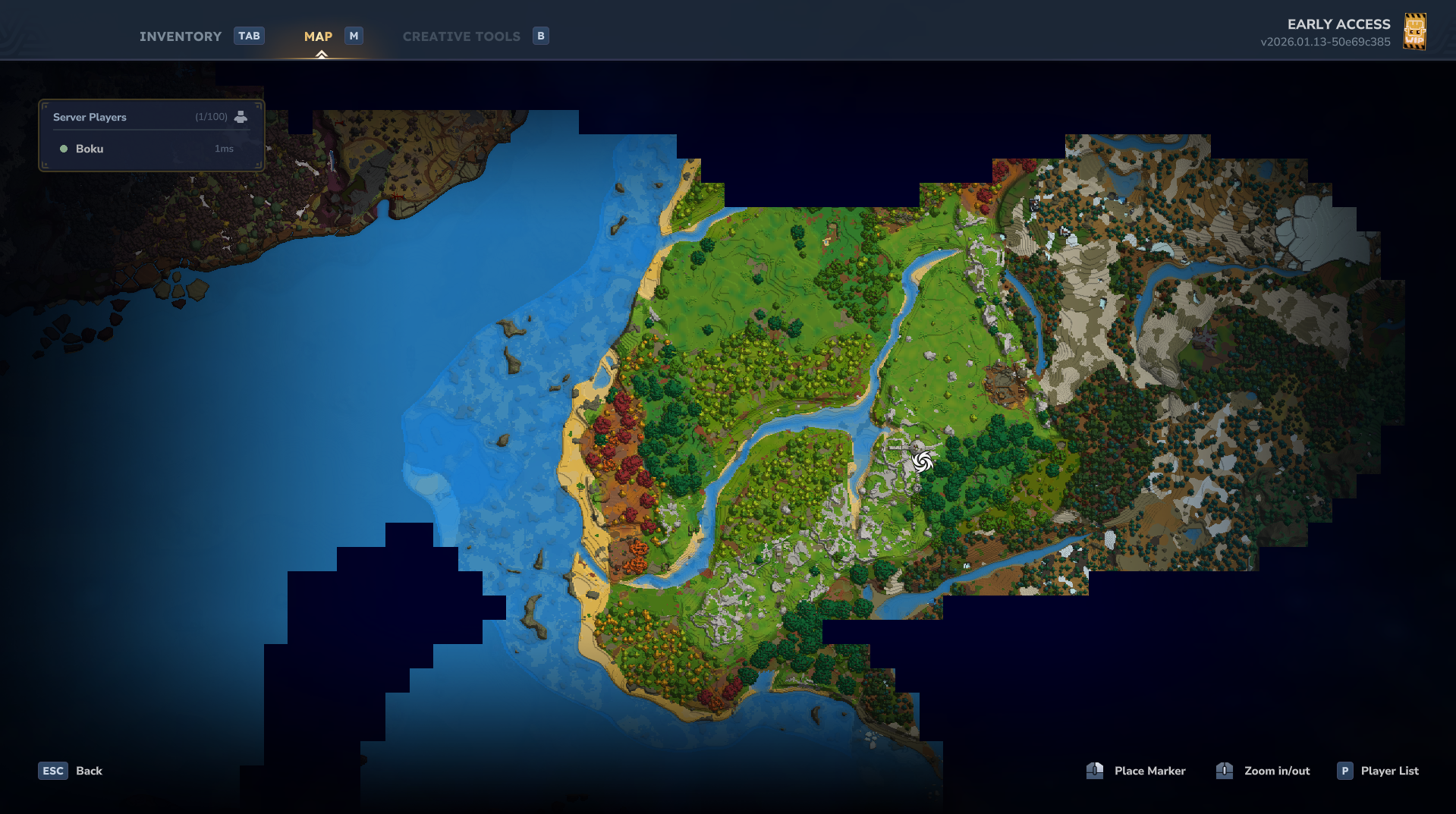
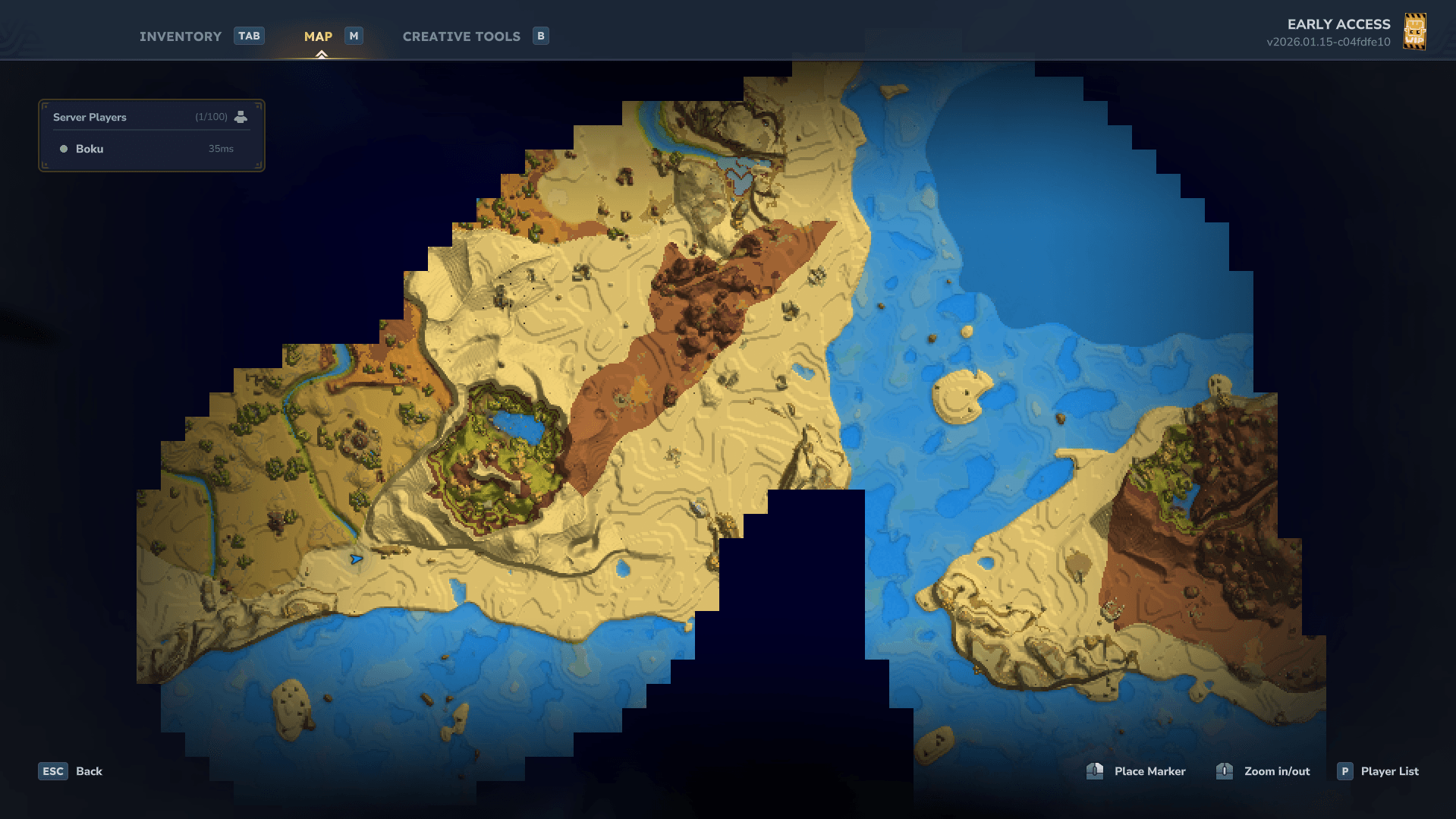
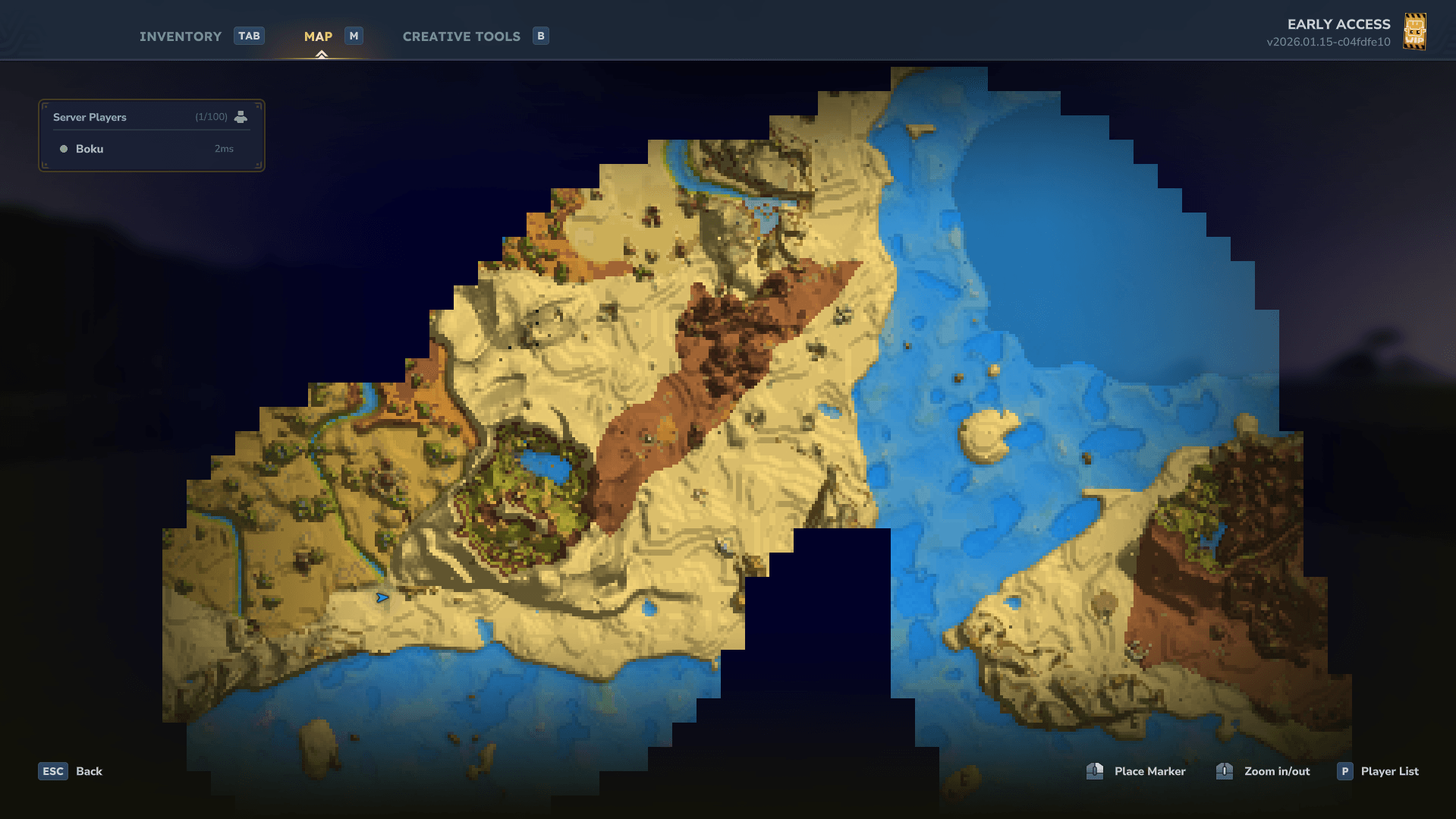
- Map Quality Settings: Admins can balance visual fidelity and performance by choosing between
LOW,MEDIUM, orHIGHquality. LOW: Loads up to 80,000 chunks (8x8 resolution).MEDIUM: Loads up to 25,000 chunks (16x16 resolution).HIGH: Loads up to 8,000 chunks (32x32 resolution).
Note: High quality strictly limits loaded chunks to prevent memory errors.
You can also manually set the maximum number of loaded chunks via /bm config maxchunk, within recommended limits or using our UI config menu with /bm and in the admin tab (need admin permission).
Commands & Permissions
The command system has been overhauled with a new UI-based configuration. Basic features are available to all players, while admin features require specific permissions.
You can either do /op add <player> to give full access or assign specific permissions as needed using /perm group add Adventure <permission>.
Public Commands (No Permission Required)
/bettermap(or/bm)- Opens the main BetterMap Configuration UI to manage user settings and view help.
/bm waypoint menuor/waypointor/wp- Opens the Waypoint UI to manage, share, or delete waypoints.
/bm min <value>- Sets your personal minimum zoom scale (default base is 32).
/bm max <value>- Sets your personal maximum zoom scale (default base is 256).
Admin
Permission: bettermap.admin
- Grants full admin access to BetterMap. Allows viewing all settings and overrides under
/bettermap.
Teleportation
Permission: bettermap.command.teleport
- Map Teleport: Allows the user to teleport to locations via the Waypoint UI buttons or by right-clicking anywhere on the map.
Global Shared Waypoint Edit/Delete
Permission: bettermap.command.waypoint.editglobal
- Allows editing/deleting shared waypoints created by other players.
- Marker owners can always edit/delete their own shared waypoints.
- This permission overrides the global toggle if the toggle is disabled.
Map Privacy Overrides
Permissions:
bettermap.command.override.players- Bypass global hide playersbettermap.command.override.warps- Bypass global hide all/other warpsbettermap.command.override.unexploredwarps- Bypass global hide unexplored warpsbettermap.command.override.poi- Bypass global hide all POIs and hidden POI namesbettermap.command.override.unexploredpoi- Bypass global hide unexplored POIsbettermap.command.override.spawn- Bypass global hide spawnbettermap.command.override.death- Bypass global hide death markersbettermap.command.override.waypoints- Bypass global hide waypoints
Configuration Commands
Permission: bettermap.command.config
- Required to use
/bm configsubcommands and to access admin settings in the UI.
/bm config radar <range>- Sets the radar range (use
-1for infinite).
- Sets the radar range (use
/bm config location- Toggles the server-wide default for the location HUD.
/bm config hideplayers- Hides player cursors on the map.
/bm config hidewarps- Hides other players' warps on the map.
/bm config hideunexploredwarps- Hides warps in unexplored regions.
/bm config hidepois- Hides all POI markers on the map.
/bm config hideunexploredpoi- Hides POIs in unexplored regions.
/bm config hideglobalwaypoints- Hides global waypoints on the map for all players.
/bm config waypointteleport- Toggles the ability to teleport to waypoints.
/bm config markerteleport- Toggles the ability to teleport to map markers.
/bm config shareallexploration- Toggles "Linked Map" mode (shared exploration data).
/bm config track/untrack- Adds or removes the current world from the active whitelist.
/bm config maxchunk <number>- Manually overrides the maximum number of loaded chunks.
/bm config autosave <minutes>- Sets the interval for auto-saving map data.
/bm config worldborder- Toggles the world border visualization on the map.
/bm config worldborderradius <radius>- Sets the world border radius in blocks.
/bm config worldborderoffset <x> <z>- Sets the world border center offset (X and Z coordinates).
Reload Command
Permission: bettermap.command.reload
/bm reload- Reloads the configuration file immediately.
Configuration & Data Storage
All plugin files are located within the server's mods directory.
Configuration File
You can modify the plugin settings in mods/bettermap/config.json.
Note: Changing mapQuality or maxChunksToLoad requires a server restart to take effect.
Default Configuration:
{
  "explorationRadius": 16,
  "updateRateMs": 500,
  "mapQuality": "MEDIUM",
  "minScale": 10.0,
  "maxScale": 256.0,
  "debug": false,
  "locationEnabled": true,
  "locationHudPosition": "top_right",
  "shareAllExploration": false,
  "maxChunksToLoad": 25000,
  "radarEnabled": true,
  "radarRange": -1,
  "hidePlayersOnMap": false,
  "hideAllWarpsOnMap": false,
  "hideOtherWarpsOnMap": false,
  "hideUnexploredWarpsOnMap": true,
  "allowWaypointTeleports": true,
  "allowMapMarkerTeleports": true,
  "hideAllPoiOnMap": false,
  "hideUnexploredPoiOnMap": true,
  "hideSpawnOnMap": false,
  "hideDeathMarkerOnMap": false,
  "hideGlobalWaypointsOnMap": false,
  "hiddenPoiNames": [],
  "autoSaveInterval": 5,
  "maxPersonalMarkersPerPlayer": 12,
  "maxSharedMarkersPerPlayer": 12,
  "allowedWorlds": [
    "default",
    "world"
  ],
  "caveModeEnabled": true,
  "caveModeLayerSize": 10,
  "caveModeUndergroundThreshold": 100,
  "caveModeRadius": 4,
  "discoverSurfaceUnderground": false,
  "caveFogOfWar": false,
  "worldBorderEnabled": false,
  "worldBorderRadius": 5000,
  "worldBorderOffsetX": 0,
  "worldBorderOffsetZ": 0
}
Saved Exploration Data
Map data is saved per world. You can find the saved exploration files here: mods/bettermap/data/
Examples:
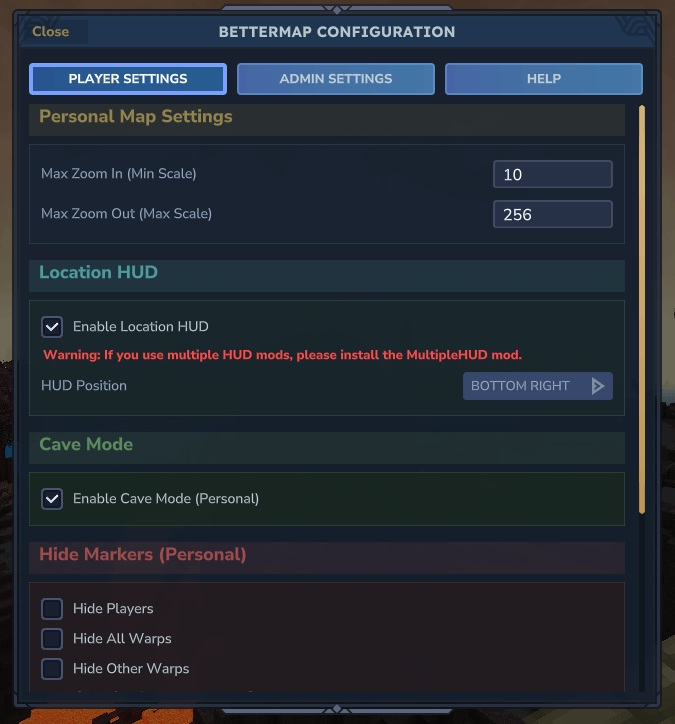
- BetterMap config menu (using
/bm):
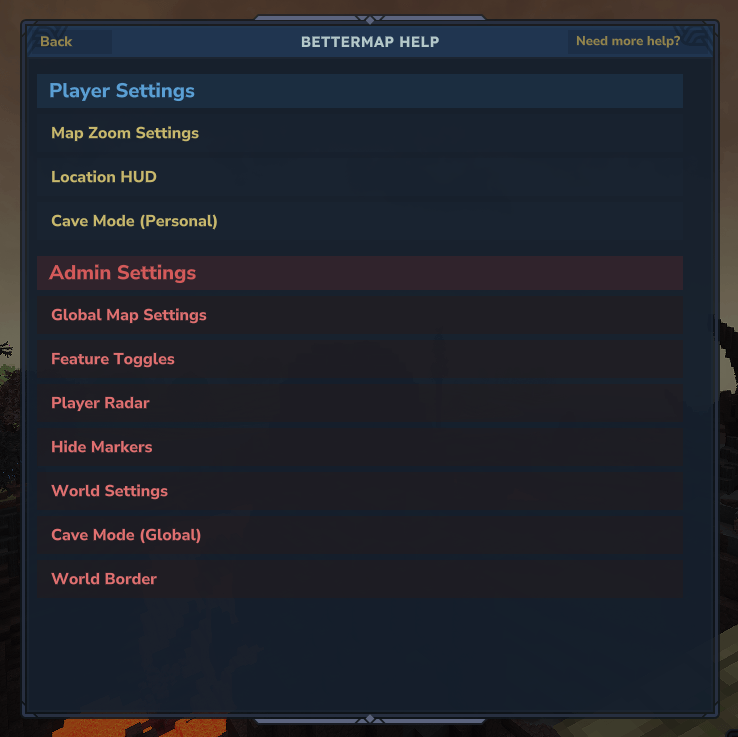
- BetterMap help menu (using
/bm help):
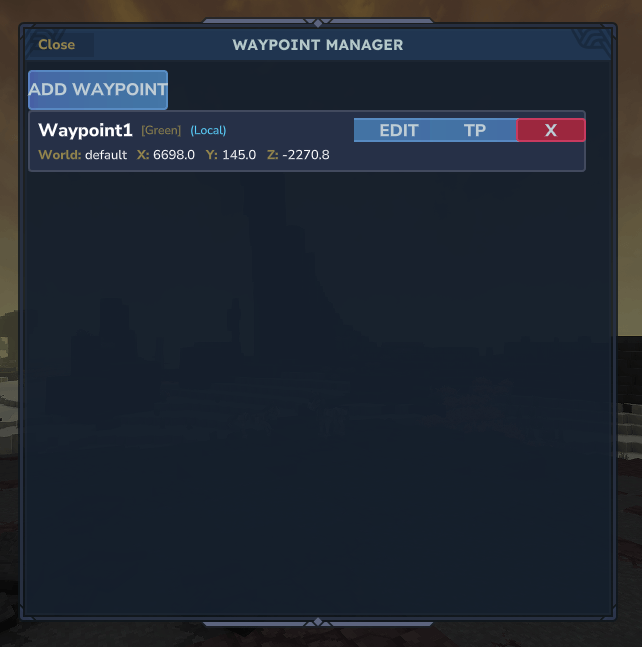
- Waypoint list using command
/bettermap waypoint menu:
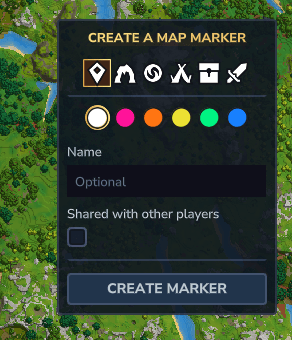
- Waypoint on map:
- Waypoint edit menu:
- Cave mode:
- High Quality map:
- Medium Quality map:
- Low Quality map:
Credits
This project was created to improve the exploration quality of life in Hytale.
- Created by: Paralaxe and Theobosse
- Contributors: Xytronix and DARKACE
- Team: Ninesliced
Found a bug? Have a suggestion? Please report it in the comments or on our discord server! Our discord link
Our other mods:
You can support us by using our link and our 50% coupon code on zap-hosting.com:

We also have a ko-fi page if you want to support us by giving a donation: ko-fi link
Project description from CurseForge.
Pick your setup
BetterMap releases for each Hytale build.
Choose the version and loader you play, then open the matching release.
Check the dependencies, then try the file in a copied instance before changing a world you care about.
Recent files
BetterMap releases and Hytale builds
BetterMap-1.3.7.jar
11 Jun 2026
Client Not supported Server Required Dependencies No extras listed Listed on Project page
Check the 0.5 setup 0.5 release
BetterMap-1.3.6.jar
26 May 2026
Client Not supported Server Required Dependencies No extras listed Listed on Project page
Check the setup BetterMap-1.3.5-pre-release-2026.04.17-c2d518cc9.jar
18 Apr 2026
Client Not supported Server Required Dependencies No extras listed Listed on Project page
Check the setup BetterMap-1.3.5-pre-release-2026.03.26-92489d5e7.jar
27 Mar 2026
Client Not supported Server Required Dependencies No extras listed Listed on Project page
Check the setup BetterMap-1.3.5.jar
26 Mar 2026
Client Not supported Server Required Dependencies No extras listed Listed on Project page
Check the setup BetterMap-1.3.4-pre-release-2026.03.12-b1f856309.jar
13 Mar 2026
Client Not supported Server Required Dependencies No extras listed Listed on Project page
Check the setup BetterMap-1.3.4.jar
13 Mar 2026
Client Not supported Server Required Dependencies No extras listed Listed on Project page
Check the setup BetterMap-1.3.3-pre-release-2026.02.26-7681d338c.jar
28 Feb 2026
Client Not supported Server Required Dependencies No extras listed Listed on Project page
Check the setup BetterMap-1.3.3.jar
28 Feb 2026
Client Not supported Server Required Dependencies No extras listed Listed on Project page
Check the setup BetterMap-1.3.2-pre-release-2026.02.19-ad6f58ec8.jar
23 Feb 2026
Client Not supported Server Required Dependencies No extras listed Listed on Project page
Check the setup BetterMap-1.3.2.jar
23 Feb 2026
Client Not supported Server Required Dependencies No extras listed Listed on Project page
Check the setup BetterMap-1.3.1-pre-release-2026.02.19-ad6f58ec8.jar
20 Feb 2026
Client Not supported Server Required Dependencies No extras listed Listed on Project page
Check the setup Looking for an older file? The official CurseForge project page is in Resources.
 mod
mod CurseForge · Hytale
Cultivation: Xianxia Leveling & Realm Progression
Walk the path of a Xianxia cultivator. Meditate for Spirit Qi, break through 7 realms, found a sect, walk an elemental Dao, wield flying-sword techniques, tame spirit beasts, and survive the heavens' tribulations.
 mod
mod CurseForge · Hytale
pillows n' plushies
weaponised femboy body pillows (dakimakura), cozy cushion blocks, plushie characters, silly fumo, futon bed, lain onesie mage robes (kigurumi), pillow hexstaff + hexbook + glyph guide for hexcode magic via patchly! anime ref: astolfo, ferris, rimuru, lain!
 mod
mod CurseForge · Hytale
PATUCASA (NPC, MOB EXCLUSION)
This a simple mod to exclude npcs from spawning in your plot